


- Posts: 9
- Thank you received: 0
3 Post Moderation Rule for New Boarders (25 Jan 2021)
New boarders will have their posts moderated - Don't worry if you cannot see your post immediately.
Title MISSING after being exported from Motion.
06 May 2020 12:35 #106945
by BEATRYE
Title MISSING after being exported from Motion. was created by BEATRYE
First time poster, & doing so because I have not found a solution yet.
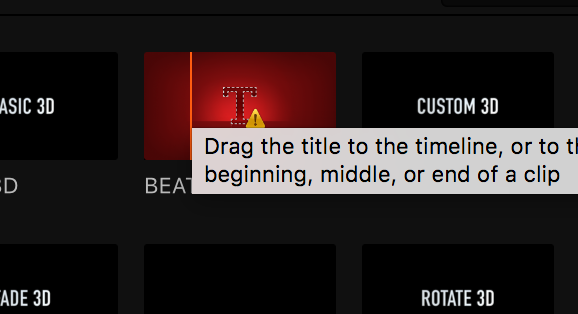
I am trying to create a custom 3d title so I opened "custom 3D" in motion and enabled x,y,z controls and added my custom font. however when opening up final cut again it gives me the missing "T!" screen when trying to preview it and adding to timeline. All my folders are localized and I even copied it to other places such as FCPX's package contents, etc. in hope of it working with no luck.
I also tried to make another one without changing anything but enabling 3d controls and it also does the same "T!" error.
HELP ME PLS :silly: :silly: :pinch:
I am trying to create a custom 3d title so I opened "custom 3D" in motion and enabled x,y,z controls and added my custom font. however when opening up final cut again it gives me the missing "T!" screen when trying to preview it and adding to timeline. All my folders are localized and I even copied it to other places such as FCPX's package contents, etc. in hope of it working with no luck.
I also tried to make another one without changing anything but enabling 3d controls and it also does the same "T!" error.
HELP ME PLS :silly: :silly:
:pinch: 

Please Log in to join the conversation.


15 May 2020 03:44 - 15 May 2020 03:45 #107175
by JoeEditor
Replied by JoeEditor on topic Title MISSING after being exported from Motion.
Do you go to the File menu and click Save when you open them in Motion?
And what category are you saving them to?
And what category are you saving them to?
Last edit: 15 May 2020 03:45 by JoeEditor.
Please Log in to join the conversation.
16 May 2020 04:34 #107204
by BEATRYE
Replied by BEATRYE on topic Title MISSING after being exported from Motion.
yes, i have saved from the file menu multiple times. They are located in my Motion templates folder, titles. both of which are '.localized'. I have also tried adding them directly to final cut's titles inside of package contents to no avail.
Hoping it's not a software issue as I'm still on High Sierra but highly avoidant of going to Mojave or higher.
Hoping it's not a software issue as I'm still on High Sierra but highly avoidant of going to Mojave or higher.
Please Log in to join the conversation.
- Tom Wolsky
-

- Offline
- Moderator
-

16 May 2020 11:32 #107212
by Tom Wolsky
Replied by Tom Wolsky on topic Title MISSING after being exported from Motion.
You also have to add a category folder between the Titles folder and the effect folder.
Please Log in to join the conversation.
16 May 2020 15:46 #107221
by JoeEditor
Replied by JoeEditor on topic Title MISSING after being exported from Motion.
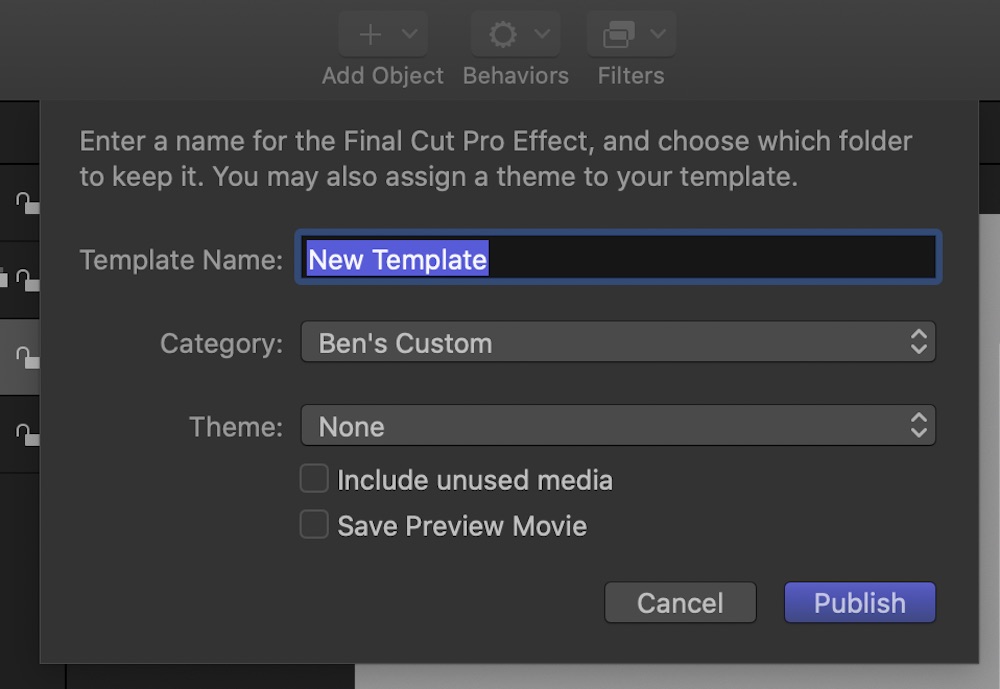
When you save that template the first time, did you see this window pop-up?
Please Log in to join the conversation.
16 May 2020 16:16 #107223
by BEATRYE
Replied by BEATRYE on topic Title MISSING after being exported from Motion.
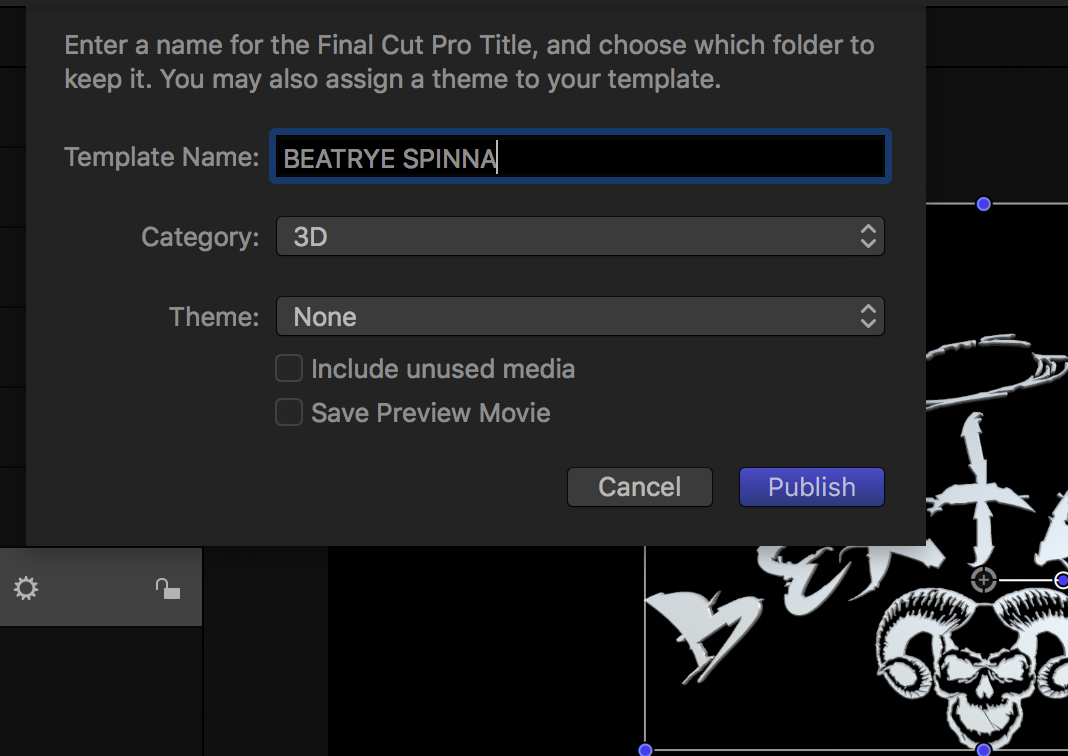
Yes, I did. This is what it looks like. I have also included the path in which the file is located. all folders have been '.localized' as well. even tried taking that extension off at some point.
The weird thing is that while inside FCPX I see the logo in the library window but when i preview it or drag it inside of my project i'm hit with the 'T!' error. Also there is no missing files to link. I'm feeling stuck :side:
The weird thing is that while inside FCPX I see the logo in the library window but when i preview it or drag it inside of my project i'm hit with the 'T!' error. Also there is no missing files to link. I'm feeling stuck :side:

Please Log in to join the conversation.
16 May 2020 18:11 #107228
by JoeEditor
Replied by JoeEditor on topic Title MISSING after being exported from Motion.
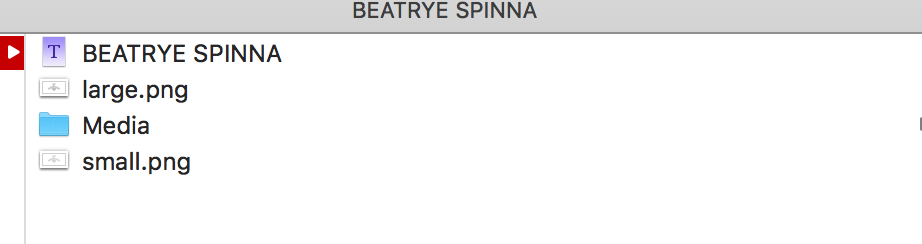
In the "Beatrye Spinna" folder, what else is there besides the Motion project itself? There should be more. Did you put that there, or did the Motion application put it there automatically?
Also, any copies you move to other places, remove them asap.
Also, any copies you move to other places, remove them asap.
Please Log in to join the conversation.
16 May 2020 20:06 #107231
by BEATRYE
Replied by BEATRYE on topic Title MISSING after being exported from Motion.
Motion created the folder itself. These are the contents. The 'media' folder is empty tho.
Please Log in to join the conversation.
16 May 2020 21:39 #107232
by JoeEditor
Replied by JoeEditor on topic Title MISSING after being exported from Motion.
And that doesn't show up in FCPX?
Please Log in to join the conversation.
16 May 2020 22:24 #107235
by BEATRYE
Replied by BEATRYE on topic Title MISSING after being exported from Motion.
It does show up in Final Cut (look at the attachments on my original posting) . However, when I try to use the title/drag it in or even preview it , it gives the error 'T!'. Idk what else I need to do.
Please Log in to join the conversation.
16 May 2020 23:49 #107238
by JoeEditor
Replied by JoeEditor on topic Title MISSING after being exported from Motion.
Be sure FCPX and Motion are the same version numbers.
Please Log in to join the conversation.
17 May 2020 06:06 #107249
by BEATRYE
Replied by BEATRYE on topic Title MISSING after being exported from Motion.
Ok, that is likely the problem. Motion is 5.4.3 while FCPX is 10.3.4.
Is there anyway to downgrade Motion or (update FCPX without the app store) , because when i try to update on the app store it won't let me , it's trying to get me to go directly to 10.4.8
Is there anyway to downgrade Motion or (update FCPX without the app store) , because when i try to update on the app store it won't let me , it's trying to get me to go directly to 10.4.8
Please Log in to join the conversation.
17 May 2020 11:42 - 17 May 2020 11:42 #107253
by JoeEditor
Replied by JoeEditor on topic Title MISSING after being exported from Motion.
Yes, they'll both have to be compatible versions when you create templates. FCPX should be at 10.4.8 and Motion at 5.4.5 at the moment. So update both.
Last edit: 17 May 2020 11:42 by JoeEditor.
Please Log in to join the conversation.
17 May 2020 17:13 #107261
by BEATRYE
Replied by BEATRYE on topic Title MISSING after being exported from Motion.
Well as I said, I don't really want to update to Mojave or higher at the moment. Is there no work around?
Anyways, thank you for the help!
Anyways, thank you for the help!
Please Log in to join the conversation.

18 May 2020 01:35 #107273
by dgwvideo
Creating history....one edit at a time !
Replied by dgwvideo on topic Title MISSING after being exported from Motion.
The only workaround I can think of to enable you to use your title in your FCPX project would be to fully create the title in Motion, then export a movie file out of Motion and import that into FCPX. The title will be baked into the movie, so any version of FCPX would play it. Obviously you'd have to create and export every title you want out of Motion to bring into your project. Without compatible versions this is one way to make use of the Motion title.
Creating history....one edit at a time !
Please Log in to join the conversation.
- Karsten Schlüter
-

- Offline
- Moderator
-
Less
More
- Posts: 3790
- Thank you received: 718
18 May 2020 03:57 #107274
by Karsten Schlüter
in case, you're using a 'younger' version of Motion = non-matching plugins in FCPX, MotionMasterMind F. Mahoney offers a free service, which tweaks some internal XMLcode of your plugin:
fcpxtemplates.com/motion-template-backdater/
give that a try.......
Replied by Karsten Schlüter on topic Title MISSING after being exported from Motion.
BEATRYE wrote: … Is there no work around?
…
in case, you're using a 'younger' version of Motion = non-matching plugins in FCPX, MotionMasterMind F. Mahoney offers a free service, which tweaks some internal XMLcode of your plugin:
fcpxtemplates.com/motion-template-backdater/
give that a try.......
Please Log in to join the conversation.
