


- Thank you received: 0
3 Post Moderation Rule for New Boarders (25 Jan 2021)
New boarders will have their posts moderated - Don't worry if you cannot see your post immediately.
Slip edit with Keyboard shortcut only?
-
 Topic Author
- New Member
-

Less
More
05 May 2020 16:48 #106919
by
Slip edit with Keyboard shortcut only? was created by
I understand
[ selects the left edge
] selects the right edge
\ selects both left and right of 2 clips
How do I select both edges of a clip like this below
with a keyboard shortcut?
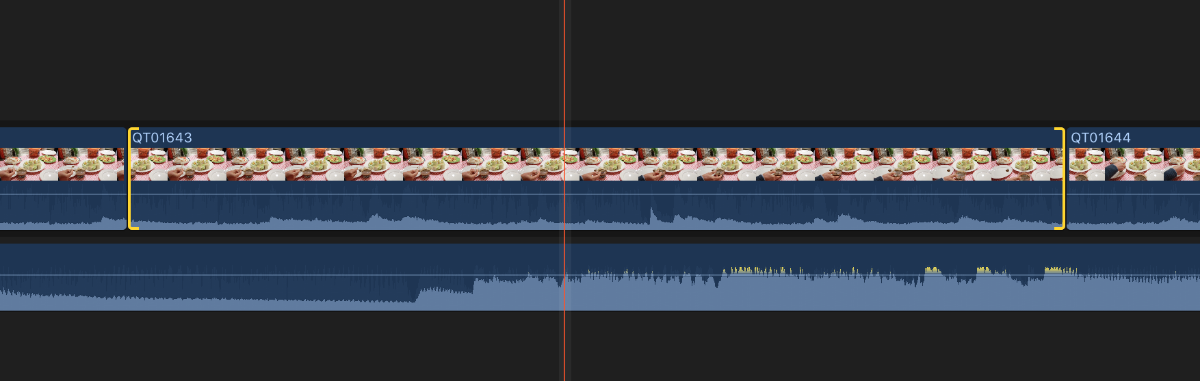
Basically I want to slip a shot. I know I can do this by activating the Trim tool and clicking on a shot. But how can I do this with a keyboard shortcut? with no mouse input.
[ selects the left edge
] selects the right edge
\ selects both left and right of 2 clips
How do I select both edges of a clip like this below
with a keyboard shortcut?
Basically I want to slip a shot. I know I can do this by activating the Trim tool and clicking on a shot. But how can I do this with a keyboard shortcut? with no mouse input.
Please Log in to join the conversation.
- Fcp my bread and butter
-

- Offline
- Senior Member
-

Less
More
- Posts: 68
- Thank you received: 5
06 May 2020 08:54 - 06 May 2020 09:00 #106933
by Fcp my bread and butter
Replied by Fcp my bread and butter on topic Slip edit with Keyboard shortcut only?
yes because " Select Left and Right Edit Edges " on keyboard select left and right of the same cut ... both sides of one edit
Last edit: 06 May 2020 09:00 by Fcp my bread and butter.
Please Log in to join the conversation.


06 May 2020 08:55 - 06 May 2020 08:56 #106934
by JoeEditor
Replied by JoeEditor on topic Slip edit with Keyboard shortcut only?
You have to select the clip with a mouse click using the Trim tool (T). A search of available commands to assign keyboard shortcuts to fails to show me an option to select a clip for a slip edit.
Slipping each direction can be done with the comma and period keys.
A single mouse click isn't horrible or time-consuming, but I do think a keyboard shortcut to select a clip for slip editing would be nice. Time for the feedback page.
www.apple.com/feedback/finalcutpro.html
Slipping each direction can be done with the comma and period keys.
A single mouse click isn't horrible or time-consuming, but I do think a keyboard shortcut to select a clip for slip editing would be nice. Time for the feedback page.
www.apple.com/feedback/finalcutpro.html
Last edit: 06 May 2020 08:56 by JoeEditor.
Please Log in to join the conversation.
