


3 Post Moderation Rule for New Boarders (25 Jan 2021)
New boarders will have their posts moderated - Don't worry if you cannot see your post immediately.
How would you do Picture in Picture pew d pie effect


You could shop around for a pic-in-pic effect that works the way you want it to. Look at the Templates section here, scour through there, you may find a free one.
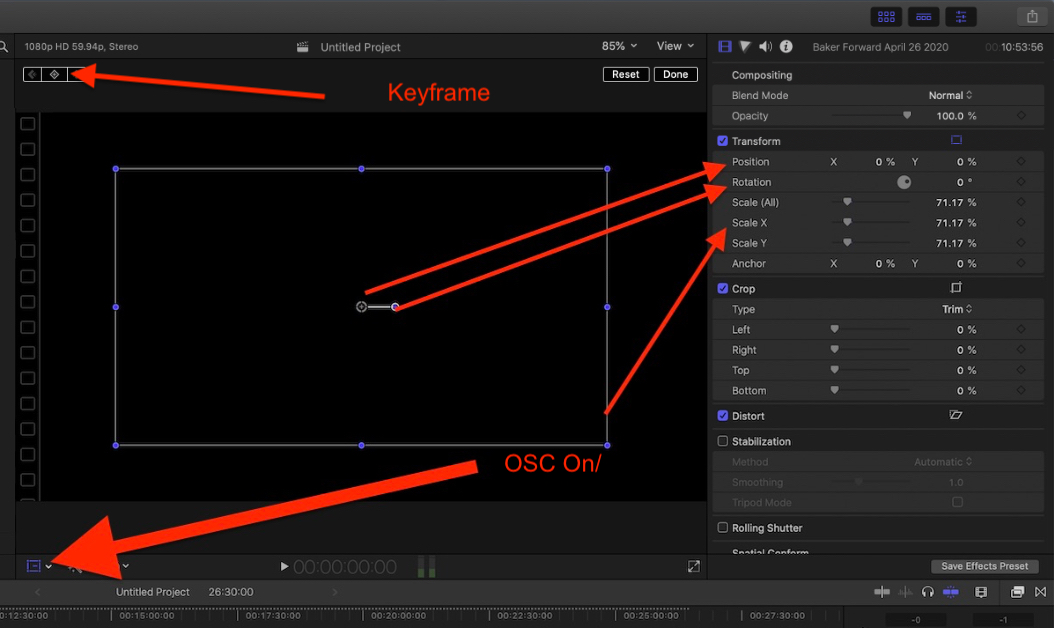
Super easy to do with keyframes. Place the playhead where you want the animation to start. Keyframe Position parameters (X & Y) and scale. Place the playhead where you want the clip to return to full size, create keyframes there. Then, keyframe the movement in between.
I trick I was taught by a Holywood leading effects professional many years ago, when doing these things, it is often easier and faster to keyframe the end of the animation first. In this case (and I do these a lot) I find keyframing the start and end fast and easy. As you're not really changing anything, just marking where the clip needs to start and end as-is. Then keyframe movement/animation in between.
Also, learn the OSC (on-screen controls) for keyframing scale and position parameters, it's really easy and fast.
Please Log in to join the conversation.


Please Log in to join the conversation.
- Cameron Jake
-

- Offline
- Premium Member
-

- Posts: 144
- Thank you received: 3
Oh and Guru - for a world class killer editor you sure need some help
 I will give you culture lessons you can be my Guru.
Pew is he worlds most famous youtuber with 109 million subscribers.
Please Log in to join the conversation.
I'm sure I could make a dozen cultural references you'd not understand, also. The world has more than one culture.
Please Log in to join the conversation.
- Cameron Jake
-
- Offline
- Premium Member
-
- Posts: 144
- Thank you received: 3
You tube stars are broke.
Please Log in to join the conversation.

I've seen a few of his vids and they're just not for me. They're skewed towards a teenage audience.
Please Log in to join the conversation.
- Cameron Jake
-
- Offline
- Premium Member
-
- Posts: 144
- Thank you received: 3
Anyhoo - My next PiP effect relates to enclose clip - the clip is a product launch. I want to place images of the prototype product on top of this background.
ibb.co/qmK23y8
Almost as though the product is on stage, but not - because without CGI that would be hard.
I read the slide show post here from 2015 and the only template / plug in I liked is a one that is no longer available.
Naturally it looks like I am going to have to buy something SHEESH... unless you can think of a work round????
I am trying to avoid tacky looking keyframe picture in frame manual ideas - as it will look a bit school boy.
How might you do it?
Please Log in to join the conversation.
Please Log in to join the conversation.
Scale and position, add shadows, and color grade and grain to match the background image.
Personally, I'd use mO2 (MotionVFX), actual 3D virtual background, and a 3D model or high-resolution image of the product. But then, I'm using mO2 almost daily now.
Please Log in to join the conversation.
Please Log in to join the conversation.
I did give a solution that did not require that, first. Stop being a jerk, arc, whoever you really are.
Please Log in to join the conversation.
FCPX.guru wrote: I.
I did give a solution that did not require that, first. Stop being a jerk, arc, whoever you really are.
Perhaps you should take your own advise. I left a very simple response that did not require you to go into full blown A-hole mode.
If someone is having problems doing a PIP they probably don't have a clue about 3-D animation. If the product is an original product it might be very complex. No one is going to create the model for free. We could suggest Cameron allow a visual effects artist to do everything but I am under the impression Cameron has a limited budget.
Please Log in to join the conversation.
Please Log in to join the conversation.
FCPX.guru wrote: arc, you've been threatened with being blocked yourself, please stop and stick to being helpful with Apple pro apps.
I do help people Mr. Guru and you know it. Xavier consistently makes harassing statements towards me. You even mentioned it. That being said I have done nothing to cause me to get banned. I will state FCP/Apple forums are always a bit different from any other forum. That being said I would never have been blocked form the Edius forum, the Matrox forum, the Pinnacle forums or any other forums for anything I have posted thus far. I can say Xavier would have been blocked by now in any other forum besides this forum. Do you see my point?
Please Log in to join the conversation.
- Cameron Jake
-
- Offline
- Premium Member
-
- Posts: 144
- Thank you received: 3
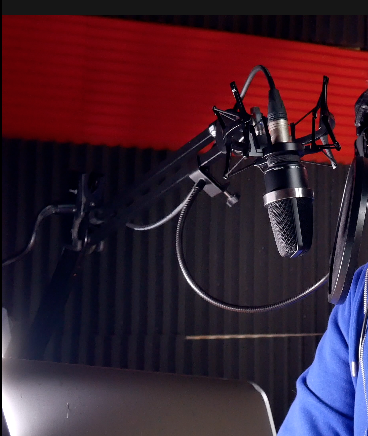
annoyed that coverflux is not available....NOW I just realised my tile in the background is falling down.. is a fix possible or will it look like a fix in the backgronud.... can you see the wall showing through?
Please Log in to join the conversation.
- Cameron Jake
-
- Offline
- Premium Member
-
- Posts: 144
- Thank you received: 3
I had tons of crops done before I noticed the error... had to go back over them all. If someone watches it on a big tv they will see it but - what can you do eh... in future it would be good if there was a like smudge tool like in PS so you could draw stuff out.
I tried the colour mask - but it was very fiddly and didnt work for me
Anyhoo, I think you are all wonderful and helpful especially you GURU who selflessly offers wonderous help to people like me. A gent.
Please Log in to join the conversation.
Please Log in to join the conversation.
Cameron Jake wrote: NOW I just realised my tile in the background is falling down.. is a fix possible or will it look like a fix in the backgronud.... can you see the wall showing through?
I'd have used the curves to select that color specifically and change it to another color. Fast, easy, flawless if done well.
Please Log in to join the conversation.
