


- Posts: 7
- Thank you received: 0
3 Post Moderation Rule for New Boarders (25 Jan 2021)
New boarders will have their posts moderated - Don't worry if you cannot see your post immediately.
FCPX AND MOTION CRASH ON EXPORT
25 Apr 2020 14:47 #106558
by RENO
FCPX AND MOTION CRASH ON EXPORT was created by RENO
Hi Everyone,
I'm sure I'm not the firts on tis topic but I still didin't find any solutions to my problem..hope someone could help me.
I'm working on Mac OS 10.12.3, I was working on a film usin FCPX and Motion 5, eveything went ok, but three days ago, as I wanted to export a still image from Motion, it didn't work. I was doing it since these last three weeks for the film, making still image to make it in 3D in motion. So I tyed to go to FCPX to export the image, but now FCPX just crashed as I went to file / Share ... I found out that any way I wanted to share, nothinh work, either on FCPX or Motion. Motion doesn't crash but it does not export? But FCP systematicly crash when I try to share... I tries to reinstall both of the logiciel, clean the preferences, throx away all the pluggins..nothing works... Would someone now what could I do...? I have to finish this film for a cleint soon and don't know how to fix this..
Manu thanks in advance...
JR
I'm sure I'm not the firts on tis topic but I still didin't find any solutions to my problem..hope someone could help me.
I'm working on Mac OS 10.12.3, I was working on a film usin FCPX and Motion 5, eveything went ok, but three days ago, as I wanted to export a still image from Motion, it didn't work. I was doing it since these last three weeks for the film, making still image to make it in 3D in motion. So I tyed to go to FCPX to export the image, but now FCPX just crashed as I went to file / Share ... I found out that any way I wanted to share, nothinh work, either on FCPX or Motion. Motion doesn't crash but it does not export? But FCP systematicly crash when I try to share... I tries to reinstall both of the logiciel, clean the preferences, throx away all the pluggins..nothing works... Would someone now what could I do...? I have to finish this film for a cleint soon and don't know how to fix this..
Manu thanks in advance...
JR
Please Log in to join the conversation.


26 Apr 2020 12:33 #106577
by joema
There have been several reports of older versions of FCPX running on older versions of MacOS which suddenly began crashing during export. We don't know the cause, although one user apparently traced his to an updated file in /System/Library/PrivateFrameworks/MobileDevice.framework
In that case he recovered the previous version of that file from backup and the crashes went away.
The resolution of the other cases is unknown because they are still happening or if resolved, the people don't post the solution or they never post enough information to pursue it.
Logically it might be caused by some type of software update, such as the above file which might be part of iTunes. But we just don't know.
The fastest approach is update to the latest possible versions of MacOS and FCPX on your current hardware. These have many fixes and starting with FCPX 10.4.7 it's considerably faster. The only issue I'm aware of is a narrow problem with playback of certain HEVC codecs on 10.4.7. As always with any upgrade make sure you have good backups, and especially save the current versions of Final Cut Pro.app in /Applications and any FCPX libraries.
If it is fixed in an update, then you will have saved tremendous amounts of time trying to debug a problem. If it's not fixed you won't generally be any worse off. However - Catalina does not support 32-bit apps or utilities so if upgrading from an old version for purposes of troubleshooting, don't go beyond Mojave.
That said, on the current versions you can try these steps:
- Disable background rendering in FCPX Preferences>Playback>Background render (clear check box).
- Delete all render files: File>Delete Generated Library Files>Delete Render Files>All
- Select all clips in timeline with CMD+A
- Do one-time render of all clips in timeline with CTRL+R. State if that hangs or crashes.
- If render phase completes OK, then export using these settings: File>Share>Master File>Settings, Format: Computer, Video Codec: H.264 Faster Encode, Resolution: 1920x1080
- When doing the above export, pick a different output location in a different folder than you previously used.
If it still crashes please post the call stack of the crashing thread. Do not post the entire crash log just the thread that crashed.
Other standard troubleshooting steps:
Be certain you are not running the Chrome browser or any browser based on Chrome. It is poorly behaved and saturates the VideoToolBox framework, causing FCPX to become unstable. We had one reliable report where complete removal of Chrome was required to stop the problem.
Be certain you have at least 15% free space on all hard drives. Insufficient drive space can cause FCPX or any other app to behave unpredictably, and render/export takes a lot of disk space.
Be certain that all hard drives are locally attached and HFS+ formatted, not ExFAT nor NAS drives.
Make sure you are running the latest version of Apple Pro Video Formats. Prior to Mojave this is updated via the Mac App Store. Starting with Mojave it is updated in System Preferences>Software Update. To inspect the current version, do About This Mac>System Report>Software>Installations, then scroll down to Pro Video Formats and note the highest installed version number. On Catalina it is 2.1.1, I don't remember the highest on previous MacOS versions, maybe 2.0.7.
Replied by joema on topic FCPX AND MOTION CRASH ON EXPORT
RENO wrote: ...I'm working on Mac OS 10.12.3... three days ago, as I wanted to export a still image from Motion, it didn't work. I was doing it since these last three weeks for the film, making still image to make it in 3D in motion. So I tyed to go to FCPX to export the image, but now FCPX just crashed as I went to file / Share ... I found out that any way I wanted to share, nothinh work, either on FCPX or Motion. Motion doesn't crash but it does not export? But FCP systematicly crash when I try to share...
There have been several reports of older versions of FCPX running on older versions of MacOS which suddenly began crashing during export. We don't know the cause, although one user apparently traced his to an updated file in /System/Library/PrivateFrameworks/MobileDevice.framework
In that case he recovered the previous version of that file from backup and the crashes went away.
The resolution of the other cases is unknown because they are still happening or if resolved, the people don't post the solution or they never post enough information to pursue it.
Logically it might be caused by some type of software update, such as the above file which might be part of iTunes. But we just don't know.
The fastest approach is update to the latest possible versions of MacOS and FCPX on your current hardware. These have many fixes and starting with FCPX 10.4.7 it's considerably faster. The only issue I'm aware of is a narrow problem with playback of certain HEVC codecs on 10.4.7. As always with any upgrade make sure you have good backups, and especially save the current versions of Final Cut Pro.app in /Applications and any FCPX libraries.
If it is fixed in an update, then you will have saved tremendous amounts of time trying to debug a problem. If it's not fixed you won't generally be any worse off. However - Catalina does not support 32-bit apps or utilities so if upgrading from an old version for purposes of troubleshooting, don't go beyond Mojave.
That said, on the current versions you can try these steps:
- Disable background rendering in FCPX Preferences>Playback>Background render (clear check box).
- Delete all render files: File>Delete Generated Library Files>Delete Render Files>All
- Select all clips in timeline with CMD+A
- Do one-time render of all clips in timeline with CTRL+R. State if that hangs or crashes.
- If render phase completes OK, then export using these settings: File>Share>Master File>Settings, Format: Computer, Video Codec: H.264 Faster Encode, Resolution: 1920x1080
- When doing the above export, pick a different output location in a different folder than you previously used.
If it still crashes please post the call stack of the crashing thread. Do not post the entire crash log just the thread that crashed.
Other standard troubleshooting steps:
Be certain you are not running the Chrome browser or any browser based on Chrome. It is poorly behaved and saturates the VideoToolBox framework, causing FCPX to become unstable. We had one reliable report where complete removal of Chrome was required to stop the problem.
Be certain you have at least 15% free space on all hard drives. Insufficient drive space can cause FCPX or any other app to behave unpredictably, and render/export takes a lot of disk space.
Be certain that all hard drives are locally attached and HFS+ formatted, not ExFAT nor NAS drives.
Make sure you are running the latest version of Apple Pro Video Formats. Prior to Mojave this is updated via the Mac App Store. Starting with Mojave it is updated in System Preferences>Software Update. To inspect the current version, do About This Mac>System Report>Software>Installations, then scroll down to Pro Video Formats and note the highest installed version number. On Catalina it is 2.1.1, I don't remember the highest on previous MacOS versions, maybe 2.0.7.
Please Log in to join the conversation.

26 Apr 2020 12:43 - 26 Apr 2020 12:44 #106580
by JoeEditor
Replied by JoeEditor on topic FCPX AND MOTION CRASH ON EXPORT
OK, let's go through the basic troubleshooting scheme.
1- What PERCENTAGE of your system drive is free space? (Capacity multiplied by .15 = ?)
2- What PERCENTAGE of your media drive is free space?
3- Uninstall the Google Chrome browser totally if you have it installed (support files and all).
4- What are your Mac specs (make/model/year, RAM, video card, media drive connection type).
5- In FCPX go to the Preferences and turn off Background Rendering, and NEVER turn it back on EVER!
6- Delete all render files.
7- Hold the Option and Command keys together while launching FCPX, when presented with the option, delete preference files.
And I see joema posted as I was typing. Well, there you go, so nice we give it twice.
1- What PERCENTAGE of your system drive is free space? (Capacity multiplied by .15 = ?)
2- What PERCENTAGE of your media drive is free space?
3- Uninstall the Google Chrome browser totally if you have it installed (support files and all).
4- What are your Mac specs (make/model/year, RAM, video card, media drive connection type).
5- In FCPX go to the Preferences and turn off Background Rendering, and NEVER turn it back on EVER!
6- Delete all render files.
7- Hold the Option and Command keys together while launching FCPX, when presented with the option, delete preference files.
And I see joema posted as I was typing. Well, there you go, so nice we give it twice.
Last edit: 26 Apr 2020 12:44 by JoeEditor.
Please Log in to join the conversation.
26 Apr 2020 13:43 #106582
by RENO
Replied by RENO on topic FCPX AND MOTION CRASH ON EXPORT
HI,
many thanks for answering.
My Macintosh HD is 999,34 capacity and 226,62 available, so the HD free space would be (999,34X0.15=) 140go
But it was not the case when it started to crash, I just make a bug cleaning since the crash. I think it was less than 15%.
My media HD was more than 15%. But even if I work with external HD, with a simple jpeg on my timeline, it doesn't export and crash.
I just did uninstall Chrome. Still crashes.
My Mac spec are OS 10.12.6 now, It was 10.12.3 when it crashed so I treid to upgrade to solve the probleme but it didn't. Mac Book Pro Retina 15 Inches, Mid-2014, 2,8 GHz Intel Core i7, , 16 Go 1600 MHz DDR3
Just turned off the backgrouynd rendering. Still crashes. But I won't...
Deleted all the render files. Still crashes.
Deleted the preferences when starting FCPX but still crashes...
Many thanks, don't know what to do next...
many thanks for answering.
My Macintosh HD is 999,34 capacity and 226,62 available, so the HD free space would be (999,34X0.15=) 140go
But it was not the case when it started to crash, I just make a bug cleaning since the crash. I think it was less than 15%.
My media HD was more than 15%. But even if I work with external HD, with a simple jpeg on my timeline, it doesn't export and crash.
I just did uninstall Chrome. Still crashes.
My Mac spec are OS 10.12.6 now, It was 10.12.3 when it crashed so I treid to upgrade to solve the probleme but it didn't. Mac Book Pro Retina 15 Inches, Mid-2014, 2,8 GHz Intel Core i7, , 16 Go 1600 MHz DDR3
Just turned off the backgrouynd rendering. Still crashes. But I won't...
Deleted all the render files. Still crashes.
Deleted the preferences when starting FCPX but still crashes...
Many thanks, don't know what to do next...
Please Log in to join the conversation.
27 Apr 2020 10:48 - 27 Apr 2020 10:49 #106601
by joema
Do you mean it DOES NOT export and crash or it DOES crash?
You should be able to upgrade to the latest versions of MacOS and FCPX. If MacOS will not upgrade this is itself a problem and could be related to the FCPX issue. It might be lack of disk space or some other factor. If you cannot upgrade to Catalina, you can download and upgrade to Mojave. 32-bit apps, utilities and codecs work OK on Mojave, and FCPX 10.4.8 runs fine on Mojave: support.apple.com/en-us/HT210190
We have one report of a user with the same export issue (also on a very old version of MacOS and FCPX) whose problem was fixed by upgrading MacOS and FCPX. While there is no guarantee of this, it is a normal troubleshooting step.
As always make sure you have good backups before doing any upgrade. Before upgrading FCPX, save your current version of /Applications/Final Cut Pro.app, and current versions of your libraries.
Replied by joema on topic FCPX AND MOTION CRASH ON EXPORT
RENO wrote: ...But even if I work with external HD, with a simple jpeg on my timeline, it doesn't export and crash....
Do you mean it DOES NOT export and crash or it DOES crash?
RENO wrote: ...My Mac spec are OS 10.12.6 now, It was 10.12.3 when it crashed so I treid to upgrade to solve the probleme but it didn't. Mac Book Pro Retina 15 Inches, Mid-2014, 2,8 GHz Intel Core i7, , 16 Go 1600 MHz DDR3...
You should be able to upgrade to the latest versions of MacOS and FCPX. If MacOS will not upgrade this is itself a problem and could be related to the FCPX issue. It might be lack of disk space or some other factor. If you cannot upgrade to Catalina, you can download and upgrade to Mojave. 32-bit apps, utilities and codecs work OK on Mojave, and FCPX 10.4.8 runs fine on Mojave: support.apple.com/en-us/HT210190
We have one report of a user with the same export issue (also on a very old version of MacOS and FCPX) whose problem was fixed by upgrading MacOS and FCPX. While there is no guarantee of this, it is a normal troubleshooting step.
As always make sure you have good backups before doing any upgrade. Before upgrading FCPX, save your current version of /Applications/Final Cut Pro.app, and current versions of your libraries.
Last edit: 27 Apr 2020 10:49 by joema.
Please Log in to join the conversation.
27 Apr 2020 11:49 #106603
by JoeEditor
Replied by JoeEditor on topic FCPX AND MOTION CRASH ON EXPORT
Actually your media and Libraries should not be on your system drive to start with.
Please Log in to join the conversation.
27 Apr 2020 16:54 #106609
by RENO
Replied by RENO on topic FCPX AND MOTION CRASH ON EXPORT
Hi,
So I did spend a long night... pas finally tried to install Mojave on an external hard rice using a usb boot. Impossible to finalize... I used a Mac OS patcher, the only way to find back Mojave as it is not on my French store anymore. Everything went fine, I made my USB boot but when I tried to open my max with it, I turn the computer on, press alt, choose my usb. Can see the apple, the charging bar goes to 100% then nothing. Stay like that... tried three time whith a usb. I tried to do the same operation with a Lacie hard drive 1T, same... apple and charging bar at 100 for hours...
So I decided to install Mojave on the external drive without the boot. It worked... finally.. but its running so slow...!!
And when I try to download FCP 10.4.8 from my AppStore, the circle goes on and on without starting...
I will come crazy soon...
So I did spend a long night... pas finally tried to install Mojave on an external hard rice using a usb boot. Impossible to finalize... I used a Mac OS patcher, the only way to find back Mojave as it is not on my French store anymore. Everything went fine, I made my USB boot but when I tried to open my max with it, I turn the computer on, press alt, choose my usb. Can see the apple, the charging bar goes to 100% then nothing. Stay like that... tried three time whith a usb. I tried to do the same operation with a Lacie hard drive 1T, same... apple and charging bar at 100 for hours...
So I decided to install Mojave on the external drive without the boot. It worked... finally.. but its running so slow...!!
And when I try to download FCP 10.4.8 from my AppStore, the circle goes on and on without starting...
I will come crazy soon...

Please Log in to join the conversation.
27 Apr 2020 21:09 #106620
by RENO
Replied by RENO on topic FCPX AND MOTION CRASH ON EXPORT
Hi,
and sorry for my english... maybe I don't use the precise words...
I mean that it does not export. I press "share" then I press any export destination 'master" or "Apple 720" or anything else and it crash.
I sent this last day and night triny to upgrade to mojave. First with a usb boost, but after multiple try, mu computer never restarted on the boot, it always stoped with the screen with the apple and the charging bar at 100%. I also tryo to use a Lacie 1T external disk as a booter. Same, apple with 100% charging bar for hours...
Then I decided to install Mojave directly on the external hardrive without the boot. It did finaly work8 I thought I had finaly the solution... but as I opened my computer with my external Mojave, it worked but was running very slow... ans as I wanted to dowload FCP or motion via Appstore ( icloud logo), it didn't work.... ( grey circle turning then again the cloud dowload logo).
It's a real nightmare...
and sorry for my english... maybe I don't use the precise words...
I mean that it does not export. I press "share" then I press any export destination 'master" or "Apple 720" or anything else and it crash.
I sent this last day and night triny to upgrade to mojave. First with a usb boost, but after multiple try, mu computer never restarted on the boot, it always stoped with the screen with the apple and the charging bar at 100%. I also tryo to use a Lacie 1T external disk as a booter. Same, apple with 100% charging bar for hours...
Then I decided to install Mojave directly on the external hardrive without the boot. It did finaly work8 I thought I had finaly the solution... but as I opened my computer with my external Mojave, it worked but was running very slow... ans as I wanted to dowload FCP or motion via Appstore ( icloud logo), it didn't work.... ( grey circle turning then again the cloud dowload logo).
It's a real nightmare...
Please Log in to join the conversation.
28 Apr 2020 11:31 - 28 Apr 2020 11:32 #106637
by joema
Replied by joema on topic FCPX AND MOTION CRASH ON EXPORT
Reno, I am sorry about your problems. I'm sure it is frustrating. However if you cannot upgrade to either Mojave or Catalina, there is some underlying problem and you cannot expect that FCPX will run properly. Your hardware supports that: 2014 Mac Book Pro Retina 15 Inches, 2,8 GHz Intel Core i7, 16 GB.
We obviously know something about MacOS on this forum but ultimately this is an FCPX forum not a MacOS or hardware forum. You fundamentally have a system-layer issue which is indirectly affecting FCPX.
It is important to be very clear and segregate the problem between MacOS and FCPX. Those must be approached sequentially. You must first get your system upgraded to Mojave or Catalina and running properly. The FCPX and MacOS issues cannot be approached concurrently.
You can continue here and we will try to help you with the MacOS upgrade but I personally am not an expert on that. However I have upgraded many machines from older MacOS versions to Mojave, including a 2013 MacBook Air, and it worked OK.
You can download the MacOS "Combo" update package for each major version, then install that as a separate step. This is a big download but it separates the download and install phase. If an install/update fails, you already have it downloaded to try again. I don't know how language localization works, it shows me only English versions but maybe that it automatic to the country: support.apple.com/downloads/macos
We obviously know something about MacOS on this forum but ultimately this is an FCPX forum not a MacOS or hardware forum. You fundamentally have a system-layer issue which is indirectly affecting FCPX.
It is important to be very clear and segregate the problem between MacOS and FCPX. Those must be approached sequentially. You must first get your system upgraded to Mojave or Catalina and running properly. The FCPX and MacOS issues cannot be approached concurrently.
You can continue here and we will try to help you with the MacOS upgrade but I personally am not an expert on that. However I have upgraded many machines from older MacOS versions to Mojave, including a 2013 MacBook Air, and it worked OK.
You can download the MacOS "Combo" update package for each major version, then install that as a separate step. This is a big download but it separates the download and install phase. If an install/update fails, you already have it downloaded to try again. I don't know how language localization works, it shows me only English versions but maybe that it automatic to the country: support.apple.com/downloads/macos
Last edit: 28 Apr 2020 11:32 by joema.
Please Log in to join the conversation.
29 Apr 2020 07:51 #106655
by RENO
Replied by RENO on topic FCPX AND MOTION CRASH ON EXPORT
Hi evryone, hope you're doing well.
So I finaly install Mojave on an external drive, FCP10.4.8 and Motion5.4.5.
It's now running ok. I tried to reimport my motion project, and it's exporting and FCP as well.... BUT, I notice that my motion project with my Mpuppet plugin installed ( MotionVFX plugin) is running very slow, the mouse control bug... asn when I unsinstal the plugin, it's running ok.
Mpuppet is a plugin that allow to animate ( distort, wrap) an object. My project consist of animating persons inside a painting. For that I have to make lots of layers ( persons, recreate the missing frame behind the person, layers for the arms, the body) and all that in a room that I turned into 3D with motion. It makes a lot of layers... plus the animation of my persons. It's a very slow animation like a slowmotion movement but maybe it is still to much.
On the Motionvfx site, they say that Mpuppet is running on Motion 5.4.3. Does it mean that it's not working on 5.4.5? That would explain the bug when the plugin is installed?
Si my problem now is that I can't finish my work on my upgrade Mojave and motion if I can't use the plugin. And when I go back to my sierra, U can use the plugin but can't export...
Could it be a problem with my processing memory? To much informations, too much layers and animation? How could that affects FCPX as well as I'm only working on motion?
I try to find the my motion render files , but in my motion preferences i can see that "Save Retiming Files" shoul be in a "/Users/username/Library/Caches/com.apple.motionapp/Retiming Cache Files/ folder, but I can't find this folder in my mac...
I have worked on three painting before that, so I suppose I have a lot of cache, or rendering stocked somewhere that I could delete, but can't find it... could it be the origin of my problem? As well as for FCPX?
Many thanks again, such ashame not to be able to fix this and still bother you with that.
So I finaly install Mojave on an external drive, FCP10.4.8 and Motion5.4.5.
It's now running ok. I tried to reimport my motion project, and it's exporting and FCP as well.... BUT, I notice that my motion project with my Mpuppet plugin installed ( MotionVFX plugin) is running very slow, the mouse control bug... asn when I unsinstal the plugin, it's running ok.
Mpuppet is a plugin that allow to animate ( distort, wrap) an object. My project consist of animating persons inside a painting. For that I have to make lots of layers ( persons, recreate the missing frame behind the person, layers for the arms, the body) and all that in a room that I turned into 3D with motion. It makes a lot of layers... plus the animation of my persons. It's a very slow animation like a slowmotion movement but maybe it is still to much.
On the Motionvfx site, they say that Mpuppet is running on Motion 5.4.3. Does it mean that it's not working on 5.4.5? That would explain the bug when the plugin is installed?
Si my problem now is that I can't finish my work on my upgrade Mojave and motion if I can't use the plugin. And when I go back to my sierra, U can use the plugin but can't export...
Could it be a problem with my processing memory? To much informations, too much layers and animation? How could that affects FCPX as well as I'm only working on motion?
I try to find the my motion render files , but in my motion preferences i can see that "Save Retiming Files" shoul be in a "/Users/username/Library/Caches/com.apple.motionapp/Retiming Cache Files/ folder, but I can't find this folder in my mac...
I have worked on three painting before that, so I suppose I have a lot of cache, or rendering stocked somewhere that I could delete, but can't find it... could it be the origin of my problem? As well as for FCPX?
Many thanks again, such ashame not to be able to fix this and still bother you with that.
Please Log in to join the conversation.
29 Apr 2020 12:23 #106659
by JoeEditor
Replied by JoeEditor on topic FCPX AND MOTION CRASH ON EXPORT
I would like to get a copy of your Motion project.
Please Log in to join the conversation.
29 Apr 2020 13:33 #106665
by RENO
Replied by RENO on topic FCPX AND MOTION CRASH ON EXPORT
Sure. Just the .mtn file or also the original media etc...?
Please Log in to join the conversation.
29 Apr 2020 13:41 - 29 Apr 2020 13:42 #106666
by joema
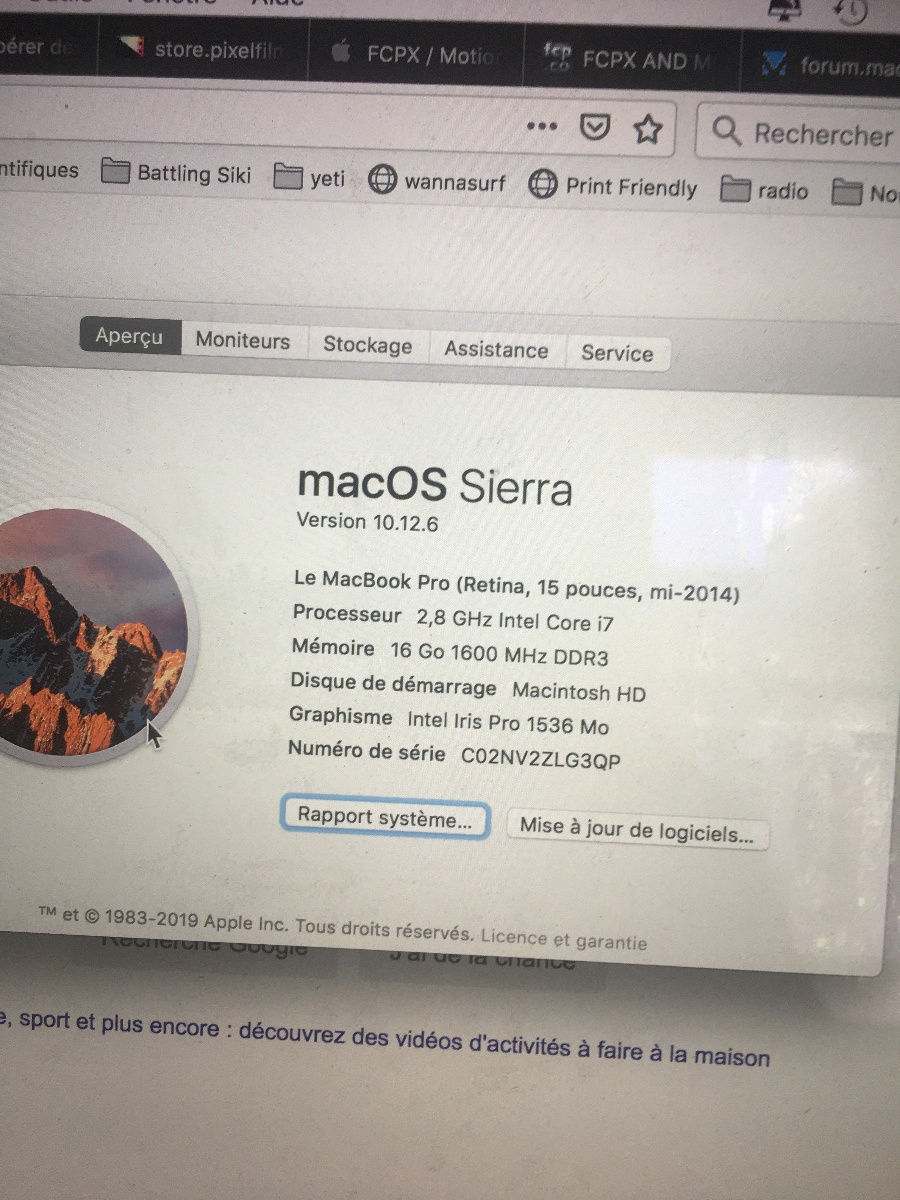
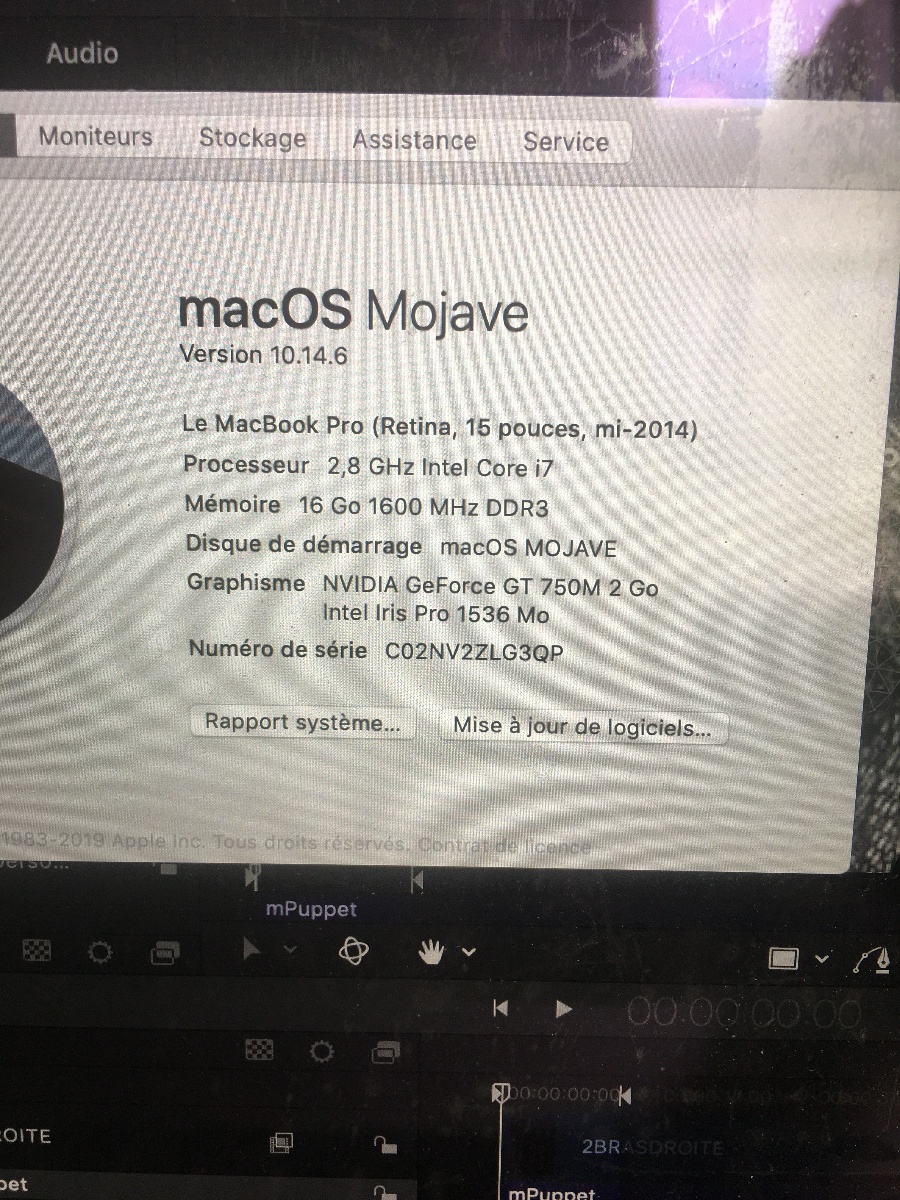
Reno, thanks for being persistent. You have made progress. In general FCPX 10.4.8 and Motion 5.4.5 are faster than previous versions due to Metal optimization. I cannot explain why it seems slower. What GPU is in your 2014 Mac Book Pro Retina 15? Post what it says in "About this Mac".
MotionVFX is a good company and mPuppet (released late last year) was a sophisticated product. It would appear to require lots of resources to run well. However I'm not familiar with Motion troubleshooting and performance issues. Maybe FCPX.guru or some other Motion expert could help.
Replied by joema on topic FCPX AND MOTION CRASH ON EXPORT
RENO wrote: ...So I finaly install Mojave on an external drive, FCP10.4.8 and Motion5.4.5.
It's now running ok. I tried to reimport my motion project, and it's exporting and FCP as well.... BUT, I notice that my motion project with my Mpuppet plugin installed ( MotionVFX plugin) is running very slow, the mouse control bug... asn when I unsinstal the plugin, it's running ok.
Mpuppet is a plugin that allow to animate ( distort, wrap) an object....I have to make lots of layers ( persons, recreate the missing frame behind the person, layers for the arms, the body) and all that in a room that I turned into 3D with motion. It makes a lot of layers... plus the animation of my persons. It's a very slow animation like a slowmotion movement but maybe it is still to much...
Si my problem now is that I can't finish my work on my upgrade Mojave and motion if I can't use the plugin. And when I go back to my sierra, U can use the plugin but can't export...I have worked on three painting before that, so I suppose I have a lot of cache, or rendering stocked somewhere that I could delete, but can't find it... could it be the origin of my problem? As well as for FCPX?...
Reno, thanks for being persistent. You have made progress. In general FCPX 10.4.8 and Motion 5.4.5 are faster than previous versions due to Metal optimization. I cannot explain why it seems slower. What GPU is in your 2014 Mac Book Pro Retina 15? Post what it says in "About this Mac".
MotionVFX is a good company and mPuppet (released late last year) was a sophisticated product. It would appear to require lots of resources to run well. However I'm not familiar with Motion troubleshooting and performance issues. Maybe FCPX.guru or some other Motion expert could help.
Last edit: 29 Apr 2020 13:42 by joema.
Please Log in to join the conversation.
29 Apr 2020 14:05 #106668
by RENO
Replied by RENO on topic FCPX AND MOTION CRASH ON EXPORT
Hi,
originaly my mac is Sierra as attached.
Then I upgraded to Mojave so attached 2
originaly my mac is Sierra as attached.
Then I upgraded to Mojave so attached 2
Please Log in to join the conversation.
29 Apr 2020 14:25 - 29 Apr 2020 14:25 #106670
by joema
You are working on a very GPU-intensive multi-layer Motion project using one of the most sophisticated plugins ever invented, yet your laptop does not have a discrete GPU. It's possible that is the issue.
If it was a 2016 or later MBP having Thunderbolt 3, you would have the theoretical option of using an eGPU but the 2014 does not have that.
At this point you need to consult with someone familiar with Motion performance optimization. Unfortunately I am not familiar with that area.
Replied by joema on topic FCPX AND MOTION CRASH ON EXPORT
RENO wrote: ...Then I upgraded to Mojave so attached 2...
You are working on a very GPU-intensive multi-layer Motion project using one of the most sophisticated plugins ever invented, yet your laptop does not have a discrete GPU. It's possible that is the issue.
If it was a 2016 or later MBP having Thunderbolt 3, you would have the theoretical option of using an eGPU but the 2014 does not have that.
At this point you need to consult with someone familiar with Motion performance optimization. Unfortunately I am not familiar with that area.
Last edit: 29 Apr 2020 14:25 by joema.
Please Log in to join the conversation.
