


- Posts: 6
- Thank you received: 0
3 Post Moderation Rule for New Boarders (25 Jan 2021)
New boarders will have their posts moderated - Don't worry if you cannot see your post immediately.
Breaking the magnetic timeline
- SpiderKenny
-
 Topic Author
- Offline
- New Member
-

Less
More
16 Apr 2020 16:26 #106240
by SpiderKenny
Breaking the magnetic timeline was created by SpiderKenny
Hi.
I'm FCPX to pull together some video which was recorded in seprate homes, due to the social distancing lockdown.
I have the screen laid out with one main background source, and three or four smaller "windows" across the bottom. Like this:
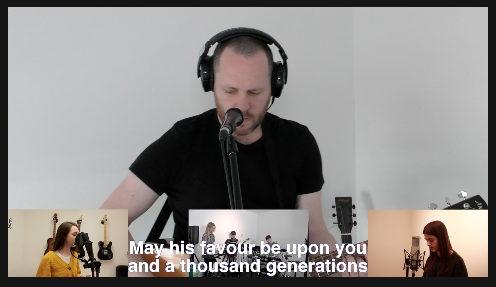
And my timeline looks like this:

From time to time I will want to swap the background source, for one of the thumbnails, and vice-versa.
But if I blade (cut) a track and try to drag it below another track, so that their z-positions are swapped, the bottom track just moves down too. (Magnetic timeline?)
So, how would you suggest I can make this kind of edit?
Hope I have made sense!
I'm FCPX to pull together some video which was recorded in seprate homes, due to the social distancing lockdown.
I have the screen laid out with one main background source, and three or four smaller "windows" across the bottom. Like this:
And my timeline looks like this:
From time to time I will want to swap the background source, for one of the thumbnails, and vice-versa.
But if I blade (cut) a track and try to drag it below another track, so that their z-positions are swapped, the bottom track just moves down too. (Magnetic timeline?)
So, how would you suggest I can make this kind of edit?
Hope I have made sense!
Please Log in to join the conversation.
- ronny courtens
-

- Offline
- Moderator
-

Less
More
- Posts: 4455
- Thank you received: 962
17 Apr 2020 10:55 #106261
by ronny courtens
Replied by ronny courtens on topic Breaking the magnetic timeline
Hi Kenny, welcome to the forums.
Once you have bladed the clip, press "P" (Position tool) before you drag the clip onto the background layer.
- Ronny
Once you have bladed the clip, press "P" (Position tool) before you drag the clip onto the background layer.
- Ronny
Please Log in to join the conversation.
- SpiderKenny
-
Topic Author
- Offline
- New Member
-
Less
More
- Posts: 6
- Thank you received: 0
17 Apr 2020 11:14 #106263
by SpiderKenny
Replied by SpiderKenny on topic Breaking the magnetic timeline
Thanks! That makes sense.
I eventually achieved the same result by scaling / positioning / cropping.
But moving the tracks into the right order makes more sense - I'll do that in future.
I eventually achieved the same result by scaling / positioning / cropping.
But moving the tracks into the right order makes more sense - I'll do that in future.
Please Log in to join the conversation.
