


- Posts: 8
- Thank you received: 1
3 Post Moderation Rule for New Boarders (25 Jan 2021)
New boarders will have their posts moderated - Don't worry if you cannot see your post immediately.
peaking colors
19 Jan 2012 20:52 #3262
by Jules
 Sorry,I'm a newcomer with video. After importing my films, something strange happens. When I point a clip, and I look at the Viewer, I see extra colors where it's very light, or dark. So this view is very colorful but unpleasant to look at.
I tried everything to correct this, but did not succeed so far. How can I handle this ?
Maybe it's an old topic, but it takes hours to find it.
Thanks for help.
peaking colors was created by Jules
Sorry,I'm a newcomer with video. After importing my films, something strange happens. When I point a clip, and I look at the Viewer, I see extra colors where it's very light, or dark. So this view is very colorful but unpleasant to look at.I tried everything to correct this, but did not succeed so far. How can I handle this ?
Maybe it's an old topic, but it takes hours to find it.
Thanks for help.
Please Log in to join the conversation.
- Tom Wolsky
-

- Offline
- Moderator
-

20 Jan 2012 01:21 #3267
by Tom Wolsky
Replied by Tom Wolsky on topic Re: peaking colors
Check that Display in your System Preferences is set to a default color. Post a screenshot if you can.
Please Log in to join the conversation.
20 Jan 2012 05:38 #3274
by Jules
Replied by Jules on topic Re: peaking colors
Thank you for your answer, but I don't know how to set the display in one color, I don't see where I can do that. I'll will examine how I can sent you a screenshot. When I play the mov-file the colors are perfect. They only change in this program, when I hit the clip; the rest of the clips stay normal. Also the View-field is not good.
Please Log in to join the conversation.
20 Jan 2012 15:17 #3281
by Jules
Replied by Jules on topic Re: peaking colors
Hello Tom,
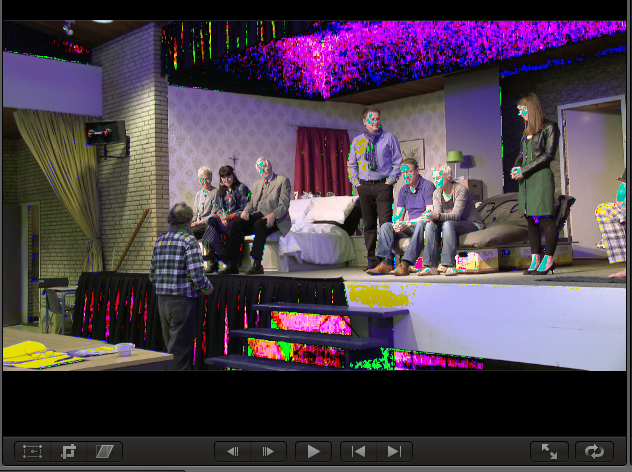
I succeeded to make a screenshot. Is this helpful ?
manny thanks, Jules
I succeeded to make a screenshot. Is this helpful ?
manny thanks, Jules
Please Log in to join the conversation.
- Tom Wolsky
-
- Offline
- Moderator
-
20 Jan 2012 22:09 #3283
by Tom Wolsky
Replied by Tom Wolsky on topic Re: peaking colors
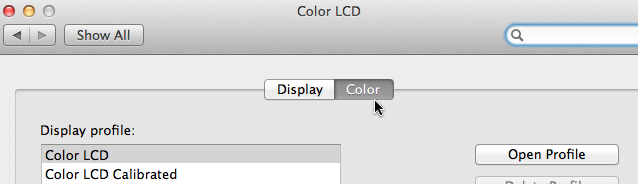
System Preferences> Display
Please Log in to join the conversation.

20 Jan 2012 22:23 #3286
by BenB
Replied by BenB on topic Re: peaking colors
What make/ model is your computer monitor?
What profile is it set up to use )(onitors in Sys Prefs)?
What profile is it set up to use )(onitors in Sys Prefs)?
Please Log in to join the conversation.
24 Jan 2012 19:38 #3428
by Jules
Replied by Jules on topic Re: peaking colors
Sorry, I don't think there is a problem in the system. As a photographer I've thousands of pictures on my screen, but never such problem.
For photographers, there is a program, called LIGHTROOM. There you can see the same colors, when you switch on a button in the histogram-field. There it is called CLIPPING.
But you can also switch it off. So, I think, (hope) that in FCPx there must also be such possibilty.
Am I right or wrong ?
Thanks for your help so far.
For photographers, there is a program, called LIGHTROOM. There you can see the same colors, when you switch on a button in the histogram-field. There it is called CLIPPING.
But you can also switch it off. So, I think, (hope) that in FCPx there must also be such possibilty.
Am I right or wrong ?
Thanks for your help so far.
Please Log in to join the conversation.
- Tom Wolsky
-
- Offline
- Moderator
-
25 Jan 2012 00:29 #3436
by Tom Wolsky
Replied by Tom Wolsky on topic Re: peaking colors
I believe you're mistaken.
Please Log in to join the conversation.
26 Jan 2012 16:55 #3461
by Jules
Replied by Jules on topic Re: peaking colors
Sorry,Tom, you were right. Because I'm not so technical, it took me a long time to understand where I could find this problem. In the monitor profile I choosed for I-Mac calibrated.
Now I choose for just I-Mac, the problem is over.
Thanks everyone for your advice.
But I keep on thinking: why don't I have this problem with pictures ?
Now I choose for just I-Mac, the problem is over.
Thanks everyone for your advice.
But I keep on thinking: why don't I have this problem with pictures ?
Please Log in to join the conversation.
26 Jan 2012 17:13 #3465
by BenB
Replied by BenB on topic Re: peaking colors
The really short answer: Photos and video have different color sampling, just like CGI files have an even different color sampling. Not all types of media assets are created equal.
Please Log in to join the conversation.
