


- Posts: 35
- Thank you received: 0
3 Post Moderation Rule for New Boarders (25 Jan 2021)
New boarders will have their posts moderated - Don't worry if you cannot see your post immediately.
Can you hide unused transitions or effects?
- Itstonybabyvlog
-
 Topic Author
- Offline
- Junior Member
-

Less
More
14 Apr 2020 01:07 #106158
by Itstonybabyvlog
Can you hide unused transitions or effects? was created by Itstonybabyvlog
Hi everyone, just wondering if anybody knows how to hide unused transitions, effects or titles in fcpx?
Please Log in to join the conversation.


14 Apr 2020 13:38 #106174
by JoeEditor
Replied by JoeEditor on topic Can you hide unused transitions or effects?
Unused? Like, you only want to see the ones used in your Project Timeline? That's a new one, and not sure why you'd want to, but I guess you do. No, the browsers show everything. But, you can go to the Timeline Index and see what you've got in your Timeline.
Please Log in to join the conversation.
- Itstonybabyvlog
-
Topic Author
- Offline
- Junior Member
-
Less
More
- Posts: 35
- Thank you received: 0
01 May 2020 05:15 #106739
by Itstonybabyvlog
Replied by Itstonybabyvlog on topic Can you hide unused transitions or effects?
I would want to so I don't have to wade through endless transitions and tacky effects that I'm never going to use to get to the transitions and effects I use on a regular basis. Is that not rational?
Please Log in to join the conversation.
01 May 2020 12:34 #106746
by JoeEditor
Replied by JoeEditor on topic Can you hide unused transitions or effects?
Yes, I used to use Themes for that, but Themes doesn't work with any efficiency any longer. No, no way to do that, and I wish there was.
Please Log in to join the conversation.

01 May 2020 13:19 #106750
by VTC
Replied by VTC on topic Can you hide unused transitions or effects?
User>Movies>Motion Templates>Titles /Generators / Effects / Transitions. Dig through and remove the cheesy ones you'll never use.
Created a folder named ATTIC then an ATTIC.zip file of them and keep it in the same MotionTemplate folder because you never know when you want to cheese something out in the future.
Created a folder named ATTIC then an ATTIC.zip file of them and keep it in the same MotionTemplate folder because you never know when you want to cheese something out in the future.
Please Log in to join the conversation.
- Tom Wolsky
-

- Offline
- Moderator
-

01 May 2020 14:04 - 01 May 2020 14:05 #106752
by Tom Wolsky
Replied by Tom Wolsky on topic Can you hide unused transitions or effects?
Those are only third party plugins. The application effects, transitions, and titles are inside the Final Cut Pro bundle.You could hack that, but I'd advise against it, and of course you have to redo it with every update, assuming there will be another update.
Last edit: 01 May 2020 14:05 by Tom Wolsky.
Please Log in to join the conversation.

01 May 2020 15:00 #106759
by VidGreg
Replied by VidGreg on topic Can you hide unused transitions or effects?
I would urge you to not modify the FCPX bundles, but you can create user based categories/folder with user created presets. Place all your favorite transitions/effects in user created folder and then easy to find the effect you want. You may need to modify and save effects in order to save to the user preset group/bundle.
Hope this Helps, Greg
Hope this Helps, Greg
Please Log in to join the conversation.
01 May 2020 17:49 #106766
by VTC
Replied by VTC on topic Can you hide unused transitions or effects?
If you're timid or squeamish well then, yes, avoid rooting around in the application bundle but I've done just that after making a duplicate zipped copy as a backup. Never have had a problem with FCP not launching after removing the junk effects that no one beyond the 6th grade should ever use.
Have something like 5 different versions (Did a search and turns out it 8 versions) of FCP here and they've all hummed along nicely without that low value baggage. (I never let an update overwrite the previous version or have some massive library with multiple projects in it. One library for each project keeps the edits nimble.)
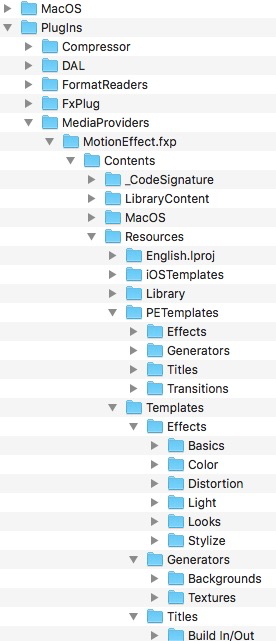
Have something like 5 different versions (Did a search and turns out it 8 versions) of FCP here and they've all hummed along nicely without that low value baggage. (I never let an update overwrite the previous version or have some massive library with multiple projects in it. One library for each project keeps the edits nimble.)
Please Log in to join the conversation.
