


- Posts: 2
- Thank you received: 0
3 Post Moderation Rule for New Boarders (25 Jan 2021)
New boarders will have their posts moderated - Don't worry if you cannot see your post immediately.
Toggle View in FCP in Media Import Window Not Working
- Zombie5000
-
 Topic Author
- Offline
- New Member
-

Less
More
10 Apr 2020 23:52 #106061
by Zombie5000
Toggle View in FCP in Media Import Window Not Working was created by Zombie5000
Hello,
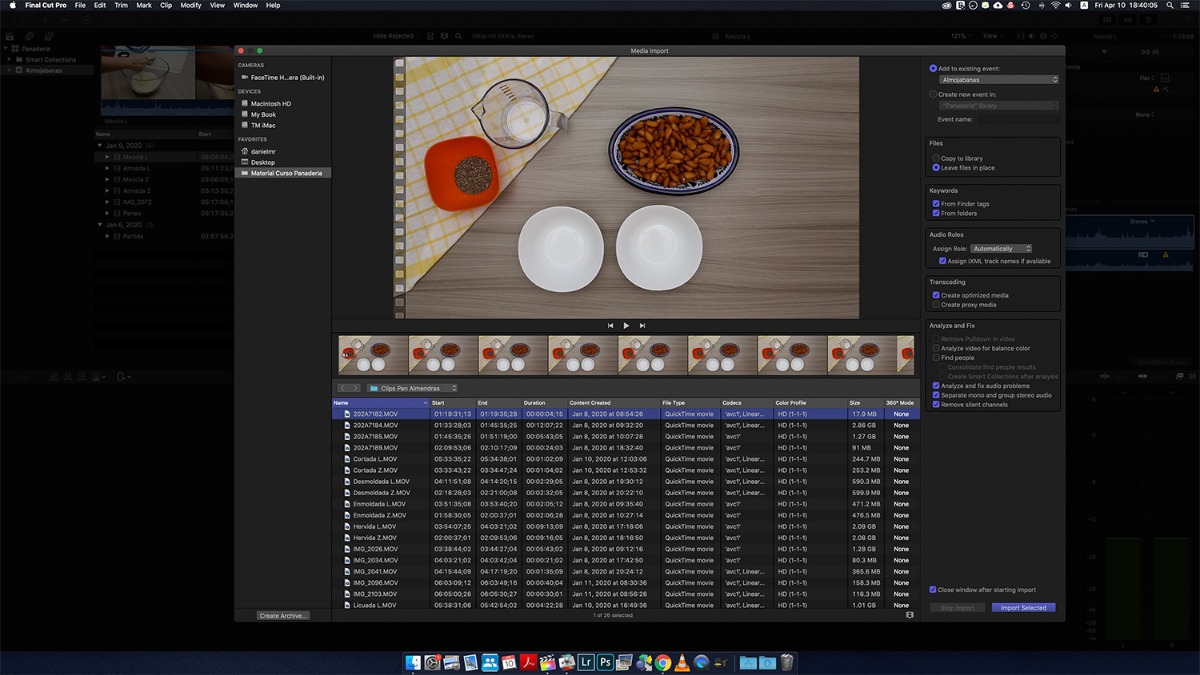
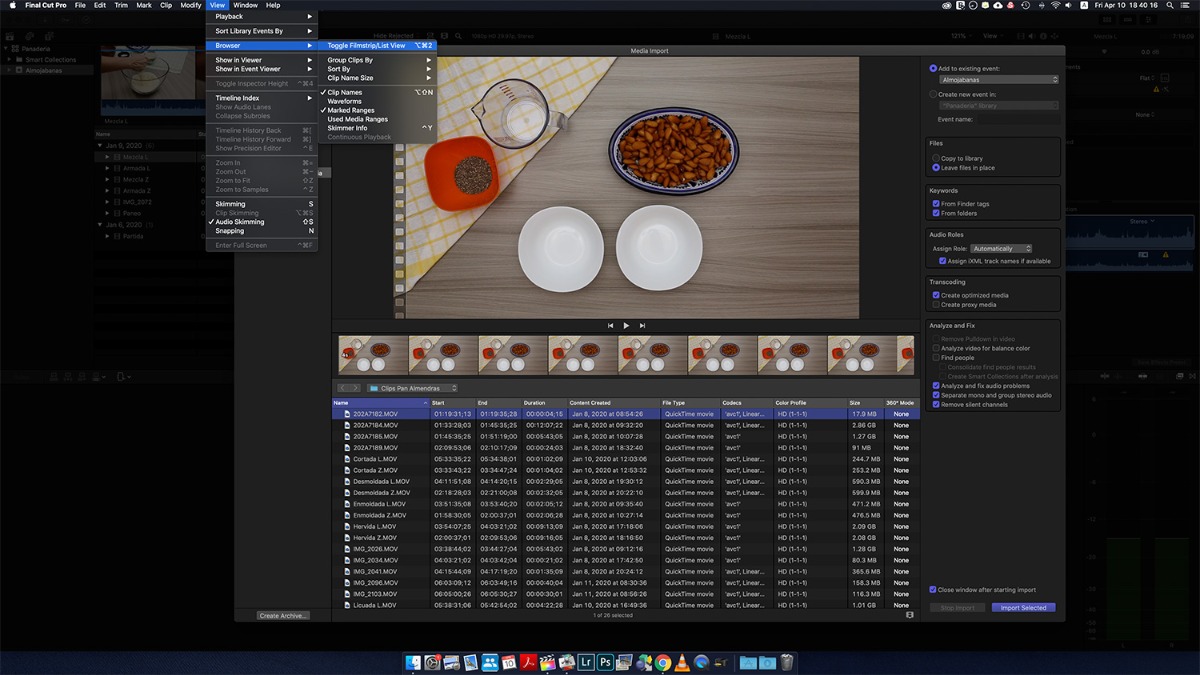
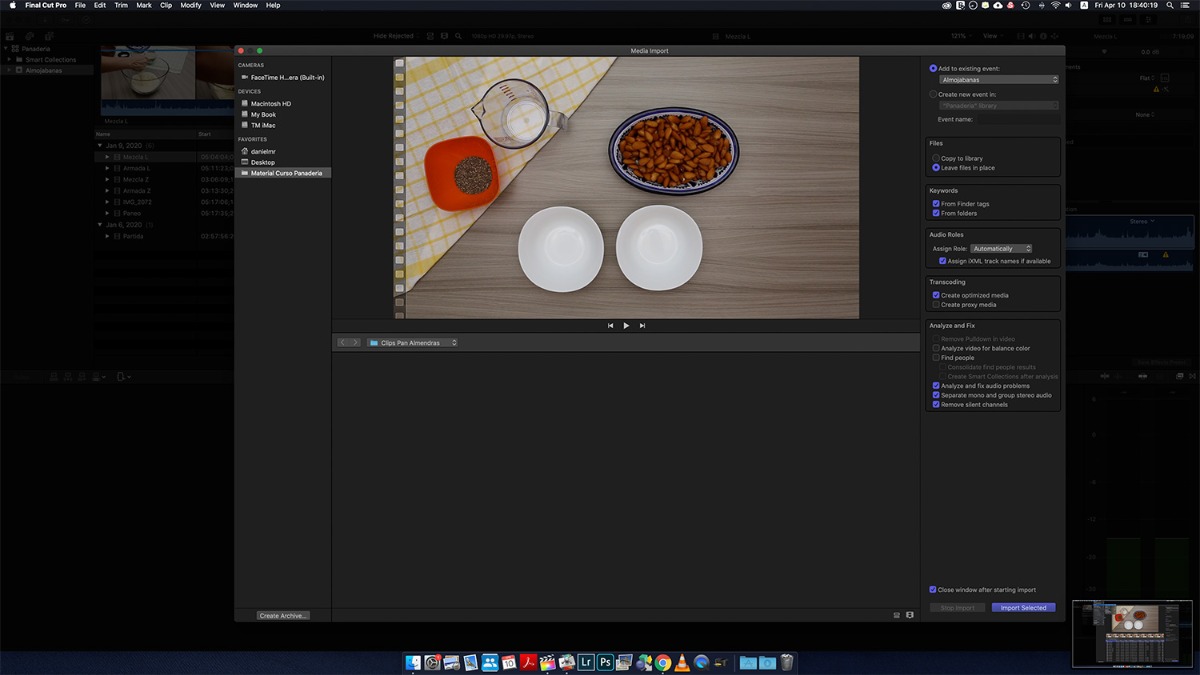
I'm working with FCP 10.4 on OSX 10.14.6 Mojave. When I'm in the Media Import Window and I want to toggle to Filmstrip view, the files just dissapear instead of be shown in filmstrip view. Want can I do to fix this issue? There are some pictures attached.
Thank you in advance.
I'm working with FCP 10.4 on OSX 10.14.6 Mojave. When I'm in the Media Import Window and I want to toggle to Filmstrip view, the files just dissapear instead of be shown in filmstrip view. Want can I do to fix this issue? There are some pictures attached.
Thank you in advance.
Please Log in to join the conversation.


11 Apr 2020 04:59 - 11 Apr 2020 05:00 #106069
by JoeEditor
Replied by JoeEditor on topic Toggle View in FCP in Media Import Window Not Working
You found a bug. I just looked at it, and yes, there's an issue. First of all, what you're selecting in the menu shouldn't do anything, as it should only change the Browser, not the Import Window. Very different things.
Second, there should be a list/filmstrip toggle button at the lower right of the Import Window to do that.
I've not actually used the Import Window in so long, I have no clue what's there anymore. I almost always drag-and-drop for my workflow.
Second, there should be a list/filmstrip toggle button at the lower right of the Import Window to do that.
I've not actually used the Import Window in so long, I have no clue what's there anymore. I almost always drag-and-drop for my workflow.
Last edit: 11 Apr 2020 05:00 by JoeEditor.
Please Log in to join the conversation.
- Zombie5000
-
Topic Author
- Offline
- New Member
-
Less
More
- Posts: 2
- Thank you received: 0
11 Apr 2020 14:38 #106073
by Zombie5000
Replied by Zombie5000 on topic Toggle View in FCP in Media Import Window Not Working
Hello,
Thank you for your answer. Casually after I posted I made some deeper research and I found in a tutorial from Larry Jordan in Creativelive that the filmstrip view is not available when importing Quicktime Movies. The explanation he gives is that the list or thumbnail view will show up whenever you have to transcode media but most of the time does not show up when you're simply importing an already existing quicktime file. So if it's not there is because that Apple has made the decision that you're gonna be bringing in the entire file anyway there is no reason to see the icon, so the icons appear or disappear depending upon what type media you are importing based upon that folder. So it's basically based upon the format of media that you are importing.
Thank you anyway.
Thank you for your answer. Casually after I posted I made some deeper research and I found in a tutorial from Larry Jordan in Creativelive that the filmstrip view is not available when importing Quicktime Movies. The explanation he gives is that the list or thumbnail view will show up whenever you have to transcode media but most of the time does not show up when you're simply importing an already existing quicktime file. So if it's not there is because that Apple has made the decision that you're gonna be bringing in the entire file anyway there is no reason to see the icon, so the icons appear or disappear depending upon what type media you are importing based upon that folder. So it's basically based upon the format of media that you are importing.
Thank you anyway.
Please Log in to join the conversation.
12 Apr 2020 14:41 #106104
by JoeEditor
Replied by JoeEditor on topic Toggle View in FCP in Media Import Window Not Working
Yeah, Apple makes some wacko decisions sometimes...
Please Log in to join the conversation.
