


- Posts: 18
- Thank you received: 0
3 Post Moderation Rule for New Boarders (25 Jan 2021)
New boarders will have their posts moderated - Don't worry if you cannot see your post immediately.
curious problem when exporting clips
02 Apr 2020 20:24 #105819
by barryhill
curious problem when exporting clips was created by barryhill
hi
I have a strange problem. I have three clips in my timeline and have disabled two of them. the other is a very short 2m test clip to try out some fonts.
When I exported, I noticed that the final 'short' clip was actually as long as the longest clip even though disabled.
The original short clip was exported, but for some reason the export process included a blank section as long as the longest clip?
Just wondering if I have missed an option? How should I have exported just the short clip?
barry
I have a strange problem. I have three clips in my timeline and have disabled two of them. the other is a very short 2m test clip to try out some fonts.
When I exported, I noticed that the final 'short' clip was actually as long as the longest clip even though disabled.
The original short clip was exported, but for some reason the export process included a blank section as long as the longest clip?
Just wondering if I have missed an option? How should I have exported just the short clip?
barry
Please Log in to join the conversation.
- Tom Wolsky
-

- Offline
- Moderator
-

02 Apr 2020 20:36 #105820
by Tom Wolsky
Replied by Tom Wolsky on topic curious problem when exporting clips
Did you export the whole project, or just the clip you wanted? Disabled clips export as black.
Please Log in to join the conversation.


03 Apr 2020 04:22 #105833
by JoeEditor
Replied by JoeEditor on topic curious problem when exporting clips
As Tom said, so in that case, select that one clip you want as a range, then export. If a rangs is selected in a Timeline, when you export, then only that section gets exported. Otherwise, you get the whole Timeline, black disabled clips and all.
Please Log in to join the conversation.
03 Apr 2020 05:44 - 03 Apr 2020 05:46 #105835
by barryhill
Replied by barryhill on topic curious problem when exporting clips
just to answer both helpful responses. Yes, I disabled the clips I didn't want to export and highlighted the clip I did want to export. The disabled clips were 'dark', and the enabled clip (the very short one) was highlighted by selecting all the components with the mouse.
You mention 'export' and I am using 'share', which I assumed is the only option when rendering and saving a file for youtube etc. Or is 'export' another option?
any further suggestions would be very welcome, it remains a mystery.
barry
You mention 'export' and I am using 'share', which I assumed is the only option when rendering and saving a file for youtube etc. Or is 'export' another option?
any further suggestions would be very welcome, it remains a mystery.
barry
Last edit: 03 Apr 2020 05:46 by barryhill.
Please Log in to join the conversation.
- Tom Wolsky
-
- Offline
- Moderator
-
03 Apr 2020 07:55 #105837
by Tom Wolsky
Replied by Tom Wolsky on topic curious problem when exporting clips
Simply selecting a clip is not sufficient, you have to make a range. Select the clip and puts X or mark in and out points with I and O.
Please Log in to join the conversation.
03 Apr 2020 08:18 #105840
by barryhill
Replied by barryhill on topic curious problem when exporting clips
Hi
Many thanks for this tip. I will give this a try. I have used FCPX on other projects and maybe I just worked with only one clip in the time line. Perhaps this 'marking' is necessary when there are more than one clip in the timeline?
barry
Many thanks for this tip. I will give this a try. I have used FCPX on other projects and maybe I just worked with only one clip in the time line. Perhaps this 'marking' is necessary when there are more than one clip in the timeline?
barry
Please Log in to join the conversation.
03 Apr 2020 13:39 #105857
by JoeEditor
Replied by JoeEditor on topic curious problem when exporting clips
Method 1:
Hit "R" for the Range tool. Click-and-drag across the section you want to export.
Method 2:
Place the playhead where you want the exported clip to start, hit "i" for In Point. Then place the playhead where you want the export to end, hit "o" for Out Point.
Method 3:
With the playhead on that clip, select it, hit "x" to select it as a range.
And a question, why have only one clip in a Timeline? You can export a single clip by itself directly from the Browser.
Hit "R" for the Range tool. Click-and-drag across the section you want to export.
Method 2:
Place the playhead where you want the exported clip to start, hit "i" for In Point. Then place the playhead where you want the export to end, hit "o" for Out Point.
Method 3:
With the playhead on that clip, select it, hit "x" to select it as a range.
And a question, why have only one clip in a Timeline? You can export a single clip by itself directly from the Browser.
Please Log in to join the conversation.
03 Apr 2020 16:44 #105872
by barryhill
Replied by barryhill on topic curious problem when exporting clips
thanks for this. I experimented with using markers and that did the job. BUT I noticed that even though I had highlighted just one clip and the others were disabled, when I inserted the markers they appeared over another clip, not the one I was exporting. The clips were the correct length, but why didn't the marked area appear over the clip I was actually exporting, but over a completely unrelated clip, that was also disabled?
Barry
Barry
Please Log in to join the conversation.
03 Apr 2020 16:46 #105873
by barryhill
Replied by barryhill on topic curious problem when exporting clips
sorry, my other question, which browser allows solo export of clips? do you have a screenshot?
barry
barry
Please Log in to join the conversation.
04 Apr 2020 13:38 #105891
by JoeEditor
Replied by JoeEditor on topic curious problem when exporting clips
When selecting a Range (nothing to do with "Markers") in a timeline, it doesn't matter which clip is selected, everything within that Range will be included in the exported file.
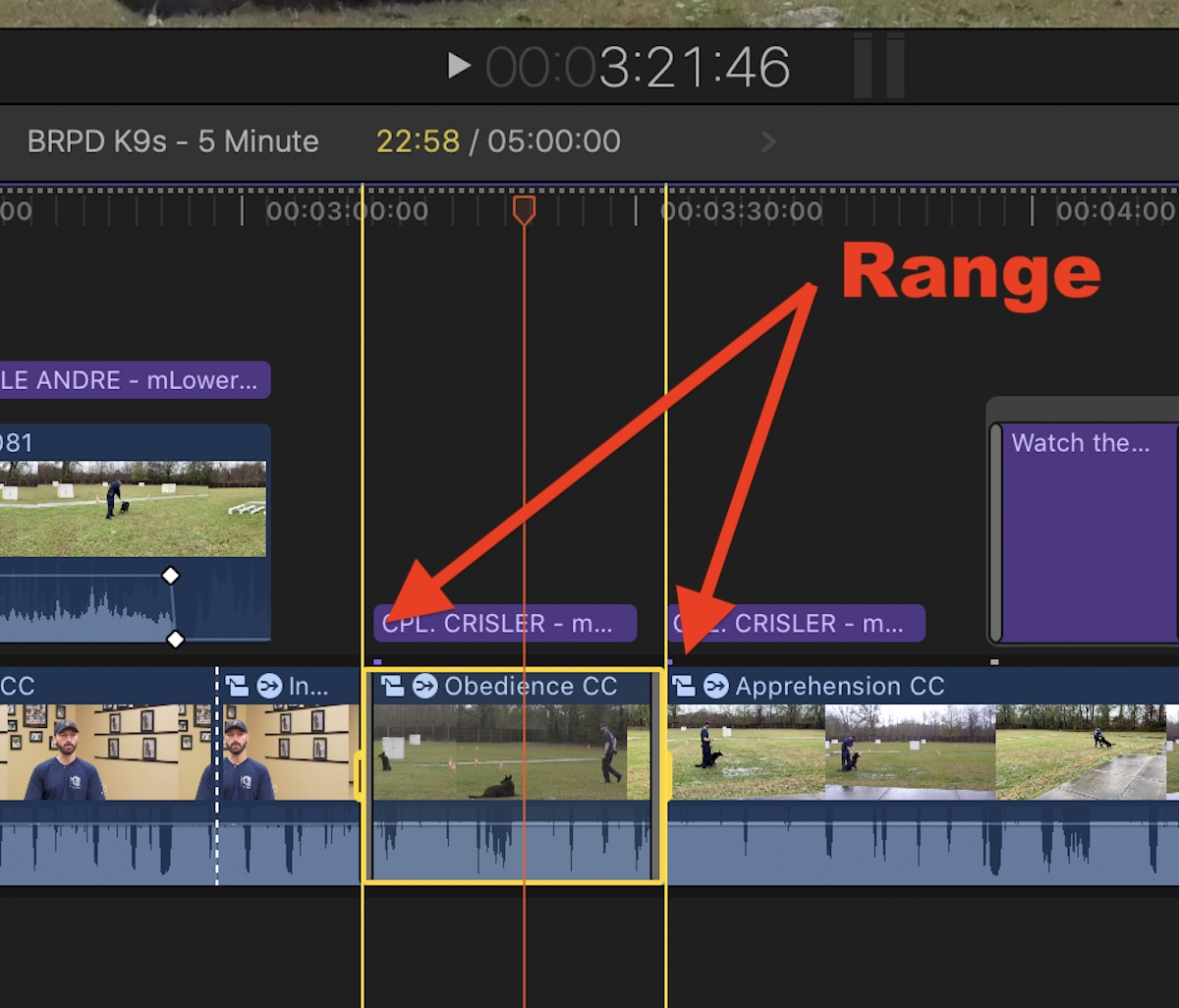
Simply select a clip or Project in the Browser, export, simple.
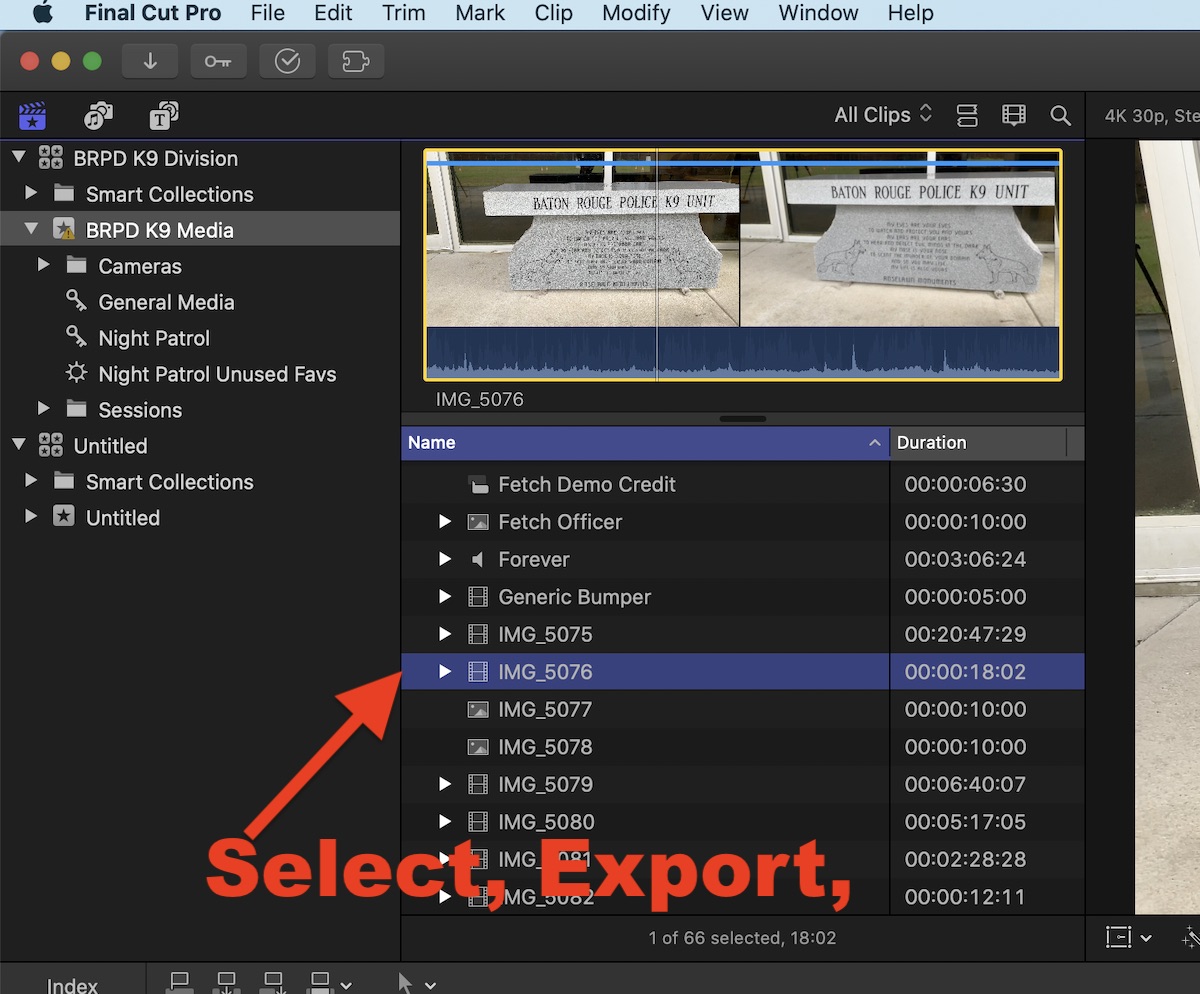
Simply select a clip or Project in the Browser, export, simple.
Please Log in to join the conversation.
04 Apr 2020 13:43 #105893
by JoeEditor
Replied by JoeEditor on topic curious problem when exporting clips
If you select a Range in a clip in the Browser, only the portion within the Range will be exported.
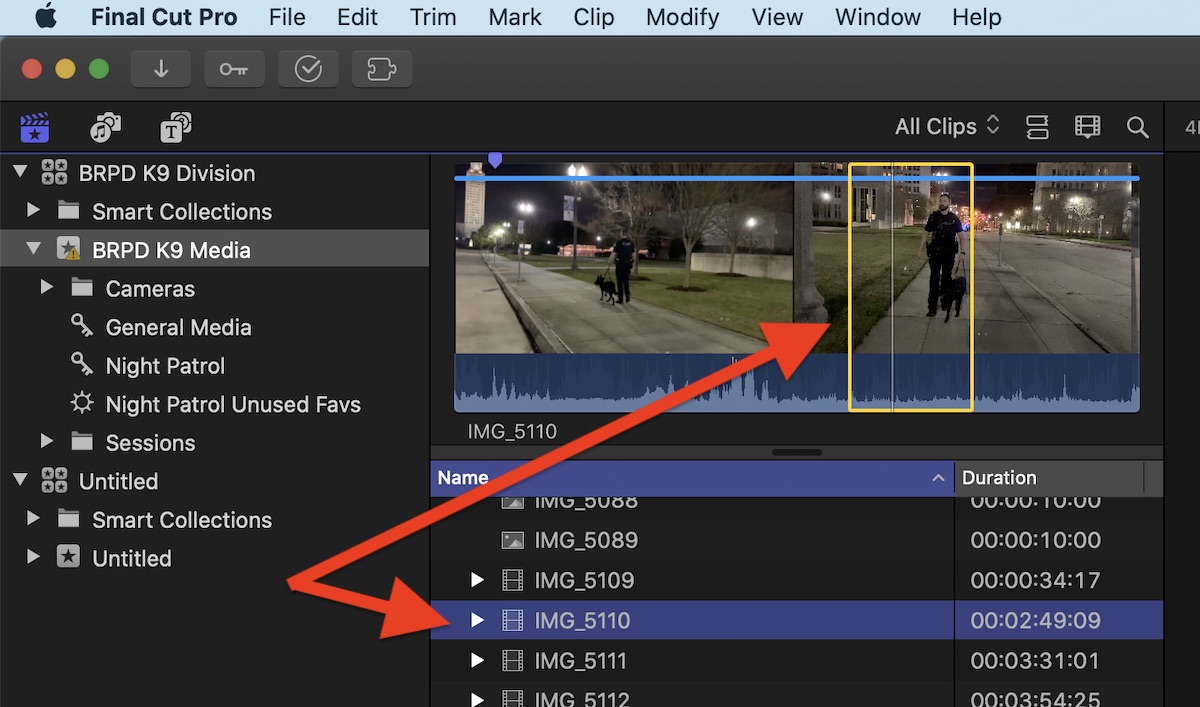
User manual link:
support.apple.com/guide/final-cut-pro/se...anges-ver28cca92/mac
User manual link:
support.apple.com/guide/final-cut-pro/se...anges-ver28cca92/mac
Please Log in to join the conversation.
