


- Posts: 1
- Thank you received: 0
3 Post Moderation Rule for New Boarders (25 Jan 2021)
New boarders will have their posts moderated - Don't worry if you cannot see your post immediately.
STOP MOTION - How to create new project as 10FPS?
30 Mar 2020 10:07 #105733
by faysal9
STOP MOTION - How to create new project as 10FPS? was created by faysal9
This is my first time here on this forum.
I'm creating a lot of stop motion videos now at home.
The thing is that whenever I go to my project properties, I can custom choose project resolution, but in FPS drop down, I am stuck with available options. from 23.98 to 60FPS.
I want to choose 10 or 15 FPS for my stop motion projects.
Please help.
I'm creating a lot of stop motion videos now at home.
The thing is that whenever I go to my project properties, I can custom choose project resolution, but in FPS drop down, I am stuck with available options. from 23.98 to 60FPS.
I want to choose 10 or 15 FPS for my stop motion projects.
Please help.
Please Log in to join the conversation.

31 Mar 2020 14:02 #105763
by JoeEditor
Replied by JoeEditor on topic STOP MOTION - How to create new project as 10FPS?
First, I'm curious as to what delivery method uses 10-15 fps. I don't know what you'd play that back on.
But unfortunately, FCPX only uses standard video frame rates.
But unfortunately, FCPX only uses standard video frame rates.
Please Log in to join the conversation.

31 Mar 2020 16:43 #105766
by Albo
Replied by Albo on topic STOP MOTION - How to create new project as 10FPS?
Stop Motion is done at 24fps.
If you want to change how it looks it's up to you to animate it accordingly.
If you want to change how it looks it's up to you to animate it accordingly.
Please Log in to join the conversation.

01 Apr 2020 02:57 - 01 Apr 2020 02:59 #105779
by Redifer
Replied by Redifer on topic STOP MOTION - How to create new project as 10FPS?
Stopmotion is done at whatever frame rate you wanna do it at. I've done it as slow and 7.5 frames per second and as fast as 60. That said, your timeline doesn't need to match your stop motion frame rate. Just create a normal 24 or 30 or 60fps timeline. I don't know how you're photographing your animation, but assemble all of the frames using the fabulous Qucktime 7 Pro (I'm not sure if regular Quicktime Player can do this). Or you can assemble them in After Effects and export a 24, 30, or 60fps video file at the same resolution of your original pictures. It will seem to move WAY too fast, but no need to worry about that, it's fine. Import that into FCP. Then retime that imported video file on the timeline until it runs at your desired frame rate. So if your timeline is 30fps, youd slow it by 33% ot get 10 frames per second.
Last edit: 01 Apr 2020 02:59 by Redifer.
Please Log in to join the conversation.
01 Apr 2020 12:56 #105785
by Albo
Replied by Albo on topic STOP MOTION - How to create new project as 10FPS?
What I mean is that Stop Motion is made at 24 FPS. It's how you animate that gives it the look you want.
You do not animate at 7 FPS. You use the 24 FPS base and you move according to the feel you want to give.
And you don't animate at 30 FPS either.
My two cents...as a professional animator.
You do not animate at 7 FPS. You use the 24 FPS base and you move according to the feel you want to give.
And you don't animate at 30 FPS either.
My two cents...as a professional animator.
Please Log in to join the conversation.
01 Apr 2020 14:10 #105786
by JoeEditor
Replied by JoeEditor on topic STOP MOTION - How to create new project as 10FPS?
Why can't you animate at 30fps? What if it is for television broadcast, not a movie theater?
Please Log in to join the conversation.
- Andreas Kiel
-

- Offline
- Platinum Member
-

Less
More
- Posts: 1077
- Thank you received: 189
01 Apr 2020 16:39 #105791
by Andreas Kiel
Replied by Andreas Kiel on topic STOP MOTION - How to create new project as 10FPS?
Albo is right.
Standard Cartoon (animation stand) and Stop Motion is done at 24 (12 by 2) the classical way.
That what I've been told by my teacher when I was younger and he was quite famous from cinema and TV
Standard Cartoon (animation stand) and Stop Motion is done at 24 (12 by 2) the classical way.
That what I've been told by my teacher when I was younger and he was quite famous from cinema and TV
Please Log in to join the conversation.
01 Apr 2020 17:19 #105793
by Albo
Replied by Albo on topic STOP MOTION - How to create new project as 10FPS?
You can animate anyway you want. The animation is related to how much movement you make between shots. If you hold a frame for 12 images it will last 1/2 second on screen.
Blinking your eyes is 1 or two frames depending on how fast you want it.
If you want a slow motion blinking for 1 second it will take 24 frames.
If you put a 24 FPS animation in a 30 FPS timeline it will go faster.
A lot of animation is done on two's. Meaning that every frame is doubled.
1 image = two frames It is more economival (It takes less time to make).
A lot of Wallace and Gromit films are done on two's but only when needed.
Blinking your eyes is 1 or two frames depending on how fast you want it.
If you want a slow motion blinking for 1 second it will take 24 frames.
If you put a 24 FPS animation in a 30 FPS timeline it will go faster.
A lot of animation is done on two's. Meaning that every frame is doubled.
1 image = two frames It is more economival (It takes less time to make).
A lot of Wallace and Gromit films are done on two's but only when needed.
Please Log in to join the conversation.
02 Apr 2020 02:11 - 02 Apr 2020 02:14 #105804
by Redifer
Replied by Redifer on topic STOP MOTION - How to create new project as 10FPS?
You can animate at any frame rate you want. If your timeline is 30fps and you're doing it on 2s, your stop motion is 15 frame per second. If it varies then, well, it's variable. I gone from on 1s to on 2s to even on 3s depending. But yes you CAN animate at 30fps. I've done it. I've also done 60fps on ones. That's a 60fps stop motion animation. There is no rule that you MUST do it at 24fps. I would use a 30fs timeline or even 60fps as it offers far more flexibility than 24fps. The only reason I'd use 24 is if I were going to a DCP or film.
The point is, though, that your timeline need not match the frame rate of your animation. That's the important takeway here.
The point is, though, that your timeline need not match the frame rate of your animation. That's the important takeway here.
Last edit: 02 Apr 2020 02:14 by Redifer.
Please Log in to join the conversation.
02 Apr 2020 03:27 #105805
by JoeEditor
Replied by JoeEditor on topic STOP MOTION - How to create new project as 10FPS?
There was a time animation was done at 24fps because that was the frame rate of the celluloid film it was being photographed to. We work with digital media, we have more flexibility.
Please Log in to join the conversation.
- Andreas Kiel
-
- Offline
- Platinum Member
-
Less
More
- Posts: 1077
- Thank you received: 189
02 Apr 2020 10:33 #105809
by Andreas Kiel

A a good old ARRI easily could record at a higher frame rate (up to 100) and the 'trick desk' cameras can't do more than 1 fps.
The classical 12 on 2 still seems to have the 'best look'
Replied by Andreas Kiel on topic STOP MOTION - How to create new project as 10FPS?
Celluloid film has no frame rateFCPX.guru wrote: There was a time animation was done at 24fps because that was the frame rate of the celluloid film it was being photographed to. We work with digital media, we have more flexibility.
A a good old ARRI easily could record at a higher frame rate (up to 100) and the 'trick desk' cameras can't do more than 1 fps.
The classical 12 on 2 still seems to have the 'best look'
Please Log in to join the conversation.
02 Apr 2020 11:44 #105810
by Albo
Replied by Albo on topic STOP MOTION - How to create new project as 10FPS?
I won't go into the ins and out of animation.
If you animate at 30 FPS. 15 frames is 1/2 second.
The point in animation is how you move your character to achieve what you want.
As a rule, even in the digital world we animate at 24 FPS. It doesn't proclude from animating at whatever you want.
At 60 FPS you will need 30 frames to animate 1/2 second. If you are animating a puppet it doesn't make sense.
So animate at whatever FPS you want. Animation is about rythme and how much you move between each frame.
I am not taking about Motion which is a Motion graphics software. I'm simply saying animation is usually done by moving an object or a drawing at 24 FPS.
If you animate at 30 FPS. 15 frames is 1/2 second.
The point in animation is how you move your character to achieve what you want.
As a rule, even in the digital world we animate at 24 FPS. It doesn't proclude from animating at whatever you want.
At 60 FPS you will need 30 frames to animate 1/2 second. If you are animating a puppet it doesn't make sense.
So animate at whatever FPS you want. Animation is about rythme and how much you move between each frame.
I am not taking about Motion which is a Motion graphics software. I'm simply saying animation is usually done by moving an object or a drawing at 24 FPS.
Please Log in to join the conversation.
02 Apr 2020 13:14 - 02 Apr 2020 13:16 #105812
by JoeEditor
Replied by JoeEditor on topic STOP MOTION - How to create new project as 10FPS?
"Celluloid film has no frame rate"
When played back it does, 24fps standard, all theaters do 24fps playback of film.
"As a rule, even in the digital world, we animate at 24 FPS."
Why? What is the purpose of this "rule"?
When played back it does, 24fps standard, all theaters do 24fps playback of film.
"As a rule, even in the digital world, we animate at 24 FPS."
Why? What is the purpose of this "rule"?
Last edit: 02 Apr 2020 13:16 by JoeEditor.
Please Log in to join the conversation.
- Andreas Kiel
-
- Offline
- Platinum Member
-
Less
More
- Posts: 1077
- Thank you received: 189
02 Apr 2020 13:26 #105814
by Andreas Kiel
Theatre use only was a 'gimmick'
Replied by Andreas Kiel on topic STOP MOTION - How to create new project as 10FPS?
The YouTube link I supplied was TV and made for TV - but captured on Celluloid.FCPX.guru wrote: "Celluloid film has no frame rate"
When played back it does, 24fps standard, all theaters do 24fps playback of film.
Theatre use only was a 'gimmick'
It's the 'Look'. When animating with 'real things' like drawings, stop motion (like with clay Aardman does) it doesn't look that 'artificial'FCPX.guru wrote: "As a rule, even in the digital world, we animate at 24 FPS."
Why? What is the purpose of this "rule"?
Please Log in to join the conversation.
02 Apr 2020 15:32 #105816
by Albo
Replied by Albo on topic STOP MOTION - How to create new project as 10FPS?
Also the 24 FPS comes from the movie frame rate that was 16 FPS then standarized at 24 FPS. Which is still in usage today.
Please Log in to join the conversation.


02 Apr 2020 16:32 #105817
by Francois
Replied by Francois on topic STOP MOTION - How to create new project as 10FPS?
Interesting discussion here and mostly by the fact that all of you are about right mostly ALBO …
Many of us can remember using an OXBERRY animation stand which was THE standard then for animation as much as the ARRI BL or the ECLAIR NPR were the standard gear for synch sound (24 fps or 25fps) in low budget productions.
The OXBERRY could run at a maximum of 180 frames per minute (3 fps) in continuous mode. Is this a multiple of 30 fps or 24fps? We all know it was for 24 fps as television NTSC was interlaced and useless for any animation…You could not even go out without a huge truck.
ALBO wrote
So animate at whatever FPS you want. Animation is about rythme and how much you move between each frame.
Great conclusion do your calculations and chose timeline standard for delivery
and in doute go 24 it’s cool, economical and has nice “look”
The subject says: STOP MOTION
Stop motion of the real world or on location is another story as what you are filming has a duration that you want to accelerate to another duration to show a phenomenon , but again you need smoothness, so do your calculations and check your delivery requirements for final choice of FPS base.
Is that 2 cents ?
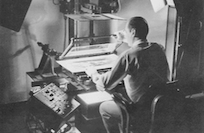
Many of us can remember using an OXBERRY animation stand which was THE standard then for animation as much as the ARRI BL or the ECLAIR NPR were the standard gear for synch sound (24 fps or 25fps) in low budget productions.
The OXBERRY could run at a maximum of 180 frames per minute (3 fps) in continuous mode. Is this a multiple of 30 fps or 24fps? We all know it was for 24 fps as television NTSC was interlaced and useless for any animation…You could not even go out without a huge truck.
ALBO wrote
So animate at whatever FPS you want. Animation is about rythme and how much you move between each frame.
Great conclusion do your calculations and chose timeline standard for delivery
and in doute go 24 it’s cool, economical and has nice “look”
The subject says: STOP MOTION
Stop motion of the real world or on location is another story as what you are filming has a duration that you want to accelerate to another duration to show a phenomenon , but again you need smoothness, so do your calculations and check your delivery requirements for final choice of FPS base.
Is that 2 cents ?
Please Log in to join the conversation.
02 Apr 2020 20:03 #105818
by Albo
I edited my first film on a Steenbeck. 16mm.
I was lucky because I had access to this. No Final cut at that time.
Replied by Albo on topic STOP MOTION - How to create new project as 10FPS?
Nice.Many of us can remember using an OXBERRY animation stand
I edited my first film on a Steenbeck. 16mm.
I was lucky because I had access to this. No Final cut at that time.
Please Log in to join the conversation.
02 Apr 2020 21:08 #105821
by arc
Replied by arc on topic STOP MOTION - How to create new project as 10FPS?
The video below is not stop motion animation. It cell animation or line drawing animation. My guess is cell. It was probably done using an Oxberry Animation Stand and then edited on a Steenbeck.
Cell animation and stop motion animation are both cool but the speed and smoothness of the animation is up to you. Stop motion animation is used when animating objects. Cell animation is used when you make use of drawing techniques onto cells.
At 24 FPS in order to spell your name with pennies sliding into frame using stop motion you would move the the pennies one centimeter and expose four frames each time you move the pennies. That works but it looks like stop motion animation.
If you want to go totally hardcore you can move the pennies just 2 millimeter and expose only one frame each time you move the pennies. This will look much smother during playback but will also require a lot more time and effort.
24 FPS, 30 FPS even 60 FPS can all work. It is all about timing and the distance the objects are moved.
The goal when making King Kong (black and white version) Star Wars or Sinbad The Sailor is to not have it look like stop motion animation but instead look like live action. That being said Lego Animations are a different story.
At my college we had an Oxberry and Steenbeck.
Cell animation and stop motion animation are both cool but the speed and smoothness of the animation is up to you. Stop motion animation is used when animating objects. Cell animation is used when you make use of drawing techniques onto cells.
At 24 FPS in order to spell your name with pennies sliding into frame using stop motion you would move the the pennies one centimeter and expose four frames each time you move the pennies. That works but it looks like stop motion animation.
If you want to go totally hardcore you can move the pennies just 2 millimeter and expose only one frame each time you move the pennies. This will look much smother during playback but will also require a lot more time and effort.
24 FPS, 30 FPS even 60 FPS can all work. It is all about timing and the distance the objects are moved.
The goal when making King Kong (black and white version) Star Wars or Sinbad The Sailor is to not have it look like stop motion animation but instead look like live action. That being said Lego Animations are a different story.
At my college we had an Oxberry and Steenbeck.
Please Log in to join the conversation.
02 Apr 2020 21:20 #105822
by arc
Replied by arc on topic STOP MOTION - How to create new project as 10FPS?
Another way to look at it is you can do 3-D animation at 60 FPS and the animation will look silky smooth. If you drop down to 30 FPS it will look less smooth than 60 FPS. If you drop it down to 5 FPS it starts to look like stop motion animation. That is because you have eliminated a lot of the key-frames in between the starting point and stopping point. That is also why gamers want the high frame rates.
Please Log in to join the conversation.
03 Apr 2020 06:14 - 03 Apr 2020 06:16 #105836
by PaulG
Replied by PaulG on topic STOP MOTION - How to create new project as 10FPS?
Final Cut operates at film and video playback rates. It does not support image sequences the way animation oriented programs like After Effects or Motion do. In After Effects, you can “interpret “ an image sequence in any frame rate you want. The standard interpretation is a default video frame rate of 24 or 30 or 25. But you can do 3,10, or any frame rate you want. I sometimes use this feature when I’ve got a few frames that I’m looping at variety of speeds. But generally speaking, when shooting normal stop motion, you work to a standard projection/playback frame rate (24fps eg) and you shoot in 2s, 3s etc by creating hold frames or specifying in Dragonframe or other capture software how many frames to capture in a burst. This way each time you hit the shutter, you don’t have to hit it twice or three times. You should always shoot the 2s or 3s in camera rather than messing with it in post. That’s because playback on set is a pain if you are planning tho ad d the extra frames in post. No one does it that way professionally. I have been doing SM for 35 years on the highest levels and you always capture all the frames on set. BTW even though US video playback is 30fps, almost nobody shoots at anything other than 24. Why? Because 30fps is 25% more frames to shoot and animation is hard enough work without making extra frames.
Last edit: 03 Apr 2020 06:16 by PaulG.
Please Log in to join the conversation.
