


- Posts: 51
- Thank you received: 1
3 Post Moderation Rule for New Boarders (25 Jan 2021)
New boarders will have their posts moderated - Don't worry if you cannot see your post immediately.
Export multiple title-roles with audio included?
22 Mar 2020 21:19 #105506
by DFPete
Export multiple title-roles with audio included? was created by DFPete
Hi there,
I have a project with 25 different endcards (as titles with different roles).
Now I want to export that project to 25 different files (because of 25 different title-roles).
BUT my project includes audio and in my export dialogue the option to include the audio in the files is not present.
Any ideas?
I have a project with 25 different endcards (as titles with different roles).
Now I want to export that project to 25 different files (because of 25 different title-roles).
BUT my project includes audio and in my export dialogue the option to include the audio in the files is not present.
Any ideas?
Please Log in to join the conversation.
- Tom Wolsky
-

- Offline
- Moderator
-

22 Mar 2020 21:38 #105507
by Tom Wolsky
Replied by Tom Wolsky on topic Export multiple title-roles with audio included?
What export settings are you using? Post screenshots of what you see in settings pane.
Please Log in to join the conversation.
22 Mar 2020 21:51 #105508
by DFPete

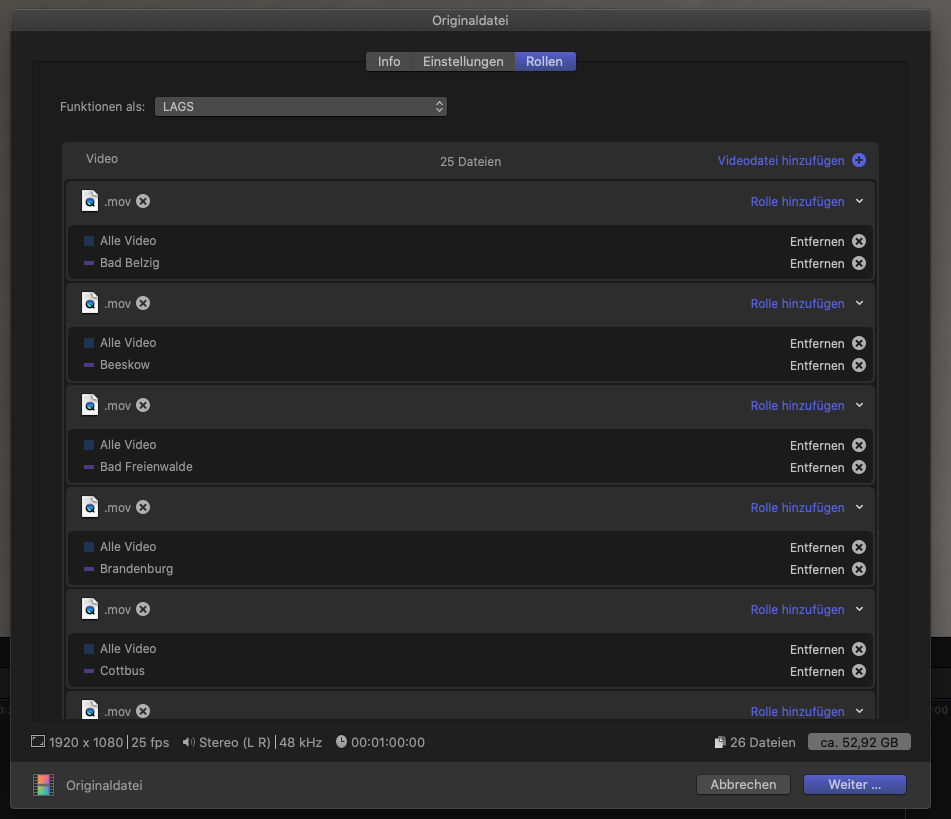

You can see the timeline and 2 screenshots from my export settings. I used "separate files" as a base and made my own profile.
Replied by DFPete on topic Export multiple title-roles with audio included?
You can see the timeline and 2 screenshots from my export settings. I used "separate files" as a base and made my own profile.
Please Log in to join the conversation.
- Tom Wolsky
-
- Offline
- Moderator
-
23 Mar 2020 00:17 #105511
by Tom Wolsky
Replied by Tom Wolsky on topic Export multiple title-roles with audio included?
You're trying to use roles to make a batch export of multiple movies. It can't do that the way you want. What might be easier is to make 25 duplicate projects in the browser and put a separate end card in each, and batch export all 25 movies.
Please Log in to join the conversation.

23 Mar 2020 05:13 - 23 Mar 2020 05:15 #105512
by JoeEditor
Replied by JoeEditor on topic Export multiple title-roles with audio included?
"It can't do that the way you want."
Actually not true, the way you're doing it is correct, works like a charm. In fact, we used subtitles from different languages, each language had it's own role, to do different versioned exports from the same timeline, in the soon-dead Apple authorized training.
BUT you have your end cards in the Timeline muted, they're all gray. Nothing will expose if it is muted. But you're on the right track picking specific roles for each export of the same Timeline.
Actually not true, the way you're doing it is correct, works like a charm. In fact, we used subtitles from different languages, each language had it's own role, to do different versioned exports from the same timeline, in the soon-dead Apple authorized training.
BUT you have your end cards in the Timeline muted, they're all gray. Nothing will expose if it is muted. But you're on the right track picking specific roles for each export of the same Timeline.
Last edit: 23 Mar 2020 05:15 by JoeEditor.
Please Log in to join the conversation.
23 Mar 2020 09:01 #105517
by DFPete
Replied by DFPete on topic Export multiple title-roles with audio included?
Thanks for response.
My „Problem“ is, that my endcards are title-templates, not captions.
Would be great to see this option in the next update.
My „Problem“ is, that my endcards are title-templates, not captions.
Would be great to see this option in the next update.
Please Log in to join the conversation.
23 Mar 2020 12:37 #105522
by JoeEditor
Replied by JoeEditor on topic Export multiple title-roles with audio included?
Yes, you can give titles individual roles. It does work now. I’ll post an example in a bit.
Please Log in to join the conversation.
- Tom Wolsky
-
- Offline
- Moderator
-
23 Mar 2020 12:51 #105524
by Tom Wolsky
Replied by Tom Wolsky on topic Export multiple title-roles with audio included?
But can you combine the audio into the same stem?
Please Log in to join the conversation.
24 Mar 2020 19:09 - 24 Mar 2020 19:19 #105571
by JoeEditor
Replied by JoeEditor on topic Export multiple title-roles with audio included?
Sure, just specify which Roles to include, simple as that. But you can't give a title an audio role, as it has no audio component. But you make a custom audio role and a custom title role, both with the same name. Include both in your export.

Last edit: 24 Mar 2020 19:19 by JoeEditor.
Please Log in to join the conversation.
- Tom Wolsky
-
- Offline
- Moderator
-
24 Mar 2020 19:19 #105572
by Tom Wolsky
Replied by Tom Wolsky on topic Export multiple title-roles with audio included?
I can’t see a way, when making separate files, to combine an audio role into the video stem.
Please Log in to join the conversation.
24 Mar 2020 19:22 #105573
by JoeEditor
Replied by JoeEditor on topic Export multiple title-roles with audio included?
I just posted a couple of screenshots.
Start by creating the custom sub-roles you need for audio and titles.
When you export, go to the Roles section, specify a Quicktime Multitrack Movie, add/remove the roles you want to be included/excluded. It's that easy.
Start by creating the custom sub-roles you need for audio and titles.
When you export, go to the Roles section, specify a Quicktime Multitrack Movie, add/remove the roles you want to be included/excluded. It's that easy.
Please Log in to join the conversation.
24 Mar 2020 19:47 #105578
by DFPete
Replied by DFPete on topic Export multiple title-roles with audio included?
Sure that works as expected BUT it's not an option for exporting multiple files with the same edit and different language titles including audio.
Yes you can make (in my case) 25 different projects and batch export them than you end up with compounding everything and the whole project get's even more complex.
Would just be nice to add the option to include audio when exporting to different role-files.
Yes you can make (in my case) 25 different projects and batch export them than you end up with compounding everything and the whole project get's even more complex.
Would just be nice to add the option to include audio when exporting to different role-files.
Please Log in to join the conversation.
25 Mar 2020 03:55 #105587
by JoeEditor
Replied by JoeEditor on topic Export multiple title-roles with audio included?
It absolutely is an option to do what you want. And all from the one, single Timeline. You can include Audio with Roles, they have their own roles. If you want to "link" roles between media types, not sure how that would work. That'd be a pretty complex role editor. I do multiple language projects about once a month, and I use roles to do it. I usually get three languages out of one timeline, titles and audio. When you say "Would just be nice add the option to include audio when exporting to different role-files", well, you can, I showed how. Best of luck.
Please Log in to join the conversation.
- Carsten Orlt
-

- Offline
- Platinum Member
-

Less
More
- Posts: 422
- Thank you received: 82
25 Mar 2020 05:47 #105589
by Carsten Orlt
Replied by Carsten Orlt on topic Export multiple title-roles with audio included?
Hallo (I answer in English but I saw you're German too)
You can't do what you want inside Final Cut because the export only allows for one output file at a time. This output file can have many tracks for Video or Audio, but all gets exported into one physical file (that's why you have only one Ausio entry in your screenshot, because you didn't specify any other audio role configurations). Inside Final Cut you would have to export all 25 versions one by one switching roles with every export.
But you can do what you want in Compressor (extra purchase but worth it). You would send all 25 versions one by one to Compressor from FInal (under the File menu - no render involved) enabling one of the 25 title roles at a time. Once done you can selct all 'entries' in Compressor and apply one export preset of your liking, set all to the same destination, and then batch render the lot.
You can't do what you want inside Final Cut because the export only allows for one output file at a time. This output file can have many tracks for Video or Audio, but all gets exported into one physical file (that's why you have only one Ausio entry in your screenshot, because you didn't specify any other audio role configurations). Inside Final Cut you would have to export all 25 versions one by one switching roles with every export.
But you can do what you want in Compressor (extra purchase but worth it). You would send all 25 versions one by one to Compressor from FInal (under the File menu - no render involved) enabling one of the 25 title roles at a time. Once done you can selct all 'entries' in Compressor and apply one export preset of your liking, set all to the same destination, and then batch render the lot.
Please Log in to join the conversation.
25 Mar 2020 08:51 #105592
by DFPete
Replied by DFPete on topic Export multiple title-roles with audio included?
That‘s the point. You CAN‘T export 25 files with different roles including audio from one timeline with one click from inside FCPX. Do do this all one by one leaves much space for failure.
Please Log in to join the conversation.
25 Mar 2020 11:43 #105596
by JoeEditor
Replied by JoeEditor on topic Export multiple title-roles with audio included?
No, there is no one, single button to do this, and how would one single button know which roles to use? Yes, life is horrible. But I use this method all the time, and no, it is not prone to mistakes. Best of luck.
Please Log in to join the conversation.
25 Mar 2020 11:48 #105598
by DFPete
Replied by DFPete on topic Export multiple title-roles with audio included?
Hehe, it's not that bad  So there is a workaround, who cares. I thought there is this feature and I'm just don't see it.
Thanks for all
So there is a workaround, who cares. I thought there is this feature and I'm just don't see it.Thanks for all
Please Log in to join the conversation.
