


- Posts: 52
- Thank you received: 0
3 Post Moderation Rule for New Boarders (25 Jan 2021)
New boarders will have their posts moderated - Don't worry if you cannot see your post immediately.
Why does audio trim separate of video
- Brad Parsons
-
 Topic Author
- Offline
- Senior Member
-

Less
More
04 Mar 2020 05:50 #105166
by Brad Parsons
Why does audio trim separate of video was created by Brad Parsons
I am trying a multicam edit and when I cut and drag off or trim a clip, I have to drag off the video and then the audio. They aren't dragging off together. I don't use the program much but don't remember this being an issue in the past unless I wanted it to be.
Please Log in to join the conversation.


04 Mar 2020 14:08 #105180
by JoeEditor
Replied by JoeEditor on topic Why does audio trim separate of video
You must have the audio expanded from the video. Double-click the audio portion so it folds back up into the video portion. Or, show us a screen shot.
Please Log in to join the conversation.
- Brad Parsons
-
Topic Author
- Offline
- Senior Member
-
Less
More
- Posts: 52
- Thank you received: 0
05 Mar 2020 04:07 - 05 Mar 2020 04:08 #105193
by Brad Parsons
Replied by Brad Parsons on topic Why does audio trim separate of video
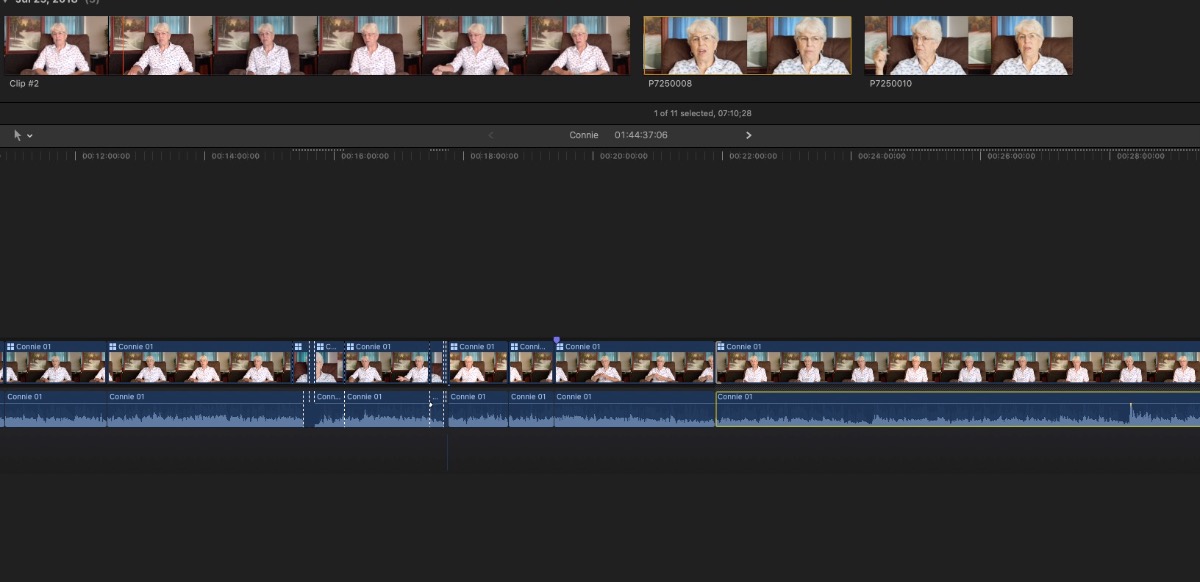
I am in the middle of a multicam edit. Maybe it is always so in Multicam edit.
Last edit: 05 Mar 2020 04:08 by Brad Parsons.
Please Log in to join the conversation.
- Tom Wolsky
-

- Offline
- Moderator
-

05 Mar 2020 04:51 #105194
by Tom Wolsky
Replied by Tom Wolsky on topic Why does audio trim separate of video
In a normal timeline the pointer defaults to do a ripple edit when you drag. In a multicam clip it defaults to do a roll edit so the clip doesn’t lose sync. Is that what you’re setting?
Please Log in to join the conversation.
05 Mar 2020 12:28 #105198
by JoeEditor
Replied by JoeEditor on topic Why does audio trim separate of video
Look closely at his screenshot. He has the audio components expanded.
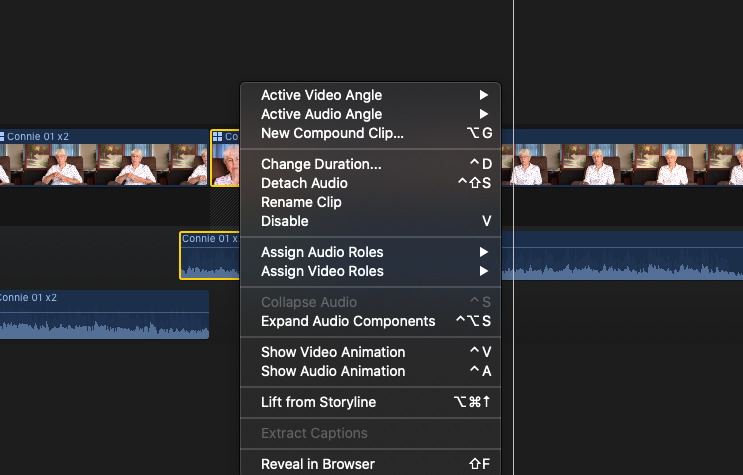
Line it all up correctly. Select All, right-click any clip and chose Collapse Audio Components.
Or many you've expended them from the Timeline Index.
Line it all up correctly. Select All, right-click any clip and chose Collapse Audio Components.
Or many you've expended them from the Timeline Index.
Please Log in to join the conversation.
- Tom Wolsky
-
- Offline
- Moderator
-
05 Mar 2020 14:50 #105206
by Tom Wolsky
Replied by Tom Wolsky on topic Why does audio trim separate of video
You’re right Ben. Thanks.
Please Log in to join the conversation.
- Brad Parsons
-
Topic Author
- Offline
- Senior Member
-
Less
More
- Posts: 52
- Thank you received: 0
06 Mar 2020 04:40 #105222
by Brad Parsons
Replied by Brad Parsons on topic Why does audio trim separate of video
Thank you Tom and Ben
I'm trying to do a ripple edit as I am cutting sections out of the interview. It was a two camera shoot. I am blading the timeline roughly where I want to end the current clip moving over and blading where I want to start again, deleting the unwanted section of footage and audio and then I attempt ripple cut to fine tune. To be clear, I do know how to ripple and roll and when to do each. Just can't figure out why it won't ripple cut when in multicam.
When I collapse the audio, it immediately expands when trying to do a ripple or roll cut for that matter.
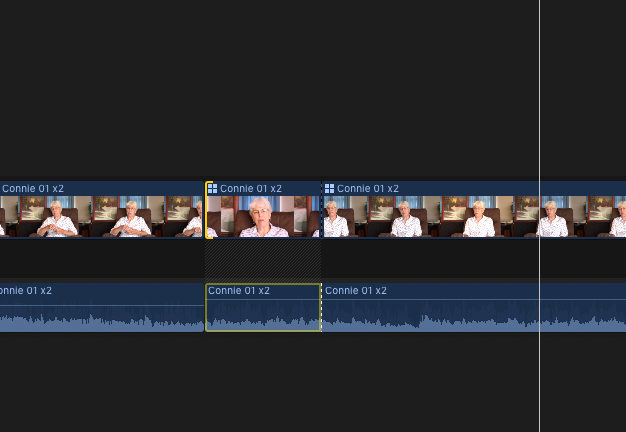
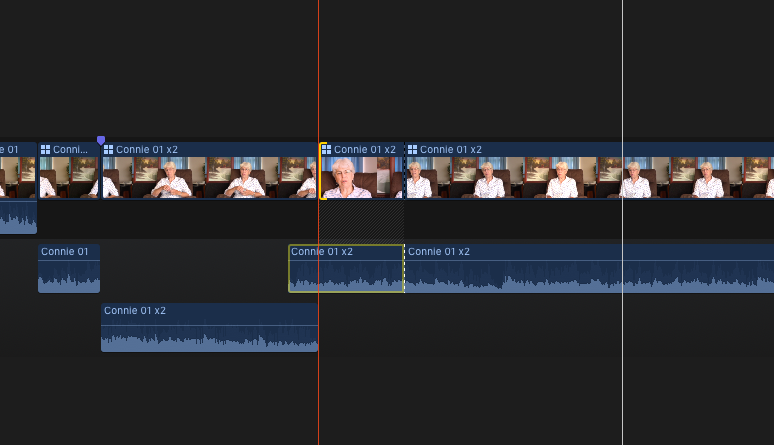
The following screen shots show, first the audio collapsed. The instant I select the edge of the clip, the audio expands as you can see in screen shot two. I then cannot collapse the clip without collapsing all of them together. This does no good however, for as soon as I try to trim off the end or beginning of a clip, the audio once again expands and I have to drag them off individually. The clip I am attempting to trim, is not a simple camera cut, it is actually the end or beginning of a splice where there was several seconds removed so ripple edits work, just not together. The audio and video stay synced but as you can see as in clip two, the video shortens but the audio slides left and does not. It's not a huge deal but really slows things down to have to drag off the video and then the audio and then play back to see if it's in the right place and do it all over again.
I just don't remember this being an issue in the past.
I'm trying to do a ripple edit as I am cutting sections out of the interview. It was a two camera shoot. I am blading the timeline roughly where I want to end the current clip moving over and blading where I want to start again, deleting the unwanted section of footage and audio and then I attempt ripple cut to fine tune. To be clear, I do know how to ripple and roll and when to do each. Just can't figure out why it won't ripple cut when in multicam.
When I collapse the audio, it immediately expands when trying to do a ripple or roll cut for that matter.
The following screen shots show, first the audio collapsed. The instant I select the edge of the clip, the audio expands as you can see in screen shot two. I then cannot collapse the clip without collapsing all of them together. This does no good however, for as soon as I try to trim off the end or beginning of a clip, the audio once again expands and I have to drag them off individually. The clip I am attempting to trim, is not a simple camera cut, it is actually the end or beginning of a splice where there was several seconds removed so ripple edits work, just not together. The audio and video stay synced but as you can see as in clip two, the video shortens but the audio slides left and does not. It's not a huge deal but really slows things down to have to drag off the video and then the audio and then play back to see if it's in the right place and do it all over again.
I just don't remember this being an issue in the past.
Please Log in to join the conversation.

06 Mar 2020 13:06 - 06 Mar 2020 13:07 #105224
by joema
Here is a guess: it appears the audio is detached from the video. Normally this shows connection points for each clip, but I don't see those. In earlier versions of FCPX there was an option to disable display of connection points. What version of FCPX and MacOS is this?
With detached audio if you then blade both layers with SHIFT+B, then select trim mode, then try to trim the video layer, each connected audio clip will try to maintain sync with the detached video above it. That in turn causes the "piling up" effect you see. It is not audio expanding - it is individual audio connected clips maintaining sync with the video clips above them when you trim the video.
Again that is just a guess. With FCPX the best approach is do not detach audio from video, and do not do major content selections in the timeline.
The preferred approach:
(1) Sync all audio/video as multicams
(2) With angle viewer enabled (SHIFT+CMD+7) mark favorites/rejects/keyword ranges on the multicam clilp in the event browser - not in the timeline.
(3) Set event browser filter to hide rejects, show favorites, or show keyword ranges you created
(4) Add the filtered set of clips to the timeline. As needed, adjust order and trim. Do not detach dialog audio from video.
Replied by joema on topic Why does audio trim separate of video
Brad Parso wrote: ... I am blading the timeline roughly where I want to end the current clip moving over and blading where I want to start again, deleting the unwanted section of footage and audio and then I attempt ripple cut to fine tune....When I collapse the audio, it immediately expands when trying to do a ripple or roll cut for that matter...
Here is a guess: it appears the audio is detached from the video. Normally this shows connection points for each clip, but I don't see those. In earlier versions of FCPX there was an option to disable display of connection points. What version of FCPX and MacOS is this?
With detached audio if you then blade both layers with SHIFT+B, then select trim mode, then try to trim the video layer, each connected audio clip will try to maintain sync with the detached video above it. That in turn causes the "piling up" effect you see. It is not audio expanding - it is individual audio connected clips maintaining sync with the video clips above them when you trim the video.
Again that is just a guess. With FCPX the best approach is do not detach audio from video, and do not do major content selections in the timeline.
The preferred approach:
(1) Sync all audio/video as multicams
(2) With angle viewer enabled (SHIFT+CMD+7) mark favorites/rejects/keyword ranges on the multicam clilp in the event browser - not in the timeline.
(3) Set event browser filter to hide rejects, show favorites, or show keyword ranges you created
(4) Add the filtered set of clips to the timeline. As needed, adjust order and trim. Do not detach dialog audio from video.
Last edit: 06 Mar 2020 13:07 by joema.
Please Log in to join the conversation.
- Brad Parsons
-
Topic Author
- Offline
- Senior Member
-
Less
More
- Posts: 52
- Thank you received: 0
10 Mar 2020 04:32 #105283
by Brad Parsons
Replied by Brad Parsons on topic Why does audio trim separate of video
Thanks everyone for the input. I have the latest FCPX and am running Mavericks.
I'll just live with this on this little project. Maybe the next multicam project will work correctly. I never had this issue in the past so, maybe something went wrong here. If it persists, I'll have to try another solution.
Thank you
I'll just live with this on this little project. Maybe the next multicam project will work correctly. I never had this issue in the past so, maybe something went wrong here. If it persists, I'll have to try another solution.
Thank you
Please Log in to join the conversation.
10 Mar 2020 05:44 #105288
by JoeEditor
Replied by JoeEditor on topic Why does audio trim separate of video
In your screenshot, why do I see the audio expanded from the video? Are they part of the same clip, or is the audio separate?
Please Log in to join the conversation.


23 Apr 2023 19:56 #125065
by jarborra
Replied by jarborra on topic Why does audio trim separate of video
Hey! Sorry to resurrect this old thread but I just had the same issue (without multicam) and this thread is the only one that comes up with Googling. My solution was to turn off "Show Audio lanes" under the View menu.
Please Log in to join the conversation.
