


- Posts: 129
- Thank you received: 2
3 Post Moderation Rule for New Boarders (25 Jan 2021)
New boarders will have their posts moderated - Don't worry if you cannot see your post immediately.
Music Track Went Dead In TimeLine, Worked Fine, and still Fine In Browser
01 Mar 2020 16:54 #105074
by Smesh
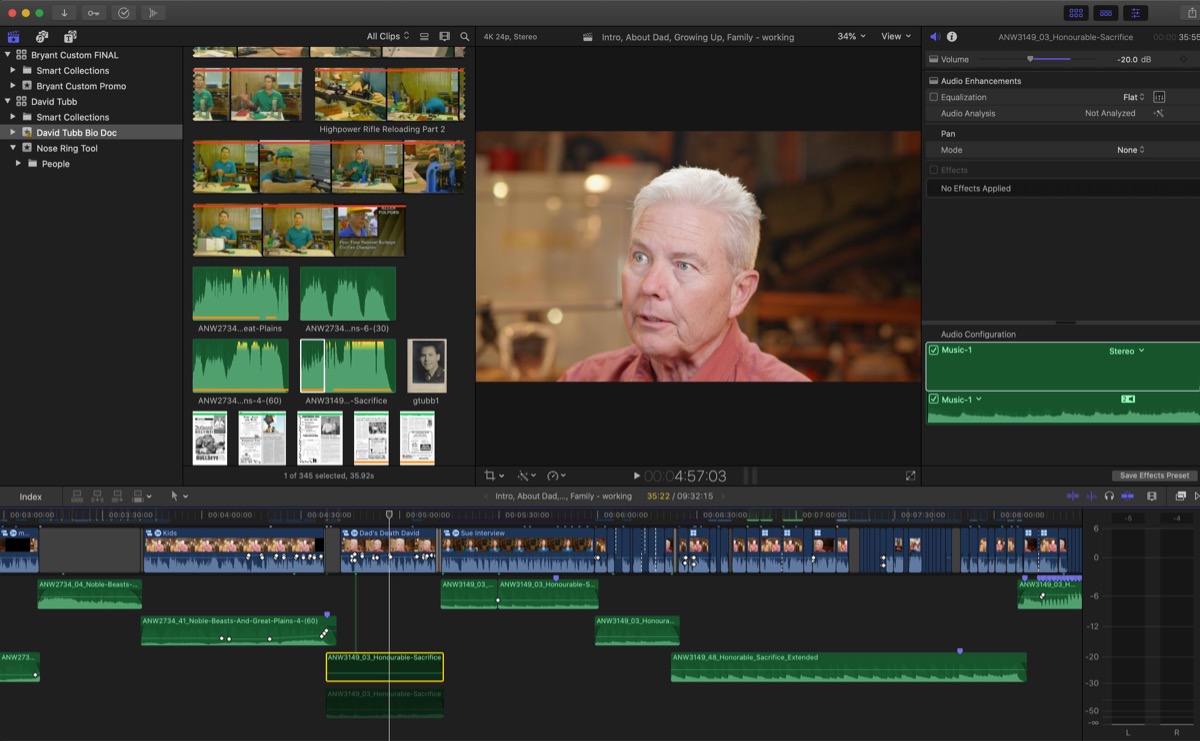
So I locked the audio and was about to Strat color grading, then one of my music clips went dead. I checked all the settings, and everything seems okay. I also played the track in the browser, no problem. I then brought a duplicate of the clip back into the timeline and it played fine. I was still confused as to what happened with the first clip, so I quit FCPX and restarted my MacBook Pro. Now both clips are dead. Anyone know what might be causing this?
Please Log in to join the conversation.
- Tom Wolsky
-

- Offline
- Moderator
-

01 Mar 2020 17:01 - 01 Mar 2020 17:19 #105075
by Tom Wolsky
Replied by Tom Wolsky on topic Music Track Went Dead In TimeLine, Worked Fine, and still Fine In Browser
The selected item and the audio below look as if they've ben disabled with the V key.
Last edit: 01 Mar 2020 17:19 by Tom Wolsky.
Please Log in to join the conversation.
01 Mar 2020 17:04 #105076
by Smesh
Replied by Smesh on topic Music Track Went Dead In TimeLine, Worked Fine, and still Fine In Browser
Well hell it just happened again with another chunk of the same track. Of course when I'm almost finished the project...
Please Log in to join the conversation.


02 Mar 2020 13:31 #105095
by JoeEditor
Replied by JoeEditor on topic Music Track Went Dead In TimeLine, Worked Fine, and still Fine In Browser
This happened to me last night. I somehow accidentally hit a keyboard shortcut to disable the audio channels in the Inspector. The difference is, V mutes and you see a dark clip with waveforms. Channels disabled in the Inspector, you see a dark clip with no waveforms. But technically, if they're disabled in the Inspector, they shouldn't show up in the timeline at all. Very odd...
Please Log in to join the conversation.
02 Mar 2020 15:24 #105100
by Smesh
Replied by Smesh on topic Music Track Went Dead In TimeLine, Worked Fine, and still Fine In Browser
Interesting. How did you manage to get it back on? I have no idea if I accidentally hit a shortcut to disable the clip, but it seems extra odd that I cut another clip in to replace it, and it suddenly disappeared again after a restart. Seems unlikely that I would accidentally hit that short twice in one day after years of using FCPX but who knows, Maybe it's new. I use V all the tie of course, but this was not used in this case.
Please Log in to join the conversation.
02 Mar 2020 23:19 #105119
by JoeEditor
Replied by JoeEditor on topic Music Track Went Dead In TimeLine, Worked Fine, and still Fine In Browser
Like I said, I had to go to the Inspector and tick the checkbox to enable that audio channel again.
Please Log in to join the conversation.
