


- Posts: 4
- Thank you received: 0
3 Post Moderation Rule for New Boarders (25 Jan 2021)
New boarders will have their posts moderated - Don't worry if you cannot see your post immediately.
Copying Start and End points from other clips
- GaryPHayes
-
 Topic Author
- Offline
- New Member
-

Less
More
29 Feb 2020 20:40 #105048
by GaryPHayes
Copying Start and End points from other clips was created by GaryPHayes
First time post and hope someone can help with this.
I have about 150 music tech performance videos (about 12GB) each that I want to replace all the high bit rate footage with - for lower bit rate conversions. Obviously relinking won't allow me to replace them. So given they are not complex edits, (many are used in long 11 min segments and 2 or 3 on a timeline) but each clip has trim points.
So is there a way to import the low bit rate ones into the project, copy the Start/End timings of the existing timeline clip to the new one, so when I do a Replace from Start it starts from the same Start point in the clip ... I need to do this frame accurate because they are sync'd to a separate music track.?
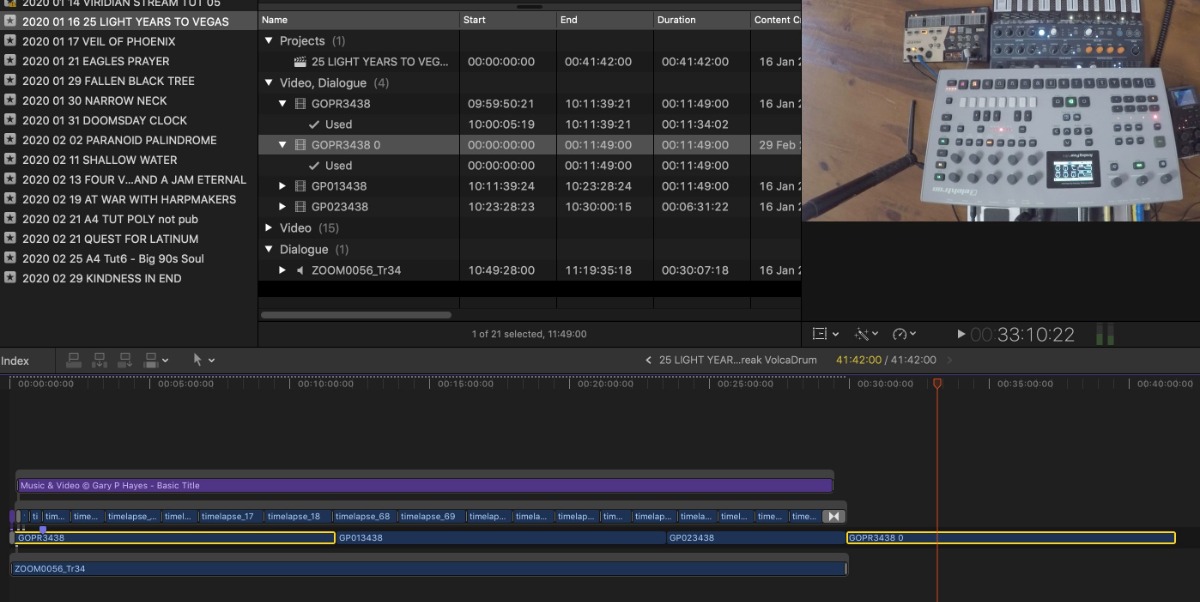
I attach an image that shows this issue. Clip GOPR3438 and GOPR3438 0 are the same clips but one is 4GB the other is 500MB, on the timeline it has a Start Point of 10:00:05:19 trimmed by about 10s - I want to put GOPR3438 0 in its place and easily copy the trim so I don't have to manually drag the start point this in the Bin for every single clip.
Any suggestions?
Cheers Gary
I have about 150 music tech performance videos (about 12GB) each that I want to replace all the high bit rate footage with - for lower bit rate conversions. Obviously relinking won't allow me to replace them. So given they are not complex edits, (many are used in long 11 min segments and 2 or 3 on a timeline) but each clip has trim points.
So is there a way to import the low bit rate ones into the project, copy the Start/End timings of the existing timeline clip to the new one, so when I do a Replace from Start it starts from the same Start point in the clip ... I need to do this frame accurate because they are sync'd to a separate music track.?
I attach an image that shows this issue. Clip GOPR3438 and GOPR3438 0 are the same clips but one is 4GB the other is 500MB, on the timeline it has a Start Point of 10:00:05:19 trimmed by about 10s - I want to put GOPR3438 0 in its place and easily copy the trim so I don't have to manually drag the start point this in the Bin for every single clip.
Any suggestions?
Cheers Gary
Please Log in to join the conversation.


01 Mar 2020 12:21 #105063
by JoeEditor
Replied by JoeEditor on topic Copying Start and End points from other clips
Here's one possible method.
Select the clip in the timeline, Shift-F to get that range highlighted in the Browser's master clip. Note the timecode. Select the new version, type in that timecode, hit i to make an In Point, Option-R to do a Replace From Start edit to the timeline version.
I'd ask why you want lower-quality versions to edit with? Would you delete the higher-quality versions eventually?
Select the clip in the timeline, Shift-F to get that range highlighted in the Browser's master clip. Note the timecode. Select the new version, type in that timecode, hit i to make an In Point, Option-R to do a Replace From Start edit to the timeline version.
I'd ask why you want lower-quality versions to edit with? Would you delete the higher-quality versions eventually?
Please Log in to join the conversation.
- GaryPHayes
-
Topic Author
- Offline
- New Member
-
Less
More
- Posts: 4
- Thank you received: 0
04 Mar 2020 20:11 #105187
by GaryPHayes
Replied by GaryPHayes on topic Copying Start and End points from other clips
Thanks FCPXGuru - will try that method. Yes the footage is very high bandwidth for what it is, usually just fingers moving on static musical instruments, so doesn't need 400+ mbs - the idea is to replace the 4GB files with about 400MB and no visual quality difference at all, as I said makes a difference on 150 projects all about 15GB each...
Please Log in to join the conversation.
- GaryPHayes
-
Topic Author
- Offline
- New Member
-
Less
More
- Posts: 4
- Thank you received: 0
04 Mar 2020 20:21 #105188
by GaryPHayes
Replied by GaryPHayes on topic Copying Start and End points from other clips
Just tried the manual entry option - key thing will not work on hundreds of clips, just too time consuming and trouble is the newly encoded lower rez clips have different timecodes too
Please Log in to join the conversation.


06 Mar 2020 18:40 #105228
by Doug
Replied by Doug on topic Copying Start and End points from other clips
Would it not be possible to just use Compressor to compress your large files to the size you want, make sure to keep the same file name and audio layout, then take your large files off line (put them on a different drive or something) and use the Relink Media feature? That should then ripple through all of the edits. It's essentially a Proxy workflow (if you're making your own proxies)
Please Log in to join the conversation.
- GaryPHayes
-
Topic Author
- Offline
- New Member
-
Less
More
- Posts: 4
- Thank you received: 0
07 Mar 2020 21:25 #105244
by GaryPHayes
Replied by GaryPHayes on topic Copying Start and End points from other clips
Thanks Doug, yes that is first thing I tried way back, but of course FCPx does not relink anything that is not the original file, and it has to be precisely the original file, even the bitrate unfortunately 
Please Log in to join the conversation.
08 Mar 2020 15:14 #105252
by Doug
Replied by Doug on topic Copying Start and End points from other clips
Did you select Audio Passthrough when compressing the files? It’s been a little while since I’ve done this but my understanding was that the key was to have the audio channel configuration be the same. So if it’s the same wrapper and channel configuration it should work regardless of bitrate.
Good luck! Let us know if you find a solution.
Good luck! Let us know if you find a solution.
Please Log in to join the conversation.
