


- Posts: 4
- Thank you received: 0
3 Post Moderation Rule for New Boarders (25 Jan 2021)
New boarders will have their posts moderated - Don't worry if you cannot see your post immediately.
FCPX Letterbox Effect trouble.
- brooklynmars
-
 Topic Author
- Offline
- New Member
-

Less
More
16 Jan 2012 17:45 #3185
by brooklynmars
FCPX Letterbox Effect trouble. was created by brooklynmars
I'm having some trouble with the Letterbox effect in FCPX. I'm trying to get a widescreen look on my video. I drag the effect unto the clip and change the aspect ratio to 2,35:1. But as you can see from the image I posted nothing changes on the clip and the top and bottom black lines don't appear. Even if I drag the effect and leave it on the default 1,85:1, it should still show lines on both top and bottom as some of you may know. I also exported the clip to see if the letterboxing appeared and it didn't.
Anyone have any suggestions on what I can do? Maybe I'm doing something wrong.
I added a before and after shot for comparison.
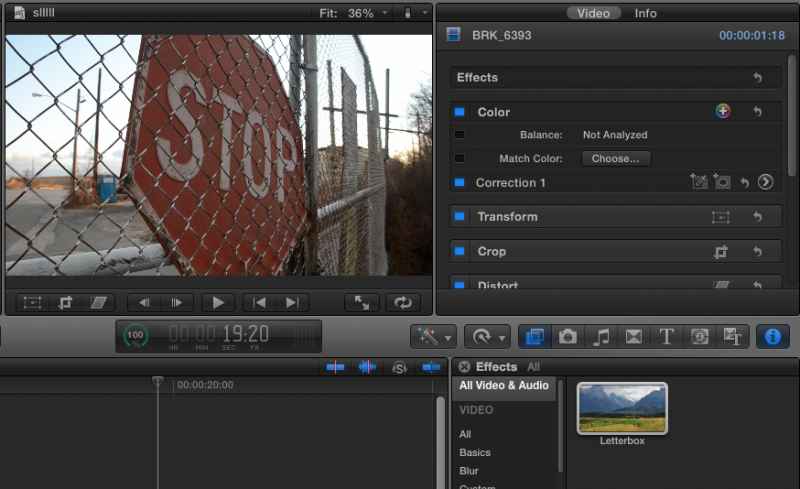
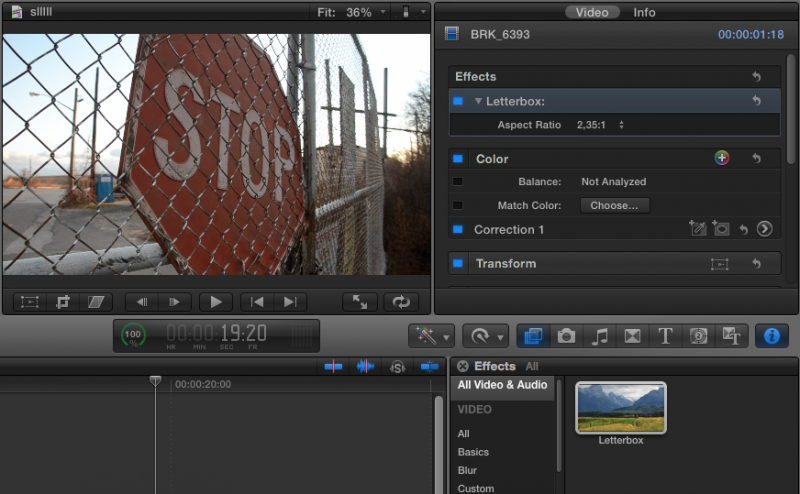
Anyone have any suggestions on what I can do? Maybe I'm doing something wrong.
I added a before and after shot for comparison.
Please Log in to join the conversation.


17 Jan 2012 00:32 - 17 Jan 2012 00:32 #3186
by alex4D
Replied by alex4D on topic Re: FCPX Letterbox Effect trouble.
You could try my 'Alex4D Widescreen Matte,' a title generator effect. When you add it to your project, all clips below - including titles and transitions - are matted using a variety of aspect ratios including 2.35:1
Download it from alex4d.wordpress.com/2011/07/22/fcpx-widescreen-matte/
Download it from alex4d.wordpress.com/2011/07/22/fcpx-widescreen-matte/
Last edit: 17 Jan 2012 00:32 by alex4D. Reason: punctuation typos
Please Log in to join the conversation.

17 Jan 2012 02:14 #3187
by Jimmyfinn
Replied by Jimmyfinn on topic Re: FCPX Letterbox Effect trouble.
It's a long shot, just check one thing..... have you set Spatial conform to 'Fill'
Please Log in to join the conversation.
- brooklynmars
-
Topic Author
- Offline
- New Member
-
Less
More
- Posts: 4
- Thank you received: 0
17 Jan 2012 07:38 - 17 Jan 2012 07:58 #3201
by brooklynmars
Replied by brooklynmars on topic Re: FCPX Letterbox Effect trouble.
I actually tried changing it to 'Fill' but it didn't fix the problem.
@alex4D Thanks. I'll just use that instead of the letterbox effect. It seems to work really well.
@alex4D Thanks. I'll just use that instead of the letterbox effect. It seems to work really well.
Last edit: 17 Jan 2012 07:58 by brooklynmars.
Please Log in to join the conversation.
- Tom Wolsky
-

- Offline
- Moderator
-

17 Jan 2012 07:58 #3202
by Tom Wolsky
Replied by Tom Wolsky on topic Re: FCPX Letterbox Effect trouble.
Try setting the clip or clips into a compound clip and applying the effect to the compound.
Please Log in to join the conversation.
17 Jan 2012 15:50 #3211
by NocoDave
Replied by NocoDave on topic Re: FCPX Letterbox Effect trouble.
That is strange. Have you tried checking the effect on other clips, perhaps different codec and timeline settings. or maybe opening a copy of the effect in Motion to see if the copy has the same problem?
Please Log in to join the conversation.
