


- Posts: 568
- Thank you received: 74
3 Post Moderation Rule for New Boarders (25 Jan 2021)
New boarders will have their posts moderated - Don't worry if you cannot see your post immediately.
Does anyone use Apogee FCPX extension?
22 Dec 2019 15:01 - 22 Dec 2019 15:11 #103405
by Axel
Does anyone use Apogee FCPX extension? was created by Axel
To be honest, this is just playing around.
I saw the musician in this MacPro review:
... use AirDrop to import a "lalala" recorded on his iPhone into LPX to use it as a rhythm sample.
I thought, hey, that's cool. But they must have cut the part out where he still has to manually import it.
Later, I thought, why don't I check if anything like artlist is in the FCPX extensions list. Looked under "Audio" and found a description of Apogee. Downloaded the iPhone demo, good recorder. Could be quite capable, given that you also can use several iOS devices as "satellites" that are TC-locked, kind of, via bluetooth. Roles, notes, keywords, markers, all that good stuff.
But nowhere did I find a way to, er, extend FCPX (there's still only Shutterstock, which I never use). It is as if I was the only one who new about that.
First, I kept it simple and airdropped a "test, test, test" recording. Upon "open" (in the message card) , it immediately played in Music, being a Wav. It gets dropped into the downloads folder, so one better drags and drops it into an event from there. However, with this method, nothing but the name survived.
Only if you go via the scenes tab, select, confirm, share, go to "others", choose AirDrop and again confirm, a zip file is transmitted, containing along the wavs fcpxml files. By doubleclicking on those, a new event appears. Everything seems to be there, only the roles (I chose Effects) were wrong. Color was brown, role name <empty>.
Very poor documentation. A very superficial tutorial video on the website. And: no hint how to make this an FCPX extension.
EDIT:
Because, as I only saw now, the "Available Workflow Extensions" in the FCP resources site have a special compartment for "Workflow Extensions".
Sorry, my bad.
I saw the musician in this MacPro review:
... use AirDrop to import a "lalala" recorded on his iPhone into LPX to use it as a rhythm sample.
I thought, hey, that's cool. But they must have cut the part out where he still has to manually import it.
Later, I thought, why don't I check if anything like artlist is in the FCPX extensions list. Looked under "Audio" and found a description of Apogee. Downloaded the iPhone demo, good recorder. Could be quite capable, given that you also can use several iOS devices as "satellites" that are TC-locked, kind of, via bluetooth. Roles, notes, keywords, markers, all that good stuff.
But nowhere did I find a way to, er, extend FCPX (there's still only Shutterstock, which I never use). It is as if I was the only one who new about that.
First, I kept it simple and airdropped a "test, test, test" recording. Upon "open" (in the message card) , it immediately played in Music, being a Wav. It gets dropped into the downloads folder, so one better drags and drops it into an event from there. However, with this method, nothing but the name survived.
Only if you go via the scenes tab, select, confirm, share, go to "others", choose AirDrop and again confirm, a zip file is transmitted, containing along the wavs fcpxml files. By doubleclicking on those, a new event appears. Everything seems to be there, only the roles (I chose Effects) were wrong. Color was brown, role name <empty>.
Very poor documentation. A very superficial tutorial video on the website. And: no hint how to make this an FCPX extension.
EDIT:
Because, as I only saw now, the "Available Workflow Extensions" in the FCP resources site have a special compartment for "Workflow Extensions".
Sorry, my bad.
Last edit: 22 Dec 2019 15:11 by Axel.
Please Log in to join the conversation.

22 Dec 2019 18:41 #103408
by JoeEditor
Replied by JoeEditor on topic Does anyone use Apogee FCPX extension?
I use AirDrop daily, but it can't go directly into an app, it will import into Photos (for pictures) or to the Downloads folder. Would be great if I could go directly into FCPX without having to touch the Finder.
From the Apogee site;
"... then share the recorded audio and Final Cut Pro XML files to Dropbox directly from MetaRecorder. "
From the Apogee site;
"... then share the recorded audio and Final Cut Pro XML files to Dropbox directly from MetaRecorder. "
Please Log in to join the conversation.
- Andreas Kiel
-

- Offline
- Platinum Member
-

Less
More
- Posts: 1077
- Thank you received: 189
23 Dec 2019 12:13 #103425
by Andreas Kiel
Replied by Andreas Kiel on topic Does anyone use Apogee FCPX extension?
Maybe you just can use a "voice over"
Please Log in to join the conversation.
23 Dec 2019 14:05 - 23 Dec 2019 14:13 #103428
by JoeEditor
Replied by JoeEditor on topic Does anyone use Apogee FCPX extension?
Neat trick, but my recordings are done away from the studio, so that wouldn't help me.
One change in Catalina from that video, when in the Audio MIDI Setup app, go to the "Audio Devices" window, as there's no more iOS Device window. But it works really well if you need it.
One change in Catalina from that video, when in the Audio MIDI Setup app, go to the "Audio Devices" window, as there's no more iOS Device window. But it works really well if you need it.
Last edit: 23 Dec 2019 14:13 by JoeEditor.
Please Log in to join the conversation.
23 Dec 2019 14:20 - 23 Dec 2019 14:23 #103431
by Axel
Replied by Axel on topic Does anyone use Apogee FCPX extension?
Thank you both.
As I said, I was just playing around, and it was more for the purpose of finding a cool little trick. I do have an audio interface and a mic to plug in.
I thought, a Wav file opens in Music automatically? What if I went to >info >open with >all applications >Final Cut Pro >always open with ... ?
Upon klicking on the open button in the successfully airdropped card, a message appears: "Final Cut Pro cannot open Test.wav - wrong file type" :blink: :blink: :blink:
Perhaps it worked in LPX.
As I said, I was just playing around, and it was more for the purpose of finding a cool little trick. I do have an audio interface and a mic to plug in.
I thought, a Wav file opens in Music automatically? What if I went to >info >open with >all applications >Final Cut Pro >always open with ... ?
Upon klicking on the open button in the successfully airdropped card, a message appears: "Final Cut Pro cannot open Test.wav - wrong file type" :blink: :blink: :blink:
Perhaps it worked in LPX.
Last edit: 23 Dec 2019 14:23 by Axel.
Please Log in to join the conversation.
23 Dec 2019 14:31 - 23 Dec 2019 14:36 #103433
by JoeEditor
Replied by JoeEditor on topic Does anyone use Apogee FCPX extension?
Take that WAV file into Compressor and make it an AIFF or something at the correct sample/bit rates FCPX needs. Open that WAV file in QT Player, use the Info window to see how it is formatted.
Last edit: 23 Dec 2019 14:36 by JoeEditor.
Please Log in to join the conversation.
23 Dec 2019 14:38 - 23 Dec 2019 14:58 #103434
by Axel
It is. It's an 48 kHz 24-bit wav file, intended for FCPX. And FCP can of course open it. Just not by double clicking the file itself.
Replied by Axel on topic Does anyone use Apogee FCPX extension?
FCPX.guru wrote: Take that WAV file into Compressor and make it an AIFF or something at the correct sample/bit rates FCPX needs.
It is. It's an 48 kHz 24-bit wav file, intended for FCPX. And FCP can of course open it. Just not by double clicking the file itself.
Last edit: 23 Dec 2019 14:58 by Axel.
Please Log in to join the conversation.
- Andreas Kiel
-
- Offline
- Platinum Member
-
Less
More
- Posts: 1077
- Thank you received: 189
23 Dec 2019 15:09 #103435
by Andreas Kiel
 :evil:
Replied by Andreas Kiel on topic Does anyone use Apogee FCPX extension?
... like an .mp4 does???Axel wrote: ... And FCP can of course open it. Just not by double clicking the file itself...
:evil: Please Log in to join the conversation.
23 Dec 2019 15:32 #103437
by Axel
What are you referring to?
Unaltered, double clicking an .mp4 opens Quicktime player.
"open with" leads to
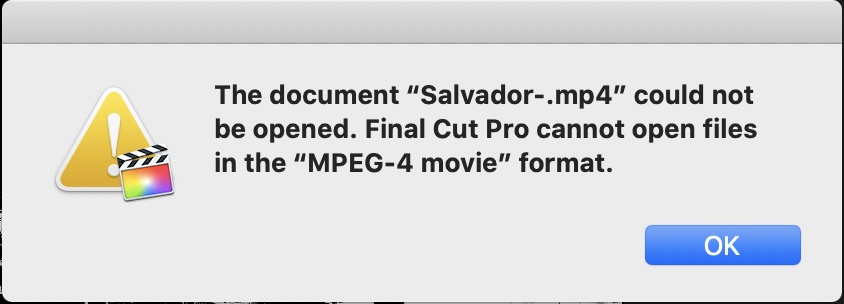
What about ProRes? Recently exported as master by FCP:
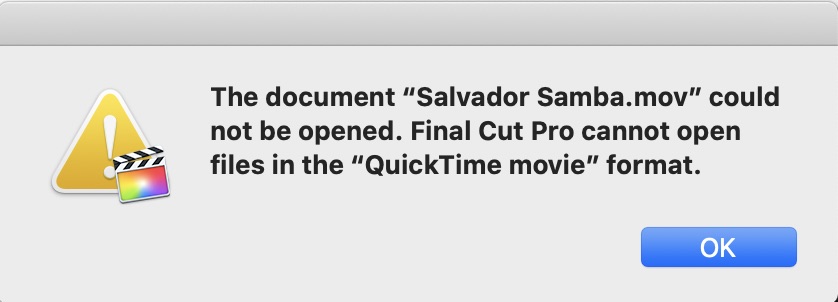
Replied by Axel on topic Does anyone use Apogee FCPX extension?
Andreas Kiel wrote:
... like an .mp4 does???Axel wrote: ... And FCP can of course open it. Just not by double clicking the file itself...
What are you referring to?
Unaltered, double clicking an .mp4 opens Quicktime player.
"open with" leads to
What about ProRes? Recently exported as master by FCP:
Please Log in to join the conversation.
23 Dec 2019 21:43 #103447
by JoeEditor
Replied by JoeEditor on topic Does anyone use Apogee FCPX extension?
Um, you don't Open With FCPX, you Import into FCPX. I'm confused. If you use the proper Import command inside of FCPX, does it import?
Please Log in to join the conversation.
23 Dec 2019 22:57 #103448
by Axel
Replied by Axel on topic Does anyone use Apogee FCPX extension?
Yes, of course.
FCPX behaves differently in this respect than FCP7, where this worked, I'm certain. Or Photoshop. I do this all the time in PS. Who needs Bridge? Right click: open with Photoshop!
FCPX behaves differently in this respect than FCP7, where this worked, I'm certain. Or Photoshop. I do this all the time in PS. Who needs Bridge? Right click: open with Photoshop!
Please Log in to join the conversation.
