


- Posts: 1
- Thank you received: 0
3 Post Moderation Rule for New Boarders (25 Jan 2021)
New boarders will have their posts moderated - Don't worry if you cannot see your post immediately.
FCPX Export / Audio Sync Issue
- PedroChidders
-
 Topic Author
- Offline
- New Member
-

Less
More
21 Nov 2019 11:05 #102744
by PedroChidders
FCPX Export / Audio Sync Issue was created by PedroChidders
Hi Guys,
Having an issue with audio after exporting from FCPX.
I'm just editing simple videos cut to a beat. Within my project, everything is synced perfectly and everything cuts exactly to the beat. However, when I export the video, it is out of sync by 1 or 2 frames. It's minor but noticeable when it's supposed to cut exactly on the beat.
I'm running FCPX 10.2.2. My macbook is from early 2015 and I keep the firmwares back slightly as I've read horror stories about IOS updates crippling peoples laptops.
My project is 4K 30fps, audio 48kHz. I have also tested on a 1080p 24fps project with the same issue. The audio in my timeline is 44.1kHz.
The troubleshooting steps I have already tried are as follows:
1 - Removed black generated gap at beginning of timeline, replaced with custom generator
2 - Tested with 1080p project
3 - Changed project audio to 44.1kHz
4 - Tested with 48khz audio file within timeline
5 - Exported at both Apple Pro Res 422 and h.264
None of the above steps have had an affect.
I realise there is a risk using slightly older versions of the software but I'm not running 10.0 so I would have thought this issue would not be related to that. I also expected changing the audio file bit rate to match the project would fix it but no luck.
Help my Final Cut geniuses! You're my only hope!
Happy to provide info / screenshots as requested
Having an issue with audio after exporting from FCPX.
I'm just editing simple videos cut to a beat. Within my project, everything is synced perfectly and everything cuts exactly to the beat. However, when I export the video, it is out of sync by 1 or 2 frames. It's minor but noticeable when it's supposed to cut exactly on the beat.
I'm running FCPX 10.2.2. My macbook is from early 2015 and I keep the firmwares back slightly as I've read horror stories about IOS updates crippling peoples laptops.
My project is 4K 30fps, audio 48kHz. I have also tested on a 1080p 24fps project with the same issue. The audio in my timeline is 44.1kHz.
The troubleshooting steps I have already tried are as follows:
1 - Removed black generated gap at beginning of timeline, replaced with custom generator
2 - Tested with 1080p project
3 - Changed project audio to 44.1kHz
4 - Tested with 48khz audio file within timeline
5 - Exported at both Apple Pro Res 422 and h.264
None of the above steps have had an affect.
I realise there is a risk using slightly older versions of the software but I'm not running 10.0 so I would have thought this issue would not be related to that. I also expected changing the audio file bit rate to match the project would fix it but no luck.
Help my Final Cut geniuses! You're my only hope!
Happy to provide info / screenshots as requested
Please Log in to join the conversation.


25 Nov 2019 09:47 #102804
by petersxs
Replied by petersxs on topic FCPX Export / Audio Sync Issue
<hi
Audio in a Video should be 48 kHz .. try converting external ( compressor) then import 48 kHz audio file into fcp an put on timeline is it sync to your audio ?
do you have any external monitoring audio and or video involved in fcpx ?
what happen when you reimport the master into fcp ? still non sync ?
put on top of your timeline and align .. Audio or video
what do you see &hear ?
Audio in a Video should be 48 kHz .. try converting external ( compressor) then import 48 kHz audio file into fcp an put on timeline is it sync to your audio ?
do you have any external monitoring audio and or video involved in fcpx ?
what happen when you reimport the master into fcp ? still non sync ?
put on top of your timeline and align .. Audio or video
what do you see &hear ?
Please Log in to join the conversation.


10 Feb 2020 17:08 #104516
by bcassin
Owner InnerParakeet
www.innerparakeet.com
Replied by bcassin on topic FCPX Export / Audio Sync Issue
I can confirm that I have a similar issue. My mixer spotted it. Anytime I export something from the Apple device, computer, or web settings audio on the exported file is one frame early.
Also trying to export as Audio and Video H264 has the same sync offset.
Oddly using Compressor's H264 setting I get perfect sync
Prores exports are in sync too.
I reported it as a bug.
Also trying to export as Audio and Video H264 has the same sync offset.
Oddly using Compressor's H264 setting I get perfect sync
Prores exports are in sync too.
I reported it as a bug.
Owner InnerParakeet
www.innerparakeet.com
Please Log in to join the conversation.
- darrenronbotnam
-
- Offline
- New Member
-
Less
More
- Posts: 4
- Thank you received: 0
16 Apr 2020 21:24 #106248
by darrenronbotnam
Replied by darrenronbotnam on topic FCPX Export / Audio Sync Issue
Same issue here.
I can add a weird detail: my master file is out of sync in Quicktime....but works correctly on VLC.
Please, someone has any idea?
Thanks so much
I can add a weird detail: my master file is out of sync in Quicktime....but works correctly on VLC.
Please, someone has any idea?
Thanks so much
Please Log in to join the conversation.


17 Apr 2020 12:42 #106267
by JoeEditor
Replied by JoeEditor on topic FCPX Export / Audio Sync Issue
Audio bit-rate won't make any difference. Audio SAMPLE RATE makes the world of difference. I've never had these issues, but our shooters always use video standard 48kHz when gathering video. Verify the sample rates of your clips and Project settings. Again, this is the first I've ever heard of this issue.
Please Log in to join the conversation.

10 Mar 2021 01:56 #113262
by lia
Replied by lia on topic FCPX Export / Audio Sync Issue
Hi, I hope somehow you're still checking the forum. I've recently encountered the same issue and was wondering if you ever managed to fix the problem? Even if I render the project and import it to another timeline to sync it, it still renders out of sync. If you fixed it I would greatly appreciate if you tell me how, thank you.
Please Log in to join the conversation.
- teekay1959
-

- Offline
- New Member
-
Less
More
- Posts: 5
- Thank you received: 0
14 Mar 2021 19:23 #113387
by teekay1959
Replied by teekay1959 on topic FCPX Export / Audio Sync Issue
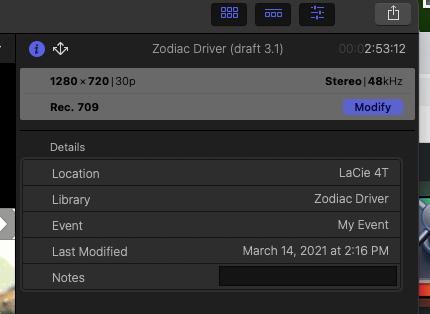
Hi Ben, you mention that SAMPLE RATES make a world of difference. Yet, I too am having the same issue. Audio drifts out of sync. Using Big Sur and FCPX (10.5.1). I rerecorded the audio track to 48 and then reimported it. (It was 41 before.) No effect. Audio still falls out of sync to some tight cuts. As for the sample rates of my video clips, not sure where to find that. My video clips come from many different sources that were not initially intended for this project. I've included a screen grab of my project settings. Any insights would be most helpful. Thanks.
Please Log in to join the conversation.
- Tom Wolsky
-

- Offline
- Moderator
-

14 Mar 2021 19:41 #113388
by Tom Wolsky
Replied by Tom Wolsky on topic FCPX Export / Audio Sync Issue
Open the clip in the QuickTime player and see what it says in the Info window.
Please Log in to join the conversation.
- teekay1959
-
- Offline
- New Member
-
Less
More
- Posts: 5
- Thank you received: 0
15 Mar 2021 04:02 #113401
by teekay1959
Replied by teekay1959 on topic FCPX Export / Audio Sync Issue
Thank you Tom. I followed your instructions and here is the QT info on the first four video clips that I use in my movie project. Is there anything here that would suggest to you why the audio sync drifts away when I export the movie? I should add that I do not use any of the audio in any of the video clips. I have a song playing underneath ALL clips that was recorded in 48.

Please Log in to join the conversation.
- Tom Wolsky
-
- Offline
- Moderator
-
15 Mar 2021 11:27 #113405
by Tom Wolsky
Replied by Tom Wolsky on topic FCPX Export / Audio Sync Issue
Did you try putting all the content into a 23.98 project?
Please Log in to join the conversation.
- teekay1959
-
- Offline
- New Member
-
Less
More
- Posts: 5
- Thank you received: 0
15 Mar 2021 16:42 #113411
by teekay1959
Replied by teekay1959 on topic FCPX Export / Audio Sync Issue
I'm assuming 23.98 refers to the frame rate. No. Currently, the project is in 30. I will move all the clips to a project with a 23.98 frame rate later on today. But out of curiosity, still learning, what is the advantage of putting all content into a 23.98 project?
Please Log in to join the conversation.
- Tom Wolsky
-
- Offline
- Moderator
-
15 Mar 2021 16:49 #113413
by Tom Wolsky
Replied by Tom Wolsky on topic FCPX Export / Audio Sync Issue
It's the same frame rate as the media. It shouldn't be required, but then it shouldn't go out of sync either.
Please Log in to join the conversation.
- teekay1959
-
- Offline
- New Member
-
Less
More
- Posts: 5
- Thank you received: 0
16 Mar 2021 01:45 #113428
by teekay1959
Replied by teekay1959 on topic FCPX Export / Audio Sync Issue
Thanks Tom. I sent you the data from the first four clips. I've since checked the rest of the project and have clips from three other video sources, one at 29.97, another at 24.1, and the last at 30. Do you still think putting the project to 23.98 will help?
Please Log in to join the conversation.
- Tom Wolsky
-
- Offline
- Moderator
-
16 Mar 2021 06:32 #113433
by Tom Wolsky
Replied by Tom Wolsky on topic FCPX Export / Audio Sync Issue
There’s no 24.1. That’s come from a camera or phone that shoots an unstable frame rate. You should convert that to 23.98. Did you try a 23.98 project? It’ll take a minute to copy/paste and export a segment?
Please Log in to join the conversation.
- teekay1959
-
- Offline
- New Member
-
Less
More
- Posts: 5
- Thank you received: 0
17 Mar 2021 03:48 #113446
by teekay1959
Replied by teekay1959 on topic FCPX Export / Audio Sync Issue
Tom. You called it. I copied and pasted my entire timeline to a 23.98 project and it worked. After export, both video and audio stayed in snappy sync right to the end. Thank you. Thank you. Thank you. 👍🏻
Please Log in to join the conversation.
