


- Posts: 10
- Thank you received: 0
3 Post Moderation Rule for New Boarders (25 Jan 2021)
New boarders will have their posts moderated - Don't worry if you cannot see your post immediately.
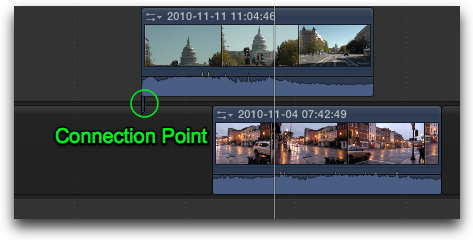
Moving a connection point on a connected clip
10 Jan 2012 05:12 #3070
by desmondx
Moving a connection point on a connected clip was created by desmondx
Hey all, can someone please tell me if it is possible and if so how, to move a connection point on a connected clip in the timeline??
I googled it and saw on fcpx.tv/tips3.html that they said the shortcut was COM + OPT but it didn't work.
Please help as this is constantly annoying me!
I googled it and saw on fcpx.tv/tips3.html that they said the shortcut was COM + OPT but it didn't work.
Please help as this is constantly annoying me!
Please Log in to join the conversation.
- Tom Wolsky
-

- Offline
- Moderator
-

10 Jan 2012 05:23 #3071
by Tom Wolsky
Replied by Tom Wolsky on topic Re: Moving a connection point on a connected clip
That's the correct shortcut. Hold Cmd-Opt and click on the connected clip where you want it to connect to the primary.
Please Log in to join the conversation.
11 Jan 2012 06:45 #3090
by desmondx
Replied by desmondx on topic Re: Moving a connection point on a connected clip
Oh OK, I wasn't doing the click part before!
Thanks a lot
Thanks a lot
Please Log in to join the conversation.
- katana_spit
-

- Offline
- New Member
-

Less
More
- Posts: 7
- Thank you received: 1
12 Nov 2016 14:22 #82628
by katana_spit
Replied by katana_spit on topic Moving a connection point on a connected clip
works same on fcpx 10.3
Please Log in to join the conversation.
