




- Posts: 170
- Thank you received: 2
3 Post Moderation Rule for New Boarders (25 Jan 2021)
New boarders will have their posts moderated - Don't worry if you cannot see your post immediately.
A button?
16 Sep 2019 16:40 #101459
by PhilCF
Can someone please remind me of the command that makes FCPX automatically skip to the next clip when you are watching them in the Viewer? At the moment the playhead just stops at the end of the clip and I have to manually click on the next clip to watch. Thank you !
Sorry for the inane question x
Sorry for the inane question x
Please Log in to join the conversation.
16 Sep 2019 19:59 #101464
by Axel
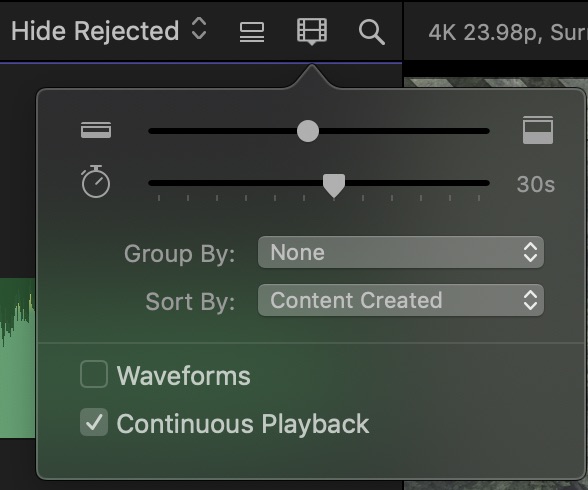
"continous playback"
Arrow down jumps to the next clip, arrow up to the previous. Certain things are faster without mouse. Also: use the JKL keys! K=pause; L=play; LL=play double speed (asf); J=play backwards.
phil@circuitfactory.ae wrote: Can someone please remind me of the command that makes FCPX automatically skip to the next clip when you are watching them in the Viewer?
"continous playback"
phil@circuitfactory.ae wrote: At the moment the playhead just stops at the end of the clip and I have to manually click on the next clip to watch. Thank you !
Arrow down jumps to the next clip, arrow up to the previous. Certain things are faster without mouse. Also: use the JKL keys! K=pause; L=play; LL=play double speed (asf); J=play backwards.
Please Log in to join the conversation.
- Andreas Kiel
-

- Offline
- Platinum Member
-

Less
More
- Posts: 1077
- Thank you received: 189
17 Sep 2019 12:56 #101479
by Andreas Kiel
Replied by Andreas Kiel on topic A button?
K + L = half speed forward, J + K half speed backwardsAxel wrote: Also: use the JKL keys! K=pause; L=play; LL=play double speed (asf); J=play backwards.
Please Log in to join the conversation.

17 Sep 2019 21:02 #101482
by joema
Besides the answer given, there are many commands for defining multiple ranges in the browser and navigating between them: support.apple.com/kb/PH12533?locale=en_US&viewlocale=en_US
There is one little quirk: SHIFT+O is supposed to go to the end of the range selection and repeating it should go to the end of the next range selection. But in this one case you have to step forward one frame so you're past the out point and then use Shift-O. Thanks to Tom Wolsky for pointing this out.
phil@circuitfactory.ae wrote: Can someone please remind me of the command that makes FCPX automatically skip to the next clip when you are watching them in the Viewer?...
Besides the answer given, there are many commands for defining multiple ranges in the browser and navigating between them: support.apple.com/kb/PH12533?locale=en_US&viewlocale=en_US
There is one little quirk: SHIFT+O is supposed to go to the end of the range selection and repeating it should go to the end of the next range selection. But in this one case you have to step forward one frame so you're past the out point and then use Shift-O. Thanks to Tom Wolsky for pointing this out.
Please Log in to join the conversation.
