


3 Post Moderation Rule for New Boarders (25 Jan 2021)
New boarders will have their posts moderated - Don't worry if you cannot see your post immediately.
HDR is turning all my White Titles to Grey


25 Jul 2019 14:20 - 25 Jul 2019 14:21 #100584
by Topher5
HDR is turning all my White Titles to Grey was created by Topher5
When producing an HDR project I am going through all the proper steps to create an HDR (HLG) video. I also tried to export to HDR (PQ) ... no joy, the copy that should be white exports as 25% grey. Argh. I tried basic text and more elaborate Title sequences they all come up grey.
Save me OB1, you are my only hope.
Save me OB1, you are my only hope.
Last edit: 25 Jul 2019 14:21 by Topher5.
Please Log in to join the conversation.


26 Jul 2019 02:30 #100592
by JoeEditor
Replied by JoeEditor on topic HDR is turning all my White Titles to Grey
Not sure this is it, but...
Select the Library in the Browser.
Go to the Inspector, click Modify button very top right.
Verify it is set to Wide Gamut HDR.
Maybe?
Select the Library in the Browser.
Go to the Inspector, click Modify button very top right.
Verify it is set to Wide Gamut HDR.
Maybe?
Please Log in to join the conversation.
- flaminghick
-

- Offline
- Senior Member
-

Less
More
- Posts: 54
- Thank you received: 0
16 Nov 2020 16:12 #110891
by flaminghick
Replied by flaminghick on topic HDR is turning all my White Titles to Grey
Did you end up firing this out? I am currently having the exact same issue. I can't make text white no matter what I do.
Please Log in to join the conversation.

14 Dec 2020 06:57 #111468
by garcjesu
Replied by garcjesu on topic HDR is turning all my White Titles to Grey
Hi I am having the same problem. Have you guys figured out how to fix this?
Please Log in to join the conversation.
- flaminghick
-
- Offline
- Senior Member
-
Less
More
- Posts: 54
- Thank you received: 0
14 Dec 2020 20:17 #111489
by flaminghick
Replied by flaminghick on topic HDR is turning all my White Titles to Grey
I did figure it out. Go into the color board and move the exposure up. I can’t remember if it’s exposure, highlights, or a combination of the two, but you should be able to adjust it from there.
Please Log in to join the conversation.
14 Dec 2020 22:21 #111493
by garcjesu
Replied by garcjesu on topic HDR is turning all my White Titles to Grey
Yes it worked! Thank you so much!! The exposure all the way to the right is the one that made it super bright white. Thanks again!
Please Log in to join the conversation.

30 Oct 2022 07:44 - 30 Oct 2022 18:15 #122650
by begin
Replied by begin on topic HDR is turning all my White Titles to Grey
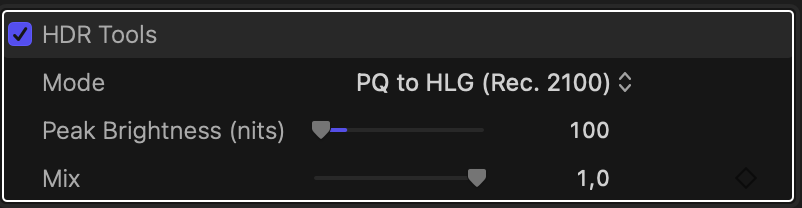
Adding HDR tools to the template / plugin often does the trick. (You may need to adjust HDR tools -> 'Peak Brightness (nits)' to 100)
If after that it isn't fixed try
Apple also may have a solution ( source )
Can someone with Apple Motion please verify?
If after that it isn't fixed try
- putting the template in a Group (Option + G)
- or put the template below the clip and set the clips blend mode to 'Behind'
Apple also may have a solution ( source )
- in Apple Motion
- In the Layers list of the template project in Motion, select the Project object.
- In the Properties Inspector, select the Override FCP Color Space checkbox.
Can someone with Apple Motion please verify?
Last edit: 30 Oct 2022 18:15 by begin. Reason: clarification of what peak brightness
Please Log in to join the conversation.

30 Oct 2022 10:45 #122652
by MotionFX
It does not work: in HLG peak brightness goes up to 50% and in PQ it hits 100 nits.
But it can still be solved in Motion: you can add the HDR tools, set PQ to HLG with 100 nits peak brightness and you can even publish the mix parameter so you can adjust the amount of brightness in FCP.
Replied by MotionFX on topic HDR is turning all my White Titles to Grey
Adding HDR tools to the template / plugin often does the trick. (You may need to adjust Peak Brightness to 100)
If after that it isn't fixed try
- putting the template in a Group (Option + G)
- or put the template below the clip and set the clips blend mode to 'Behind'
Apple also may have a solution ( source )This may be the easiest solution.
- in Apple Motion
- In the Layers list of the template project in Motion, select the Project object.
- In the Properties Inspector, select the Override FCP Color Space checkbox.
Can someone with Apple Motion please verify?
It does not work: in HLG peak brightness goes up to 50% and in PQ it hits 100 nits.
But it can still be solved in Motion: you can add the HDR tools, set PQ to HLG with 100 nits peak brightness and you can even publish the mix parameter so you can adjust the amount of brightness in FCP.
Please Log in to join the conversation.
30 Oct 2022 17:42 #122659
by begin
Replied by begin on topic HDR is turning all my White Titles to Grey
@MotionFX
Can you please check if the 'Apple solution' with setting the 'Override FCP Color Space' checkbox in Motion works?
It sounds like a solution that doesn't require any settings tweaking in FCP.
Can you please check if the 'Apple solution' with setting the 'Override FCP Color Space' checkbox in Motion works?
It sounds like a solution that doesn't require any settings tweaking in FCP.
Please Log in to join the conversation.
31 Oct 2022 16:48 #122687
by MotionFX
Replied by MotionFX on topic HDR is turning all my White Titles to Grey
No, it does not. What I said at first was referred to that: in HLG peak brightness goes up to 50% and in PQ it hits 100 nits.Can you please check if the 'Apple solution' with setting the 'Override FCP Color Space' checkbox in Motion works?
Please Log in to join the conversation.
- fb_1218468323
-
- Offline
- New Member
-

Less
More
- Posts: 2
- Thank you received: 0
02 Jun 2023 13:03 #125742
by fb_1218468323
Replied by fb_1218468323 on topic HDR is turning all my White Titles to Grey
I am having the same issue in 10.6.6. While going into the title and the color and moving the exposure up did fix certain titles, It does not fix all. For one, I selected 3d and then picked a glossy white, and it comes out grey. Not sure why something that used to work fine is now a new step, and not working. I am using iPhone footage, so it automatically did the color correction vs the old way, but I think this might have something to do with the titles?If anyone has noticed this and has a correction, please reply. Thanks much
Please Log in to join the conversation.
