


- Posts: 10
- Thank you received: 0
3 Post Moderation Rule for New Boarders (25 Jan 2021)
New boarders will have their posts moderated - Don't worry if you cannot see your post immediately.
renaming folder on final cut original media!!
- NightWalker
-
 Topic Author
- Offline
- New Member
-

Less
More
21 Jul 2019 16:29 - 21 Jul 2019 16:31 #100515
by NightWalker
renaming folder on final cut original media!! was created by NightWalker
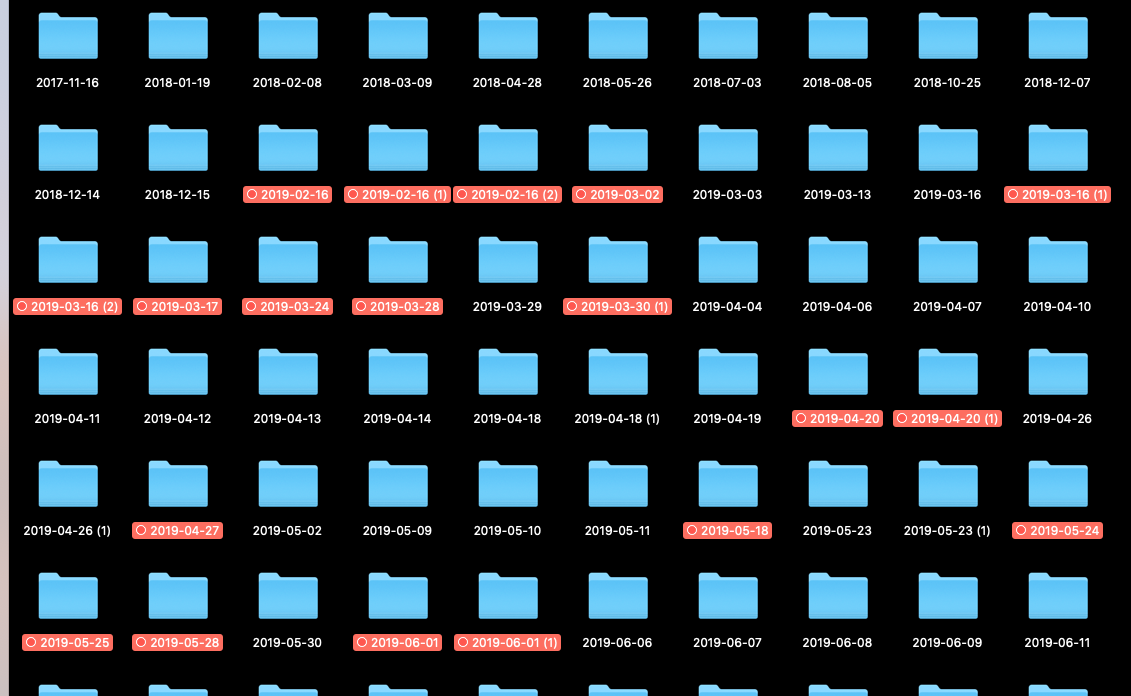
hello there guys!!is there any way to rename the folders inside the Final Cut Original Media Folder?i want to rename folders for easy location and delete media of my FC projects,see the attach picture.
Last edit: 21 Jul 2019 16:31 by NightWalker.
Please Log in to join the conversation.


21 Jul 2019 18:00 #100519
by JoeEditor
Replied by JoeEditor on topic renaming folder on final cut original media!!
First, you should do all of your organization in the FCPX browser. If you want to manually organize media on the hard drive, then do that before creating your FCPX Library/Event, then import your media as "keep in place."
Do NOT touch the folder naming and hierarchy inside of an FCPX bundle. You're asking for trouble. That is all done inside FCPX in the Browser. You really shouldn't have a need to be inside there anyway.
Do NOT touch the folder naming and hierarchy inside of an FCPX bundle. You're asking for trouble. That is all done inside FCPX in the Browser. You really shouldn't have a need to be inside there anyway.
Please Log in to join the conversation.
- NightWalker
-
Topic Author
- Offline
- New Member
-
Less
More
- Posts: 10
- Thank you received: 0
21 Jul 2019 21:43 - 21 Jul 2019 21:52 #100522
by NightWalker
do you mean to " Leave files In place"
Replied by NightWalker on topic renaming folder on final cut original media!!
FCPX.guru wrote: First,
then import your media as "keep in place.".
do you mean to " Leave files In place"
Last edit: 21 Jul 2019 21:52 by NightWalker.
Please Log in to join the conversation.
22 Jul 2019 01:58 #100523
by JoeEditor
Replied by JoeEditor on topic renaming folder on final cut original media!!
Yes
Please Log in to join the conversation.
22 Jul 2019 10:29 #100524
by Axel
... but don't destroy the structure of the original card! There are basically two ways to rename clips prior to importing them in FCP. One is to rename them on the original card. This is only risk-free if you use a tool like (Sony's) Catalyst Browse, which preserves (i.e.) so-called spanned clips. However, although these clips will have your custom names forever, they will still be copied to the library, unless you rip them out of the card's folder tree. D.O.N.'T !!!
The second method is to wrap the clips as movs (EditReady, Kyno and the like).
The only reason to make Finder names was if FCP was not the spider in the center of the web, if you had other people working on the same clips elsewhere, and there was no protocol such as an FCPXML to identify the intended edits.
That said, renaming clips inside (and solely to be seen inside) FCP is really enjoyable. I haven't seen a tutorial on this, just tried it once off my own bat, and it's very well thought out. Set the rules, batch-rename your clips, and you have added another ton of useful information to your library.
Replied by Axel on topic renaming folder on final cut original media!!
FCPX.guru wrote: First, you should do all of your organization in the FCPX browser. If you want to manually organize media on the hard drive, then do that before creating your FCPX Library/Event, then import your media as "keep in place."
... but don't destroy the structure of the original card! There are basically two ways to rename clips prior to importing them in FCP. One is to rename them on the original card. This is only risk-free if you use a tool like (Sony's) Catalyst Browse, which preserves (i.e.) so-called spanned clips. However, although these clips will have your custom names forever, they will still be copied to the library, unless you rip them out of the card's folder tree. D.O.N.'T !!!
The second method is to wrap the clips as movs (EditReady, Kyno and the like).
FCPX.guru wrote: Do NOT touch the folder naming and hierarchy inside of an FCPX bundle. You're asking for trouble. That is all done inside FCPX in the Browser. You really shouldn't have a need to be inside there anyway.
The only reason to make Finder names was if FCP was not the spider in the center of the web, if you had other people working on the same clips elsewhere, and there was no protocol such as an FCPXML to identify the intended edits.
That said, renaming clips inside (and solely to be seen inside) FCP is really enjoyable. I haven't seen a tutorial on this, just tried it once off my own bat, and it's very well thought out. Set the rules, batch-rename your clips, and you have added another ton of useful information to your library.
Please Log in to join the conversation.
