


- Posts: 1
- Thank you received: 0
3 Post Moderation Rule for New Boarders (25 Jan 2021)
New boarders will have their posts moderated - Don't worry if you cannot see your post immediately.
FCPX Project disappeared
19 Jun 2019 08:40 #100259
by dave3d
FCPX Project disappeared was created by dave3d
HI,
This is the second time this has happened to me, the first time I had to completely remake the timeline. So I closed down FCPX last night, opened it up this morning and no project file. I've searched for it by name, tried the file list view, deleted preferences on launch, tried all the backup files from yesterday. None of them have a project file. I've deleted that CurrentVersion.flexolibrary file from the package contents also.It's gone I'm afraid. Just in case, theres nothing typed in the search window either. Luckily I wasn't far in but this is very worrying. Some of my projects have weeks of work in them.
This is the second time this has happened to me, the first time I had to completely remake the timeline. So I closed down FCPX last night, opened it up this morning and no project file. I've searched for it by name, tried the file list view, deleted preferences on launch, tried all the backup files from yesterday. None of them have a project file. I've deleted that CurrentVersion.flexolibrary file from the package contents also.It's gone I'm afraid. Just in case, theres nothing typed in the search window either. Luckily I wasn't far in but this is very worrying. Some of my projects have weeks of work in them.
Please Log in to join the conversation.


21 Jun 2019 02:36 #100275
by dgwvideo
Creating history....one edit at a time !
Replied by dgwvideo on topic FCPX Project disappeared
It would be helpful to know your computer specs and also the project settings and media/codecs used. In the meantime, where are you storing your libraries, projects and media? On the system drive, external HD? If external, how is that drive formatted? (i.e. Mac OS Extended Journaled, EXFAT, etc.). If the project and/or media is on a drive approaching full capacity, that could cause issues. 15% to 20% of free space on any connected drive is recommended. Repairing permissions using First Aid in Mac OS for all drives is also a good maintenance routine to get into. If you hadn't deleted the CurrentVersion.flexolibrary you may have been able to use Pro Maintenance tools to fix a potentially corrupt project or library, but since you did that solution likely wont work. It is rarely necessary to delete files from the package contents of a library, so best to generally avoid doing that. There are times that is necessary, but usually not as a starting point.
Creating history....one edit at a time !
Please Log in to join the conversation.

21 Jun 2019 11:46 #100276
by joema
Sorry to hear about this problem. In general FCPX data integrity is very good. Over the years I've had hundreds of FCPX crashes and never lost any significant edits.
The most common cause of losing a project is accidentally opening a clip and editing that, then shutting down FCPX which deletes the timeline history, so you can't easily "go back" to the previously-opened clip. The edits are still inside the clip but there's no project to easily find. There is no "last modified" timestamp on the clip since it was not physically edited. Rather the edits were written to SQL tables within CurrentVersion.fcpevent within the event folder of the library.
If there's any possibility this might have happened you could export an event XML and look through it in TextEdit. Since most clips are not opened and edited, most of the XML file will look repetitive. Eventually you might come to a large block containing edits done to a clip, then just scroll up a bit to see the clip name. Then in FCPX open that clip and see if the edits are there. Maybe someone else has a better method.
Another possible cause of losing a project is it's in another event. Projects aren't required to be in the event you are editing. You've probably already tried this, but use the top-level "Projects" library smart collection to display all projects in the library.
If you have weeks of work in a project, it's important that be backed up on a file level. You can lose the project for various reasons including disk failure. Time Machine keeps a continuous differential file-level backup (including FCPX libraries) allowing you to roll back to a prior state.
In addition it's useful to periodically make additional manual copies of the library. If using a "lean" library where media, cache and proxies are located outside the library, this is easy and fast: In Finder right-click on the library and select "duplicate".
The FCPX auto-backups by default are in /Movies/Final Cut Backups. Regardless of whether you library is configured for internal or external storage/cache/proxies, those store "lean" backup versions of the library. They contain only the SQL tables with your edits and media links, so they are relatively small.
Upon encountering a problem, I suggest copying all the FCPX backups from the above location to a safe place. That way they won't accidentally get lost or deleted. You can open each of those FCPX auto-backups by double-clicking on the library package in Finder or from within FCPX by doing File>Open Library>From Backup.
*Never* change anything within a library bundle without first making a backup copy of that library at the file level.
Within the library package there is a folder for each event. Within that event there us a database file CurrentVersion.fcpevent which contains several SQLite database tables. Those contain all your edits inc'l effects and audio edits, plus links to the media or to symlinks which in turn point to the media.
Within that event folder there are sub-folders for each project. Each project folder contains another CurrentVersion.fcpevent with the edits for that project. If your project exists there will be a sub-folder with that project name within the event folder of the library bundle. You could look to see if that exists in the current library or any backup copy of the library you have.
Replied by joema on topic FCPX Project disappeared
dave3d wrote: ...I closed down FCPX last night, opened it up this morning and no project file. I've searched for it by name, tried the file list view, deleted preferences on launch, tried all the backup files from yesterday. None of them have a project file. I've deleted that CurrentVersion.flexolibrary file from the package contents also.It's gone I'm afraid. Just in case, theres nothing typed in the search window either. Luckily I wasn't far in but this is very worrying. Some of my projects have weeks of work in them.
Sorry to hear about this problem. In general FCPX data integrity is very good. Over the years I've had hundreds of FCPX crashes and never lost any significant edits.
The most common cause of losing a project is accidentally opening a clip and editing that, then shutting down FCPX which deletes the timeline history, so you can't easily "go back" to the previously-opened clip. The edits are still inside the clip but there's no project to easily find. There is no "last modified" timestamp on the clip since it was not physically edited. Rather the edits were written to SQL tables within CurrentVersion.fcpevent within the event folder of the library.
If there's any possibility this might have happened you could export an event XML and look through it in TextEdit. Since most clips are not opened and edited, most of the XML file will look repetitive. Eventually you might come to a large block containing edits done to a clip, then just scroll up a bit to see the clip name. Then in FCPX open that clip and see if the edits are there. Maybe someone else has a better method.
Another possible cause of losing a project is it's in another event. Projects aren't required to be in the event you are editing. You've probably already tried this, but use the top-level "Projects" library smart collection to display all projects in the library.
If you have weeks of work in a project, it's important that be backed up on a file level. You can lose the project for various reasons including disk failure. Time Machine keeps a continuous differential file-level backup (including FCPX libraries) allowing you to roll back to a prior state.
In addition it's useful to periodically make additional manual copies of the library. If using a "lean" library where media, cache and proxies are located outside the library, this is easy and fast: In Finder right-click on the library and select "duplicate".
The FCPX auto-backups by default are in /Movies/Final Cut Backups. Regardless of whether you library is configured for internal or external storage/cache/proxies, those store "lean" backup versions of the library. They contain only the SQL tables with your edits and media links, so they are relatively small.
Upon encountering a problem, I suggest copying all the FCPX backups from the above location to a safe place. That way they won't accidentally get lost or deleted. You can open each of those FCPX auto-backups by double-clicking on the library package in Finder or from within FCPX by doing File>Open Library>From Backup.
*Never* change anything within a library bundle without first making a backup copy of that library at the file level.
Within the library package there is a folder for each event. Within that event there us a database file CurrentVersion.fcpevent which contains several SQLite database tables. Those contain all your edits inc'l effects and audio edits, plus links to the media or to symlinks which in turn point to the media.
Within that event folder there are sub-folders for each project. Each project folder contains another CurrentVersion.fcpevent with the edits for that project. If your project exists there will be a sub-folder with that project name within the event folder of the library bundle. You could look to see if that exists in the current library or any backup copy of the library you have.
Please Log in to join the conversation.
- CosmosBandit
-

- Offline
- New Member
-

Less
More
- Posts: 1
- Thank you received: 0
01 Sep 2021 17:33 #116079
by CosmosBandit
Replied by CosmosBandit on topic FCPX Project disappeared
I created a new project, did a little work on it, then attempted to go back to my previous project but it was missing. I FOUND IT. All I did was, on my new project I created, I Command-Z'd my way backward repeatedly and it "undid" it's way all the way back to my original project. I'm VERY new to FCP so no doubt I created the new project incorrectly.
Please Log in to join the conversation.
- ronny courtens
-

- Offline
- Moderator
-

Less
More
- Posts: 4455
- Thank you received: 962
01 Sep 2021 17:53 #116080
by ronny courtens
Replied by ronny courtens on topic FCPX Project disappeared
The best way to check if you have correctly created a Project is by looking in Smart Collections > Projects. That collection holds every project you have created in the Library. If it isn't there, you probably have been editing inside a clip instead of creating a Project.
As we see these problems more often than we would want to, I have submitted multiple requests to prevent people from opening a clip in its own timeline. As a result, you now must use the Clip>Open Clip menu to open a clip instead of just R-clicking the clip and open it. But that is not enough. We should be able to apply basic effects and corrections on clips in the browser without having to open them in a timeline.
- Ronny
As we see these problems more often than we would want to, I have submitted multiple requests to prevent people from opening a clip in its own timeline. As a result, you now must use the Clip>Open Clip menu to open a clip instead of just R-clicking the clip and open it. But that is not enough. We should be able to apply basic effects and corrections on clips in the browser without having to open them in a timeline.
- Ronny
Please Log in to join the conversation.
02 Sep 2021 21:04 #116098
by dmetz
Replied by dmetz on topic FCPX Project disappeared
YOU'RE the guy?! Dang, Ronny! ;^) While I agree on some level with the need to protect folks from themselves, there are times when I need to open a clip to get audio into sync. I'd rather not Detach Audio and make a compound clip, but instead just fix the original. It doesn't happen often, but I love that I can do it when needed.
Please Log in to join the conversation.

15 Mar 2022 11:47 #119455
by Pad
Replied by Pad on topic FCPX Project disappeared
CosmosBandit You saved my life!
After weeks of work my project just disappeared.
Your command Z approach actually worked
To be honest I didn't think it would.
Just when I was thinking that I would have to rebuild the timeline all over again.
Have a great day!!!!
After weeks of work my project just disappeared.
Your command Z approach actually worked
To be honest I didn't think it would.
Just when I was thinking that I would have to rebuild the timeline all over again.
Have a great day!!!!
Please Log in to join the conversation.
17 Mar 2022 14:23 #119507
by Pad
Replied by Pad on topic FCPX Project disappeared
Hi Just come back to my project. The library is in tact but when clicking to open the project there's nothing in the timeline.
Can any one help?
I've closed and rebooted FCPX, Opened a previous Library and also tried rebooting my Mac
Still nothing the timeline
It's a lot of work I'm going to loose if I don't find the project.
I'm new to FCPX and no computer geek so simple speak would be great
Many thanks
Can any one help?
I've closed and rebooted FCPX, Opened a previous Library and also tried rebooting my Mac
Still nothing the timeline
It's a lot of work I'm going to loose if I don't find the project.
I'm new to FCPX and no computer geek so simple speak would be great
Many thanks
Please Log in to join the conversation.
- Tom Wolsky
-

- Offline
- Moderator
-
17 Mar 2022 14:47 #119508
by Tom Wolsky
Replied by Tom Wolsky on topic FCPX Project disappeared
What as the project called? Check in the Library/Smart Collections/Projects. Is it there? How long would the project be? Check if there is a clip about that length in case you opened a clip and started editing inside it.
Please Log in to join the conversation.
17 Mar 2022 15:06 #119509
by Pad
Replied by Pad on topic FCPX Project disappeared
The project is there in the library but nothing appears in the time line when I double click it. It has the time down as 00:00:00:00
I've opened previous backup Libraries, including one from yesterday but it's the same story "No content in the timeline".
Everything was fine until I started a new project in a new Library. when I returned to the project in question a few minutes later the timeline was blank in the project and showing 0 length. All of the content is still showing in the event though.
This has taken me weeks of work
I hope I don't need to rebuild the timeline
I've opened previous backup Libraries, including one from yesterday but it's the same story "No content in the timeline".
Everything was fine until I started a new project in a new Library. when I returned to the project in question a few minutes later the timeline was blank in the project and showing 0 length. All of the content is still showing in the event though.
This has taken me weeks of work
I hope I don't need to rebuild the timeline
Please Log in to join the conversation.
- Tom Wolsky
-
- Offline
- Moderator
-
17 Mar 2022 15:11 #119510
by Tom Wolsky
Replied by Tom Wolsky on topic FCPX Project disappeared
I understand the timeline is empty. About how long would your edited project have been? Check the length with the lengths of your clips. Skim through the clips to check if you've edited into one. Do you remember if you used the Open Clip function?
Please Log in to join the conversation.
18 Mar 2022 09:49 #119531
by Pad
Replied by Pad on topic FCPX Project disappeared
Thanks joema!Found It in a synchronised clip. Phew, several stressful hours I can tell you.
Please Log in to join the conversation.
18 Mar 2022 09:55 #119532
by joema
Replied by joema on topic FCPX Project disappeared
That was Tom who suggested you check all your clips.
Please Log in to join the conversation.
18 Mar 2022 13:05 #119535
by Pad
Replied by Pad on topic FCPX Project disappeared
Tom, You were correct about the location of my timeline. It was in a synchronised clip. A simple double click opened it up in the timeline
I owe you one!!!
I owe you one!!!
Please Log in to join the conversation.
- Tom Wolsky
-
- Offline
- Moderator
-
18 Mar 2022 13:15 #119536
by Tom Wolsky
Replied by Tom Wolsky on topic FCPX Project disappeared
Copy the contents of the sync clip and paste it into a project of the correct specs that match the sync clip.
Please Log in to join the conversation.
18 Mar 2022 18:30 #119541
by Pad
Replied by Pad on topic FCPX Project disappeared
When I double clicked the clip with the timeline in it. the project opened in the timeline and is editable. The project icon however has my desktop picture in the clapper board. Do I still need to copy the the content of the sync clip to a new project?
I'm scared to death of losing everything again.
I'm scared to death of losing everything again.
Please Log in to join the conversation.
- Tom Wolsky
-
- Offline
- Moderator
-
18 Mar 2022 18:46 #119542
by Tom Wolsky
Replied by Tom Wolsky on topic FCPX Project disappeared
Cam you post a screenshot of what you’re seeing where? Thanks.
Please Log in to join the conversation.
19 Mar 2022 12:06 #119558
by Pad
Replied by Pad on topic FCPX Project disappeared
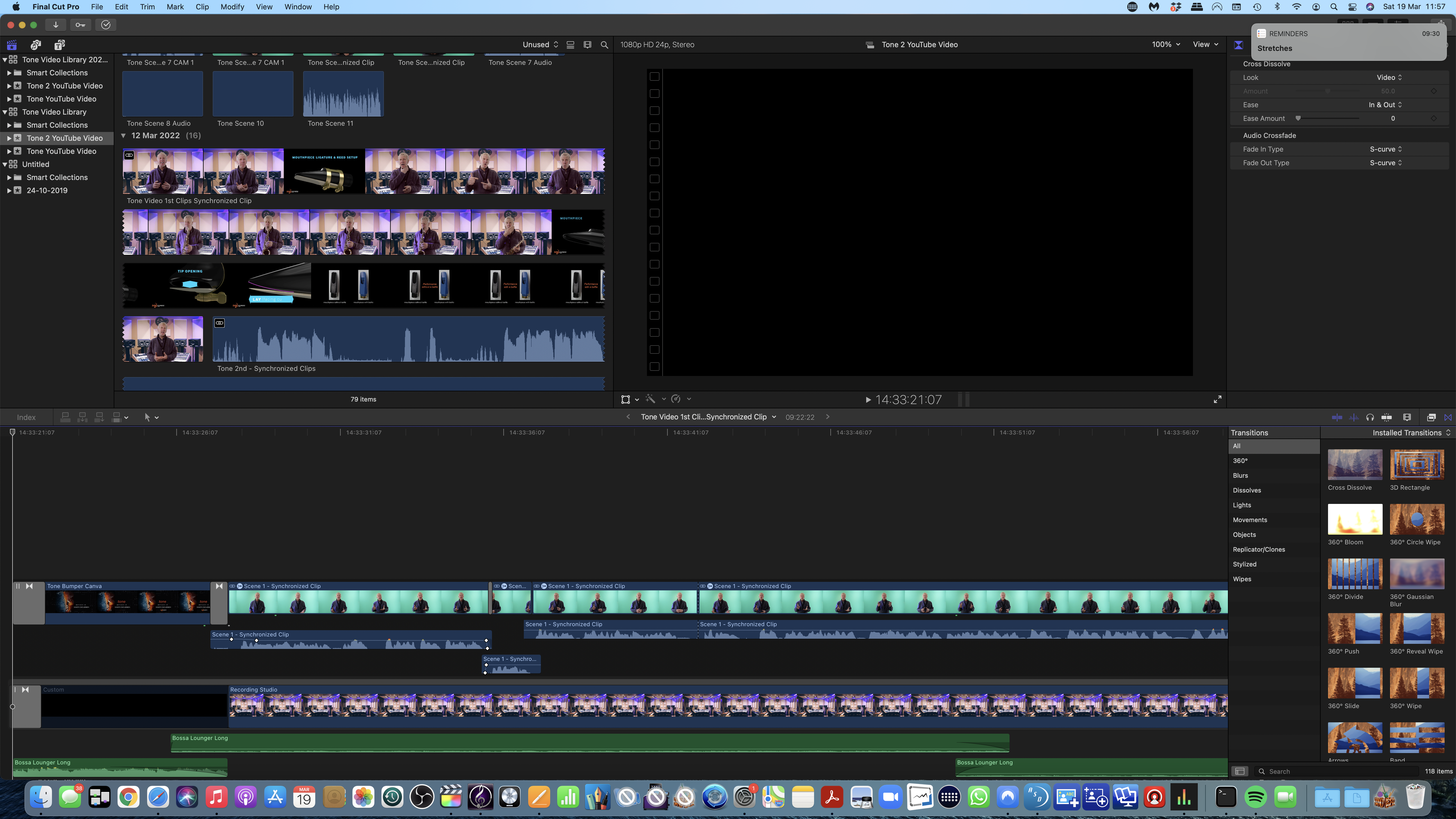
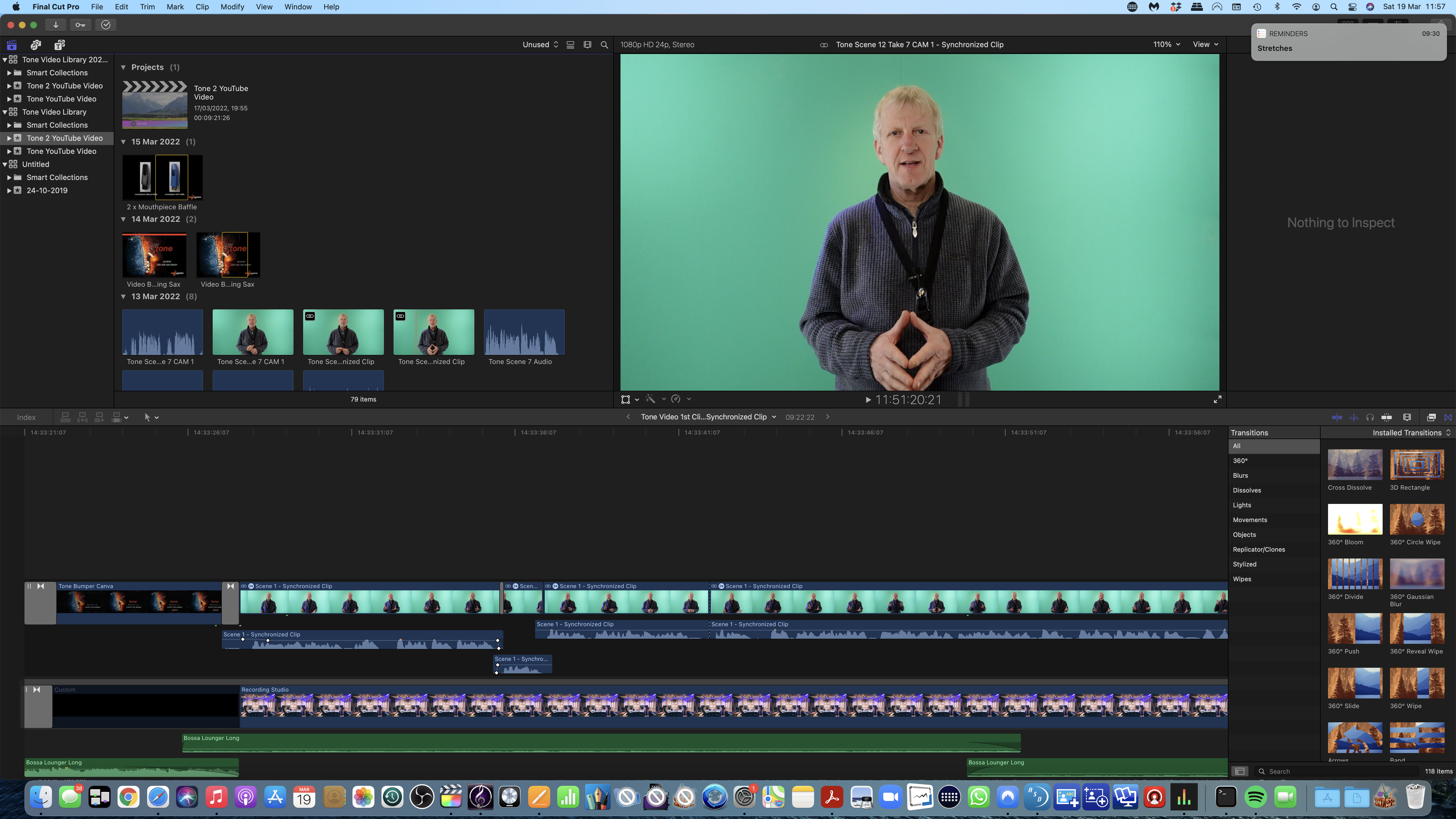
The first screenshot shows the desktop withinin the project icon and in the second you can see the project inside the clip. I double clicked the clip with the timeline in and it opened up in the timeline. I assume that I am still editing from within the clip? How do I restore this situation to where I need to be?
Many thanks for your help!
Many thanks for your help!
Please Log in to join the conversation.
- Tom Wolsky
-
- Offline
- Moderator
-
19 Mar 2022 12:29 - 19 Mar 2022 12:31 #119559
by Tom Wolsky
Replied by Tom Wolsky on topic FCPX Project disappeared
"the desktop within the project icon"
I don't know what this means. I don't know what difference you're trying to show between the two screenshots.
These are sync clips. See the icon in the upper left.

This is the header of the timeline.

You're inside one of the sync clips. Create a new project with the specifications of the sync clip. Copy and paste the contents of the sync clip into a project.
I would recommend to take a look at the IzzyVideo free tutorial introduction to FCP on YouTube.
It will help with your understanding of how the application works and with the terminology used in it.
I don't know what this means. I don't know what difference you're trying to show between the two screenshots.
These are sync clips. See the icon in the upper left.
This is the header of the timeline.
You're inside one of the sync clips. Create a new project with the specifications of the sync clip. Copy and paste the contents of the sync clip into a project.
I would recommend to take a look at the IzzyVideo free tutorial introduction to FCP on YouTube.
It will help with your understanding of how the application works and with the terminology used in it.
Last edit: 19 Mar 2022 12:31 by Tom Wolsky.
Please Log in to join the conversation.
19 Mar 2022 12:50 #119560
by Pad
Replied by Pad on topic FCPX Project disappeared
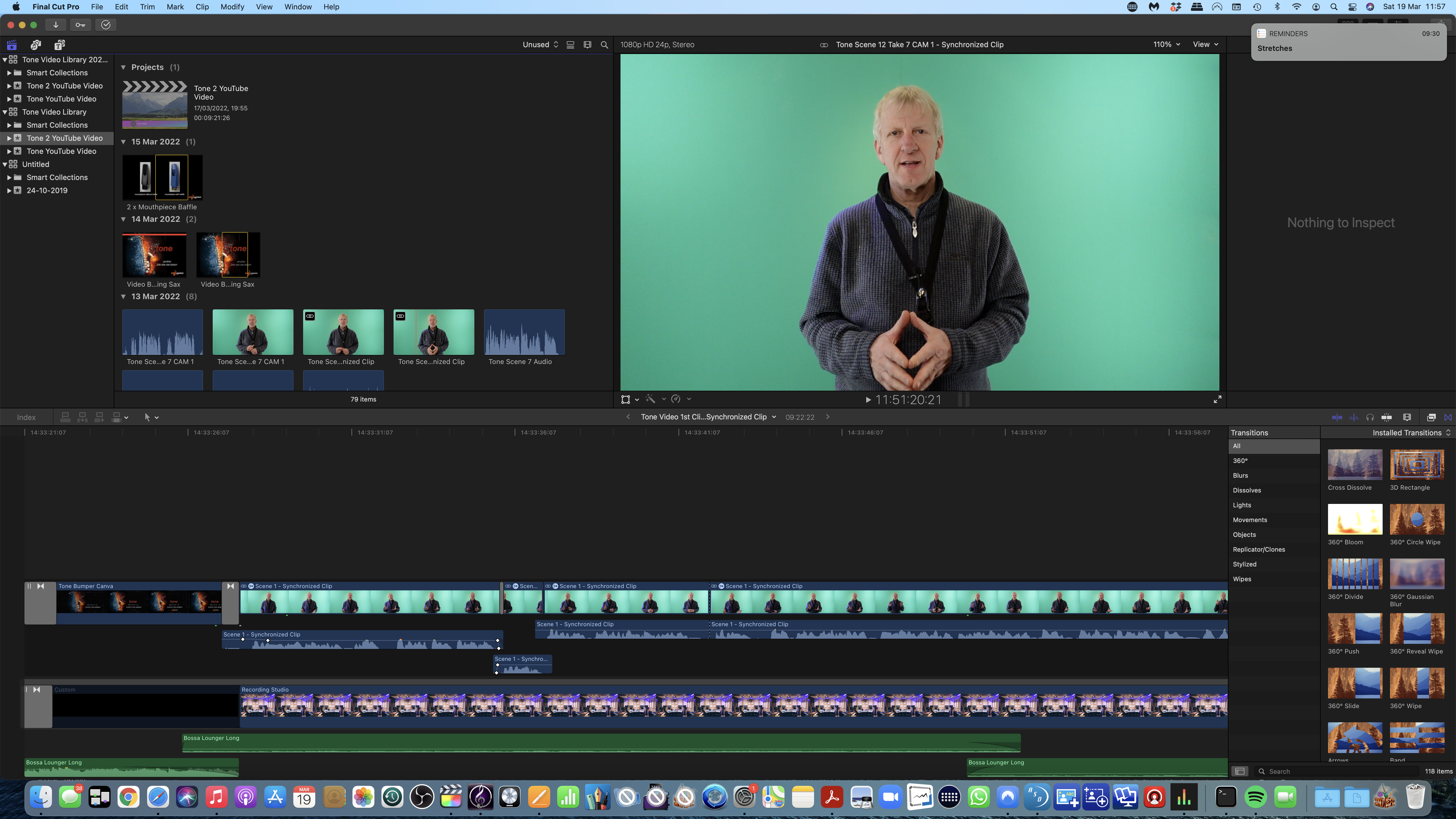
Sorry, I might not be clear. The screen shot 'Project icon with my desktop' is just to show my desktop in the clapper board. Which isn't the way it was previously.
I now know to create a new project and copy the contents of the clip to it but I'm not sure I understand what you mean by ' with the specifications of the sync clip'
I've created a new Project and copy & pasted the clip contents and have had the same results as when I double clicked the Sync clip in the previous project. I'm just hoping that maybe this has solved the problem.
Sorry! I'm on a steep learning curve here
Thanks for your help in this!
I now know to create a new project and copy the contents of the clip to it but I'm not sure I understand what you mean by ' with the specifications of the sync clip'
I've created a new Project and copy & pasted the clip contents and have had the same results as when I double clicked the Sync clip in the previous project. I'm just hoping that maybe this has solved the problem.
Sorry! I'm on a steep learning curve here
Thanks for your help in this!
Please Log in to join the conversation.
