


- Posts: 1
- Thank you received: 0
3 Post Moderation Rule for New Boarders (25 Jan 2021)
New boarders will have their posts moderated - Don't worry if you cannot see your post immediately.
Move object (Video) without moving its mask
06 Jun 2019 23:51 #100135
by Zeayo
Move object (Video) without moving its mask was created by Zeayo
Is there any way to move an object but keep its mask static? For example: I want to make a video "appear" on screen coming from behind an invisible "line" (The mask), but animating the video, not the animating to the mask to reveal the object. How can I do this? I just want a static mask 
Please Log in to join the conversation.


10 Jan 2020 13:21 #103835
by paz
Replied by paz on topic Move object (Video) without moving its mask
Hi did you find out how to do this as I've got the same problem? best Bob
Please Log in to join the conversation.


10 Jan 2020 13:42 #103837
by JoeEditor
Replied by JoeEditor on topic Move object (Video) without moving its mask
So you want to reveal the video from behind an object that is inside that same video clip? You'll have to duplicate the clip on top of itself (Opt-drag). Mask the top copy, animate the bottom copy. If I'm understanding you correctly.
Or, add a Gap Clip or Solid generator above the clip, crop it, and animate the video below it.
Or, you could animate the video by keyframing the start and end. Then add keyframes for the Crop parameters at the start and end to match.
I guess I'd need to see an example of what you're trying to do.
Or, add a Gap Clip or Solid generator above the clip, crop it, and animate the video below it.
Or, you could animate the video by keyframing the start and end. Then add keyframes for the Crop parameters at the start and end to match.
I guess I'd need to see an example of what you're trying to do.
Please Log in to join the conversation.
10 Jan 2020 13:55 #103839
by paz
Replied by paz on topic Move object (Video) without moving its mask
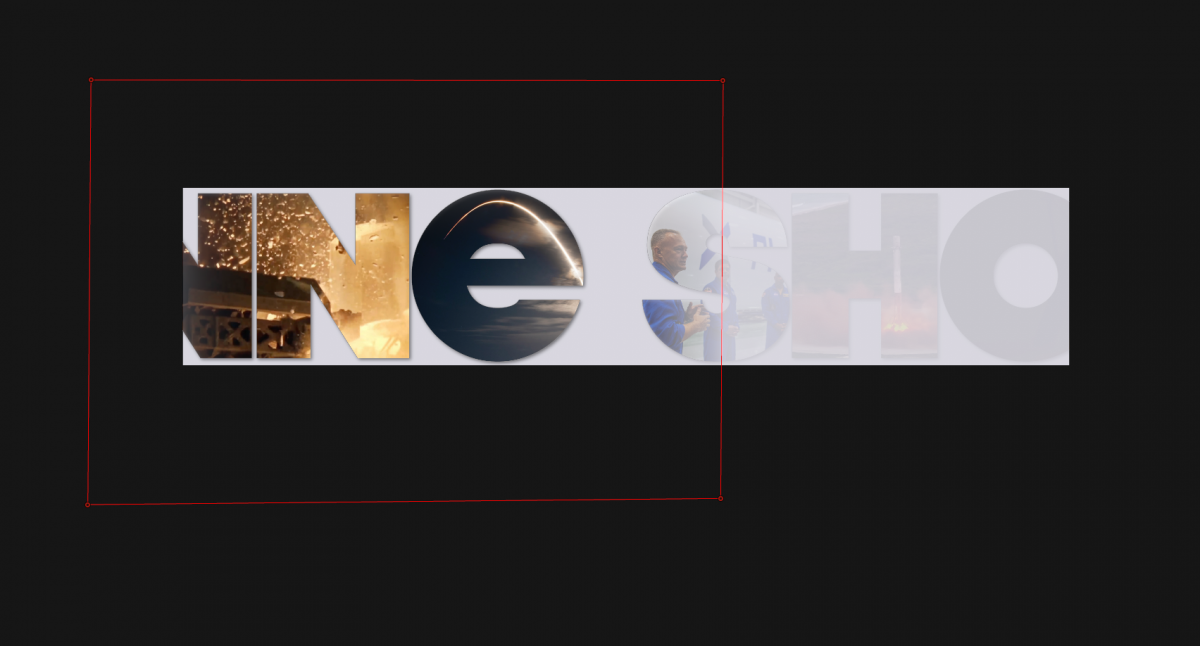
its a bit complex - as I'm working on a wide canvas with an even wider moving compound clip which has a stencil alpha on it (Being moving footage within text) over it. At one point I want to mask off, or in fact drop the opacity on part of the screen ie just the left side. AS I'm moving the large stencil alpha compound clip it seems any mask or wipe will move with the shot. The closest I've got is to animate a draw mask on one copy of the compound clip to reveal a second copy below which has lower opacity. See attached - thanks Bob

Please Log in to join the conversation.
- JarrodMFay
-

- Offline
- Elite Member
-

Less
More
- Posts: 172
- Thank you received: 34
10 Jan 2020 14:40 #103841
by JarrodMFay
Replied by JarrodMFay on topic Move object (Video) without moving its mask
I know it doesn't answer your FCPX question but this would be so easy in Motion that you would save a ton of time and it would be well worth the expense. Just a thought.
Please Log in to join the conversation.
10 Jan 2020 14:52 #103842
by paz
Replied by paz on topic Move object (Video) without moving its mask
Yes you are right but I don't know motion that well, it's my own fault for over designing it!! Cheers thanks for talking Best Bob
Please Log in to join the conversation.
11 Jan 2020 11:14 #103854
by arc
Replied by arc on topic Move object (Video) without moving its mask
I have not done much motion graphics work with FCPX. I guess I should test it out. I know with Premiere Pro it could be done real easy using track mattes.
Please Log in to join the conversation.
11 Jan 2020 19:52 #103855
by JoeEditor
Replied by JoeEditor on topic Move object (Video) without moving its mask
Take your Compound, call it "Layer 1 Compound", and keyframe it to animate across the page as you want it.
Then put the Layer 1 Compound inside of another Compound called "Layer 2 Compound" and mask that Layer 2 Compound.

Then put the Layer 1 Compound inside of another Compound called "Layer 2 Compound" and mask that Layer 2 Compound.
Please Log in to join the conversation.
12 Jan 2020 08:50 #103860
by paz
Replied by paz on topic Move object (Video) without moving its mask
Thanks so much I'll give that a go - It took me time to work out the logic that once compounded again the clip becomes the same width as the project so the mask remains static. - Thanks again best Bob
Please Log in to join the conversation.
