


- Posts: 41
- Thank you received: 0
3 Post Moderation Rule for New Boarders (25 Jan 2021)
New boarders will have their posts moderated - Don't worry if you cannot see your post immediately.
What software to burn the following output from compressor?
04 Jun 2019 09:57 #100101
by Whokuni
I have two files, a .ac3 and .m2v. How and what software can I use to burn these to a DVD disk. I know I used the old versions of some FCP software - ?studio? if my guess is right. But I guess those days are long gone. Can anybody suggest what else I could use please that would allow me to create a tasteful menu and not just the run of the mill DVD output from FCP X itself.
Thanking you in advance.
Whokuni
Thanking you in advance.
Whokuni
Please Log in to join the conversation.


05 Jun 2019 05:17 #100113
by dgwvideo
Creating history....one edit at a time !
Replied by dgwvideo on topic What software to burn the following output from compressor?
Roxio Toast is an option. You can import the .ac3 and the .m2V and choose from a variety of authoring options. We have it, but actually seldom use it, although we have used it a few times. The UI is a bit funky in version 15 (the one we have) but you can get the newest (17 I think) for anywhere between $49 and $79 depending on the deal they offer.
Creating history....one edit at a time !
Please Log in to join the conversation.
05 Jun 2019 08:22 #100115
by Whokuni
Replied by Whokuni on topic What software to burn the following output from compressor?
Thank you for your reply. I have the latest version and didnt have much luck burning the output from Compressor. I know you can burn direct to DVD from within FCP X but it doesnt provide the option of chapters etc as far as I could gather. Maybe something Im missing. Will have another go with Toast and see whether I have better luck this time round.
Thank you once again.
Whokuni
Thank you once again.
Whokuni
Please Log in to join the conversation.

05 Jun 2019 13:06 #100117
by JoeEditor
Replied by JoeEditor on topic What software to burn the following output from compressor?
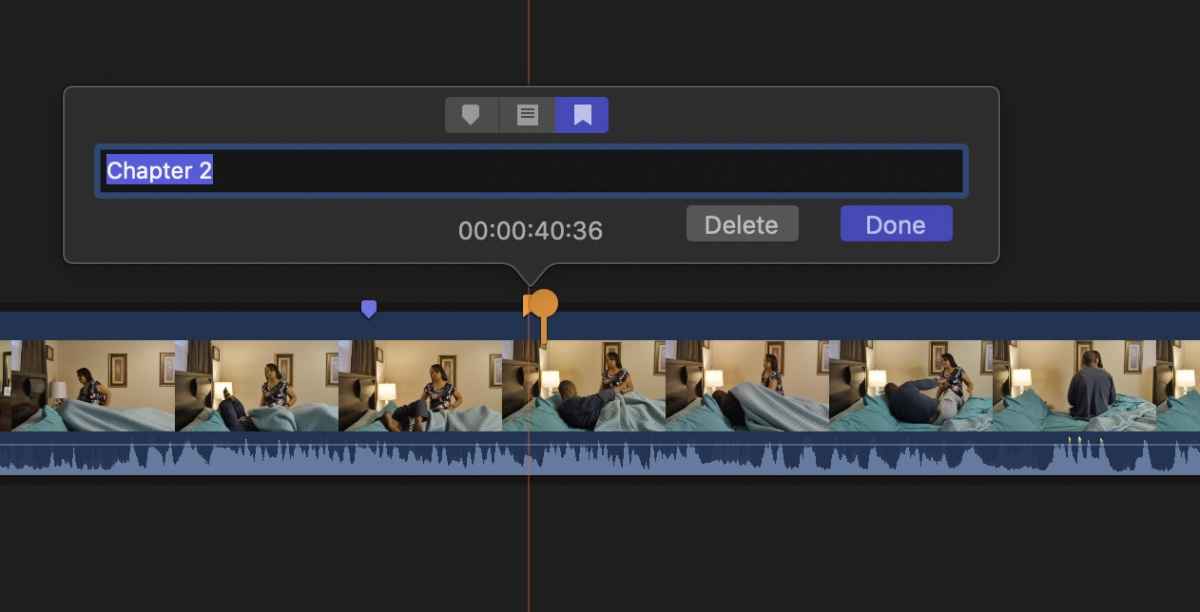
You can have chapter burning directly from FCPX. You make Chapter Markers, title them, and when you export to DVD simply choose the option to use Chapters.

Please Log in to join the conversation.

06 Jun 2019 00:44 - 06 Jun 2019 00:51 #100120
by VTC
Replied by VTC on topic What software to burn the following output from compressor?
Don't understand WHY you made two files from Compressor but to burn these files...
1 - Drag video file into window.
It will ask for missing AUDIO file.
2 - Point it to the AC3 file.
You can burn with chapters by selecting chapters MANUALLY
1 - Double click video file in main window.
2 - Click CHAPTERS.
3 - Set to MANUAL. It should recognize exported chapter marks. If not click + button then set manually based on time.
TO MAKE HIGHEST QUALITY DISC:
1 - Choose CUSTOMIZE.
2 - Select ENCODING
3 - Select CUSTOM
4 - Bump Bit Rate to 9.0 for DVD, 26 for Bluray
5 - Motion Estimation to BEST, Half-PEL
The maximum Bit Rate settings means only 1:06 will fit on a standard DVD. For Two hours run time you'll need double layer discs. Believe me you CAN tell the difference by bumping up the bit rate. You can make fancier menus other than the cheesy ones Toast provides as I do this all the time.
DON'T burn straight to disc. SAVE AS DISC IMAGE allows you to preview what you've done and as long as you don't dump the mastering data (Preferences: Storage - "Delete Converted Items Now') you can make changes to the output or menu or settings and Toast will not have to re-encode the video all over again but it WILL if you make changes to the underlying video file.
1 - Drag video file into window.
It will ask for missing AUDIO file.
2 - Point it to the AC3 file.
You can burn with chapters by selecting chapters MANUALLY
1 - Double click video file in main window.
2 - Click CHAPTERS.
3 - Set to MANUAL. It should recognize exported chapter marks. If not click + button then set manually based on time.
TO MAKE HIGHEST QUALITY DISC:
1 - Choose CUSTOMIZE.
2 - Select ENCODING
3 - Select CUSTOM
4 - Bump Bit Rate to 9.0 for DVD, 26 for Bluray
5 - Motion Estimation to BEST, Half-PEL
The maximum Bit Rate settings means only 1:06 will fit on a standard DVD. For Two hours run time you'll need double layer discs. Believe me you CAN tell the difference by bumping up the bit rate. You can make fancier menus other than the cheesy ones Toast provides as I do this all the time.
DON'T burn straight to disc. SAVE AS DISC IMAGE allows you to preview what you've done and as long as you don't dump the mastering data (Preferences: Storage - "Delete Converted Items Now') you can make changes to the output or menu or settings and Toast will not have to re-encode the video all over again but it WILL if you make changes to the underlying video file.
Last edit: 06 Jun 2019 00:51 by VTC.
Please Log in to join the conversation.
06 Jun 2019 08:05 #100122
by Whokuni
Replied by Whokuni on topic What software to burn the following output from compressor?
Once again, many thanks for these insights. There is no end to my learning process.
Thank you
Thank you
Please Log in to join the conversation.
