


- Posts: 1
- Thank you received: 0
3 Post Moderation Rule for New Boarders (25 Jan 2021)
New boarders will have their posts moderated - Don't worry if you cannot see your post immediately.
what is best export settings for youtube in fcpx 2019 ?
- लक्ष्मण.मगर
-
 Topic Author
- Offline
- New Member
-

Less
More
16 May 2019 02:16 #99955
by लक्ष्मण.मगर
youtube export setting?
Please Log in to join the conversation.


16 May 2019 15:20 - 17 May 2019 01:18 #99965
by JoeEditor
Replied by JoeEditor on topic what is best export settings for youtube in fcpx 2019 ?
The best is ProRes 422, takes longer to upload, but always gives great results.
Normally I just use the standard H.264 Web export and they look just fine on YT. We do this daily.
Normally I just use the standard H.264 Web export and they look just fine on YT. We do this daily.
Last edit: 17 May 2019 01:18 by JoeEditor.
Please Log in to join the conversation.

17 May 2019 00:48 - 17 May 2019 00:48 #99974
by Redifer
Replied by Redifer on topic what is best export settings for youtube in fcpx 2019 ?
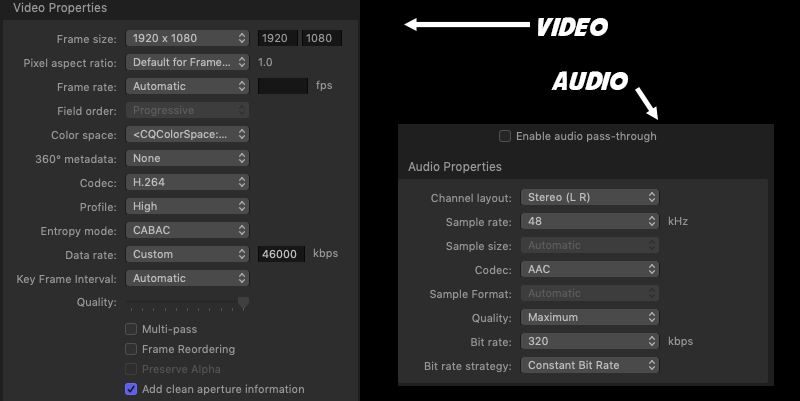
More realistically, try these settings (pictured below) which are for Compressor. Set up FCP to export with these settings through Compressor to enjoy high quality AND fast uploads. You don't want your bitrate too low. Youtube has a bitrate of around 8mbps for 1080p stuff, but that doesn't mean you should upload anywhere near that low of a bitrate. Youtube will always recompress, but it's a good idea to give it the best original file to work with. That said, these settings will result in nearly the same or the same final video quality as a ProRes4444 upload . At least for now. In the future it may make more of a difference if their encoder gets any better.
Also keep in mind that it depends on the browser you use when watching videos on Youtube. They look best in Chrome, have the best (and most stable) framerate on game consoles like the PS4, look worst in Firefox (crushes many colors, especially greens, sometimes even makes the greens look "nuclear", and drops a ton of frames during 60fps playback) and Safari doesn't even support modern codecs like WebM VP8 and MSE & WebM VP9. Visit www.youtube.com/html5 to see what your browser supports.
Also keep in mind that it depends on the browser you use when watching videos on Youtube. They look best in Chrome, have the best (and most stable) framerate on game consoles like the PS4, look worst in Firefox (crushes many colors, especially greens, sometimes even makes the greens look "nuclear", and drops a ton of frames during 60fps playback) and Safari doesn't even support modern codecs like WebM VP8 and MSE & WebM VP9. Visit www.youtube.com/html5 to see what your browser supports.
Last edit: 17 May 2019 00:48 by Redifer.
Please Log in to join the conversation.

03 Mar 2021 10:24 #113036
by Defiler
Replied by Defiler on topic what is best export settings for youtube in fcpx 2019 ?
Hey! Sadly the picture with the perfect compressor settings for YouTube is not clickable anymore. Could you maybe send it in text-form? I would really appreciate that! 
Regards
Defiler
Regards
Defiler
Please Log in to join the conversation.
