


- Posts: 1080
- Thank you received: 106
3 Post Moderation Rule for New Boarders (25 Jan 2021)
New boarders will have their posts moderated - Don't worry if you cannot see your post immediately.
Disk sizes reported wrongly?
14 Apr 2019 00:19 - 14 Apr 2019 00:20 #99628
by Redifer
Disk sizes reported wrongly? was created by Redifer
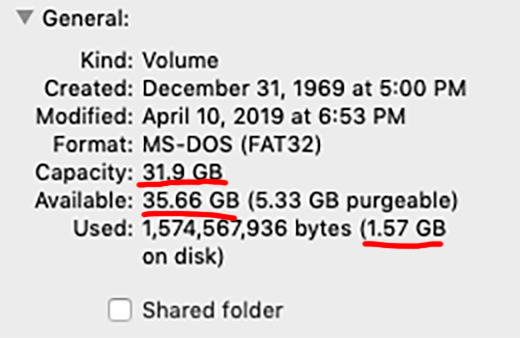
I've begun to notice that ALL disks connected to my Mac are reported as having incorrect sizes. For example, the screenshot posted below is a 32GB SD card. It correctly states that the capacity is 31.9 GB. But it says that I have 35.66 GB of free space even though I already have 1.57GB of data on the card. WTF??? Is my Mac OS broken? Or is it just being dumb? I have tried to put 34-ish GB of data on the card to test but it won't let me, because the card is actually 31.9 GB and not like 37 or so as the macOS thinks. It does not seem to matter how the card itself is formatted (Fat32, exFAT, HFS+, etc etc).
Last edit: 14 Apr 2019 00:20 by Redifer.
Please Log in to join the conversation.

15 Apr 2019 00:57 - 15 Apr 2019 00:58 #99636
by JoeEditor
Replied by JoeEditor on topic Disk sizes reported wrongly?
That is wild! Does reformatting the SD card does not fix it? Could be a corrupted card. Is it only this one card or all SD cards, or just some SD cards? I mean, is it card specific or anything? That is so weird...
Last edit: 15 Apr 2019 00:58 by JoeEditor.
Please Log in to join the conversation.
15 Apr 2019 08:10 - 15 Apr 2019 08:10 #99640
by Redifer
Replied by Redifer on topic Disk sizes reported wrongly?
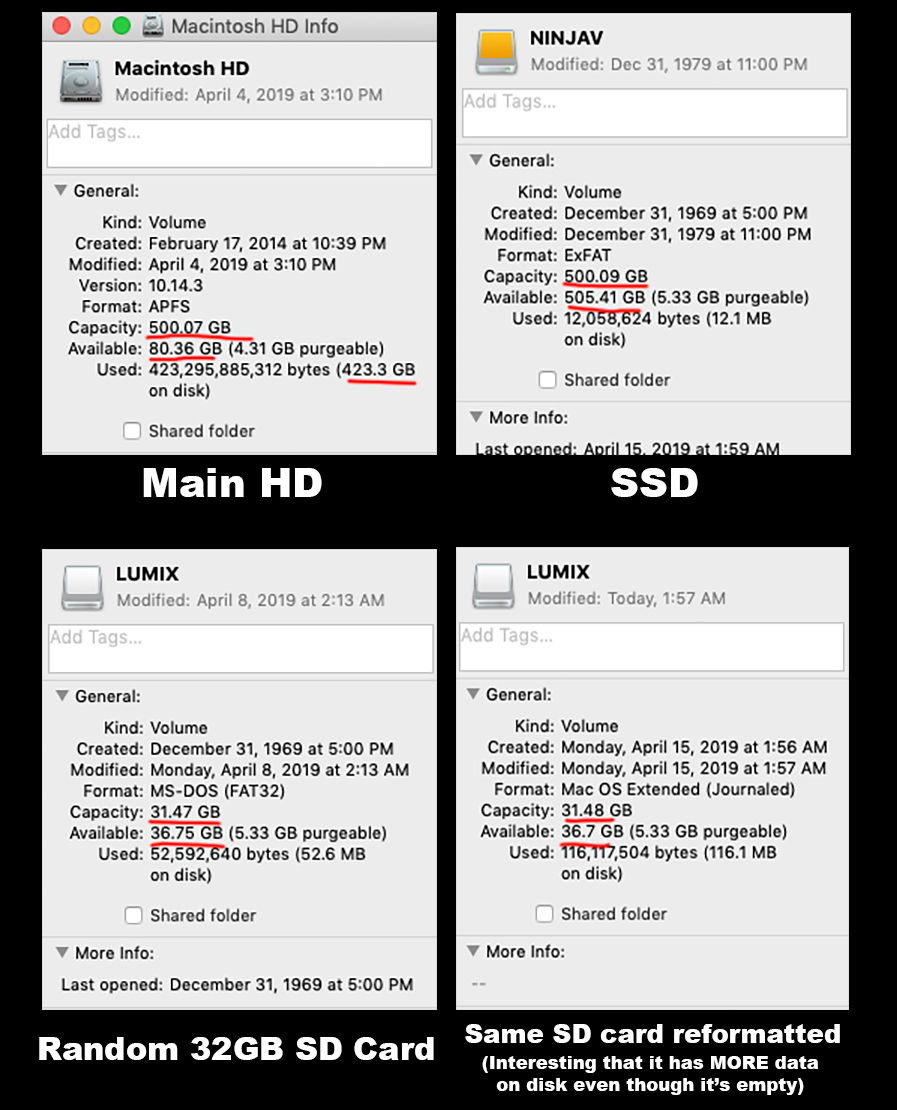
I've tried reformatting to several different formats and it always comes back like that. Even a brand new thumb drive (the one pictured in my original post) showed up like that. But it's for most (not all) every SD card and also my main drive. Here's some other pics:
Last edit: 15 Apr 2019 08:10 by Redifer.
Please Log in to join the conversation.
15 Apr 2019 12:44 #99644
by JoeEditor
Replied by JoeEditor on topic Disk sizes reported wrongly?
wow... I'm stumped...
Please Log in to join the conversation.
- Jonathan Levin
-

- Offline
- Platinum Member
-

Less
More
- Posts: 786
- Thank you received: 21
15 Apr 2019 15:17 #99645
by Jonathan Levin
Replied by Jonathan Levin on topic Disk sizes reported wrongly?
Hi.
Are the results the same if you try this on another machine?
Are the results the same if you try this on another machine?
Please Log in to join the conversation.

15 Apr 2019 16:02 - 15 Apr 2019 21:36 #99646
by VidGreg
Replied by VidGreg on topic Disk sizes reported wrongly?
Hi Joe
This is the way that the OS calculates file sizing now. If you subtract the "purgeable" from the available and then add to the used, it will be roughly equivalent. So the question is, "What does the "purgeable" data reflect.
Mostly, but not all is accounted as the file sizes for all the files with "Hard Links". If you have hard links, the purgeable size increases for each link to file by the file size it points to.
A much better and thorough explanation can be found here… eclecticlight.co/2019/02/09/finder-cant-...-hard-links-confuse/
Hope this Helps, Greg
This is the way that the OS calculates file sizing now. If you subtract the "purgeable" from the available and then add to the used, it will be roughly equivalent. So the question is, "What does the "purgeable" data reflect.
Mostly, but not all is accounted as the file sizes for all the files with "Hard Links". If you have hard links, the purgeable size increases for each link to file by the file size it points to.
A much better and thorough explanation can be found here… eclecticlight.co/2019/02/09/finder-cant-...-hard-links-confuse/
Hope this Helps, Greg
Last edit: 15 Apr 2019 21:36 by VidGreg. Reason: spelling correction
Please Log in to join the conversation.

15 Apr 2019 16:10 #99647
by dgwvideo
Creating history....one edit at a time !
Replied by dgwvideo on topic Disk sizes reported wrongly?
Greg's comments are useful, but I don't think that is the answer to this issue. In no case should available space exceed the drive or disk capacity, so something else is going on. You might try resetting the system SMC as well as NVram/Pram. This can cause quirky problems from time to time.
support.apple.com/en-us/HT201295
Another test might be to create a new admin user and see if you get the same results.
support.apple.com/en-us/HT201295
Another test might be to create a new admin user and see if you get the same results.
Creating history....one edit at a time !
Please Log in to join the conversation.
15 Apr 2019 20:59 #99649
by JoeEditor
Replied by JoeEditor on topic Disk sizes reported wrongly?
I don't see that on any of our Macs. Yeah, that's not what VidGreg is referring to, different issue. I have heard of this issue once before, some time ago. Didn't pay it much mind, thought it was a once in a lifetime fluke.
Please Log in to join the conversation.
15 Apr 2019 21:32 #99651
by VidGreg
Replied by VidGreg on topic Disk sizes reported wrongly?
DG, I should have been clearer, and I agree with you, it should always report actual capacity. I do think this is a bug but it is caused by how the OS is dealing (incorrectly) in reporting drive capacity by adding the purgeable size.
The article I linked to is titled "Finder can’t total file sizes correctly: how hard links confuse". And as I stated, a much better explanation.
This is a programming bug, IMHO
Haven't found solution, but I haven't had any negative issues. Maybe if your card/drive is very full, and you think you have more space??
I have also seen this like here on my SD card holding my Sound Libraries…

The Finder is reporting ~3.07GB over Capacity of the card. Same as the "purgeable".
So this is a current issue. but is appearing on multiple OSs. I'm on High Sierra, but my new SD card is a recent creation. Issue is on my old card too!
Hope this Helps, Greg
The article I linked to is titled "Finder can’t total file sizes correctly: how hard links confuse". And as I stated, a much better explanation.
This is a programming bug, IMHO
Haven't found solution, but I haven't had any negative issues. Maybe if your card/drive is very full, and you think you have more space??
I have also seen this like here on my SD card holding my Sound Libraries…
The Finder is reporting ~3.07GB over Capacity of the card. Same as the "purgeable".
So this is a current issue. but is appearing on multiple OSs. I'm on High Sierra, but my new SD card is a recent creation. Issue is on my old card too!
Hope this Helps, Greg
Please Log in to join the conversation.
