


- Posts: 63
- Thank you received: 0
3 Post Moderation Rule for New Boarders (25 Jan 2021)
New boarders will have their posts moderated - Don't worry if you cannot see your post immediately.
HELP ... FCPX Time line view went crazy
03 Apr 2019 13:40 #99496
by Dinky
HELP ... FCPX Time line view went crazy was created by Dinky
Hi all,
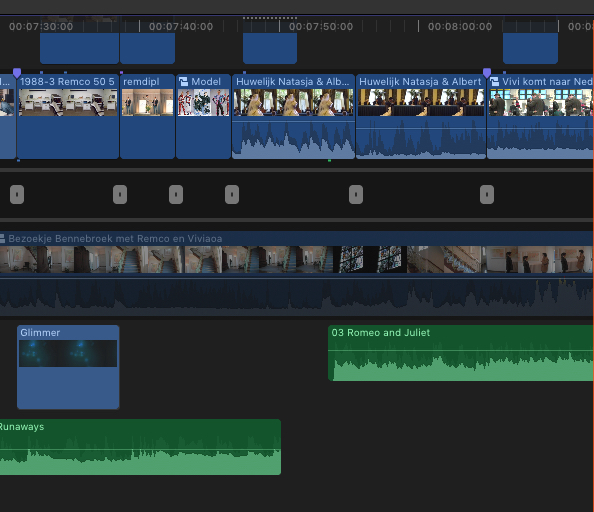
Is there anybody who can help me out ? I was in the middle of editing an FCPX project when suddenly (probably by accidentally hitting a certain key) the time line view went crazy. I have absolutely no clue how to get it back to the "normal" view. I added a screenshot of what it looks like
Any help is appreciated since it is a time critical project
Is there anybody who can help me out ? I was in the middle of editing an FCPX project when suddenly (probably by accidentally hitting a certain key) the time line view went crazy. I have absolutely no clue how to get it back to the "normal" view. I added a screenshot of what it looks like
Any help is appreciated since it is a time critical project
Please Log in to join the conversation.
- Tom Wolsky
-

- Offline
- Moderator
-

03 Apr 2019 14:26 #99497
by Tom Wolsky
Replied by Tom Wolsky on topic HELP ... FCPX Time line view went crazy
You’ve gone into the Precusion Editor it looks like. Press the Escape key.
Please Log in to join the conversation.
- JarrodMFay
-

- Offline
- Elite Member
-

Less
More
- Posts: 172
- Thank you received: 34
03 Apr 2019 15:15 #99498
by JarrodMFay
Replied by JarrodMFay on topic HELP ... FCPX Time line view went crazy
Yup. Or just double click one of those little grey boxes in between the timelines.
Please Log in to join the conversation.
03 Apr 2019 17:03 #99500
by Dinky
Replied by Dinky on topic HELP ... FCPX Time line view went crazy
Thanks very much.
I think I entered this editor by accidentally pressing the space bas ever so lightly and trimming a clip at the same time.
Anyway, it's solved now. Pfff
I think I entered this editor by accidentally pressing the space bas ever so lightly and trimming a clip at the same time.
Anyway, it's solved now. Pfff
Please Log in to join the conversation.


04 Apr 2019 01:18 #99504
by JoeEditor
Replied by JoeEditor on topic HELP ... FCPX Time line view went crazy
You enter the Precision Editor by double-clicking an edit point. The space bar doesn't do it. Just FYI.
Please Log in to join the conversation.
