


- Posts: 287
- Thank you received: 1
3 Post Moderation Rule for New Boarders (25 Jan 2021)
New boarders will have their posts moderated - Don't worry if you cannot see your post immediately.
Can I set default columns for event browser?
16 Mar 2019 02:15 #99331
by pszilard
Can I set default columns for event browser? was created by pszilard
Whenever I import a clip I get columns in the event browser that I do not need and have to manually turn off every time. E.g. 360 Mode and Stereoscopic Mode.
Is there somewhere to define a default list of displayed columns?
Thanks in advance,
Paul
Is there somewhere to define a default list of displayed columns?
Thanks in advance,
Paul
Please Log in to join the conversation.
16 Mar 2019 03:05 #99332
by pszilard
Replied by pszilard on topic Can I set default columns for event browser?
I think I can do this by creating a Template in Final Cut Pro Manager from Arctic Whiteness.
Is there a native FCPX way?
Is there a native FCPX way?
Please Log in to join the conversation.


16 Mar 2019 04:02 - 16 Mar 2019 04:03 #99333
by dgwvideo
Creating history....one edit at a time !
Replied by dgwvideo on topic Can I set default columns for event browser?
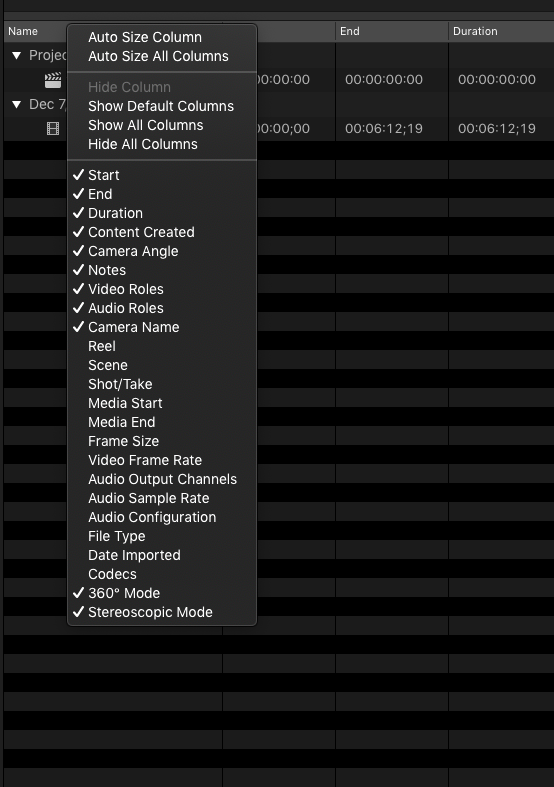
Control click anywhere in the top menu bar (with Name, Start, etc.) and you'll get options for selecting what you want. I'm not sure that these always stick when relaunching FCPX, but usually they seem to.
Creating history....one edit at a time !
Last edit: 16 Mar 2019 04:03 by dgwvideo.
Please Log in to join the conversation.
- Karsten Schlüter
-

- Offline
- Moderator
-

Less
More
- Posts: 3790
- Thank you received: 718
16 Mar 2019 04:15 #99334
by Karsten Schlüter
as an addendum:
and you can click'n drag the columns into individual order …
Replied by Karsten Schlüter on topic Can I set default columns for event browser?
dgwvideo wrote: Control click anywhere in the top menu bar (with Name, Start, etc.) and you'll get options for selecting what you want. …
as an addendum:
and you can click'n drag the columns into individual order …
Please Log in to join the conversation.
16 Mar 2019 10:45 #99336
by pszilard
Replied by pszilard on topic Can I set default columns for event browser?
I am used to right click and then select. Didn't think that Control+click makes a sticky selection. Thanks for that, I'll have to try it.
Please Log in to join the conversation.

16 Mar 2019 21:24 - 16 Mar 2019 21:25 #99340
by JoeEditor
Replied by JoeEditor on topic Can I set default columns for event browser?
FCPX has had this super annoying behavior of forcing the factory default column layout on us for several versions now. You rarely will see, if ever, the column layout be the way it was the last time you were working in FCPX. Every launch resets that. Drives me insane. And no, you can not change it.
Control-click and right-click are the exact same thing.
Control-click and right-click are the exact same thing.
Last edit: 16 Mar 2019 21:25 by JoeEditor.
Please Log in to join the conversation.
- thomas.lim
-

- Offline
- New Member
-

Less
More
- Posts: 10
- Thank you received: 0
14 Jun 2020 19:18 #107888
by thomas.lim
Replied by thomas.lim on topic Can I set default columns for event browser?
Glad to know I'm not the only one. But sad to know after so many years and revisions that this is still an issue. I hate having to re-select columns every time I open the software.FCPX.guru wrote: FCPX has had this super annoying behavior of forcing the factory default column layout on us for several versions now. You rarely will see, if ever, the column layout be the way it was the last time you were working in FCPX. Every launch resets that. Drives me insane. And no, you can not change it.
Please Log in to join the conversation.

17 Dec 2020 15:22 #111556
by VTC
Replied by VTC on topic Can I set default columns for event browser?
And has anyone actially USED that 360º mode column? Yes, the default setting is idocy. The fastest thing is to do is hit the last selection on the list, Hide All Columns, then check off the ones you want. It's maddening to have to do this just like it is having to turn Title/Safe overlays on every time you open the same project. It's like the coders only code without knowing what's useful in the software.
Please Log in to join the conversation.


11 Apr 2021 23:12 #113904
by Wondering
Replied by Wondering on topic Can I set default columns for event browser?
I'm guessing there's still no way to do this?
Please Log in to join the conversation.
12 Apr 2021 03:40 #113907
by JoeEditor
Replied by JoeEditor on topic Can I set default columns for event browser?
Nope, not yet, probably never will. You'd think being able to save a custom preset would be common sense to do from day one.
Please Log in to join the conversation.
