


- Posts: 4
- Thank you received: 0
3 Post Moderation Rule for New Boarders (25 Jan 2021)
New boarders will have their posts moderated - Don't worry if you cannot see your post immediately.
Strange Infra Green Color Appears In Video Clip
- circle center
-
 Topic Author
- Offline
- New Member
-

Less
More
02 Mar 2019 00:49 #99110
by circle center
Strange Infra Green Color Appears In Video Clip was created by circle center
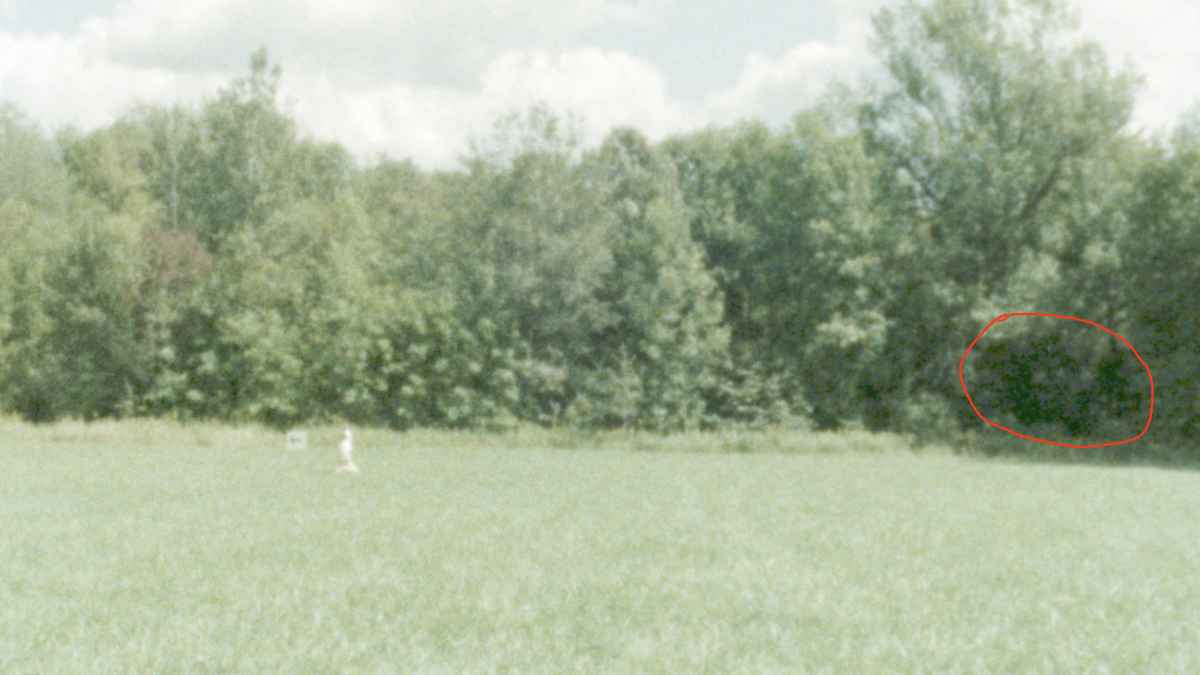
Hello, I've been color grading in FCPX and recently noticed that in one of my shots, there appears to be a strange digital looking infra-green color. I noticed that when I cut off both, Color Board and Match Color, the strange green color is still present. The only thing that I did to the shot was raise the light (exposure) a tad. Other similar shots seem to look fine.
Does anyone have an idea of what this could be and how I can correct this issue?
I attached a sample of this shot .. the problem is in the middle/right of the shot in the red circle.
Film was shot on Super 8mm film stock .
Thanks kindly for any help you can offer!
Does anyone have an idea of what this could be and how I can correct this issue?
I attached a sample of this shot .. the problem is in the middle/right of the shot in the red circle.
Film was shot on Super 8mm film stock .
Thanks kindly for any help you can offer!
Please Log in to join the conversation.


02 Mar 2019 04:40 - 02 Mar 2019 04:51 #99111
by Redifer
Replied by Redifer on topic Strange Infra Green Color Appears In Video Clip
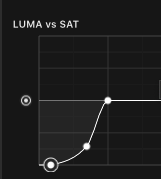
How was this scanned to video? Anyway try opening up the Color tools and adding a Hue/Saturation Curve. Once there scroll down to LUMA vs SAT. Click and adjust the lower portion of the curves to look something like this and see if that helps you. Make adjustments to it until it looks OK to you. If my curves don't work for you, reset it, use the eyedropper and sample the color (also on the LUMA vs SAT). It will make three dots. Drag the middle one completely down to the bottom.
Last edit: 02 Mar 2019 04:51 by Redifer.
Please Log in to join the conversation.
- Karsten Schlüter
-

- Offline
- Moderator
-

Less
More
- Posts: 3790
- Thank you received: 718
02 Mar 2019 04:49 #99112
by Karsten Schlüter
Replied by Karsten Schlüter on topic Strange Infra Green Color Appears In Video Clip
… replied to your other post at ASC… but for sake of completeness:
… looks to me - no grading expert! - like a 'clipped' black/shadows/luma …
select your unaltered clip in your project
open the Waveform Monitor cmd/7
here an example:
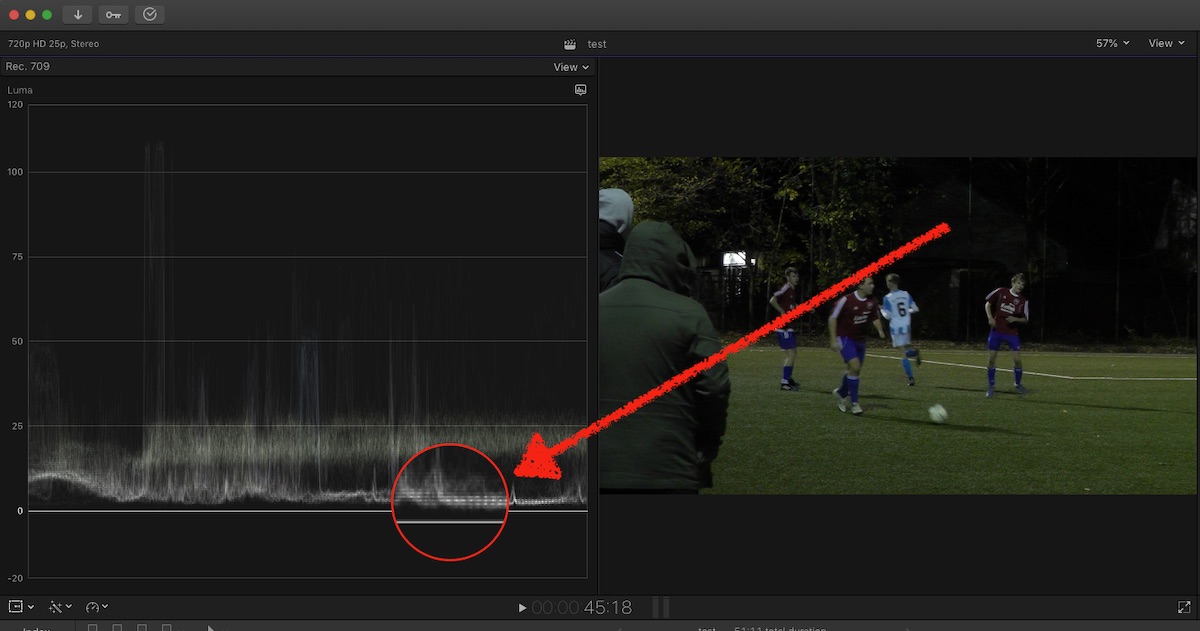
the Luma shows a flat-line = no detail, just a black solid (which is no prob in my example, to WAS a dark night
if your recording is 'flat', nothing brings back detail. sorry to say … to avoid that professionals switch the Histogram in the cams viewer.......
… looks to me - no grading expert! - like a 'clipped' black/shadows/luma …
select your unaltered clip in your project
open the Waveform Monitor cmd/7
here an example:
the Luma shows a flat-line = no detail, just a black solid (which is no prob in my example, to WAS a dark night
if your recording is 'flat', nothing brings back detail. sorry to say … to avoid that professionals switch the Histogram in the cams viewer.......
Please Log in to join the conversation.
02 Mar 2019 04:54 #99113
by Redifer
Replied by Redifer on topic Strange Infra Green Color Appears In Video Clip
I just had another idea. You said you raised the exposure. Did you raise it with the master slider or just raise the brights? Looking at your image it seems overexposed as if the black levels were raised, too.
Please Log in to join the conversation.
- circle center
-
Topic Author
- Offline
- New Member
-
Less
More
- Posts: 4
- Thank you received: 0
03 Mar 2019 16:13 #99122
by circle center
Replied by circle center on topic Strange Infra Green Color Appears In Video Clip
@ Redifer, thanks so much for your feedback Redifer .. I really appreciate it!
To answer your question, I basically raised the Highlights and Mid-tones and I dropped the shadows a little. Before this, I did a Match Color with another section of this same shot that is brighter.
To answer your question, I basically raised the Highlights and Mid-tones and I dropped the shadows a little. Before this, I did a Match Color with another section of this same shot that is brighter.
Please Log in to join the conversation.
- circle center
-
Topic Author
- Offline
- New Member
-
Less
More
- Posts: 4
- Thank you received: 0
03 Mar 2019 16:15 #99123
by circle center
Replied by circle center on topic Strange Infra Green Color Appears In Video Clip
Thanks so much for the feedback Karsten! 
Please Log in to join the conversation.
