


- Posts: 238
- Thank you received: 20
3 Post Moderation Rule for New Boarders (25 Jan 2021)
New boarders will have their posts moderated - Don't worry if you cannot see your post immediately.
Editing 360 video in 10.4.5
- Squamish ed
-
 Topic Author
- Offline
- Elite Member
-

Less
More
23 Feb 2019 22:54 #99021
by Squamish ed
Ed
Editing 360 video in 10.4.5 was created by Squamish ed
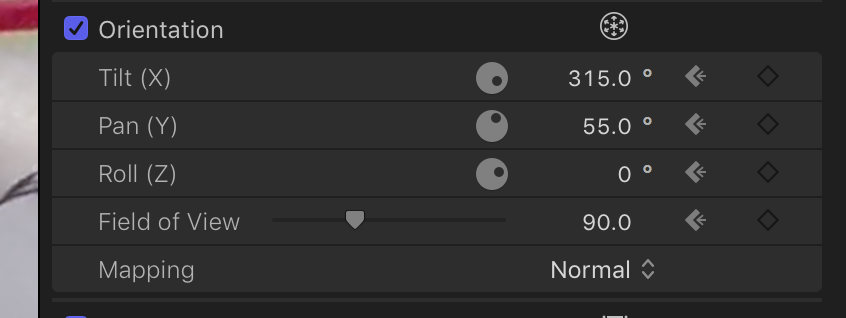
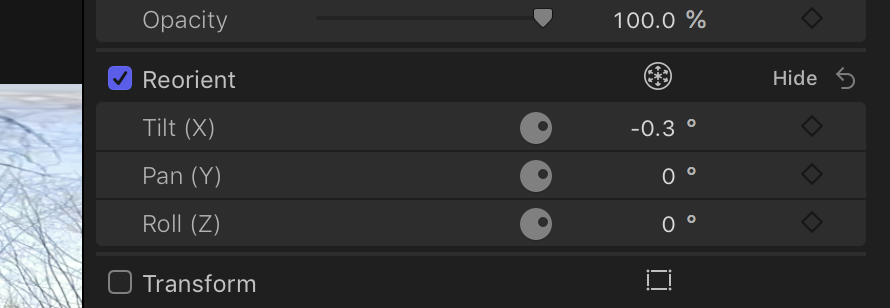
I'm editing a few clips taken with a GoPro Fusion and am running into something I don't understand. In the inspector one project offers Reorientation and in the other project it offers Orientation. Reorientation offers more controls that are of interest for me. Any idea why the 2 are different? I checked the project info in the inspector and both appear the same.
Ed
Please Log in to join the conversation.
- Tom Wolsky
-

- Offline
- Moderator
-

24 Feb 2019 00:59 #99022
by Tom Wolsky
Replied by Tom Wolsky on topic Editing 360 video in 10.4.5
It looks like one is flat and the other is 360. Orientation in flat project, Reorient in the 360 project.
Please Log in to join the conversation.
- Squamish ed
-
Topic Author
- Offline
- Elite Member
-
Less
More
- Posts: 238
- Thank you received: 20
24 Feb 2019 02:26 #99023
by Squamish ed
Ed
Replied by Squamish ed on topic Editing 360 video in 10.4.5
It's still eluding me why I have different options. I tried making a new project with the same settings and using the same 360 clip. In the new project I had all the 360 options at first so I switched projects and found what I described earlier but then when I went back to the new project it had reverted to only the X,Y and Z options and field of view and mapping had disappeared.
Am I doing something wrong or might this be a bug?
Am I doing something wrong or might this be a bug?
Ed
Please Log in to join the conversation.
- Tom Wolsky
-
- Offline
- Moderator
-
24 Feb 2019 06:07 #99028
by Tom Wolsky
Replied by Tom Wolsky on topic Editing 360 video in 10.4.5
Are you making a 360 project or a flat project? 360 media in one type of project has one option, and a different option in a flat project.
Please Log in to join the conversation.
- Squamish ed
-
Topic Author
- Offline
- Elite Member
-
Less
More
- Posts: 238
- Thank you received: 20
25 Feb 2019 01:24 #99035
by Squamish ed
Ed
Replied by Squamish ed on topic Editing 360 video in 10.4.5
I had to think about it for a bit but I finally got it sorted out. I'd created a 360 project because I thought that was what I needed as I'm working with 360 clips. What I was trying to do was to create a flat project using 360 clips so I could use clips shot in 360 to make a flat image It's pretty much the same as what GoPro has labelled 'overcapture' but instead of using the buggy GoPro Fusion Studio software it can be done inside FCPX.
I wasn't able to modify the 360 project to a 1080P but creating a new project and copying over solved the problem.
Once again you nailed it Tom. The options that disappeared before are now back - the sun can rise again. Many thanks
I wasn't able to modify the 360 project to a 1080P but creating a new project and copying over solved the problem.
Once again you nailed it Tom. The options that disappeared before are now back - the sun can rise again. Many thanks
Ed
Please Log in to join the conversation.
