


- Posts: 3
- Thank you received: 0
3 Post Moderation Rule for New Boarders (25 Jan 2021)
New boarders will have their posts moderated - Don't worry if you cannot see your post immediately.
Audio transitions with range select
24 Jan 2019 16:31 #98650
by LethMedia
Audio transitions with range select was created by LethMedia
I use range select very often to select portions of an audio clip that needs increasing or decreasing. When a range of audio is selected, I simply grab the audio level line and increase/decrease volume. In this way FCPX automatically makes four keyframes and makes a fade/transition in the beginning and end of the range. I would like this transition to be longer than the default which is very fast. Is there any way to change the default transition time when using range select in this way? I am aware that I can move the keyframes manually later on, but this is pretty time consuming.
Thanks in advance
Thanks in advance
Please Log in to join the conversation.


25 Jan 2019 13:10 #98664
by JoeEditor
Replied by JoeEditor on topic Audio transitions with range select
No way to change that, sorry. I use this technique daily, and zoom in enough to be accurate with my ranges, and don't ever find a need to change them.
Please Log in to join the conversation.
- Rinaldo Doon
-
- Offline
- Senior Member
-

Less
More
- Posts: 41
- Thank you received: 11
27 Jan 2019 15:00 #98677
by Rinaldo Doon
Replied by Rinaldo Doon on topic Audio transitions with range select
Oddly enough, this was mentioned in Ripple Training's Live YouTube the other day.
The preset length of audio fades is in FCPX's Preferences, under General. Changing this changes the length of fades that appear with keyframes when you drag down having selected a range on audio.
No,I never knew that either!
The preset length of audio fades is in FCPX's Preferences, under General. Changing this changes the length of fades that appear with keyframes when you drag down having selected a range on audio.
No,I never knew that either!
Please Log in to join the conversation.
31 Jan 2019 08:57 #98759
by LethMedia
Replied by LethMedia on topic Audio transitions with range select
Hi Rinaldo
Very happy to read your reply. However it doesn't work for me. Have you tried it yourself? Maybe you can help me with more information about the Ripple live show you are mentioning. I found this show and here the range method is mentioned, but also that you will get hard fades using this method. Its around 49:25. Hope you can throw some light on this - thanks...
Kind regards
Bent
Very happy to read your reply. However it doesn't work for me. Have you tried it yourself? Maybe you can help me with more information about the Ripple live show you are mentioning. I found this show and here the range method is mentioned, but also that you will get hard fades using this method. Its around 49:25. Hope you can throw some light on this - thanks...
Kind regards
Bent
Please Log in to join the conversation.
- Rinaldo Doon
-
- Offline
- Senior Member
-
Less
More
- Posts: 41
- Thank you received: 11
01 Feb 2019 12:39 #98771
by Rinaldo Doon
Replied by Rinaldo Doon on topic Audio transitions with range select
In reply to Bent:
Bent, well I was right (a bit!) and also wrong…
What I saw (as you correctly point out), was the hard fades mentioned at 49:25 in the Ripple Live 1 show. Somewhere else in that show (sorry, can’t find it easily), I think Steve actually did drag down an audio range but didn’t notice the fades had appeared – he was taking about something else at the time, I believe.
Anyway, I initially thought that perhaps preset audio fade adjustments in Preferences only worked in 10.4.5 while dragging to adjust audio levels, and not 10.4, and that maybe you were on 10.4.
I was using 10.4.5 for the test and what I must have done is set the fade preset in Preferences to half a second, thought I could see that in the timeline when dragging down a short range, increased the fade preset to two seconds and made sure I selected a much bigger range in order to see the longer fades. I saw that the fade was longer, thus, I concluded that it was me that had changed the fade duration.
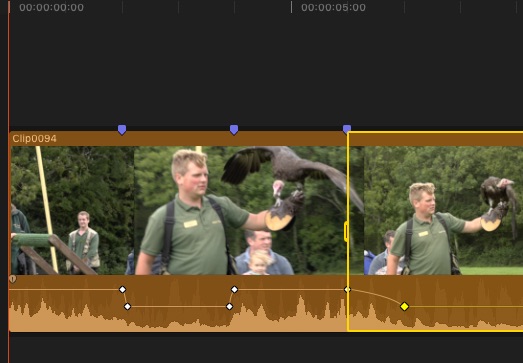
Well, of course it wasn’t me. What is going on however, which I believe hasn’t been mentioned, is that the fade length when you drag down within a range, is dependent on the length of the range! If you select a two-second range, the fade duration is 3 frames. If you select a twenty-second range, the fade is 1 second.
Having now seen what’s going on, I can confirm that the behaviour is identical in 10.4 and 10.4.5, and most likely all versions between.
This picture below shows the audio keyframes for a two-second range and at the start of a twenty-second range, and as you can see the fade durations are different.
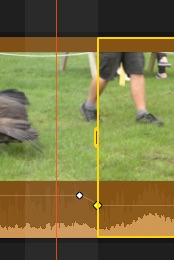
Incidentally, if after selected a range you use the keyboard shortcuts for adjusting audio volume by 1dB (Modify menu/Adjust Volume/Up (+1dB), etc), the keyframes are as shown in the picture below, the first keyframe being about a third of a frame outside the range – look for the 1-frame highlight on the picture to see this.
So it looks like feedback time, as for certain situations it would certainly be useful to have a selectable fixed length of fade when dragging down on a range of audio.
Sincerely hope this helps.
Bent, well I was right (a bit!) and also wrong…
What I saw (as you correctly point out), was the hard fades mentioned at 49:25 in the Ripple Live 1 show. Somewhere else in that show (sorry, can’t find it easily), I think Steve actually did drag down an audio range but didn’t notice the fades had appeared – he was taking about something else at the time, I believe.
Anyway, I initially thought that perhaps preset audio fade adjustments in Preferences only worked in 10.4.5 while dragging to adjust audio levels, and not 10.4, and that maybe you were on 10.4.
I was using 10.4.5 for the test and what I must have done is set the fade preset in Preferences to half a second, thought I could see that in the timeline when dragging down a short range, increased the fade preset to two seconds and made sure I selected a much bigger range in order to see the longer fades. I saw that the fade was longer, thus, I concluded that it was me that had changed the fade duration.
Well, of course it wasn’t me. What is going on however, which I believe hasn’t been mentioned, is that the fade length when you drag down within a range, is dependent on the length of the range! If you select a two-second range, the fade duration is 3 frames. If you select a twenty-second range, the fade is 1 second.
Having now seen what’s going on, I can confirm that the behaviour is identical in 10.4 and 10.4.5, and most likely all versions between.
This picture below shows the audio keyframes for a two-second range and at the start of a twenty-second range, and as you can see the fade durations are different.
Incidentally, if after selected a range you use the keyboard shortcuts for adjusting audio volume by 1dB (Modify menu/Adjust Volume/Up (+1dB), etc), the keyframes are as shown in the picture below, the first keyframe being about a third of a frame outside the range – look for the 1-frame highlight on the picture to see this.
So it looks like feedback time, as for certain situations it would certainly be useful to have a selectable fixed length of fade when dragging down on a range of audio.
Sincerely hope this helps.
Please Log in to join the conversation.
02 Feb 2019 14:28 #98777
by LethMedia
Replied by LethMedia on topic Audio transitions with range select
Thank you so much for the effort of your extended reply. I see what you mean and it is good to finally understand what is happening when pulling down audio levels in this way. But as I think we agree on, this is not working very well. I am on 10.4.4, not wanting to update at the moment since I am in the middle of a big project involving motion templates. However, as I understand you, there is no change in this functionality in 10.4.5.
I actually already suggested Apple to change this behaviour via the feedback function within FCPX. If you and others do the same, maybe we could see an improvement in future updates.
Thank you again for taking the time to explain your findings.
Kind regards Bent
I actually already suggested Apple to change this behaviour via the feedback function within FCPX. If you and others do the same, maybe we could see an improvement in future updates.
Thank you again for taking the time to explain your findings.
Kind regards Bent
Please Log in to join the conversation.
