


- Posts: 2
- Thank you received: 0
3 Post Moderation Rule for New Boarders (25 Jan 2021)
New boarders will have their posts moderated - Don't worry if you cannot see your post immediately.
ReTime editor
- mediaedit.co.uk
-
 Topic Author
- Offline
- New Member
-

Less
More
04 Jan 2019 12:09 #98402
by mediaedit.co.uk
ReTime editor was created by mediaedit.co.uk
Firstly hi there best for 2019!
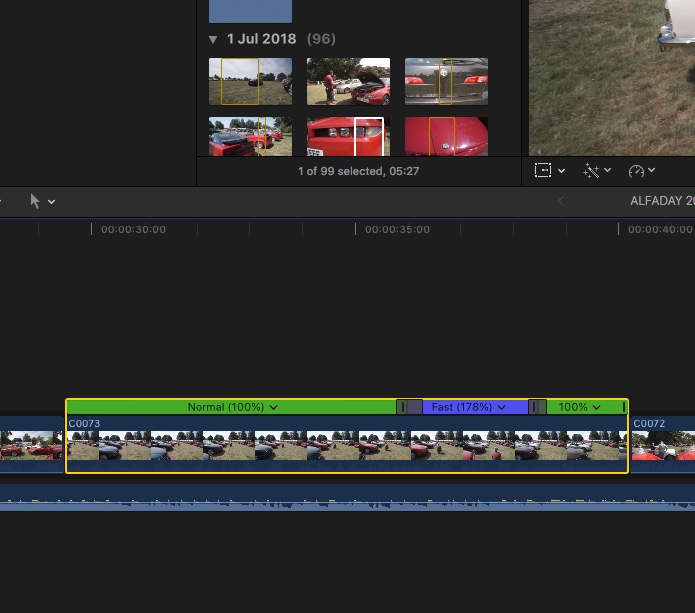
I wondered if anybody has any ideas for copying and pasting a variable retime edit to another clip clip on the timeline.
I've searched and searched everywhere and see its only able to paste a constant speed to another clip?
I had a look around for plugins as well, there seems to be nothing out there anybody with any ideas?
Wouldn't this be a useful tool ?
best
Bob
I wondered if anybody has any ideas for copying and pasting a variable retime edit to another clip clip on the timeline.
I've searched and searched everywhere and see its only able to paste a constant speed to another clip?
I had a look around for plugins as well, there seems to be nothing out there anybody with any ideas?
Wouldn't this be a useful tool ?
best
Bob
Please Log in to join the conversation.

05 Jan 2019 14:23 #98405
by Jimmyfinn
Replied by Jimmyfinn on topic ReTime editor
Blwyddyn Newydd Dda!
Not possible I'm afraid, only non-variable speed changes copy across.
As a workaround maybe...
Create a Compound clip of a shot then add your variable speed changes.
You can then open it and use replace with a new shot and it will retain speed changes.
Not possible I'm afraid, only non-variable speed changes copy across.
As a workaround maybe...
Create a Compound clip of a shot then add your variable speed changes.
You can then open it and use replace with a new shot and it will retain speed changes.
Please Log in to join the conversation.

05 Jan 2019 15:13 #98406
by JoeEditor
Replied by JoeEditor on topic ReTime editor
Not at my workstation now, but does Paste Attributes not include retiming? Just thinking out loud.
Please Log in to join the conversation.
- mediaedit.co.uk
-
Topic Author
- Offline
- New Member
-
Less
More
- Posts: 2
- Thank you received: 0
06 Jan 2019 18:04 #98410
by mediaedit.co.uk
Replied by mediaedit.co.uk on topic ReTime editor
thanks for your replies...
I have done a little more research and as you say only can paste content frame rates, however if you get Twixtor you can copy and paste the variable frames set up in one clip to another, its a quick and easy solution , however the rendering isn't the fastest for quick previews like you can get with retiming.
I'm surprised no one has any alternative methods, ripe for a plug in option, id certainly purchase as Twixtor is very expensive.
I also had a look at making a ramp (then exporting the effect) using Motion, however it seems it doesn't let you keyframe variable rates either!!
I have done a little more research and as you say only can paste content frame rates, however if you get Twixtor you can copy and paste the variable frames set up in one clip to another, its a quick and easy solution , however the rendering isn't the fastest for quick previews like you can get with retiming.
I'm surprised no one has any alternative methods, ripe for a plug in option, id certainly purchase as Twixtor is very expensive.
I also had a look at making a ramp (then exporting the effect) using Motion, however it seems it doesn't let you keyframe variable rates either!!
Please Log in to join the conversation.
07 Jan 2019 11:40 - 07 Jan 2019 11:49 #98414
by Jimmyfinn
Replied by Jimmyfinn on topic ReTime editor
I'm not sure that I would purchase a Plug in that enabled that. I work on Promos and do a fair amount of speed changes to get things to fit strict durations. For the material I work on, I find that it's often easier to tackle variable speed effects from scratch on a clip as its unlikely a copied setting would have the exact effect I was looking for on a new clip. Although I can see how it gets you 'in the ballpark', you would still have to spend time refining the end frame and transitions.
Last edit: 07 Jan 2019 11:49 by Jimmyfinn.
Please Log in to join the conversation.
07 Jan 2019 12:23 #98415
by JoeEditor
Replied by JoeEditor on topic ReTime editor
I have to agree. When are two clips so identical that variable spurred changes would match?
Please Log in to join the conversation.
- Karsten Schlüter
-

- Offline
- Moderator
-

Less
More
- Posts: 3790
- Thank you received: 718
07 Jan 2019 14:12 #98416
by Karsten Schlüter
no doubt, but:
Replied by Karsten Schlüter on topic ReTime editor
mediaedit.co.uk wrote: … its a quick and easy solution…
no doubt, but:
- selecting the Range you like to retime (type R)
- ctrl-alt-R and type 180% (for example)
- (no step 3)
Please Log in to join the conversation.
- haysoos123
-
- Offline
- Platinum Member
-

Less
More
- Posts: 402
- Thank you received: 72
11 Jan 2019 02:00 #98459
by haysoos123
Replied by haysoos123 on topic ReTime editor
I've definitely had moments where I've needed this... sometimes, you want to copy and paste EXACTLY the speed ramp, since it's very hard to recreate it exactly, especially if it's complicated. There is s weird work-around, though:
Duplicate the clip. Select the duplicated clip (that has the speed ramp) and go to the menu and select Clip->Open Clip. You've now 'opened up' the clip, so cut in your desired clip that you want to copy that speed ramp onto. Basically, 'opening' a clip is a bit like using it like a compound clip. Now, this might create some havoc if you're doing this and then bringing the project into Resolve or something like that, but in that case you should bake in the speed ramps anyway.
This is particular to the way FCPX handles clips in the timeline. Every clip can be 'opened up' and you can actually do some amount of tweaking of that particular instance of the clip in the timeline.
Duplicate the clip. Select the duplicated clip (that has the speed ramp) and go to the menu and select Clip->Open Clip. You've now 'opened up' the clip, so cut in your desired clip that you want to copy that speed ramp onto. Basically, 'opening' a clip is a bit like using it like a compound clip. Now, this might create some havoc if you're doing this and then bringing the project into Resolve or something like that, but in that case you should bake in the speed ramps anyway.
This is particular to the way FCPX handles clips in the timeline. Every clip can be 'opened up' and you can actually do some amount of tweaking of that particular instance of the clip in the timeline.
Please Log in to join the conversation.
