


- Posts: 120
- Thank you received: 3
3 Post Moderation Rule for New Boarders (25 Jan 2021)
New boarders will have their posts moderated - Don't worry if you cannot see your post immediately.
How Do I Import HEVC?
20 Dec 2018 16:02 #98239
by RayPaula
How Do I Import HEVC? was created by RayPaula
Hi, I just received my GoPro Hero7 Black which uses HEVC shooting 4K 60fps. I'm on O.S. High Sierra and have FCPX. Can anyone here please explain and/or point me in the right direction for information in regards to reformatting within FCPX or otherwise without video quality loss? I would sincerely appreciate any help that you may give. Thank you. Ray
Please Log in to join the conversation.


21 Dec 2018 04:15 - 21 Dec 2018 04:16 #98247
by dgwvideo
Creating history....one edit at a time !
Replied by dgwvideo on topic How Do I Import HEVC?
FCPX 10.4 on High Sierra and above will import HEVC files directly using the import function. Exporting from FCPX is another matter, but you will need to to configure it to do so. You will need to add a compressor destination to the share menu. You can select one of the Apple HEVC codecs (8 bit or 10 bit) and add that to the FCPX share menu. Here is some basic info on how to do that:
www.pavtube.com/export-h265-from-fcp-x-10-4.html
www.pavtube.com/export-h265-from-fcp-x-10-4.html
Creating history....one edit at a time !
Last edit: 21 Dec 2018 04:16 by dgwvideo.
Please Log in to join the conversation.
21 Dec 2018 13:22 - 21 Dec 2018 18:29 #98251
by RayPaula
Replied by RayPaula on topic How Do I Import HEVC?
Thank you for your help and the link. That's great news that FCPX will import HEVC however, I don't want to export as h265. I would like to reformat the 4K 60fps HEVC to the best FCPX Prores as possible to maintain 4K quality. As a newbie to FCPX, I'm not really sure if I could simply reformat from HEVC to .MOV without losing 4K quality. All of my other video is in a h264 .MOV structure. If you could give me further direction, I would sincerely appreciate it. Thank you. Ray
Last edit: 21 Dec 2018 18:29 by RayPaula.
Please Log in to join the conversation.

21 Dec 2018 14:00 #98253
by joema
In general you don't need to reformat or transcode to optimized media or anything else when editing H264 or HEVC/H265 to maintain quality. The on-disk files themselves are never edited. It's not like Photoshop editing a JPG where there is concern over re-compression of a lossy format with each save operation. In FCPX all edits are simply metadata stored in the library.
The internal FCPX render format is ProRes 422, so even if you don't transcode to optimized media you are essentially already editing in ProRes.
HEVC is very compute-intensive and if your hardware, OS and app (FCPX) don't all support HEVC acceleration it can be very slow. E.g, a 12-core 2013 Mac Pro might be very slow, even if running FCPX 10.4.4 on Mojave. FCPX on High Sierra supports HEVC acceleration for decode (aka playback) and 8-bit encode when exporting. It is not currently supported for 10-bit encode, so that is super slow.
Replied by joema on topic How Do I Import HEVC?
RayPaula wrote: ....I would like to reformat the 4K 60fps HEVC to the best FCPX Prores as possible to maintain 4K quality...
In general you don't need to reformat or transcode to optimized media or anything else when editing H264 or HEVC/H265 to maintain quality. The on-disk files themselves are never edited. It's not like Photoshop editing a JPG where there is concern over re-compression of a lossy format with each save operation. In FCPX all edits are simply metadata stored in the library.
The internal FCPX render format is ProRes 422, so even if you don't transcode to optimized media you are essentially already editing in ProRes.
HEVC is very compute-intensive and if your hardware, OS and app (FCPX) don't all support HEVC acceleration it can be very slow. E.g, a 12-core 2013 Mac Pro might be very slow, even if running FCPX 10.4.4 on Mojave. FCPX on High Sierra supports HEVC acceleration for decode (aka playback) and 8-bit encode when exporting. It is not currently supported for 10-bit encode, so that is super slow.
Please Log in to join the conversation.
21 Dec 2018 18:29 #98257
by RayPaula
Replied by RayPaula on topic How Do I Import HEVC?
Thank you for the help in explaining the codec. I have a software program called EditReady in which I normally rewrap to my video to .MOV. I looked at the newEditReady upgrade today in which it accepts HEVC leading me to be able to transcode to .mov, and/or FCPX Prores 422 and others. There are several ProRes formats in which I will ultimately use for FCPX editing. As a newbie, I'm not sure which one to use to maintain 4K quality. I currently have a 2016 15" MacBook Pro w/ touchbar running OS High Sierra. It has a 1TB ssd drive and AMD Radeon Pro 460 Graphic card. I also have an external Promise PegasusR6 24TB drive. I'm planning on purchasing an iMac 27" in about a year or two. Thanks again for all your help. Ray 
Please Log in to join the conversation.
21 Dec 2018 19:52 #98258
by joema
You generally don’t need to transcode to any ProRes codec before importing to FCPX “to maintain 4k quality”. If you need ProRes (proxy or 4k) for performance reasons, FCPX can do that by itself during import or afterward.
If your MBP is laggy when editing 4k/60 HEVC from a GoPro, you can create proxies during or after import. If you don’t mind the space you can create optimized media, which is ProRes 422.
I suggest being on the latest versions of FCPX and macOS. Also install Apple Pro Video Formats 2.0.7. In Mojave you do that via System Prefs>Software Update. In prior versions, Google that and download from Apple; it’s free.
Replied by joema on topic How Do I Import HEVC?
RayPaula wrote: ...not sure which one to use to maintain 4K quality. I currently have a 2016 15" MacBook Pro w/ touchbar running OS High Sierra. It has a 1TB ssd drive and AMD Radeon Pro 460 Graphic card....
You generally don’t need to transcode to any ProRes codec before importing to FCPX “to maintain 4k quality”. If you need ProRes (proxy or 4k) for performance reasons, FCPX can do that by itself during import or afterward.
If your MBP is laggy when editing 4k/60 HEVC from a GoPro, you can create proxies during or after import. If you don’t mind the space you can create optimized media, which is ProRes 422.
I suggest being on the latest versions of FCPX and macOS. Also install Apple Pro Video Formats 2.0.7. In Mojave you do that via System Prefs>Software Update. In prior versions, Google that and download from Apple; it’s free.
Please Log in to join the conversation.
21 Dec 2018 20:53 #98260
by RayPaula
Replied by RayPaula on topic How Do I Import HEVC?
Thank you for explaining how I could simply import HEVC files natively into FCPX. I can see how that would be the simplest way due to not transcoding in EditReady beforehand. The biggest reason I would be transcoding with EditReady would be for immediate use of the HEVC file for viewing through other programs. Please correct me if I'm wrong; I believe if I do transcode to .MOV I would maintain the 4K quality in which I could import that into FCPX later on for editing. I would then edit out Optimized ProRes 422. I sincerely appreciate your time and patience in helping me understand these proper procedures. I'm coming from Sony Vegas Pro and have been transitioning to Mac, FCPX, etc. over the past couple years. I'm always learning from this awesome forum. Thanks again, Ray
Please Log in to join the conversation.

22 Dec 2018 06:33 - 22 Dec 2018 06:41 #98269
by Redifer
Replied by Redifer on topic How Do I Import HEVC?
I am using Mohave and the latest FCPX and I cannot import HEVC. It seems that Apple has a very limited understanding of HEVC and can only import certain kinds. What kind that is I do not know as no HEVC/H.265 file I have ever come across on the internet will open. The kind I have will not play in the Finder, Quicktime nor can it be imported into FCPX. The only way to play the video file on a Mac is with VLC. Here's what VLC reports it as:
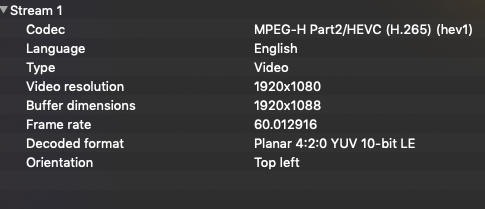
Again, this does not work on Mac OS. HEVC support is very limited on a Mac.
If they're gonna stop support of legacy codecs, they could at least support CURRENT codecs. Just sayin'.
Again, this does not work on Mac OS. HEVC support is very limited on a Mac.
If they're gonna stop support of legacy codecs, they could at least support CURRENT codecs. Just sayin'.
Last edit: 22 Dec 2018 06:41 by Redifer.
Please Log in to join the conversation.
22 Dec 2018 13:14 #98270
by joema
I have tried several HEVC files and FCPX 10.4.4 on Mojave handles most of them OK. Examples: www.libde265.org/downloads-videos/
A few above-listed HEVC files that have an MKV wrapper cannot be handled by either FCPX nor Resolve nor EditReady. This isn't an issue with the codec but the Matroska wrapper. Premiere will open those but is so slow it's unusable without proxies -- even on an iMac Pro.
FCPX can also handle all the Samsung NX1 HEVC variants I've tested, see downloadable camera-native files: www.imaging-resource.com/news/2014/11/19...abs-available-for-do
Some of these can be quite sluggish, which is expected. That is why I keep reminding the OP this is not an image quality issue it is predominately an editing performance issue. There is likely no image quality difference between editing or color correcting H264 or HEVC or ProRes transcoded from those codecs.
IF the camera can *acquire* in ProRes, that is different. That could be advantageous in some cases. But this is different from transcoding to ProRes material (esp 8-bit 4:2:0) that was acquired in H264 or HEVC.
However the OP's concern is not HEVC in general only *one* specific codec -- HEVC from a GoPro Hero7. If he could post a small test sample to DropBox or some other download point, I'll be happy to test it on various Mac and NLEs. I have the same laptop he has -- a 2016 15" MBP.
It says on Apple's FCPX compatibility page that H265/HEVC material from the GoPro Hero 6 and Hero 7 are supported: support.apple.com/en-us/HT204203#gopro
Replied by joema on topic How Do I Import HEVC?
Redifer wrote: I am using Mohave and the latest FCPX and I cannot import HEVC. It seems that Apple has a very limited understanding of HEVC and can only import certain kinds. What kind that is I do not know as no HEVC/H.265 file I have ever come across on the internet will open....
I have tried several HEVC files and FCPX 10.4.4 on Mojave handles most of them OK. Examples: www.libde265.org/downloads-videos/
A few above-listed HEVC files that have an MKV wrapper cannot be handled by either FCPX nor Resolve nor EditReady. This isn't an issue with the codec but the Matroska wrapper. Premiere will open those but is so slow it's unusable without proxies -- even on an iMac Pro.
FCPX can also handle all the Samsung NX1 HEVC variants I've tested, see downloadable camera-native files: www.imaging-resource.com/news/2014/11/19...abs-available-for-do
Some of these can be quite sluggish, which is expected. That is why I keep reminding the OP this is not an image quality issue it is predominately an editing performance issue. There is likely no image quality difference between editing or color correcting H264 or HEVC or ProRes transcoded from those codecs.
IF the camera can *acquire* in ProRes, that is different. That could be advantageous in some cases. But this is different from transcoding to ProRes material (esp 8-bit 4:2:0) that was acquired in H264 or HEVC.
However the OP's concern is not HEVC in general only *one* specific codec -- HEVC from a GoPro Hero7. If he could post a small test sample to DropBox or some other download point, I'll be happy to test it on various Mac and NLEs. I have the same laptop he has -- a 2016 15" MBP.
It says on Apple's FCPX compatibility page that H265/HEVC material from the GoPro Hero 6 and Hero 7 are supported: support.apple.com/en-us/HT204203#gopro
Please Log in to join the conversation.
24 Dec 2018 13:49 #98297
by RayPaula
Replied by RayPaula on topic How Do I Import HEVC?
Awesome information from the above responses. My GoPro HEVC codec is much different than Redifer. My codecs show as HEVC, AAC, Timecode. In addition, the GoPro folder offers it as a MP4 which can be played in QuickTime. As you know, this could be rewrapped easily to .MOV. In EditReady 2.5.1 (latest version), I can rewrap and/or convert to ProRes formats as well. In addition it has a H.265 (HEVC) output. I haven't actually tried anything in FCPX due to just beginning to dive into it. I totally agree with joema that FCPX should ingest GoPro HEVC without issue. I have read this in several other places as well. In my situation, I'm going to keep all my folders intact as I do with all my video for FCPX at which point I will decide ProRes, etc.. If I want to view and/or pass on video immediately without editing, I will do so by simply making a copy and rewrapping to a format I'm passing it on to. Thank you again for all your help, very much appreciated. Happy Holidays to all!! Ray
Please Log in to join the conversation.
