


- Posts: 129
- Thank you received: 2
3 Post Moderation Rule for New Boarders (25 Jan 2021)
New boarders will have their posts moderated - Don't worry if you cannot see your post immediately.
Frame.io Problems, Questions
28 Nov 2018 17:29 #97985
by Smesh
Frame.io Problems, Questions was created by Smesh
I'm running a new iMac Pro with Mojave and FCPX 10.4.4. I installed the frame.io plug-in and tested the demo for a few days. It seemed to work pretty well, so last night, I purchased the subscription. I was a bit nervous about using it with my client, but uploaded a few audio tracks for him to review. The upload crashed once, but finally went through. I invited him and he was able to listen to them. The interface was pretty un-intuitive though, at least for audio. Still, it worked. He didn't respond in the frame.io app, but sent an email with comments instead. Not sure if there was even an option for video.
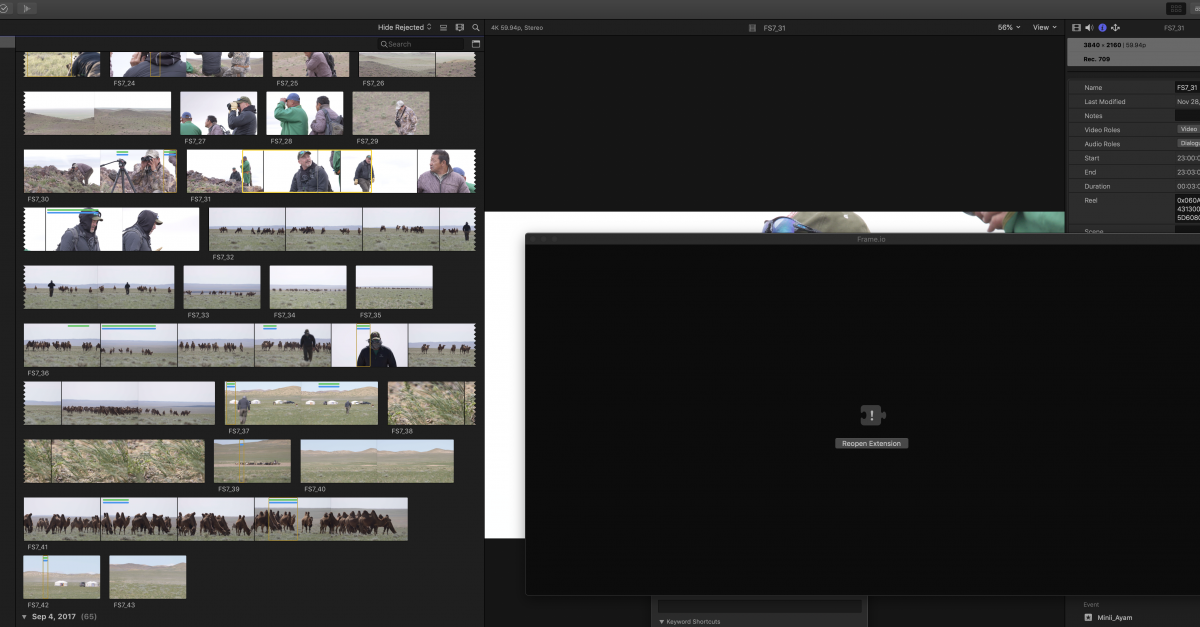
But here's the problem. This morning I got up to keep working, and wanted to send my client a clip from the browser to ask some questions about it. I opened the extension from within final cut pro, and dragged the clip form the browser (proxy mode). It showed an error icon telling me to reload the plug-in with a button to click, which I did. Same thing happened a few times. Tried to open the app from applications, and nothing happens. Nothing. Tried everything. Tried opening App Store for an update, but there isn't one.
Is anyone else having issues with frame.io integration? Perhaps the only option is to send clips while in optimized mode? I will try again in optimized, but I want to send him a low res clip instead of a giant file.
But here's the problem. This morning I got up to keep working, and wanted to send my client a clip from the browser to ask some questions about it. I opened the extension from within final cut pro, and dragged the clip form the browser (proxy mode). It showed an error icon telling me to reload the plug-in with a button to click, which I did. Same thing happened a few times. Tried to open the app from applications, and nothing happens. Nothing. Tried everything. Tried opening App Store for an update, but there isn't one.
Is anyone else having issues with frame.io integration? Perhaps the only option is to send clips while in optimized mode? I will try again in optimized, but I want to send him a low res clip instead of a giant file.
Please Log in to join the conversation.
28 Nov 2018 18:56 #97986
by Smesh
Replied by Smesh on topic Frame.io Problems, Questions
For anyone who's wondering, I figured it out. I re-installed the app, then you need to click on the icon in the top right of your screen (different from the one inside final cut pro x which is confusing), then select the gear icon, and choose account settings, then click on "install Frame.io Share Destinations."
Please Log in to join the conversation.
28 Nov 2018 21:41 #97990
by Smesh
Replied by Smesh on topic Frame.io Problems, Questions
Here we go again. Problem is back. My share destinations disappeared and I get errors again when I try to drop files in. Anyone else having issues with frame io? I just subscribed yesterday, but if it's not reliable, I'm going to have to cancel.
Please Log in to join the conversation.


29 Nov 2018 01:02 #97991
by JoeEditor
Replied by JoeEditor on topic Frame.io Problems, Questions
You need to download and install Frame.io from their site. I have it, we use it daily, quite a bit, no issues here. Maybe contact their tech support.
Please Log in to join the conversation.

29 Nov 2018 03:55 #97992
by Doug
Replied by Doug on topic Frame.io Problems, Questions
I've been using Frame.io for a couple of years now, have never had a problem like that. We have multiple editors uploading things daily and all works well. All this to say that it's worth sticking it out, and definitely contact their tech support. Amazing customer service which will definitely be able to help you.
Please Log in to join the conversation.
29 Nov 2018 04:53 #97995
by Smesh
Replied by Smesh on topic Frame.io Problems, Questions
Did a zoom video conference with their tech support and got it sorted out. Had to make the share settings from scratch. Using the link in account settings was doing something funky. Also figured out a way to only upload a low res version. Even when I was working in proxy, it would upload the whole original clip, then make different sizes. I wanted to save space so set up an export using a web res of like 960 x whatever and it's WAY faster just discussing inventory of clips and getting clarification from the shooters and host. Great customer service.
Please Log in to join the conversation.
29 Nov 2018 05:34 #97996
by Smesh
Replied by Smesh on topic Frame.io Problems, Questions
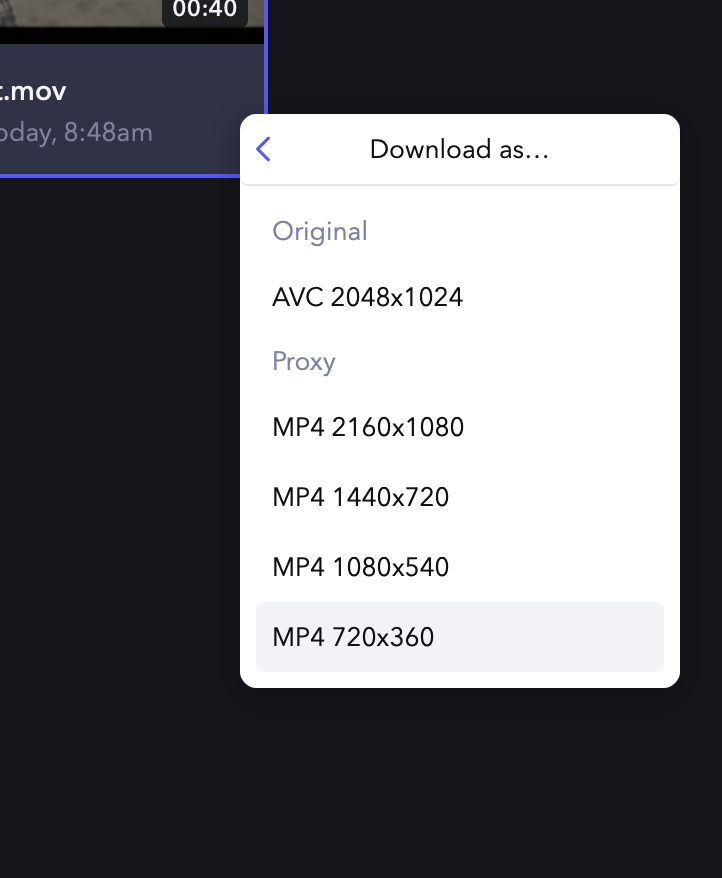
The plugins and uploads are working now, but I just tried to upload a 2k prores file with an adjustment layer to make it letterbox 2.35:1 and it looks terrible on the site. All kinds of weird green artifacts and really low res. I also noticed that it rendered its own proxy files, but changed the aspect ratios on the files. My original file 2048x1024, but the download options are h.264 2160x1080 (larger than the original), 1440 x 720, etc. Seems weird.The prores file looked decent once downloaded, but the h.264 files have weird green horizontal lines in the blacks. I wouldn't want clients to see that.
Please Log in to join the conversation.
29 Nov 2018 12:45 #97999
by JoeEditor
Replied by JoeEditor on topic Frame.io Problems, Questions
We upload 4K via the FCPX "Frame.io H.264" preset and don't have any issues. What sort of internet speeds do you have? That could effect the look of large file playback. And yes, Frame.io should give you a few options for downloading a file.
Please Log in to join the conversation.
29 Nov 2018 17:04 - 29 Nov 2018 17:08 #98001
by Smesh
Internet speed is plenty fast enough. The green lines are even in the downloaded h.264 files that frame.io generates on their side. If I download my source ProRes, it has no lines. When I watch any of them on their server, I am guessing it is some flavor of compressed file their server created after I uploaded my ProRes 422 file.
It may be a hardware issue. I was about to upload the screenshot I took yesterday showing obvious green horizontal lines and artifacts in the black intro, and when I opened the screenshot (after freshly booting my iMac Pro), the green lines in the blacks were not there. I was dumbfounded. I thought maybe I grabbed the wrong screen shot at first. I double checked frame .Io, and all is well on their site as well. So now I'm wondering how that could be? I wish I would have taken a photo or video of the screen with my iPhone. It was pretty horrendous.
The Pro Res file didn't show those behaviors yesterday though - only the h.264 files. Is it possible that my iMac Pro is having a hardware issue and difficulty displaying blacks in h.264 files? I have had some other issues since getting the machine a little over a week ago now, like running out of application memory with very little open, so I guess it's possible. If the display was showing green lines, but the screen capture did not capture the green lines, what would cause that? I don't do drugs, I swear. :blink:
Replied by Smesh on topic Frame.io Problems, Questions
FCPX.guru wrote: We upload 4K via the FCPX "Frame.io H.264" preset and don't have any issues. What sort of internet speeds do you have? That could effect the look of large file playback. And yes, Frame.io should give you a few options for downloading a file.
Internet speed is plenty fast enough. The green lines are even in the downloaded h.264 files that frame.io generates on their side. If I download my source ProRes, it has no lines. When I watch any of them on their server, I am guessing it is some flavor of compressed file their server created after I uploaded my ProRes 422 file.
It may be a hardware issue. I was about to upload the screenshot I took yesterday showing obvious green horizontal lines and artifacts in the black intro, and when I opened the screenshot (after freshly booting my iMac Pro), the green lines in the blacks were not there. I was dumbfounded. I thought maybe I grabbed the wrong screen shot at first. I double checked frame .Io, and all is well on their site as well. So now I'm wondering how that could be? I wish I would have taken a photo or video of the screen with my iPhone. It was pretty horrendous.
The Pro Res file didn't show those behaviors yesterday though - only the h.264 files. Is it possible that my iMac Pro is having a hardware issue and difficulty displaying blacks in h.264 files? I have had some other issues since getting the machine a little over a week ago now, like running out of application memory with very little open, so I guess it's possible. If the display was showing green lines, but the screen capture did not capture the green lines, what would cause that? I don't do drugs, I swear. :blink:
Last edit: 29 Nov 2018 17:08 by Smesh.
Please Log in to join the conversation.
29 Nov 2018 18:39 #98004
by JoeEditor
Replied by JoeEditor on topic Frame.io Problems, Questions
Be sure your system drive has plenty of free space.
I run an iMac Pro and don't have any issues.
I'd contact Frame.IO tech support.
I run an iMac Pro and don't have any issues.
I'd contact Frame.IO tech support.
Please Log in to join the conversation.
29 Nov 2018 19:06 #98005
by Smesh
Replied by Smesh on topic Frame.io Problems, Questions
I only have 150GB on the 1TB SSD. Here is a screen grab from the way that frame.io changes the dimensions on upload.
Please Log in to join the conversation.
