


- Posts: 1080
- Thank you received: 106
3 Post Moderation Rule for New Boarders (25 Jan 2021)
New boarders will have their posts moderated - Don't worry if you cannot see your post immediately.
Probably a stupid question, but... how do I prevent the pop-up when adding the first clip to a new t
21 Nov 2018 00:09 #97848
by Redifer
Probably a stupid question, but... how do I prevent the pop-up when adding the first clip to a new t was created by Redifer
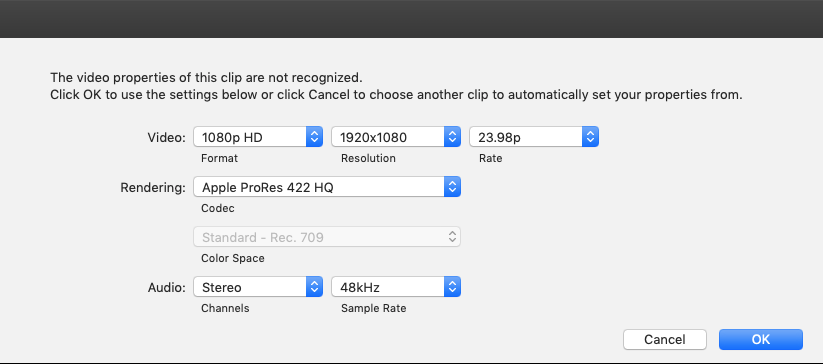
I went ahead and deleted my preferences trying to troubleshoot a different issue (didn't help, of course). I usually like to do voiceover or sound edits on its own timeline, using raw WAV or AIFF files (no video. Now, when I drop a sound file into the timeline, FCPX complains (see image below). This didn't used to be the case and I can't seem to find the preference for "please just conform to the project properties and quit bugging me". Where is it? I swear there used to be a preference giving me a choice to base it on the properties of the first clip, etc that I could disable. For the life of me I can't seem to find it. It's certainly not in the preferences. I sure hope this isn't something they got rid of in 10.4.
Please Log in to join the conversation.
- Tom Wolsky
-

- Offline
- Moderator
-

21 Nov 2018 00:15 #97849
by Tom Wolsky
Replied by Tom Wolsky on topic Probably a stupid question, but... how do I prevent the pop-up when adding the first clip to a new t
The first line seems odd, the video properties aren’t recognized. Usually appears for non-standard firnats. What are they?
Please Log in to join the conversation.
21 Nov 2018 00:18 - 21 Nov 2018 00:19 #97850
by Redifer
Replied by Redifer on topic Probably a stupid question, but... how do I prevent the pop-up when adding the first clip to a new t
AIFF 16-bit 48Khz sound files. I used to be able to add them into an empty timeline no problems whatsoever and FCPX didn't complain.
Last edit: 21 Nov 2018 00:19 by Redifer.
Please Log in to join the conversation.
- Tom Wolsky
-
- Offline
- Moderator
-
21 Nov 2018 01:16 - 21 Nov 2018 01:24 #97857
by Tom Wolsky
Replied by Tom Wolsky on topic Probably a stupid question, but... how do I prevent the pop-up when adding the first clip to a new t
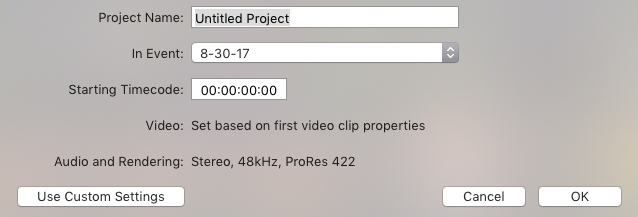
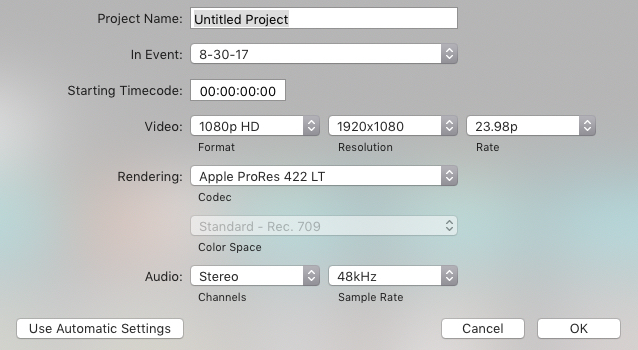
I went back to 10.2.3 to see what the behavior is. If I make a new project set to automatic, based on first clip, then I do get a dialog asking to set the specification when I put the audio file in the timeline. If I make a new project with set specifications, 1080p for instance, then there is no dialog when the audio is added.
The behavior’s the same in 10.4.4, only the dialog is the complete project settings sheet. In the older version the drop down sheet was just the resolution and frame rate.
The behavior’s the same in 10.4.4, only the dialog is the complete project settings sheet. In the older version the drop down sheet was just the resolution and frame rate.
Last edit: 21 Nov 2018 01:24 by Tom Wolsky.
Please Log in to join the conversation.
21 Nov 2018 05:54 #97864
by Redifer
Replied by Redifer on topic Probably a stupid question, but... how do I prevent the pop-up when adding the first clip to a new t
I swear in older versions there was a box you could tick that was "Set project properties based on first clip" or some such thing that seems to have gone away for some bizarre reason.
Please Log in to join the conversation.
- Tom Wolsky
-
- Offline
- Moderator
-
21 Nov 2018 06:00 #97866
by Tom Wolsky
Replied by Tom Wolsky on topic Probably a stupid question, but... how do I prevent the pop-up when adding the first clip to a new t
May have been. There was in legacy FCP, but that’s what the default automatic setting in the new project dialog does.
Please Log in to join the conversation.

21 Nov 2018 12:12 #97894
by JoeEditor
Replied by JoeEditor on topic Probably a stupid question, but... how do I prevent the pop-up when adding the first clip to a new t
I have always started many projects with VO audio file delivered to me at the TV station, for years, and being asked for video format when Timeline is set to auto has always been the behavior, since 10.0.0.
Please Log in to join the conversation.
22 Nov 2018 07:00 #97912
by Redifer
Replied by Redifer on topic Probably a stupid question, but... how do I prevent the pop-up when adding the first clip to a new t
That's weird, because it's always just obeyed my project settings. I'm sure I have something configured wrong somewhere, I just can't find where.
Please Log in to join the conversation.
22 Nov 2018 13:05 #97913
by JoeEditor
Replied by JoeEditor on topic Probably a stupid question, but... how do I prevent the pop-up when adding the first clip to a new t
If you specify project settings, it won't ask. If you leave it to the auto-configure setting, it will ask. I've never seen it do otherwise.
Please Log in to join the conversation.

23 Nov 2018 04:27 - 23 Nov 2018 04:28 #97919
by dgwvideo
Creating history....one edit at a time !
Replied by dgwvideo on topic Probably a stupid question, but... how do I prevent the pop-up when adding the first clip to a new t
The select project based on first clip has always been and still is there. Click the automatic settings in the project creation dialogue to get back to it if yours is custom.
Creating history....one edit at a time !
Last edit: 23 Nov 2018 04:28 by dgwvideo.
Please Log in to join the conversation.
25 Nov 2018 01:43 #97957
by Redifer
Replied by Redifer on topic Probably a stupid question, but... how do I prevent the pop-up when adding the first clip to a new t
It's working as expected for me now. Not sure what I was doing wrong before but I hope I don't do it again!
Please Log in to join the conversation.
