


- Posts: 70
- Thank you received: 0
3 Post Moderation Rule for New Boarders (25 Jan 2021)
New boarders will have their posts moderated - Don't worry if you cannot see your post immediately.
10.4.4 Released
- Jonathan Levin
-

- Offline
- Platinum Member
-

Less
More
- Posts: 786
- Thank you received: 21
15 Nov 2018 19:08 #97681
by Jonathan Levin
Replied by Jonathan Levin on topic 10.4.4 Released
It seems that there are a lot more effects than before. Pretty cool.
Please Log in to join the conversation.
- ektoras.papageorgiou
-

- Offline
- New Member
-

Less
More
- Posts: 17
- Thank you received: 1
15 Nov 2018 19:11 #97682
by ektoras.papageorgiou
Replied by ektoras.papageorgiou on topic 10.4.4 Released
Solid update. SRT is finally supported and will make my life easier. I was hopping for an improved support for eGPU and maybe clean video out from HDMI but nonetheless this update matures FCPX even more.
Please Log in to join the conversation.
15 Nov 2018 19:44 #97683
by ddixon
Replied by ddixon on topic 10.4.4 Released
Don't see the update in the App Store...
Please Log in to join the conversation.

15 Nov 2018 19:55 #97685
by JoeEditor
Replied by JoeEditor on topic 10.4.4 Released
Not everyone sees updates at the same time. Nature of the internet, networking, you need to wait for the packets to find the right routers, and then for your place in line, so Apple's download servers don't get overwhelmed.
Please Log in to join the conversation.
15 Nov 2018 20:25 - 15 Nov 2018 20:26 #97687
by Axel
Replied by Axel on topic 10.4.4 Released
I also don't see the update yet. Nevertheless, it's as if my prayers had been answered. Most important for my workflow:
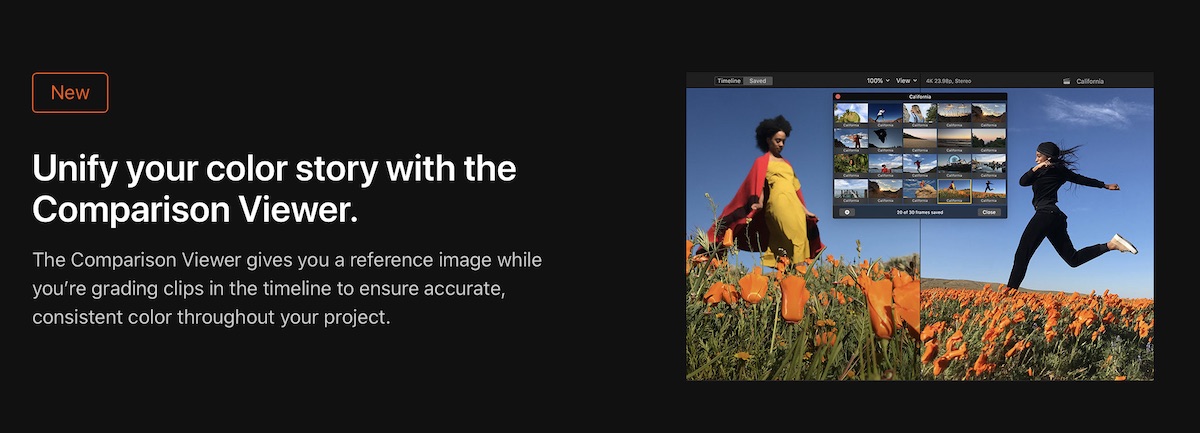
A few days ago, I wrote:
A few days ago, I wrote:
With the Creative Summit 2018 just around the corner (just read the fcp.co article), has anybody heard about an FCP upgrade? Last two years they were at least announced there. In 2016, the session descriptions included some fuss about roles, in 2017 about color correction. This year I found this:

Will we get a compare function (something that's really missing now, imo)?
What do you think?
Last edit: 15 Nov 2018 20:26 by Axel.
Please Log in to join the conversation.
15 Nov 2018 20:28 #97688
by JoeEditor
Replied by JoeEditor on topic 10.4.4 Released
If you don't want to wait, move FCPX, Motion and Compressor from your Applications folder into the Trash. Then launch the app store, and it'll show a download icon for each. Reinstall, you get the latest version right away.
Please Log in to join the conversation.
15 Nov 2018 20:41 #97689
by ddixon
Replied by ddixon on topic 10.4.4 Released
Actually, what I finally did was open App Store (Mojave) and in the Store Menu chose Reload Page and they appeared. I had no idea that was an option.
Please Log in to join the conversation.
15 Nov 2018 20:45 - 15 Nov 2018 20:46 #97690
by Axel
Did so and then emptied the trash. Launched FCP icon from Dock: my latest project opened. Does FCP perhaps use the Timemachine version from the bundle? Somewhat puzzled.
Yep, that did the trick. Thanks. All loading now.
Replied by Axel on topic 10.4.4 Released
FCPX.guru wrote: If you don't want to wait, move FCPX, Motion and Compressor from your Applications folder into the Trash. Then launch the app store, and it'll show a download icon for each. Reinstall, you get the latest version right away.
Did so and then emptied the trash. Launched FCP icon from Dock: my latest project opened. Does FCP perhaps use the Timemachine version from the bundle? Somewhat puzzled.
ddixon wrote: Actually, what I finally did was open App Store (Mojave) and in the Store Menu chose Reload Page and they appeared. I had no idea that was an option.
Yep, that did the trick. Thanks. All loading now.
Last edit: 15 Nov 2018 20:46 by Axel.
Please Log in to join the conversation.
15 Nov 2018 20:48 - 15 Nov 2018 21:23 #97691
by JoeEditor
Replied by JoeEditor on topic 10.4.4 Released
Some observations looking things over now. I see Motion has the addition of this.
"CoreText engine
Create motion graphics that accurately display and animate foreign language text, symbols, and emoji."
Plus, Windows > Window Layout, there's Classic and Cinema. Was that there before?
FYI, 2013 rMBP maxed out, Noise Reduction grinds it to a halt, zero playback.
Other things in the release notes.
Lots of fixes, too.
support.apple.com/en-us/HT201237
"CoreText engine
Create motion graphics that accurately display and animate foreign language text, symbols, and emoji."
Plus, Windows > Window Layout, there's Classic and Cinema. Was that there before?
FYI, 2013 rMBP maxed out, Noise Reduction grinds it to a halt, zero playback.
Other things in the release notes.
- Volume control is adjustable for a selected, connected clip
- Audio playback continues when resetting the peak indicators
- Audio playback continues when changing pan mode on an audio component
- Changing audio configuration of a clip properly clears any soloed audio components
- Double clicking to add an effect adds it to the top clip at the playhead position
- Core Text engine ensures accurate display of Arabic letters, Indic vowel signs in Devanagari and Thai diacritics
- Shape and Effect Mask values properly transfer via XML
- When dragging in the timeline to select a secondary storyline, you can now select individual clips or the entire secondary storyline
- Typing the first few letters of a font name jumps directly to the font in the list
Lots of fixes, too.
support.apple.com/en-us/HT201237
Last edit: 15 Nov 2018 21:23 by JoeEditor.
Please Log in to join the conversation.

15 Nov 2018 21:37 #97693
by zzchu
Replied by zzchu on topic 10.4.4 Released
Introducing Video Noise Reduction is pretty cool. It seems to slow the Mac just as much Neat Video's Noise Reduction plugin.
Pretty easy to use too.
Pretty easy to use too.
Please Log in to join the conversation.

15 Nov 2018 21:37 #97694
by Doug
Replied by Doug on topic 10.4.4 Released
Is it weird that I'm potentially most excited for this?
"- Typing the first few letters of a font name jumps directly to the font in the list"
"- Typing the first few letters of a font name jumps directly to the font in the list"
Please Log in to join the conversation.
15 Nov 2018 21:55 #97697
by Axel
Replied by Axel on topic 10.4.4 Released
Beachballs around here. Time for a fresh install.
Please Log in to join the conversation.

15 Nov 2018 22:12 #97698
by martinX
Replied by martinX on topic 10.4.4 Released
Not weird at all. It's not in my 'best feature ever' column, but it's certainly in my "that's awesome/finally!" column
Please Log in to join the conversation.
- Steve McGarrigle
-

- Offline
- Premium Member
-

15 Nov 2018 23:04 #97699
by Steve McGarrigle
Replied by Steve McGarrigle on topic 10.4.4 Released
Straight away I am seeing an alert about legacy media. Something to watch out for:
"About legacy media in Final Cut Pro X
To prepare for future macOS releases, complete Final Cut Pro projects that contain legacy media.
In Final Cut Pro, you might see an alert that legacy media files won't be compatible with future macOS releases.
Legacy media files are compatible with macOS Mojave, but they won't be with future macOS releases. Legacy media can include footage recorded with cameras like Sony HDCAM-SR cameras, footage from GoPro cameras recorded in the CineForm format, video files in the Avid DNxHD/DNxHR format created with software, footage shot with many other older cameras, or files modified with older software.
To make sure media you create now will be compatible with future macOS releases, use cameras and media formats supported by Final Cut Pro."
"About legacy media in Final Cut Pro X
To prepare for future macOS releases, complete Final Cut Pro projects that contain legacy media.
In Final Cut Pro, you might see an alert that legacy media files won't be compatible with future macOS releases.
Legacy media files are compatible with macOS Mojave, but they won't be with future macOS releases. Legacy media can include footage recorded with cameras like Sony HDCAM-SR cameras, footage from GoPro cameras recorded in the CineForm format, video files in the Avid DNxHD/DNxHR format created with software, footage shot with many other older cameras, or files modified with older software.
To make sure media you create now will be compatible with future macOS releases, use cameras and media formats supported by Final Cut Pro."
Please Log in to join the conversation.
- Jonathan Levin
-
- Offline
- Platinum Member
-
Less
More
- Posts: 786
- Thank you received: 21
16 Nov 2018 00:20 #97700
by Jonathan Levin
Replied by Jonathan Levin on topic 10.4.4 Released
“When dragging in the timeline to select a secondary storyline, you can now select individual clips or the entire secondary storyline”
I gotta try this out tommorow!
I gotta try this out tommorow!
Please Log in to join the conversation.
- ektoras.papageorgiou
-
- Offline
- New Member
-
Less
More
- Posts: 17
- Thank you received: 1
16 Nov 2018 00:32 #97701
by ektoras.papageorgiou
Replied by ektoras.papageorgiou on topic 10.4.4 Released
it would be good to mention on the browser what a legacy media really is.To make sure media you create now will be compatible with future macOS releases, use cameras and media formats supported by Final Cut Pro."
Please Log in to join the conversation.

- bradywurtz
-
- Offline
- Elite Member
-

Less
More
- Posts: 265
- Thank you received: 7
16 Nov 2018 01:30 #97706
by bradywurtz
Replied by bradywurtz on topic 10.4.4 Released
just read about that. I'm glad I don't work with any of those types of files, but still angry and confused why they're dropping support for them when it seems like it would be a very negative things for lots of professionals
Please Log in to join the conversation.

16 Nov 2018 03:14 #97707
by Redifer
Replied by Redifer on topic 10.4.4 Released
Don't worry, not the next macOS but the one after it will likely make sure that good ol' h.264 is a legacy media. **poof** goodbye pretty much everything. Apple likes forcing people to move forward. Well except when it comes to their hardware which is weaker and more expensive to what you can get by building your own. My dream is for Apple to allow macOS to be self-installed on self-built PCs... no more Apple hardware.
Please Log in to join the conversation.
