


- Posts: 730
- Thank you received: 26
3 Post Moderation Rule for New Boarders (25 Jan 2021)
New boarders will have their posts moderated - Don't worry if you cannot see your post immediately.
Composite layer follow clip underneath? (TrackX?)
- DmitriZigany
-
 Topic Author
- Offline
- Platinum Member
-

Less
More
18 Oct 2018 14:42 #97430
by DmitriZigany
Composite layer follow clip underneath? (TrackX?) was created by DmitriZigany
Hey!
I have a compositional clip layered above another clip. It works fine, except for one part where the camera moves slightly... Is there a plug in that let's me track it automatically?
I've looked at TrackX tutorials, and it seems you can't track a clip but must drag stuff into the plug-in?
Are there other alternatives?
I have a compositional clip layered above another clip. It works fine, except for one part where the camera moves slightly... Is there a plug in that let's me track it automatically?
I've looked at TrackX tutorials, and it seems you can't track a clip but must drag stuff into the plug-in?
Are there other alternatives?
Please Log in to join the conversation.
- DmitriZigany
-
Topic Author
- Offline
- Platinum Member
-
Less
More
- Posts: 730
- Thank you received: 26
18 Oct 2018 15:05 - 18 Oct 2018 16:33 #97431
by DmitriZigany
Replied by DmitriZigany on topic Composite layer follow clip underneath? (TrackX?)
Downloaded the TrackX demo... found the Track Layer generator... but can't for the life of me find all the controls as seen in the tutorials!?!? ( = I don't see the plug-in interface at all)
Last edit: 18 Oct 2018 16:33 by DmitriZigany.
Please Log in to join the conversation.

18 Oct 2018 17:32 #97434
by JoeEditor
Replied by JoeEditor on topic Composite layer follow clip underneath? (TrackX?)
Screen shot, please?
Please Log in to join the conversation.
- DmitriZigany
-
Topic Author
- Offline
- Platinum Member
-
Less
More
- Posts: 730
- Thank you received: 26
18 Oct 2018 19:17 #97435
by DmitriZigany
Replied by DmitriZigany on topic Composite layer follow clip underneath? (TrackX?)
Here's how it looks in FCPX: am I not supposed to se the plug-in interface when the generator is selected??
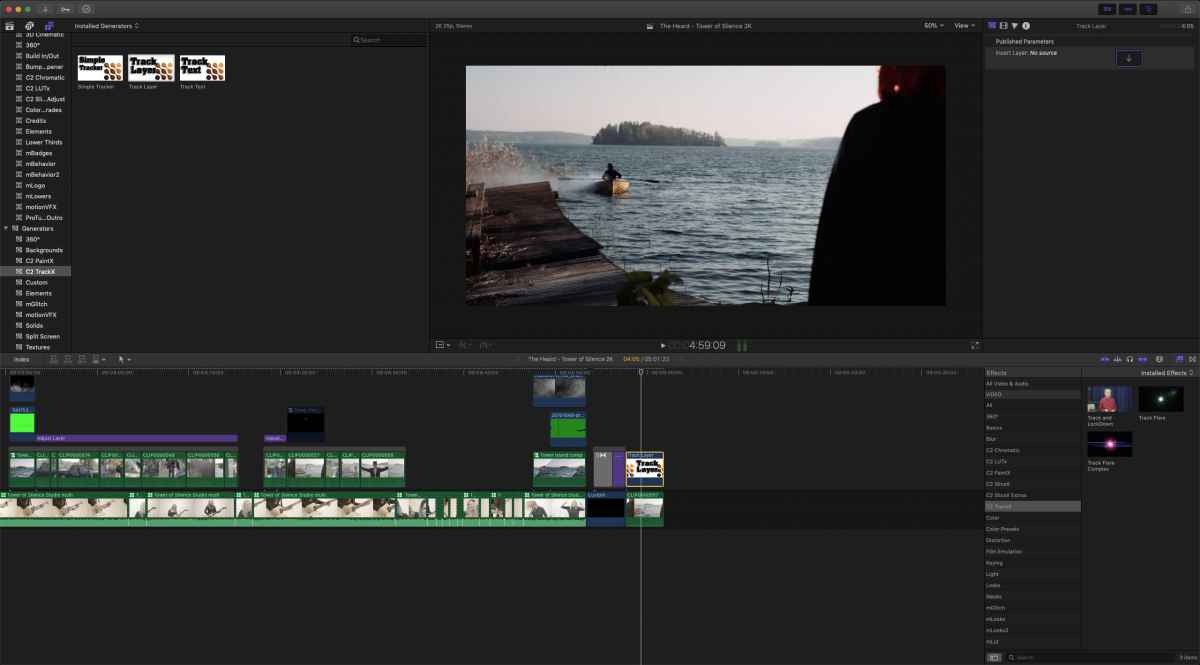
And here's the composite:

And here's the composite:
Please Log in to join the conversation.
- DmitriZigany
-
Topic Author
- Offline
- Platinum Member
-
Less
More
- Posts: 730
- Thank you received: 26
18 Oct 2018 19:20 #97436
by DmitriZigany
Replied by DmitriZigany on topic Composite layer follow clip underneath? (TrackX?)
So what I want is for the tower to follow the island as the camera moves...
Please Log in to join the conversation.
- DmitriZigany
-
Topic Author
- Offline
- Platinum Member
-
Less
More
- Posts: 730
- Thank you received: 26
18 Oct 2018 21:11 #97437
by DmitriZigany
Replied by DmitriZigany on topic Composite layer follow clip underneath? (TrackX?)
PaintX that I own is behaving weirdly too... maybe they are not compatible with Mojave???
Please Log in to join the conversation.
- DmitriZigany
-
Topic Author
- Offline
- Platinum Member
-
Less
More
- Posts: 730
- Thank you received: 26
18 Oct 2018 21:47 #97438
by DmitriZigany
Replied by DmitriZigany on topic Composite layer follow clip underneath? (TrackX?)
Ok, re-installed the plug-in and saw that there was a "MT common assets" or something that I had unchecked last time as I didn't want to install SliceX or DriveX. Now it seems to be working properly...
Please Log in to join the conversation.
- DmitriZigany
-
Topic Author
- Offline
- Platinum Member
-
Less
More
- Posts: 730
- Thank you received: 26
18 Oct 2018 22:28 #97439
by DmitriZigany
Replied by DmitriZigany on topic Composite layer follow clip underneath? (TrackX?)
But now I already hate this plug-in... Is there any other tracking plug-ins for FCPX????
Please Log in to join the conversation.
19 Oct 2018 00:10 #97440
by JoeEditor
Replied by JoeEditor on topic Composite layer follow clip underneath? (TrackX?)
I use it all the time without issues.
Coremelt's plugins are Mojave compatible.
I am unable to duplicate your issue.
I've sent a link to this thread to Coremelt so they can help.
Did you contact their tech support directly yet?
Coremelt's plugins are Mojave compatible.
I am unable to duplicate your issue.
I've sent a link to this thread to Coremelt so they can help.
Did you contact their tech support directly yet?
Please Log in to join the conversation.
- DmitriZigany
-
Topic Author
- Offline
- Platinum Member
-
Less
More
- Posts: 730
- Thank you received: 26
19 Oct 2018 02:39 #97441
by DmitriZigany
Replied by DmitriZigany on topic Composite layer follow clip underneath? (TrackX?)
I got it to work finally.
But what a convoluted way to work!!
Had to create a trillion compound clips - and you know how I feel about those!!
And I hate hate hate plug-ins where you have to drag clips into these little drop zones in the inspector...
The plug-in saved the day, but I'm not really a fan of how it works, so doubtful I'll buy it after the 15 day trial.
To begin with, it wasn't possible to use on attached clips, so I had to duplicate the clips to the end of the project do the thing there, create a compound clip (gah!!!) and drag it back to the original position. And inside TrackX there were all sorts of weird non-user-friendly things going on, for example:
it defaults to size 0.6 instead of original size, wrf? Once i had made my tracking square, my layer clip moved! so I had to reposition it. And the sliders for repositioning where much to sensitive... just not a good experience...
If they could make it into an effect instead of a generator, that would be a good start. Would also be good if it could control other clips on the timeline so I don't have to create compound clips (GAH!!!!).
Ok, end of rant.
But what a convoluted way to work!!
Had to create a trillion compound clips - and you know how I feel about those!!
And I hate hate hate plug-ins where you have to drag clips into these little drop zones in the inspector...
The plug-in saved the day, but I'm not really a fan of how it works, so doubtful I'll buy it after the 15 day trial.
To begin with, it wasn't possible to use on attached clips, so I had to duplicate the clips to the end of the project do the thing there, create a compound clip (gah!!!) and drag it back to the original position. And inside TrackX there were all sorts of weird non-user-friendly things going on, for example:
it defaults to size 0.6 instead of original size, wrf? Once i had made my tracking square, my layer clip moved! so I had to reposition it. And the sliders for repositioning where much to sensitive... just not a good experience...
If they could make it into an effect instead of a generator, that would be a good start. Would also be good if it could control other clips on the timeline so I don't have to create compound clips (GAH!!!!).
Ok, end of rant.
Please Log in to join the conversation.
19 Oct 2018 10:52 #97445
by JoeEditor
Replied by JoeEditor on topic Composite layer follow clip underneath? (TrackX?)
Actually, no, there are limitations with effects and how the FCPX developer interface works. I strongly suggest you contact Coremelt support directly. I use this ever week, and don't have the issues you're having. Something isn't working correctly on your system. I've never used a CC with TrackX. I've never had anything but full size images in the image well. Something is amiss on your system.
Please Log in to join the conversation.
- DmitriZigany
-
Topic Author
- Offline
- Platinum Member
-
Less
More
- Posts: 730
- Thank you received: 26
20 Oct 2018 22:50 #97462
by DmitriZigany
Replied by DmitriZigany on topic Composite layer follow clip underneath? (TrackX?)
How can I apply effects, colour correction etc to a clip that needs to be moved by TrackX since I need to dragged from the browser to that drop zone in the inspector from the browser?
Please Log in to join the conversation.
21 Oct 2018 00:34 #97463
by JoeEditor
Replied by JoeEditor on topic Composite layer follow clip underneath? (TrackX?)
I think you want to use SliceX, not TrackX.
Please Log in to join the conversation.

21 Oct 2018 11:06 #97464
by CoreMelt
Replied by CoreMelt on topic Composite layer follow clip underneath? (TrackX?)
Hi DmitriGanzi, you raise some valid points. We will be creating a new update of TrackX to improve some of these points. Some of the issues that frustrate you are related to limitations in FCP X we had to work around, however I do think we can find some better workarounds now so we will be improving this.
If you want to color correct etc the clip that goes inside the imagewell then you put the effects you want onto that clip, turn that into a compound clip then drop the compound clip into the image well of track layer.
However the only way of having one clip follow the movement of another clip is to use an imagewell as we have done. Like I said we certainly can improve some of these issues and I hope to have an update released relatively soon.
If you want to color correct etc the clip that goes inside the imagewell then you put the effects you want onto that clip, turn that into a compound clip then drop the compound clip into the image well of track layer.
However the only way of having one clip follow the movement of another clip is to use an imagewell as we have done. Like I said we certainly can improve some of these issues and I hope to have an update released relatively soon.
Please Log in to join the conversation.
- DmitriZigany
-
Topic Author
- Offline
- Platinum Member
-
Less
More
- Posts: 730
- Thank you received: 26
21 Oct 2018 16:06 #97467
by DmitriZigany
Replied by DmitriZigany on topic Composite layer follow clip underneath? (TrackX?)
CoreMelt,
Thanks for the reply! I suspected there were some limitations...
My frustration is two-fold:
I hate ALL plug-ins that use that image well, as you move the cursor to grab the footage, usually you pass something that make the inspector change, so you have to keep doing it... And then you have limited control of the footage once it's there...
I also really don't like compound clips and prefer to avoid using them...
I do understand it's not much you can do about either of those...
Glad to hear you are working on improvements, looking forward to seeing them soon!
Thanks for the reply! I suspected there were some limitations...
My frustration is two-fold:
I hate ALL plug-ins that use that image well, as you move the cursor to grab the footage, usually you pass something that make the inspector change, so you have to keep doing it... And then you have limited control of the footage once it's there...
I also really don't like compound clips and prefer to avoid using them...
I do understand it's not much you can do about either of those...
Glad to hear you are working on improvements, looking forward to seeing them soon!
Please Log in to join the conversation.
- DmitriZigany
-
Topic Author
- Offline
- Platinum Member
-
Less
More
- Posts: 730
- Thank you received: 26
21 Oct 2018 16:07 - 21 Oct 2018 16:07 #97468
by DmitriZigany
Replied by DmitriZigany on topic Composite layer follow clip underneath? (TrackX?)
No, I don't.FCPX.guru wrote: I think you want to use SliceX, not TrackX.
Last edit: 21 Oct 2018 16:07 by DmitriZigany.
Please Log in to join the conversation.
