




- Posts: 170
- Thank you received: 2
3 Post Moderation Rule for New Boarders (25 Jan 2021)
New boarders will have their posts moderated - Don't worry if you cannot see your post immediately.
Media Library Management
23 Sep 2018 01:17 #97151
by PhilCF
Media Library Management was created by PhilCF
Whenever I right click a file in the browser and choose "reveal in finder" i am usually taken to a file inside the library structure.
I have a current project where the files are held outside the library in a folder called "Final Cut Original Media."
My Library is 6Gb, but my "Final Cut Original Media" file is 450Gb, so this is clearly where all the files are stored.
My question is... How do i get all the original files inside the library so that I can then move the library to a different drive?
I tried to "consolidate all files" but the computer tells me "there's not enough space on the drive" - which is strange because all I want to do is move the files from the "final cut original media" folder in to the Library.
Thanks in advance !
I have a current project where the files are held outside the library in a folder called "Final Cut Original Media."
My Library is 6Gb, but my "Final Cut Original Media" file is 450Gb, so this is clearly where all the files are stored.
My question is... How do i get all the original files inside the library so that I can then move the library to a different drive?
I tried to "consolidate all files" but the computer tells me "there's not enough space on the drive" - which is strange because all I want to do is move the files from the "final cut original media" folder in to the Library.
Thanks in advance !
Please Log in to join the conversation.


23 Sep 2018 01:53 #97153
by JoeEditor
Replied by JoeEditor on topic Media Library Management
Consolidate copies files, it doesn't move files, so you need to find another drive with some space, or make space on the drive you have.
I've had two Libraries recently do this, and I'm not sure what causes FCPX to create the Original Media folder outside of the Library, when it clearly should be inside the Library.
I've had two Libraries recently do this, and I'm not sure what causes FCPX to create the Original Media folder outside of the Library, when it clearly should be inside the Library.
Please Log in to join the conversation.

23 Sep 2018 15:26 - 23 Sep 2018 21:18 #97160
by joema
It will do that if you previously created or opened another library which used "managed external" media. The terms are confusing and non-standardized, but there are three distinct storage configurations (1) Managed library with media inside (2) "Managed external" library with media outside -- that's my term -- there is no good or standardized term for this but it is distinct from (3) Unmanaged media which was imported with "leave files in place". If anyone has a better term, please say so.
For the "managed external" case, FCPX remembers the previous library storage locations and uses that for any newly-created library.
E.g, you create and populate Library1 using all internal media. Then you open an existing Library2 which was set to external media storage (but not "in place"). Then you create Library3 without specifying media storage. You assume it will be a "managed internal" library -- but that new library will use the external media location specified by the previously-opened library Library2. If you import new media to Library3, it will actually put it in the storage location previously specified by Library2.
OTOH if you clicked on Library1 (which used internal media), then create Library3, when you import data to Library3 it will be placed inside Library3 as internal managed media. So the media storage location for a newly-created library can be dependent on what library type you previously opened. You can override this and the new library's storage locations are shown in Library Properties Inspector, but it's easy to accidentally miss.
You have to watch the Library Properties Inspector "like a hawk" when creating new libraries or it may put media where you don't expect.
For an "unmanaged external" library created using "leave files in place", the folder structure and filenames will remain the same. For either a "managed internal" or "managed external" case, FCPX itself will define the folder structure and often will rename the files. If you somehow inadvertently consolidate or import media to a library which originally used "leave files in place" but later got changed to an external storage location, the original folder structure and filenames may be lost. FCPX still knows where the data is but if you rely on a specific Finder-level structure, it may get changed.
The OP expected "managed internal" media but later noticed his media was outside the library -- maybe due to the above scenario. It should be in the same FCPX-defined folder & filename format as used inside the library. It might be possible to delete the symlinks inside the library and move the files & folders back inside but that would be a science project requiring lots of testing. In general it's a lot better to create a new managed library configured for internal media and consolidate to that. If this is done on the same drive volume, FCPX will use hard links and it won't take as much space for the interim state.
Replied by joema on topic Media Library Management
FCPX.guru wrote: ... I'm not sure what causes FCPX to create the Original Media folder outside of the Library, when it clearly should be inside the Library.
It will do that if you previously created or opened another library which used "managed external" media. The terms are confusing and non-standardized, but there are three distinct storage configurations (1) Managed library with media inside (2) "Managed external" library with media outside -- that's my term -- there is no good or standardized term for this but it is distinct from (3) Unmanaged media which was imported with "leave files in place". If anyone has a better term, please say so.
For the "managed external" case, FCPX remembers the previous library storage locations and uses that for any newly-created library.
E.g, you create and populate Library1 using all internal media. Then you open an existing Library2 which was set to external media storage (but not "in place"). Then you create Library3 without specifying media storage. You assume it will be a "managed internal" library -- but that new library will use the external media location specified by the previously-opened library Library2. If you import new media to Library3, it will actually put it in the storage location previously specified by Library2.
OTOH if you clicked on Library1 (which used internal media), then create Library3, when you import data to Library3 it will be placed inside Library3 as internal managed media. So the media storage location for a newly-created library can be dependent on what library type you previously opened. You can override this and the new library's storage locations are shown in Library Properties Inspector, but it's easy to accidentally miss.
You have to watch the Library Properties Inspector "like a hawk" when creating new libraries or it may put media where you don't expect.
For an "unmanaged external" library created using "leave files in place", the folder structure and filenames will remain the same. For either a "managed internal" or "managed external" case, FCPX itself will define the folder structure and often will rename the files. If you somehow inadvertently consolidate or import media to a library which originally used "leave files in place" but later got changed to an external storage location, the original folder structure and filenames may be lost. FCPX still knows where the data is but if you rely on a specific Finder-level structure, it may get changed.
The OP expected "managed internal" media but later noticed his media was outside the library -- maybe due to the above scenario. It should be in the same FCPX-defined folder & filename format as used inside the library. It might be possible to delete the symlinks inside the library and move the files & folders back inside but that would be a science project requiring lots of testing. In general it's a lot better to create a new managed library configured for internal media and consolidate to that. If this is done on the same drive volume, FCPX will use hard links and it won't take as much space for the interim state.
Last edit: 23 Sep 2018 21:18 by joema.
Please Log in to join the conversation.
23 Sep 2018 21:53 #97162
by JoeEditor
Replied by JoeEditor on topic Media Library Management
I have a Stock Media Library. All my stock media is in folder hierarchies on a drive. I import "Leave In Place" and "Create Keywords From Folders". Once, but mistake, I had "Import To Library" marked, and it created an Original Media folder inside the Stock Media folder. Yeah, it gets confused about what you're trying to do. I've repeated this on purpose as an experiment, and sure enough, it creates that Original Media folder outside of the Library. That's a bug, shouldn't do that.
Please Log in to join the conversation.
24 Sep 2018 03:09 #97164
by PhilCF
Replied by PhilCF on topic Media Library Management
joema wrote:
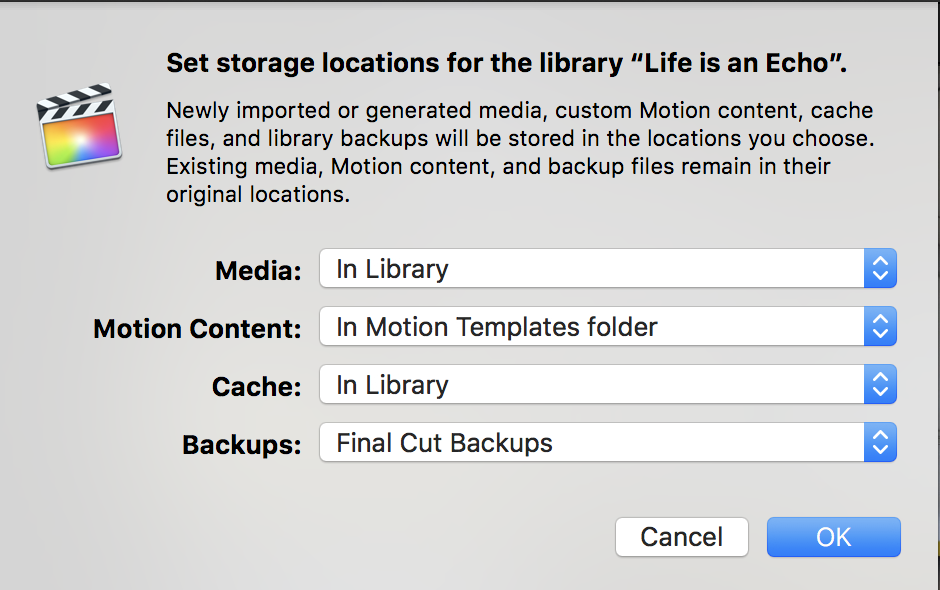
This was the issue. The setting in the Library Properties Inspector said to put Media in the External drive, rather than the "Library" - This FCPX created the folder structure and started to dump files in there.FCPX.guru wrote: ...
You have to watch the Library Properties Inspector "like a hawk" when creating new libraries or it may put media where you don't expect.
In the end, I started a new library, re-imported the footage into it, then deleted the old library. I'm sure there was a more elegant way of doing it, but I just didn't want to risk the footage.
Phil
Please Log in to join the conversation.

24 Sep 2018 14:48 #97166
by lichinho
If the two locations are on the same drive, FCP X actually uses hard links, it does not duplicate media, so there should not be a problem with free space.
Replied by lichinho on topic Media Library Management
FCPX.guru wrote: Consolidate copies files, it doesn't move files, so you need to find another drive with some space, or make space on the drive you have.
I've had two Libraries recently do this, and I'm not sure what causes FCPX to create the Original Media folder outside of the Library, when it clearly should be inside the Library.
If the two locations are on the same drive, FCP X actually uses hard links, it does not duplicate media, so there should not be a problem with free space.
Please Log in to join the conversation.
