


- Posts: 134
- Thank you received: 9
3 Post Moderation Rule for New Boarders (25 Jan 2021)
New boarders will have their posts moderated - Don't worry if you cannot see your post immediately.
FCPX recreate Optimized Medias
- Ponponpostprod
-
 Topic Author
- Offline
- Premium Member
-

Less
More
17 Sep 2018 09:27 - 17 Sep 2018 12:16 #97074
by Ponponpostprod
FCPX recreate Optimized Medias was created by Ponponpostprod
Hi everyone,
I've a big library and i've copied the original medias and optimised medias from one disk to another.
I need to make optimised media because i have Panasonic EVA1 UHD footage.
I've relinked media to the new disk, (external Media folder) but when i ask FCPX to transcode the original, fcpx render the medias again, even if they exist in the Final Cut Optimized Media Folder.
I've the good destination cache and media Folder in the library.
What can i do in order to not rerender all the optimised medias ?
As you can see in the SC. FCPX create the temp render file even if the optimized is in the folder.
One more thing the temp render stay like this and is not deleted.
I've a big library and i've copied the original medias and optimised medias from one disk to another.
I need to make optimised media because i have Panasonic EVA1 UHD footage.
I've relinked media to the new disk, (external Media folder) but when i ask FCPX to transcode the original, fcpx render the medias again, even if they exist in the Final Cut Optimized Media Folder.
I've the good destination cache and media Folder in the library.
What can i do in order to not rerender all the optimised medias ?
As you can see in the SC. FCPX create the temp render file even if the optimized is in the folder.
One more thing the temp render stay like this and is not deleted.

Last edit: 17 Sep 2018 12:16 by Ponponpostprod.
Please Log in to join the conversation.
- Ponponpostprod
-
Topic Author
- Offline
- Premium Member
-
Less
More
- Posts: 134
- Thank you received: 9
17 Sep 2018 12:41 #97078
by Ponponpostprod
Replied by Ponponpostprod on topic FCPX recreate Optimized Medias
have you ever seen this behaviour ?
Please Log in to join the conversation.

Less
More
- Posts: 971
- Thank you received: 46
17 Sep 2018 12:42 #97079
by MsJustine
Replied by MsJustine on topic FCPX recreate Optimized Medias
The optimised media like its sister proxy are garbage files, they are designed to be destroyed and recreated. The point is that you should delete the optimised, use the library manager to change the location and recreate the optimised media, sure it sucks to do this, but I am not sure there is a better alternative.
As I understand the way FCPX works, this would actually be a good thing, sometimes things go wrong, and having a garbage system like optimised and proxy, by garbage I mean not worth saving, any errors could be corrected by a new run of optimised media creation...no harm in trying is there???
As I understand the way FCPX works, this would actually be a good thing, sometimes things go wrong, and having a garbage system like optimised and proxy, by garbage I mean not worth saving, any errors could be corrected by a new run of optimised media creation...no harm in trying is there???
Please Log in to join the conversation.
- Ponponpostprod
-
Topic Author
- Offline
- Premium Member
-
Less
More
- Posts: 134
- Thank you received: 9
17 Sep 2018 12:52 #97080
by Ponponpostprod
Replied by Ponponpostprod on topic FCPX recreate Optimized Medias
I've ever done this with proxy : after changing the location, i ask to transcode, fcpx scan the folders and don't recreate media. Here not ... :dry:
Please Log in to join the conversation.
Less
More
- Posts: 971
- Thank you received: 46
17 Sep 2018 13:02 - 17 Sep 2018 13:04 #97082
by MsJustine
Replied by MsJustine on topic FCPX recreate Optimized Medias
Select the library name and then File-Delete Library generated files, Switch to original view.
Regenerate the optimised media and or proxy...
I feel that FCPX is underpowered and this aspect of the app is a bit of a problem, needs more work from the mothership...
Regenerate the optimised media and or proxy...
I feel that FCPX is underpowered and this aspect of the app is a bit of a problem, needs more work from the mothership...
Last edit: 17 Sep 2018 13:04 by MsJustine.
Please Log in to join the conversation.
- Ponponpostprod
-
Topic Author
- Offline
- Premium Member
-
Less
More
- Posts: 134
- Thank you received: 9
17 Sep 2018 13:13 #97083
by Ponponpostprod
Replied by Ponponpostprod on topic FCPX recreate Optimized Medias
I don't want to delete them, it was a long render time. I want to keep them I've ever done it .
Please Log in to join the conversation.
Less
More
- Posts: 971
- Thank you received: 46
17 Sep 2018 13:20 #97084
by MsJustine
Replied by MsJustine on topic FCPX recreate Optimized Medias
I fully understand, you have to weigh up the lost time trying to work around this issue or the time it will take to regenerate the optimised media, sadly I wish I knew a way other than to suggest bite the bullet, take the pain. a long lunch/coffee break, regenerate the media.
It is not re-rendering, it is a separate media system, renders as I understand are used during the edit, loaded into RAM and used to aid playback.
To be honest I am very alarmed that it is original/optimised and a separate proxy, when in my mind it should be 1-original, 2- optimised and 3-proxy.
Optimised is a codec, as is proxy, my advice is that you use proxy files, the optimised is for top end systems, a bit of a system hog for things like multi-cam.
It is not re-rendering, it is a separate media system, renders as I understand are used during the edit, loaded into RAM and used to aid playback.
To be honest I am very alarmed that it is original/optimised and a separate proxy, when in my mind it should be 1-original, 2- optimised and 3-proxy.
Optimised is a codec, as is proxy, my advice is that you use proxy files, the optimised is for top end systems, a bit of a system hog for things like multi-cam.
Please Log in to join the conversation.

17 Sep 2018 14:14 #97088
by Axel
Replied by Axel on topic FCPX recreate Optimized Medias
Not sure exactly what you did, but here is what works:
1. Create a new library. In inspector, choose where media are supposed to go (external, I understand).

2. Have both the "Old Library" and the "New Library" open. Now drag & drop the content of "Old" into "New". This dialog will appear:
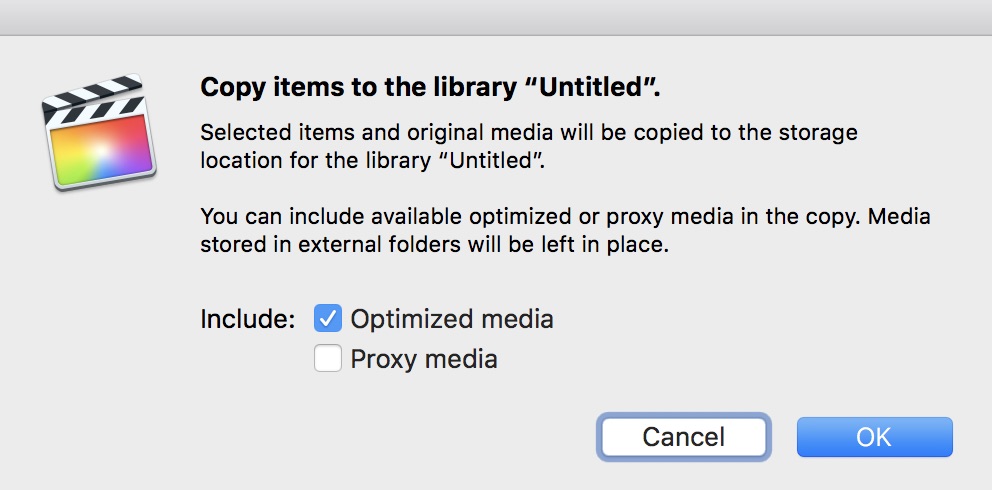
1. Create a new library. In inspector, choose where media are supposed to go (external, I understand).
2. Have both the "Old Library" and the "New Library" open. Now drag & drop the content of "Old" into "New". This dialog will appear:
Please Log in to join the conversation.
Less
More
- Posts: 971
- Thank you received: 46
17 Sep 2018 14:15 #97089
by MsJustine
Replied by MsJustine on topic FCPX recreate Optimized Medias
Wow, thanks Axel, that is so helpful...
That really is a great solution!
That really is a great solution!
Please Log in to join the conversation.
17 Sep 2018 15:10 #97091
by Axel
Replied by Axel on topic FCPX recreate Optimized Medias
As you see here:
... it is also possible to choose different locations for original, optimized or proxy. That is, if you modify the library settings in between import/creation of either. As Mark and Steve say, it was nice not to have to use such rude tricks. What usually doesn't work is when you move or copy something on Finder level. FCP keeps track of things if it's involved. Otherwise, relinking clips becomes a PITA.
... it is also possible to choose different locations for original, optimized or proxy. That is, if you modify the library settings in between import/creation of either. As Mark and Steve say, it was nice not to have to use such rude tricks. What usually doesn't work is when you move or copy something on Finder level. FCP keeps track of things if it's involved. Otherwise, relinking clips becomes a PITA.
Please Log in to join the conversation.
- Ponponpostprod
-
Topic Author
- Offline
- Premium Member
-
Less
More
- Posts: 134
- Thank you received: 9
17 Sep 2018 15:15 #97092
by Ponponpostprod
Replied by Ponponpostprod on topic FCPX recreate Optimized Medias
I knew this solution but for some reason i've done the copy outside of FCPX. The links have to be recreated.
Please Log in to join the conversation.
17 Sep 2018 15:34 #97093
by Axel
Replied by Axel on topic FCPX recreate Optimized Medias
Just import the Optimized Media, leaving files in place. After editing, move the folder, so that they turn offline. Then relink to the Original Media (should work, never tried that myself). Clumsy solution? Well, if you START by making changes in Finder, you end up with having to swap clips manually.
Please Log in to join the conversation.
- FinalCutdown
-

- Offline
- Elite Member
-

Less
More
- Posts: 222
- Thank you received: 4
15 Aug 2023 08:12 #126827
by FinalCutdown
Replied by FinalCutdown on topic FCPX recreate Optimized Medias
I hope things have changed in the past five years: I have a 30 min timeline and need to create optimized media to finalize. I created them on an external HDD which is very slow - all optimized files for this timeline take up 3TB on this drive. Now I have two SSDs: One is 1TB the other is 2TB. Is it somehow possible to move optimized media to those two drives? Or can I recreate those files on both drives? If I select the project and click generate media it will tell me that there is not enough space on the SSd..
Please Log in to join the conversation.
