


- Posts: 568
- Thank you received: 74
3 Post Moderation Rule for New Boarders (25 Jan 2021)
New boarders will have their posts moderated - Don't worry if you cannot see your post immediately.
Quickly compare shots for CC / manually matching colors
27 Aug 2018 15:35 - 27 Aug 2018 15:43 #96932
by Axel
Quickly compare shots for CC / manually matching colors was created by Axel
As requested
here
.
1. Install newest version of CommandPost (free, I sometimes toggle "scrolling timeline" with ctrl+alt+cmd+w, but there are many more options).
2. Find a reference frame.
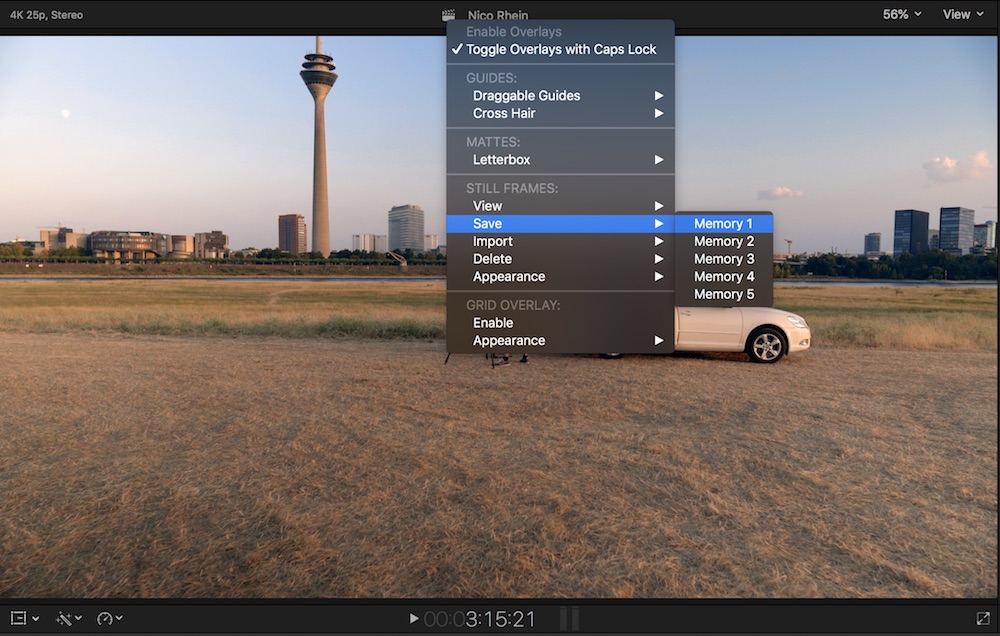
3. Right-click on the top bar of the viewer. Check "Toggle Overlays with Caps-Lock"
4. >Save >Memory 1"
5. Navigate to the frame you want to compare to.
6. Hit caps-lock. The left half of the screenshot will be over the left half of the current frame (or in any other direction, set under appearance)
The overlay does not affect any of the scopes as a connected clip / "layer" would, so you have to match the images in wysiwyg fashion. Also you can not (yet?) use a "wipe" like in Resolve. But as for now, I'm quite happy, and I think I will use that. And who knows? Perhaps 10.5 will have a more versatile compare-match tool ...
1. Install newest version of CommandPost (free, I sometimes toggle "scrolling timeline" with ctrl+alt+cmd+w, but there are many more options).
2. Find a reference frame.
3. Right-click on the top bar of the viewer. Check "Toggle Overlays with Caps-Lock"
4. >Save >Memory 1"
5. Navigate to the frame you want to compare to.
6. Hit caps-lock. The left half of the screenshot will be over the left half of the current frame (or in any other direction, set under appearance)
The overlay does not affect any of the scopes as a connected clip / "layer" would, so you have to match the images in wysiwyg fashion. Also you can not (yet?) use a "wipe" like in Resolve. But as for now, I'm quite happy, and I think I will use that. And who knows? Perhaps 10.5 will have a more versatile compare-match tool ...
Last edit: 27 Aug 2018 15:43 by Axel.
Please Log in to join the conversation.

27 Aug 2018 18:24 #96933
by JoeEditor
Replied by JoeEditor on topic Quickly compare shots for CC / manually matching colors
Chormatic does that. Would be nice to see in CP, also.
Please Log in to join the conversation.
