


- Posts: 14
- Thank you received: 0
3 Post Moderation Rule for New Boarders (25 Jan 2021)
New boarders will have their posts moderated - Don't worry if you cannot see your post immediately.
Storage help!
01 Aug 2018 01:12 #96618
by 600se
Storage help! was created by 600se
Hi all,
My employer has just set up a local NAS drive to store my final cut pro libraries. I originally asked for a thunderbolt connected RAID drive as this is what I have had experience with but somehow that got lost in translation and they got a NAS drive which is all new to me. After a few days of playing around they finally got it to connect and with a few work arounds it seems to perform similar to what a thunderbolt/usb drive would, aside from the slow boot up/connection times among other things, but can live with for now.
However, one issue I am having I just can't figure out and its seriously affecting my workflow.
For as long as I have known, when creating a new FCPX library the and importing clips into it, the original media is stored inside that library and can be revealed by right clicking and clicking "show package contents". This is a great feature as I can just copy the whole library and know my media is in there to work from home or whatever.
BUT since I have had the NAS, creating a new library on the NAS results in strange behaviour. I'll do my best to explain. Now when importing media, it no longer goes inside the library package, a new folder is created OUTSIDE of the library which contains the events and original media from the library I just created but also other libraries in the same folder. So, no longer can I just copy the library as the media will not come with it. Hopefully the below grabs will explain.
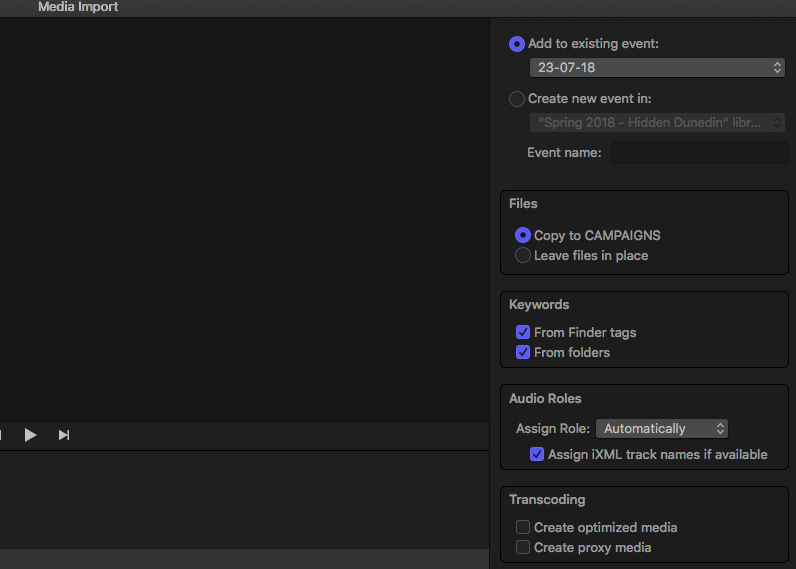
Image 1 shows the import screen. I no longer see "Copy to library" it is changed to whatever folder on my NAS the new library is saved under.
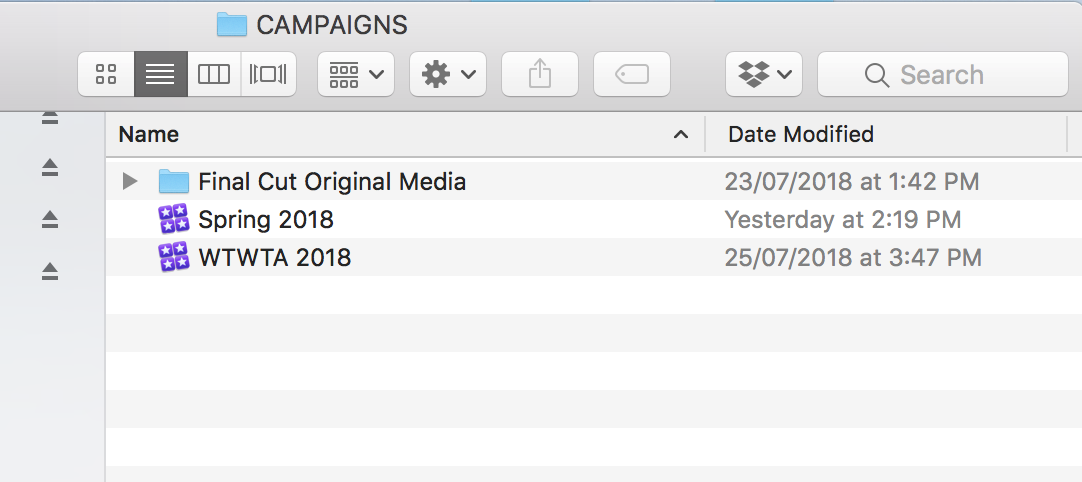
Image 2 shows the CAMPAIGN folder on my NAS where I have saved two libraries. You will also see the 'original media' folder alongside these which usually sits inside the libraries.
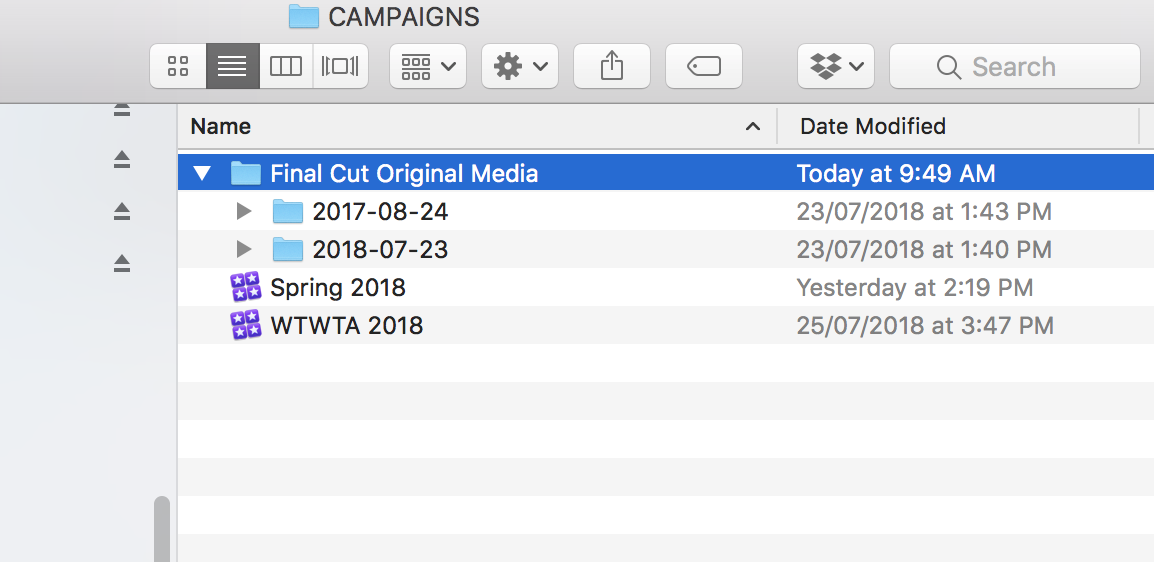
Image 3 shows that folder open revealing two events that are from different libraries.
Any ideas?
My employer has just set up a local NAS drive to store my final cut pro libraries. I originally asked for a thunderbolt connected RAID drive as this is what I have had experience with but somehow that got lost in translation and they got a NAS drive which is all new to me. After a few days of playing around they finally got it to connect and with a few work arounds it seems to perform similar to what a thunderbolt/usb drive would, aside from the slow boot up/connection times among other things, but can live with for now.
However, one issue I am having I just can't figure out and its seriously affecting my workflow.
For as long as I have known, when creating a new FCPX library the and importing clips into it, the original media is stored inside that library and can be revealed by right clicking and clicking "show package contents". This is a great feature as I can just copy the whole library and know my media is in there to work from home or whatever.
BUT since I have had the NAS, creating a new library on the NAS results in strange behaviour. I'll do my best to explain. Now when importing media, it no longer goes inside the library package, a new folder is created OUTSIDE of the library which contains the events and original media from the library I just created but also other libraries in the same folder. So, no longer can I just copy the library as the media will not come with it. Hopefully the below grabs will explain.
Image 1 shows the import screen. I no longer see "Copy to library" it is changed to whatever folder on my NAS the new library is saved under.
Image 2 shows the CAMPAIGN folder on my NAS where I have saved two libraries. You will also see the 'original media' folder alongside these which usually sits inside the libraries.
Image 3 shows that folder open revealing two events that are from different libraries.
Any ideas?
Please Log in to join the conversation.
- ronny courtens
-

- Offline
- Moderator
-

Less
More
- Posts: 4455
- Thank you received: 962
01 Aug 2018 08:49 #96619
by ronny courtens
Replied by ronny courtens on topic Storage help!
Check your Library Storage Locations:
Select the Library in FCP X, then in the Inspector press the Storage Locations > Modify Settings button.
In the window that opens, make sure that "Media" is set to" Library".
Working with a NAS is not a wise decision if you don't need to share media with other editors. A direct-attached Thunderbolt RAID will perform much better than a cheap desktop NAS.
- Ronny
Select the Library in FCP X, then in the Inspector press the Storage Locations > Modify Settings button.
In the window that opens, make sure that "Media" is set to" Library".
Working with a NAS is not a wise decision if you don't need to share media with other editors. A direct-attached Thunderbolt RAID will perform much better than a cheap desktop NAS.
- Ronny
Please Log in to join the conversation.

01 Aug 2018 10:03 #96620
by ianstubbs
Replied by ianstubbs on topic Storage help!
Good advice! Just one addition; once you have set the media location to ‘Library’ click on the Consolidate button to copy the media from your external folder into the library.
Ian.
Ian.
Please Log in to join the conversation.


01 Aug 2018 14:32 #96625
by joema
To further elaborate on this, many inexpensive NAS units are 1 gigabit ethernet -- the real world performance of these might be only 50 megabytes/sec, slower than a locally-attached slow bus-powered USB portable drive. I've seen some people report 25 MB/sec, which is about USB 2.0 performance. Nobody in their right mind would edit 4k video off a USB 2.0 HDD, yet sometimes a cheap NAS will only deliver this.
FCPX emits a unique I/O profile, a combination of large sequential I/Os (for video files) and small random I/Os for the library, plist files, etc. Even if BlackMagic benchmark on a gigabit NAS shows (say) 100 megabytes/sec for sequential I/Os, the actual FCPX performance may be worse. So a general-purpose NAS may not necessarily perform well for FCPX.
It appears that LumaForge has somehow figured out how to provide good I/O performance for FCPX even on gigabit ethernet, and obviously it's much better on 10 gig. If you carefully inspect an application's I/O stream and use prefetching or caching techniques optimized for that app, this is possible.
For any other NAS vendor besides LumaForge, I would be cautious about possible FCPX performance issues -- unless extensive testing is done. This testing might include synthetic benchmarks using similar I/O profiles deduced by monitoring the FCPX stream with tools like iosnoop and iopending. It might also require a careful study of the app's behavior, backed up with various FCPX performance tests comparing DAS and NAS.
Replied by joema on topic Storage help!
ronny courtens wrote: ...Working with a NAS is not a wise decision if you don't need to share media with other editors. A direct-attached Thunderbolt RAID will perform much better than a cheap desktop NAS....
To further elaborate on this, many inexpensive NAS units are 1 gigabit ethernet -- the real world performance of these might be only 50 megabytes/sec, slower than a locally-attached slow bus-powered USB portable drive. I've seen some people report 25 MB/sec, which is about USB 2.0 performance. Nobody in their right mind would edit 4k video off a USB 2.0 HDD, yet sometimes a cheap NAS will only deliver this.
FCPX emits a unique I/O profile, a combination of large sequential I/Os (for video files) and small random I/Os for the library, plist files, etc. Even if BlackMagic benchmark on a gigabit NAS shows (say) 100 megabytes/sec for sequential I/Os, the actual FCPX performance may be worse. So a general-purpose NAS may not necessarily perform well for FCPX.
It appears that LumaForge has somehow figured out how to provide good I/O performance for FCPX even on gigabit ethernet, and obviously it's much better on 10 gig. If you carefully inspect an application's I/O stream and use prefetching or caching techniques optimized for that app, this is possible.
For any other NAS vendor besides LumaForge, I would be cautious about possible FCPX performance issues -- unless extensive testing is done. This testing might include synthetic benchmarks using similar I/O profiles deduced by monitoring the FCPX stream with tools like iosnoop and iopending. It might also require a careful study of the app's behavior, backed up with various FCPX performance tests comparing DAS and NAS.
Please Log in to join the conversation.
- ronny courtens
-
- Offline
- Moderator
-
Less
More
- Posts: 4455
- Thank you received: 962
01 Aug 2018 16:29 #96627
by ronny courtens
Replied by ronny courtens on topic Storage help!
Joe is correct. That's why LumaForge uses 3 levels of caching (hi-level RAM, SSD and HDD caching) to guarantee extremely high performance and constant high bandwidth with FCP X and with any software that uses a mix of large sequential I/Os and small random I/Os (such as the cache files in Ppro CC, Resolve etc...). This is what makes the major difference between a cheap desktop NAS and a NAS that is specifically optimized for modern media workflows.
- Ronny
- Ronny
Please Log in to join the conversation.
