


- Posts: 786
- Thank you received: 21
3 Post Moderation Rule for New Boarders (25 Jan 2021)
New boarders will have their posts moderated - Don't worry if you cannot see your post immediately.
Delete a layer in title? How?
- Jonathan Levin
-
 Topic Author
- Offline
- Platinum Member
-

Less
More
13 Jul 2018 18:07 #96337
by Jonathan Levin
Delete a layer in title? How? was created by Jonathan Levin
Hi All.
I practicing working with a title in FCP, the "Dramatic" pre=set one.
On screen, there is a title, then a subtitle, and finally a date. How do you delete a title layer in the inspector, or anywhere. I first just deleted the text, but that affects the timing. I see at the bottom of the inspector you can add a layer, but how do you delete one or more.
Thanks millions.
JL
I practicing working with a title in FCP, the "Dramatic" pre=set one.
On screen, there is a title, then a subtitle, and finally a date. How do you delete a title layer in the inspector, or anywhere. I first just deleted the text, but that affects the timing. I see at the bottom of the inspector you can add a layer, but how do you delete one or more.
Thanks millions.
JL
Please Log in to join the conversation.

13 Jul 2018 19:18 #96340
by JoeEditor
Replied by JoeEditor on topic Delete a layer in title? How?
I'm playing with that template now. I deleted all text in the center text box, "Subtitle" and the timing is the same. I'm using markers to verify that.
Where do you see the ability to add a layer? What do you mean by a layer? Do you mean you've changed it to 3D text? Those 3D layers are for the texture of the letters.
Are you trying to delete a layer of texture? Select it, once it's highlighted in yellow, hit the Delete key.
Where do you see the ability to add a layer? What do you mean by a layer? Do you mean you've changed it to 3D text? Those 3D layers are for the texture of the letters.
Are you trying to delete a layer of texture? Select it, once it's highlighted in yellow, hit the Delete key.
Please Log in to join the conversation.
- Karsten Schlüter
-

- Offline
- Moderator
-

Less
More
- Posts: 3790
- Thank you received: 718
14 Jul 2018 05:12 #96348
by Karsten Schlüter
No?
The Inspector shows the arrows to 'tab' thru the three texts ('layers') involved in this preset…
You don't. In FC.
For sure, you can open a copy of that title in Motion and delete there a Group....
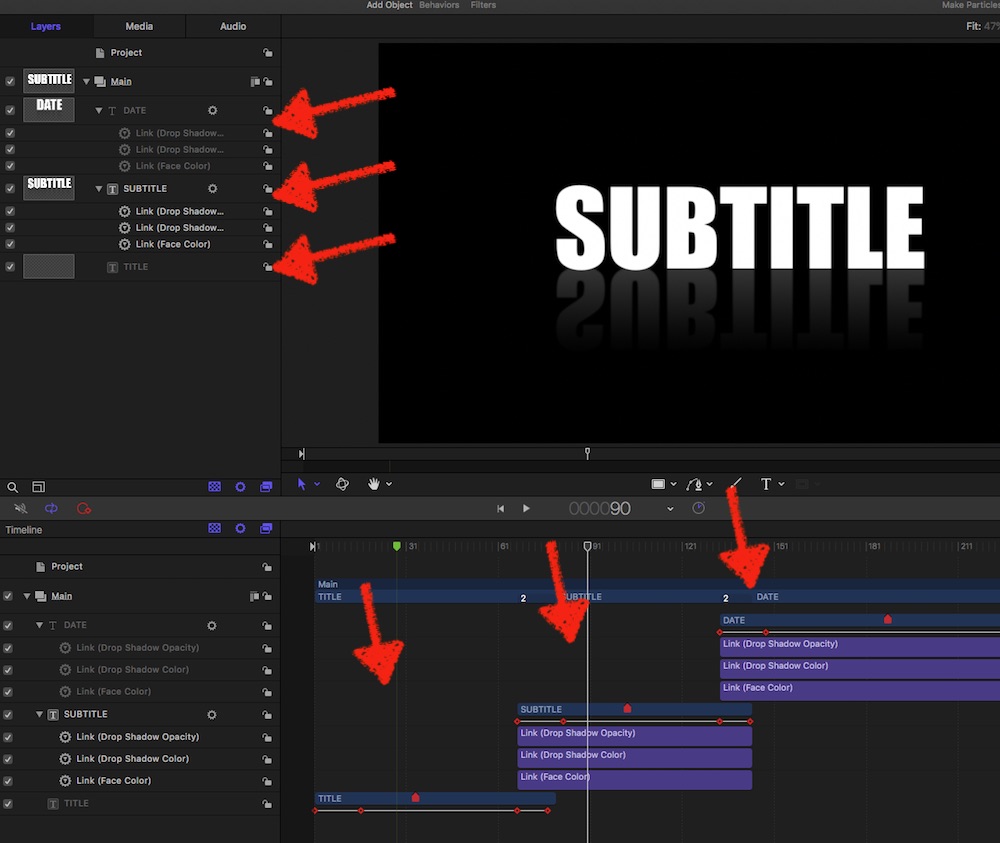
… animations very rude designed, imho …
Replied by Karsten Schlüter on topic Delete a layer in title? How?
Jonathan Levin wrote: … I see at the bottom of the inspector you can add a layer, …
No?
The Inspector shows the arrows to 'tab' thru the three texts ('layers') involved in this preset…
Jonathan Levin wrote: …how do you delete one or more.
…
You don't. In FC.
For sure, you can open a copy of that title in Motion and delete there a Group....
… animations very rude designed, imho …
Please Log in to join the conversation.
- Jonathan Levin
-
Topic Author
- Offline
- Platinum Member
-
Less
More
- Posts: 786
- Thank you received: 21
16 Jul 2018 21:05 #96387
by Jonathan Levin
Replied by Jonathan Levin on topic Delete a layer in title? How?
Karsten,
Terrific help as usual! As soon as I unbury myself from the mountain of woe I have here, I shall play with that. Seems like all roads lead back to Motion.....
Terrific help as usual! As soon as I unbury myself from the mountain of woe I have here, I shall play with that. Seems like all roads lead back to Motion.....
Please Log in to join the conversation.
- Karsten Schlüter
-
- Offline
- Moderator
-
Less
More
- Posts: 3790
- Thank you received: 718
17 Jul 2018 04:02 #96392
by Karsten Schlüter
haha, that's what Motion is meant for: customizing …
In case, you frequently use this Title and you frequently change the number of 'layers':
I would customize to ONE layer only and stack as many lines as I need in FinalCut. Make the in- and out-keyframes mandatory, which would allow to make the length 'stretchable'… as a suggestion…
Replied by Karsten Schlüter on topic Delete a layer in title? How?
Jonathan Levin wrote: … Seems like all roads lead back to Motion.....
haha, that's what Motion is meant for: customizing …
In case, you frequently use this Title and you frequently change the number of 'layers':
I would customize to ONE layer only and stack as many lines as I need in FinalCut. Make the in- and out-keyframes mandatory, which would allow to make the length 'stretchable'… as a suggestion…
Please Log in to join the conversation.
