


- Posts: 1
- Thank you received: 0
3 Post Moderation Rule for New Boarders (25 Jan 2021)
New boarders will have their posts moderated - Don't worry if you cannot see your post immediately.
How to fade out a text block
- carl.bailey
-
 Topic Author
- Offline
- New Member
-

Less
More
12 Jul 2018 09:37 #96301
by carl.bailey
How to fade out a text block was created by carl.bailey
I am new to FCPX so if I do not state my question appropriately, please forgive. I want to use the typewriter Build in/build out feature for 5 text blocks and then have them fade to black before the next clip is played. I cannot figure how to get it to fade. Any help will be greatly appreciated.
Please Log in to join the conversation.

12 Jul 2018 11:29 #96303
by lichinho
Replied by lichinho on topic How to fade out a text block
Here are just two ways to do it:
1) Add a Cross-dissolve. This can be added right to the end of the title if it is connected.
If it is sitting in the primary storyline, add a small gap clip (option-W) and do a cross-dissolve to the gap
2) Open the Video Animation pane (control-V) and drag the opacity handle at the end of the title
1) Add a Cross-dissolve. This can be added right to the end of the title if it is connected.
If it is sitting in the primary storyline, add a small gap clip (option-W) and do a cross-dissolve to the gap
2) Open the Video Animation pane (control-V) and drag the opacity handle at the end of the title
Please Log in to join the conversation.
12 Jul 2018 11:39 #96304
by Axel
Replied by Axel on topic How to fade out a text block
Third way, since a title is a video clip, you can edit it's properties in inspector with keyframed opacity:
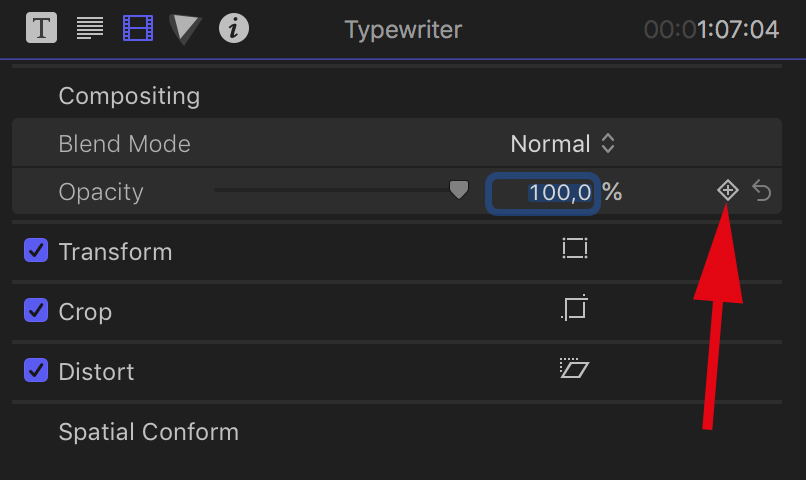
Please Log in to join the conversation.
