


- Posts: 150
- Thank you received: 2
3 Post Moderation Rule for New Boarders (25 Jan 2021)
New boarders will have their posts moderated - Don't worry if you cannot see your post immediately.
FCPX optimize and convert media
01 Jul 2018 15:33 - 01 Jul 2018 15:34 #96186
by click
FCPX optimize and convert media was created by click
Hello everyone, I have fcpx 10.4.3 with high sierra and I wanted to know how to do, I always worked with 1920x1080p files and now a friend gave me some files 3840x2160 24p I tried to work with these files but my Mac makes a little effort and also since the final video will be in 1920x1080p q this point I find inuitle edit in 4K but I would like to convert the clips in 1920x1080p so that my Mac works more easily.
now I wonder how to set up the project? so how much the clip 3840x2160p and fcpx converts it to 1920x1080p on the browser?
I tried to set the project as attached, but I find the clip on the browser and also in the timeline always 3840x2160.
thanks to who helps me.
now I wonder how to set up the project? so how much the clip 3840x2160p and fcpx converts it to 1920x1080p on the browser?
I tried to set the project as attached, but I find the clip on the browser and also in the timeline always 3840x2160.
thanks to who helps me.
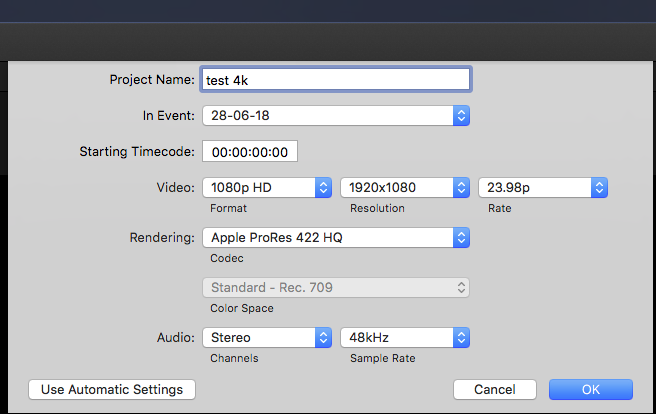
Last edit: 01 Jul 2018 15:34 by click.
Please Log in to join the conversation.

01 Jul 2018 19:08 #96187
by Axel
Replied by Axel on topic FCPX optimize and convert media
Set the project to 1080, select all video clips in the browser, right-click >transcode to >proxy. Problem solved.
Please Log in to join the conversation.
02 Jul 2018 12:16 #96190
by click
Replied by click on topic FCPX optimize and convert media
So I open a new project on fcpx in 1920x1080p then amount on the browser the native 3840x2160p clips, and dop I select all and right transcoding / right button right?
then when I select in and out on the clip and put it in the timeline this clip will be in 1920x1080p, I got it right?
thank you
then when I select in and out on the clip and put it in the timeline this clip will be in 1920x1080p, I got it right?
thank you
Please Log in to join the conversation.
02 Jul 2018 12:18 #96191
by click
Replied by click on topic FCPX optimize and convert media
One more thing I did not understand, where do I see if the clip put in the timeline is really in 1920x1080p?
thank you
ps (another system would be to convert 4K clips to fullHD first with edit ready or wrong?)

thank you
ps (another system would be to convert 4K clips to fullHD first with edit ready or wrong?)
Please Log in to join the conversation.

02 Jul 2018 17:19 #96192
by dgwvideo
Creating history....one edit at a time !
Replied by dgwvideo on topic FCPX optimize and convert media
The browser data will always show the size of the original clip. When you drop those clips into a 1080 project, they will export as 1080. Nothing else you need to do. The transcode to proxy is only for allowing your system to more easily playback the 4K clips if it won't otherwise natively play them back smooth. Be sure to change from proxy to original before you export your project.
Creating history....one edit at a time !
Please Log in to join the conversation.
