


- Posts: 3790
- Thank you received: 718
3 Post Moderation Rule for New Boarders (25 Jan 2021)
New boarders will have their posts moderated - Don't worry if you cannot see your post immediately.
QT to wmv converter?
- Karsten Schlüter
-

- Offline
- Moderator
-

Less
More
08 Jun 2018 03:41 #95902
by Karsten Schlüter
… not that simple, young Skywalker …
changing the suffix alone doesn't change some file-internal 'flag'/atoom (yep, two O) - a new suffix works 70% of cases, but not always.
Two… three options:
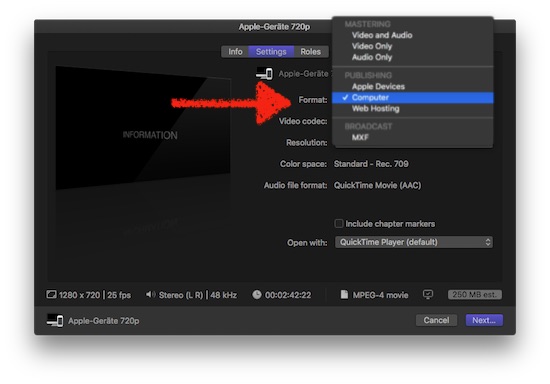
chose in the Share settings/Apple Device, and in the following dialogue, under optional settings, select Computer => creates a h264 in a 100% fully compatible mp4 container.
… but probably too big for your needs (res, file size, bit rate)
option #2 use any converter tool, Compressor, MpegStreamclip (btw: still working under 10.13_5) to convert a master output to your needs - again, select mp4…
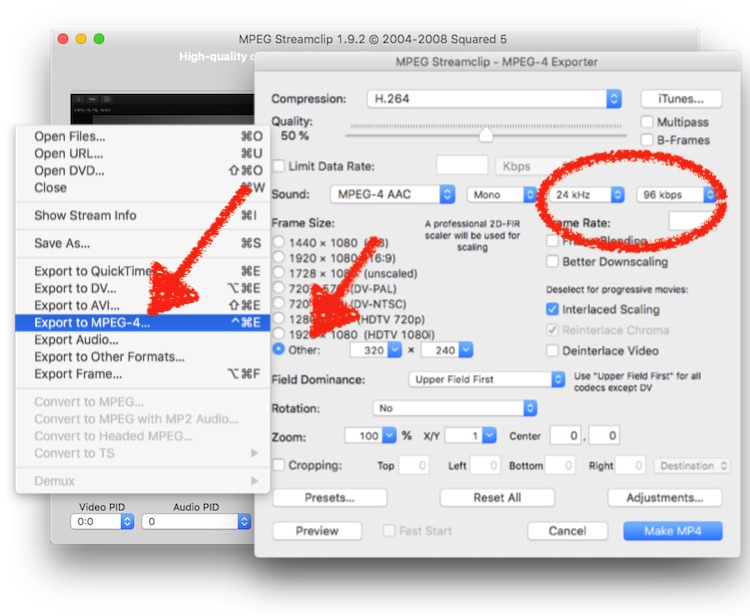
(btw: you can save a few bit with lowered audio settings …)
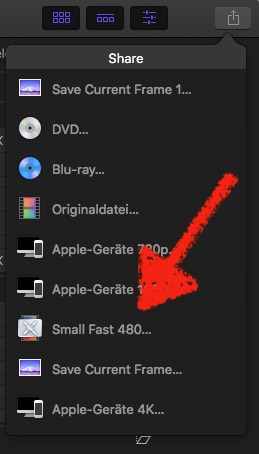
option #3 Create your own widget in Compressor …
last wiseguy-ish comment:
when a client demands for a WMV, often simply translates to 'a video file' … my experience in past decades … (compare with "sent you a mail!"=WhatsApp, "need pic as a Word!"=jpg, "I haven't touched anything!"=user mistake) :lol:
Replied by Karsten Schlüter on topic QT to wmv converter?
Jonathan Levin wrote: … Need to have extension changed from .MOV to .mp4, manually after transcode, and then will be OK.…
… not that simple, young Skywalker …
changing the suffix alone doesn't change some file-internal 'flag'/atoom (yep, two O) - a new suffix works 70% of cases, but not always.
Two… three options:
chose in the Share settings/Apple Device, and in the following dialogue, under optional settings, select Computer => creates a h264 in a 100% fully compatible mp4 container.
… but probably too big for your needs (res, file size, bit rate)
option #2 use any converter tool, Compressor, MpegStreamclip (btw: still working under 10.13_5) to convert a master output to your needs - again, select mp4…
(btw: you can save a few bit with lowered audio settings …)
option #3 Create your own widget in Compressor …
last wiseguy-ish comment:
when a client demands for a WMV, often simply translates to 'a video file' … my experience in past decades … (compare with "sent you a mail!"=WhatsApp, "need pic as a Word!"=jpg, "I haven't touched anything!"=user mistake) :lol:
Please Log in to join the conversation.
- Jonathan Levin
-
 Topic Author
- Offline
- Platinum Member
-

Less
More
- Posts: 786
- Thank you received: 21
08 Jun 2018 18:02 #95909
by Jonathan Levin
Replied by Jonathan Levin on topic QT to wmv converter?
Hi Karsten.
Thanks so much for that. I thought I had a copy of MPEGStream clip, but I have it now in case I need that. And thank you so much for referring to me as YOUNG! If you only new.
My clients have not specifically asked for WMV, or any format for that matter. Just something that will play on whatever the hell they have as far as hardware. I think I'll sendf them some very short test files to find out what works and what doesn't. This may not even be an issue in 2018, and my mind is still in 1999.
Best to you sir.
Jonathan
Thanks so much for that. I thought I had a copy of MPEGStream clip, but I have it now in case I need that. And thank you so much for referring to me as YOUNG! If you only new.
My clients have not specifically asked for WMV, or any format for that matter. Just something that will play on whatever the hell they have as far as hardware. I think I'll sendf them some very short test files to find out what works and what doesn't. This may not even be an issue in 2018, and my mind is still in 1999.
Best to you sir.
Jonathan
Please Log in to join the conversation.
- Jonathan Levin
-
Topic Author
- Offline
- Platinum Member
-
Less
More
- Posts: 786
- Thank you received: 21
08 Jun 2018 18:19 #95910
by Jonathan Levin
Replied by Jonathan Levin on topic QT to wmv converter?
DOH! I am such an idiot!!!
I went into Compresser and and found the New Setting button at the bottom left of the locations area. And just like that, there is an option for mp4!!!!
And Compressor converted a 2 minute test video much Quicker than MPEGStream clip.
So I now have options and created my own Levin MPEG-4 Custom preset. I altered the frame size to 600x338 from 1920x1080. My 2 minute test ~24MB. Maybe somehow I can get the file size way down. That's another day.....
Thanks a million everyone.
I went into Compresser and and found the New Setting button at the bottom left of the locations area. And just like that, there is an option for mp4!!!!
And Compressor converted a 2 minute test video much Quicker than MPEGStream clip.
So I now have options and created my own Levin MPEG-4 Custom preset. I altered the frame size to 600x338 from 1920x1080. My 2 minute test ~24MB. Maybe somehow I can get the file size way down. That's another day.....
Thanks a million everyone.
Please Log in to join the conversation.
- Jonathan Levin
-
Topic Author
- Offline
- Platinum Member
-
Less
More
- Posts: 786
- Thank you received: 21
03 Jul 2018 15:03 #96206
by Jonathan Levin
Replied by Jonathan Levin on topic QT to wmv converter?
Why is nothing easy????
OK. So I sent my client a jump drive that had my converted .mov files. I used the Share>Email preset in FCP and set that to medium quality. Created a H.264 file.
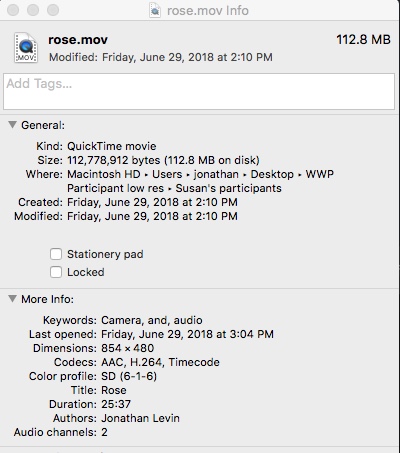
They look like this on her drive. This may be a shared drive BTW:
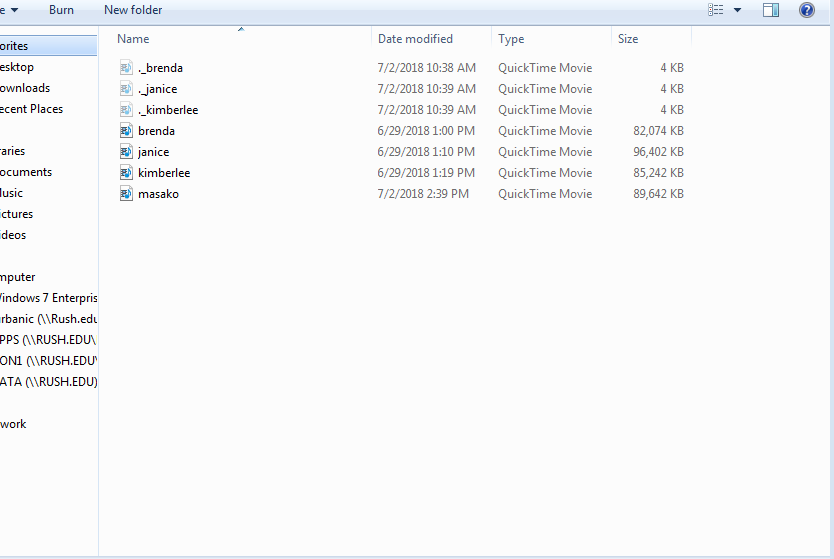
Then there was this message:
"Windows Media Player cannot play the file. The Player might not support the file type or might not support the codec that was used to compress the file.
Bottom link: Windows Media Player encountered a problem while playing the file."
GAH! Any advice???
Thanks kind people.
JL
OK. So I sent my client a jump drive that had my converted .mov files. I used the Share>Email preset in FCP and set that to medium quality. Created a H.264 file.
They look like this on her drive. This may be a shared drive BTW:
Then there was this message:
"Windows Media Player cannot play the file. The Player might not support the file type or might not support the codec that was used to compress the file.
Bottom link: Windows Media Player encountered a problem while playing the file."
GAH! Any advice???
Thanks kind people.
JL
Please Log in to join the conversation.

03 Jul 2018 15:43 #96207
by cseeman
Replied by cseeman on topic QT to wmv converter?
Perhaps they're not selecting the correct file. Those 4KB files aren't usable but the others should be OK.
Please Log in to join the conversation.
- Jonathan Levin
-
Topic Author
- Offline
- Platinum Member
-
Less
More
- Posts: 786
- Thank you received: 21
03 Jul 2018 15:56 - 03 Jul 2018 15:56 #96208
by Jonathan Levin
Replied by Jonathan Levin on topic QT to wmv converter?
Thanks cseeman.
That's the other thing. Where the hell did these files come from? They were not on the jump drive I gave them. I am waiting to hear back from my client. I had them try to change the .mov to mp4 on one of the full size files to se if that works.
That's the other thing. Where the hell did these files come from? They were not on the jump drive I gave them. I am waiting to hear back from my client. I had them try to change the .mov to mp4 on one of the full size files to se if that works.
Last edit: 03 Jul 2018 15:56 by Jonathan Levin.
Please Log in to join the conversation.

03 Jul 2018 20:19 #96212
by JoeEditor
Replied by JoeEditor on topic QT to wmv converter?
Hidden metadata files that macOS uses and Windows doesn't. Client can trash them. Change the .mov of those files to .m4v and it should be fine.
Please Log in to join the conversation.
- Jonathan Levin
-
Topic Author
- Offline
- Platinum Member
-
Less
More
- Posts: 786
- Thank you received: 21
03 Jul 2018 20:51 #96213
by Jonathan Levin
Replied by Jonathan Levin on topic QT to wmv converter?
Thanks fcpx.guru!
But should it be .m4v or .mp4? My client and I tried to convert a file from .mov to .mp4 and it converted it to a .pdf.....wtf??????
I will give .m4v a try. If that fails, I will jost host them on my website directory for them to access via a kink. Jeeezzzz. So frustrating.
But should it be .m4v or .mp4? My client and I tried to convert a file from .mov to .mp4 and it converted it to a .pdf.....wtf??????
I will give .m4v a try. If that fails, I will jost host them on my website directory for them to access via a kink. Jeeezzzz. So frustrating.
Please Log in to join the conversation.
04 Jul 2018 01:09 - 04 Jul 2018 01:12 #96214
by JoeEditor
Replied by JoeEditor on topic QT to wmv converter?
I send files to Windows systems daily. H.264 with a mp4 or m4v suffix and they seem fine. The codec is something Windows can read, it just tends to reject the .mov suffix. Yes, the whole "Industry standard" codec scam is a royal PITA.
Last edit: 04 Jul 2018 01:12 by JoeEditor.
Please Log in to join the conversation.

05 Jul 2018 01:01 - 05 Jul 2018 01:02 #96216
by dgwvideo
Creating history....one edit at a time !
Replied by dgwvideo on topic QT to wmv converter?
Jonathan,
We use a program called “Clean Eject” which removes all the Apple metadata from your thumb drive and then ejects it. The manufacturer of the app claims it is not supported in Sierra or higher, but it still works on our HS systems. We always check it on a Windows machine before we deliver and it has so far always removed everything but the actual content we want. It’s free so you might check it out.
As for mp4 file creation, we have been using Sorensen Squeeze Pro for the last 5 years for all of our encoding tasks. It is way faster, much more configurable and higher quality than Compressor of FCPX mastering and covers just about any deliverable format you would need . The universal mp4 files created by Squeeze play flawlessly on any Mac or Windows machine (and most tablet and phone devices with lower bitrates).
We have never had clients report back with failure to play videos since using Squeeze. We have the latest Desktop Pro version but they offer cheaper alternatives. Highly recommended, albeit has a bit of a learning curve.
We use a program called “Clean Eject” which removes all the Apple metadata from your thumb drive and then ejects it. The manufacturer of the app claims it is not supported in Sierra or higher, but it still works on our HS systems. We always check it on a Windows machine before we deliver and it has so far always removed everything but the actual content we want. It’s free so you might check it out.
As for mp4 file creation, we have been using Sorensen Squeeze Pro for the last 5 years for all of our encoding tasks. It is way faster, much more configurable and higher quality than Compressor of FCPX mastering and covers just about any deliverable format you would need . The universal mp4 files created by Squeeze play flawlessly on any Mac or Windows machine (and most tablet and phone devices with lower bitrates).
We have never had clients report back with failure to play videos since using Squeeze. We have the latest Desktop Pro version but they offer cheaper alternatives. Highly recommended, albeit has a bit of a learning curve.
Creating history....one edit at a time !
Last edit: 05 Jul 2018 01:02 by dgwvideo.
Please Log in to join the conversation.
