


- Posts: 145
- Thank you received: 1
3 Post Moderation Rule for New Boarders (25 Jan 2021)
New boarders will have their posts moderated - Don't worry if you cannot see your post immediately.
how to shorten timeline when using shapes from library?
03 Jun 2018 17:41 #95797
by owenpga
how to shorten timeline when using shapes from library? was created by owenpga
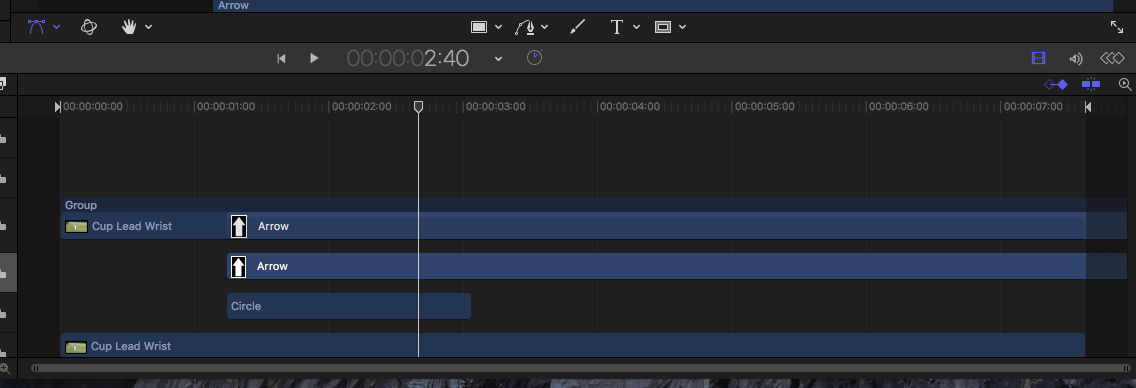
how can i shorten the time that the arrow in on time line?
Please Log in to join the conversation.
- Tom Wolsky
-

- Offline
- Moderator
-

03 Jun 2018 17:46 #95798
by Tom Wolsky
Replied by Tom Wolsky on topic how to shorten timeline when using shapes from library?
It looks like you're in a compound clip. Use the blade tool of cut the arrows, and then drag to shorten them.
Please Log in to join the conversation.
03 Jun 2018 17:51 #95799
by owenpga
Replied by owenpga on topic how to shorten timeline when using shapes from library?
im in motion
is there a blade tool in motion?
is there a blade tool in motion?
Please Log in to join the conversation.
- Tom Wolsky
-
- Offline
- Moderator
-
03 Jun 2018 17:59 #95800
by Tom Wolsky
Replied by Tom Wolsky on topic how to shorten timeline when using shapes from library?
Please Log in to join the conversation.


04 Jun 2018 01:15 - 04 Jun 2018 01:16 #95805
by JoeEditor
Replied by JoeEditor on topic how to shorten timeline when using shapes from library?
In Motion, select the image layer, place the playhead where you want it to stop, hit o to trim to that out point (or i to trim to that in point).
There is no blade tool in motion, but in the Edit menu is a Split command. It will cut the media at that point, and move the second segment to its own image layer.
There is no blade tool in motion, but in the Edit menu is a Split command. It will cut the media at that point, and move the second segment to its own image layer.
Last edit: 04 Jun 2018 01:16 by JoeEditor.
Please Log in to join the conversation.
- Karsten Schlüter
-

- Offline
- Moderator
-
Less
More
- Posts: 3790
- Thank you received: 718
04 Jun 2018 09:10 #95811
by Karsten Schlüter
aside keys (setting I/O) you can grab'n-drag the ends of any 'bar' in the timeline …
And, 'engineers' approach, you can set the I/O/duration of any element in the Inspector/Properties/Timing …
Replied by Karsten Schlüter on topic how to shorten timeline when using shapes from library?
owenpga wrote: how can i shorten the time that the arrow in on time line?
aside keys (setting I/O) you can grab'n-drag the ends of any 'bar' in the timeline …
And, 'engineers' approach, you can set the I/O/duration of any element in the Inspector/Properties/Timing …
Please Log in to join the conversation.
04 Jun 2018 13:18 #95814
by owenpga
Replied by owenpga on topic how to shorten timeline when using shapes from library?
Hi Karsten- grab and drag wasn’t possible for some reason?
I just went in an opened an arrow from library and then opened a background and it works fine with drag and drop.
can you look at the original screenshot and tell my why
the drag and drop function was inactive?
Thank you. Owen
I just went in an opened an arrow from library and then opened a background and it works fine with drag and drop.
can you look at the original screenshot and tell my why
the drag and drop function was inactive?
Thank you. Owen
Please Log in to join the conversation.
04 Jun 2018 13:43 - 04 Jun 2018 14:25 #95816
by owenpga
Replied by owenpga on topic how to shorten timeline when using shapes from library?
can anyone tell me the behavior or the emitter that’s being used to highlight the circle or are they just using opacity in keyframes? also i’d like to be able to trace a line on on the club as in this video but when I try to use the analyze motion features it doesn’t seem to pick the club head up when it moves that well . My guess is they’re not using the bezier tool as it seems perfectly matched.
thanks
thanks
Last edit: 04 Jun 2018 14:25 by owenpga. Reason: add video
Please Log in to join the conversation.
- Karsten Schlüter
-
- Offline
- Moderator
-
Less
More
- Posts: 3790
- Thank you received: 718
04 Jun 2018 16:26 - 04 Jun 2018 16:41 #95817
by Karsten Schlüter
Hi Owen,
frankly spoken - I have no clue … here's my 'rebuilt' of your timeline in M5:
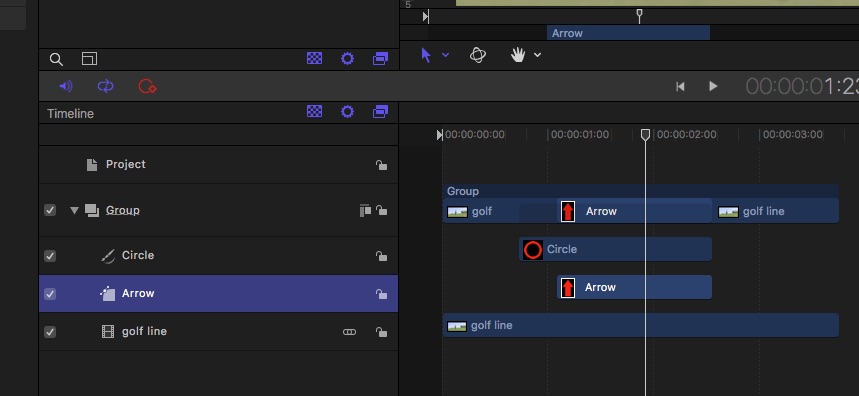
There's a single group, with some video-clip, a circle and from the Shapes collection an Arrow.
=> all drag'n drop, all click'n drag, … fully operational, functional as intended.
You mentioned 'Emitter'.…? Elaborate…
(don't use the forums Video button, just insert the YTlink)
The highlight circle is no Motion5 ready-made I'm aware of … but easy to rebuild, two circles, a few keyframes , …
Motions Tracker behavior asks for some high-contrast tiny crop of your scene. In a perfect world, the club is red, the sky is blue and the green is surprisingly green, and the club is fully seen for the whole swing, no motion blur ....
Replied by Karsten Schlüter on topic how to shorten timeline when using shapes from library?
owenpga wrote: Hi Karsten- grab and drag wasn’t possible for some reason?
…can you look at the original screenshot and tell my why
the drag and drop function was inactive? …
Hi Owen,
frankly spoken - I have no clue … here's my 'rebuilt' of your timeline in M5:
There's a single group, with some video-clip, a circle and from the Shapes collection an Arrow.
=> all drag'n drop, all click'n drag, … fully operational, functional as intended.
You mentioned 'Emitter'.…? Elaborate…
owenpga wrote: can anyone tell me the behavior or the emitter that’s being used to highlight the circle… … like to be able to trace a line on on the club as in this video but when I try to use the analyze motion features it doesn’t seem to pick the club head up when it moves that well .
...
(don't use the forums Video button, just insert the YTlink)
The highlight circle is no Motion5 ready-made I'm aware of … but easy to rebuild, two circles, a few keyframes , …
Motions Tracker behavior asks for some high-contrast tiny crop of your scene. In a perfect world, the club is red, the sky is blue and the green is surprisingly green, and the club is fully seen for the whole swing, no motion blur ....
Last edit: 04 Jun 2018 16:41 by Karsten Schlüter.
Please Log in to join the conversation.
- Karsten Schlüter
-
- Offline
- Moderator
-
Less
More
- Posts: 3790
- Thank you received: 718
04 Jun 2018 16:54 #95818
by Karsten Schlüter
Replied by Karsten Schlüter on topic how to shorten timeline when using shapes from library?
… as an example:
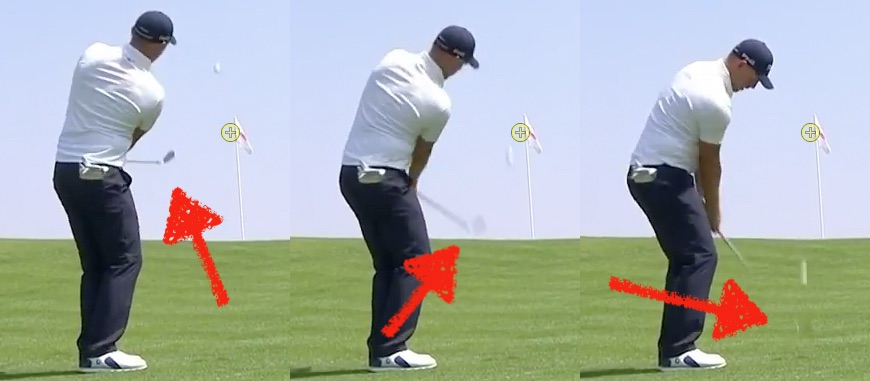
#1 club slow moving, high contrast = easy to track automatically
#2 motion-blur = any tracker (3rd party tools as TrackX included) will lose here
#3 club too fast/camera too slow = nothing to track…
#1 club slow moving, high contrast = easy to track automatically
#2 motion-blur = any tracker (3rd party tools as TrackX included) will lose here
#3 club too fast/camera too slow = nothing to track…
Please Log in to join the conversation.
