


- Posts: 730
- Thank you received: 26
3 Post Moderation Rule for New Boarders (25 Jan 2021)
New boarders will have their posts moderated - Don't worry if you cannot see your post immediately.
Split screen and Multicam
- DmitriZigany
-
 Topic Author
- Offline
- Platinum Member
-

Less
More
01 Jun 2018 16:22 #95790
by DmitriZigany
Split screen and Multicam was created by DmitriZigany
Surprisingly often I get asked to do split screens when I edit music videos...
Problem is, I usually but things in multicam clips... and as far as I know, non of the nice split screen plug-ins can use them...
Here's what I want:
Throw a split screen plug-in on a multicam clip edit (or put title above it... then for each frame just select which angle to be seen in that frame...
is there any plug-ins that do this? Or does anyone else have any tips on how to do split screens when using multicam? (other than duplicating the clip as many times as there's frames and manually resize etc etc..)
Must I've seen are based on drop zones etc... which means I have to manually sync up the clips - again = no fun!
Problem is, I usually but things in multicam clips... and as far as I know, non of the nice split screen plug-ins can use them...
Here's what I want:
Throw a split screen plug-in on a multicam clip edit (or put title above it... then for each frame just select which angle to be seen in that frame...
is there any plug-ins that do this? Or does anyone else have any tips on how to do split screens when using multicam? (other than duplicating the clip as many times as there's frames and manually resize etc etc..)
Must I've seen are based on drop zones etc... which means I have to manually sync up the clips - again = no fun!
Please Log in to join the conversation.
- Karsten Schlüter
-

- Offline
- Moderator
-

Less
More
- Posts: 3790
- Thank you received: 718
02 Jun 2018 05:56 #95793
by Karsten Schlüter
uhm, interesting task
easy to create a plugin, to 'auto' the resize/position part … one can slam that together in a minute …
but …
as any compo, each 'source' (=angle) demands its own lane, … unfortunately you have no access to the angles of a MC in Motion, as you have in Final Cuts Inspector of the MC, at last btmk. So, cloning and arranging the source 4x would be easy, but you have no option in Motion/or later in FC to tell each clone 'use Angle1-4' …
No, best to my knowledge, 50%/x/y is easy, but you have to alt-drag the clip several times to create lanes …
hmmm??
Replied by Karsten Schlüter on topic Split screen and Multicam
DmitriZigany wrote: …Here's what I want:
Throw a split screen plug-in on a multicam clip edit (or put title above it... then for each frame just select which angle to be seen in that frame... …other than duplicating the clip as many times as there's frames and manually resize etc etc..)…
uhm, interesting task
easy to create a plugin, to 'auto' the resize/position part … one can slam that together in a minute …
but …
as any compo, each 'source' (=angle) demands its own lane, … unfortunately you have no access to the angles of a MC in Motion, as you have in Final Cuts Inspector of the MC, at last btmk. So, cloning and arranging the source 4x would be easy, but you have no option in Motion/or later in FC to tell each clone 'use Angle1-4' …
No, best to my knowledge, 50%/x/y is easy, but you have to alt-drag the clip several times to create lanes …
hmmm??
Please Log in to join the conversation.
- Karsten Schlüter
-
- Offline
- Moderator
-
Less
More
- Posts: 3790
- Thank you received: 718
02 Jun 2018 06:11 - 02 Jun 2018 06:11 #95794
by Karsten Schlüter
Replied by Karsten Schlüter on topic Split screen and Multicam
… not tell, show :
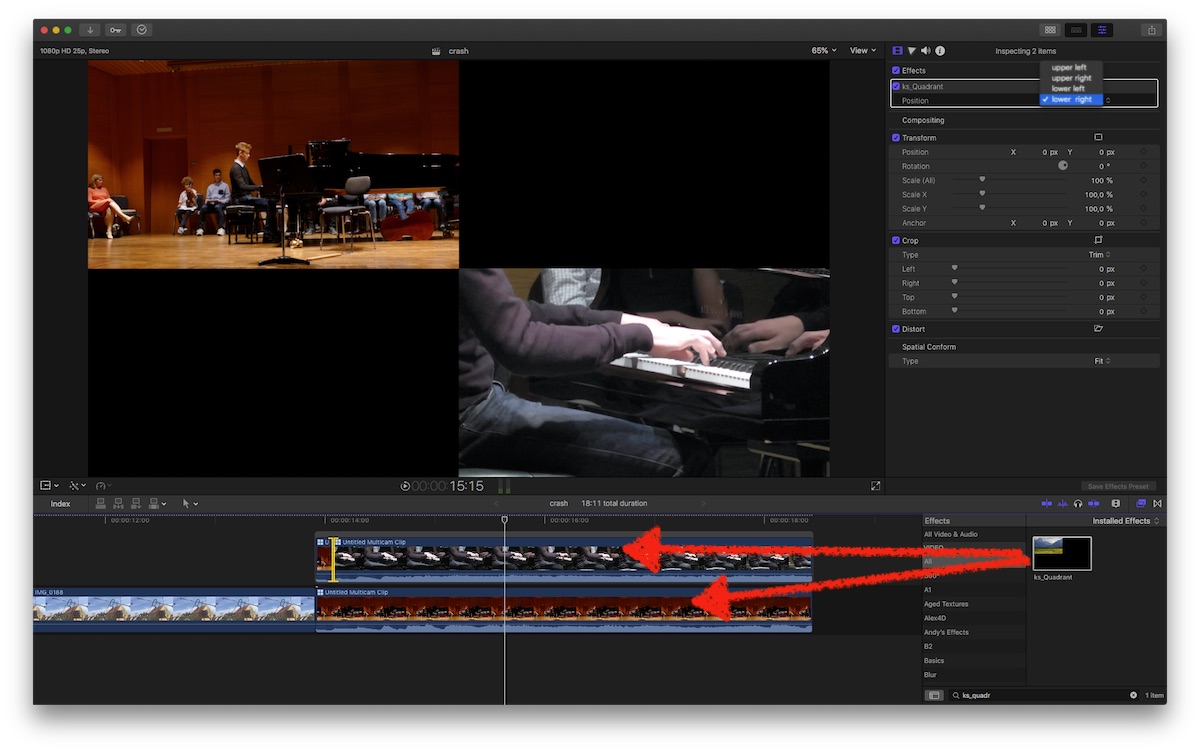
a MC in projects timeline, alt-drag to create clone in lane#2, select angles, apply Effect to both, select position...
but, you need 4 lanes …
a MC in projects timeline, alt-drag to create clone in lane#2, select angles, apply Effect to both, select position...
but, you need 4 lanes …
Last edit: 02 Jun 2018 06:11 by Karsten Schlüter.
Please Log in to join the conversation.
- DmitriZigany
-
Topic Author
- Offline
- Platinum Member
-
Less
More
- Posts: 730
- Thank you received: 26
02 Jun 2018 10:29 #95795
by DmitriZigany
Replied by DmitriZigany on topic Split screen and Multicam
I suspected there's no other way... was hoping for a quick plug-in to do those things... drop-zones work fine if you have none synced material... but when you have already synced up stuff once, you're not very eager to do it again...
(talking about those fancier split frame things with animated frames etc...)
(talking about those fancier split frame things with animated frames etc...)
Please Log in to join the conversation.

24 May 2020 15:22 #107430
by Boome52
Replied by Boome52 on topic Split screen and Multicam
Hello Dimitri; I saw your post about split screens and multi cam sync & especially using the fancier split screen plug-ins and FCPX. My business is centered around music concerts, and I have the same exact problem. Please Let me know if you find such a PLUG-IN that will allow us all to handle “SPLit SCREENS“ and multi cam clips that have a track of pre mixed music to sync to.
Actually I got a nice email back from Johnny Dekemp from zoetrope regarding this. And he invented his split screen plugin out of his early music video experience. But it still had drop zones, and His Plug-in does not work as WE WOULD LIKE a PLUG-IN to. Thanks again Dimitri keep me in the loop.
Actually I got a nice email back from Johnny Dekemp from zoetrope regarding this. And he invented his split screen plugin out of his early music video experience. But it still had drop zones, and His Plug-in does not work as WE WOULD LIKE a PLUG-IN to. Thanks again Dimitri keep me in the loop.
Please Log in to join the conversation.

25 May 2020 06:04 #107437
by arc
Replied by arc on topic Split screen and Multicam
Karsten Schlüter has the right idea. You would only needs two layers and you would have to make use of the position and crop filter if you only wanted two camera angles.
Please Log in to join the conversation.
