


- Posts: 1077
- Thank you received: 189
3 Post Moderation Rule for New Boarders (25 Jan 2021)
New boarders will have their posts moderated - Don't worry if you cannot see your post immediately.
Published parameters
- Andreas Kiel
-
 Topic Author
- Offline
- Platinum Member
-

Less
More
25 May 2018 18:21 #95667
by Andreas Kiel
Published parameters was created by Andreas Kiel
If a parameter is published it can be be changed in FCP - but only for a single instance of the template.
Is there a way to "publish for batch change"
- Andreas
Is there a way to "publish for batch change"
- Andreas
Please Log in to join the conversation.

28 May 2018 13:17 #95699
by ianstubbs
Replied by ianstubbs on topic Published parameters
No, not directly. Thoughts...
Maybe put the motion template in a compound clip? Changing it there should change it everywhere? I haven’t tried this and, of course, it would be useless for text unless it was the same text everywhere.
Or...
Alter the master template while FCPX is closed. I’ve found that many things auto update when you do this but, again, not text properties.
Best I can think of.
Ian.
Maybe put the motion template in a compound clip? Changing it there should change it everywhere? I haven’t tried this and, of course, it would be useless for text unless it was the same text everywhere.
Or...
Alter the master template while FCPX is closed. I’ve found that many things auto update when you do this but, again, not text properties.
Best I can think of.
Ian.
Please Log in to join the conversation.
28 May 2018 15:28 #95700
by lichinho
Replied by lichinho on topic Published parameters
You may make a change (or a hundred), then click "Save Effects Preset" in FCP's Inspector.
Give it a name. Then you can use this wherever you want.
Give it a name. Then you can use this wherever you want.
Please Log in to join the conversation.
- Andreas Kiel
-
Topic Author
- Offline
- Platinum Member
-
Less
More
- Posts: 1077
- Thank you received: 189
28 May 2018 16:49 #95701
by Andreas Kiel
Replied by Andreas Kiel on topic Published parameters
Thanks,
But that won't work.
Changing the master wouldn't allow to have different settings for different projects. But fortunately that doesn't work
But that won't work.
Changing the master wouldn't allow to have different settings for different projects. But fortunately that doesn't work
Please Log in to join the conversation.
- Andreas Kiel
-
Topic Author
- Offline
- Platinum Member
-
Less
More
- Posts: 1077
- Thank you received: 189
28 May 2018 16:52 #95702
by Andreas Kiel
Replied by Andreas Kiel on topic Published parameters
Saving presets only work for effects and don't allow to 'batch set' for example generator values.
Please Log in to join the conversation.
28 May 2018 17:06 #95703
by lichinho
For a generator, I think there are two approaches:
1) Edit a copy in Motion, and save with selected values for parameters
2) Without resorting to Motion:
Add generator to a timeline, adjust parameters, make it a compound clip. You could have specific events to group those reusable entitities. Once dragged to a new timeline, you can break it apart, do any other adjustments and it won't affect your compound. Think of that event as a repository of your own customized generators.
For example, suppose you want to have quick access to a generator producing a green square. Drag the Shapes generator to a timeline, change the shape to a square, change the color to green, remove the outline - i.e., a batch of changes. Make it a compound, and call it Green Square. Choose a nice place to keep it. That compound can then be used and reused (and broken apart) without having to go and change the parameters of the Shapes generator.
Replied by lichinho on topic Published parameters
Andreas Kiel wrote: Saving presets only work for effects and don't allow to 'batch set' for example generator values.
For a generator, I think there are two approaches:
1) Edit a copy in Motion, and save with selected values for parameters
2) Without resorting to Motion:
Add generator to a timeline, adjust parameters, make it a compound clip. You could have specific events to group those reusable entitities. Once dragged to a new timeline, you can break it apart, do any other adjustments and it won't affect your compound. Think of that event as a repository of your own customized generators.
For example, suppose you want to have quick access to a generator producing a green square. Drag the Shapes generator to a timeline, change the shape to a square, change the color to green, remove the outline - i.e., a batch of changes. Make it a compound, and call it Green Square. Choose a nice place to keep it. That compound can then be used and reused (and broken apart) without having to go and change the parameters of the Shapes generator.
Please Log in to join the conversation.
- Andreas Kiel
-
Topic Author
- Offline
- Platinum Member
-
Less
More
- Posts: 1077
- Thank you received: 189
29 May 2018 09:23 #95720
by Andreas Kiel
Replied by Andreas Kiel on topic Published parameters
Thanks again for the suggestions.
Think about.
Take a generator producing a rectangle, use it 10 or 50 or whatever times with different sizes (maybe colors).
Now change outline size only.
That wouldn't make senselichinho wrote: For a generator, I think there are two approaches:
1) Edit a copy in Motion, and save with selected values for parameters
Think about.
Also this wouldn't work.lichinho wrote: 2) Without resorting to Motion:
Add generator to a timeline, adjust parameters, make it a compound clip. You could have specific events to group those reusable entitities. Once dragged to a new timeline, you can break it apart, do any other adjustments and it won't affect your compound. Think of that event as a repository of your own customized generators.
For example, suppose you want to have quick access to a generator producing a green square. Drag the Shapes generator to a timeline, change the shape to a square, change the color to green, remove the outline - i.e., a batch of changes. Make it a compound, and call it Green Square. Choose a nice place to keep it. That compound can then be used and reused (and broken apart) without having to go and change the parameters of the Shapes generator.
Take a generator producing a rectangle, use it 10 or 50 or whatever times with different sizes (maybe colors).
Now change outline size only.
Please Log in to join the conversation.
29 May 2018 09:53 #95721
by lichinho
Replied by lichinho on topic Published parameters
I probably missed your point entirely.
It seems to me now that you want to make changes to several instances of a generator that you have already placed in one (or more) timelines. Is that it?
Of course, what I suggested wouldn't work.
AFAICT, the only way that a change made in one place will be replicated automatically somewhere else is to use a compound clip. THAT would work, because that is how compound clips work.
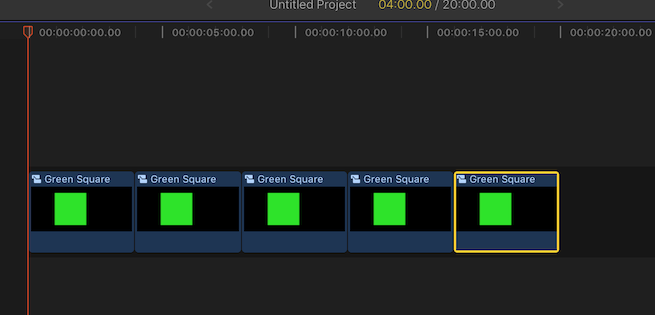
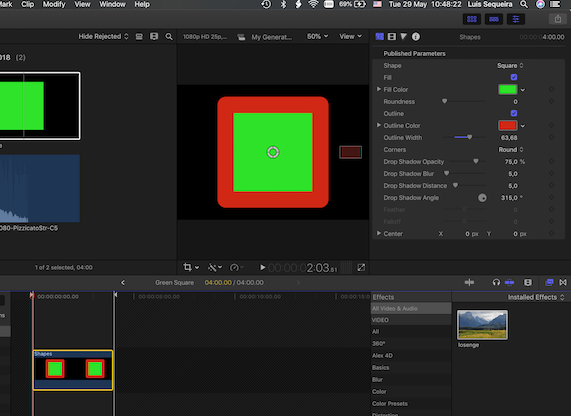
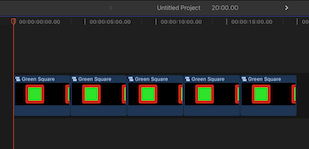
Here is a quick example:
1) A compound clip of the shapes generator, producing a green square, is added to a timeline multiple times.
2) Double-click any of the compound clips in the timeline, and make changes to the generator (here, add a large red outline, but could make any other changes)
3) ALL of them in the timeline (and in the browser!) change - is this the sort of batch change you had in mind?
Of course, there is always the possibility that I'm still missing your point.
It seems to me now that you want to make changes to several instances of a generator that you have already placed in one (or more) timelines. Is that it?
Of course, what I suggested wouldn't work.
AFAICT, the only way that a change made in one place will be replicated automatically somewhere else is to use a compound clip. THAT would work, because that is how compound clips work.
Here is a quick example:
1) A compound clip of the shapes generator, producing a green square, is added to a timeline multiple times.
2) Double-click any of the compound clips in the timeline, and make changes to the generator (here, add a large red outline, but could make any other changes)
3) ALL of them in the timeline (and in the browser!) change - is this the sort of batch change you had in mind?
Of course, there is always the possibility that I'm still missing your point.
Please Log in to join the conversation.
- Karsten Schlüter
-

- Offline
- Moderator
-

Less
More
- Posts: 3790
- Thank you received: 718
29 May 2018 10:00 #95722
by Karsten Schlüter
… it looks like, that Published Parameters are no 'Attributes', at last none copy/cmd-shift-v paste-able ones……
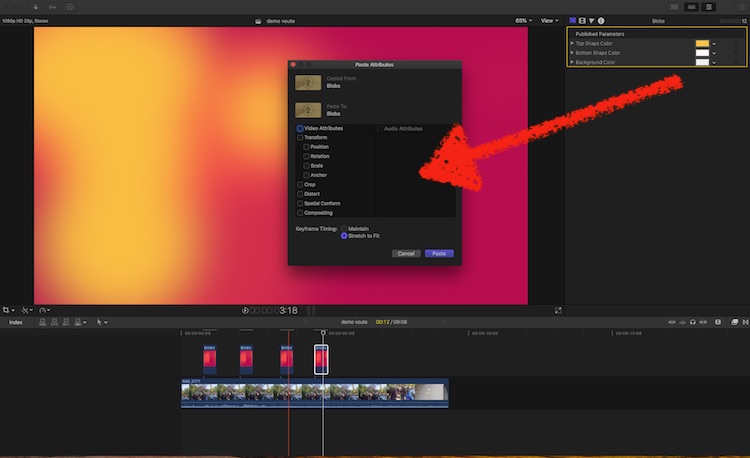
Enhancement request?
Replied by Karsten Schlüter on topic Published parameters
Andreas Kiel wrote: …Take a generator producing a rectangle, use it 10 or 50 or whatever times with different sizes (maybe colors).
Now change outline size only.
… it looks like, that Published Parameters are no 'Attributes', at last none copy/cmd-shift-v paste-able ones……
Enhancement request?
Please Log in to join the conversation.
- Andreas Kiel
-
Topic Author
- Offline
- Platinum Member
-
Less
More
- Posts: 1077
- Thank you received: 189
29 May 2018 11:32 #95728
by Andreas Kiel
Replied by Andreas Kiel on topic Published parameters
@ Luis
See the example I gave - it won't work.
@ Karsten
Obviously it needs a enhancement request for that.
See the example I gave - it won't work.
@ Karsten
Obviously it needs a enhancement request for that.
Please Log in to join the conversation.
29 May 2018 11:33 #95729
by ianstubbs
Replied by ianstubbs on topic Published parameters
Being able to paste attributes from published parameters would be very useful! In the meantime the compound clip approach would work but there is a more interesting technique as I mentioned at the top of the thread.
FCPX loads templates when it loads a timeline containing them. I've just tested how we might use this (in fact I used it unwittingly some months ago on a client project and it was VERY useful as colours and shapes changed as a brand identity was signed off).
My test this morning:
Make a simple title in Motion with a shape under a title layer.
Set the fill and border colours plus font, size etc.
Don't publish any parameters.
Publish the template and open FCPX.
Apply the template several times across a timeline
Change each title to a unique text string
Switch back to Motion and change colour of fill and border plus change the border width. (Changing the font will have no effect as we have modified the text in FCPX and it's now stored as part of the project).
Save the template in Motion.
Switch back to FCPX and notice the templates have not updated.
Quit and restart FCPX and they are read in again and all update.
To change the font select all of the titles together and change in the inspector.
Obviously this approach is not going to be useful in all situations and being able to copy and paste published parameters would be a more elegant solution. Also, Apple may change the behaviour behind this 'feature' as it's undocumented. Also beware if you store the template in the Library. I haven't tested this but it would probably mean that you have to alter the version stored in the library by digging for it in the Finder; and then the version in your Motion Templates folder would be different...
A useful trick while we wait for Apple. I will put in my request for the improvement to 'Paste Attributes' now.
Ian.
FCPX loads templates when it loads a timeline containing them. I've just tested how we might use this (in fact I used it unwittingly some months ago on a client project and it was VERY useful as colours and shapes changed as a brand identity was signed off).
My test this morning:
Make a simple title in Motion with a shape under a title layer.
Set the fill and border colours plus font, size etc.
Don't publish any parameters.
Publish the template and open FCPX.
Apply the template several times across a timeline
Change each title to a unique text string
Switch back to Motion and change colour of fill and border plus change the border width. (Changing the font will have no effect as we have modified the text in FCPX and it's now stored as part of the project).
Save the template in Motion.
Switch back to FCPX and notice the templates have not updated.
Quit and restart FCPX and they are read in again and all update.
To change the font select all of the titles together and change in the inspector.
Obviously this approach is not going to be useful in all situations and being able to copy and paste published parameters would be a more elegant solution. Also, Apple may change the behaviour behind this 'feature' as it's undocumented. Also beware if you store the template in the Library. I haven't tested this but it would probably mean that you have to alter the version stored in the library by digging for it in the Finder; and then the version in your Motion Templates folder would be different...
A useful trick while we wait for Apple. I will put in my request for the improvement to 'Paste Attributes' now.
Ian.
Please Log in to join the conversation.
- Andreas Kiel
-
Topic Author
- Offline
- Platinum Member
-
Less
More
- Posts: 1077
- Thank you received: 189
29 May 2018 11:45 #95730
by Andreas Kiel
Replied by Andreas Kiel on topic Published parameters
Ian,
There's no need to do it the way you described for the example you used.
Additionally if you do it your way only those values will be changed which are 'default' and even in many/most cases that won't work.
ALL parameters related to 'Font' are batch-changeable.
The problem though is the Font itself - changing it for a bunch of instances could/will screw up other values.
There's no need to do it the way you described for the example you used.
Additionally if you do it your way only those values will be changed which are 'default' and even in many/most cases that won't work.
ALL parameters related to 'Font' are batch-changeable.
The problem though is the Font itself - changing it for a bunch of instances could/will screw up other values.
Please Log in to join the conversation.
