


- Posts: 164
- Thank you received: 0
3 Post Moderation Rule for New Boarders (25 Jan 2021)
New boarders will have their posts moderated - Don't worry if you cannot see your post immediately.
Clip move , not audio move
25 May 2018 14:11 #95656
by Neil P
Clip move , not audio move was created by Neil P
Hi Guys,
Another basic problem which is driving me mad. I'm working on a film that has an audio track underneath it. I'm trying to edit the clips to fit with the music. Suddenly, when I adjust a clip the music track moves with it (on any clip that I select. I don't want it to do this as i'm adjusting the music to fit the track and I want the track to stay static.
I can find the answer, please help
thanks
Neil
Another basic problem which is driving me mad. I'm working on a film that has an audio track underneath it. I'm trying to edit the clips to fit with the music. Suddenly, when I adjust a clip the music track moves with it (on any clip that I select. I don't want it to do this as i'm adjusting the music to fit the track and I want the track to stay static.
I can find the answer, please help
thanks
Neil
Please Log in to join the conversation.
- Tom Wolsky
-

- Offline
- Moderator
-

25 May 2018 14:15 #95657
by Tom Wolsky
Replied by Tom Wolsky on topic Clip move , not audio move
Many people who work in music videos put the audio on the primary storyline where it should move, unless you put something in front of it. You can also put a tiny gap clip, one frane’s Enough, at the head of the timeline and attach the audio to that.
Please Log in to join the conversation.
25 May 2018 14:36 #95658
by Neil P
Replied by Neil P on topic Clip move , not audio move
ok thanks,
I've put a gap at the head of the time line (using gap generator) , how do i attached the music to it ? see picture
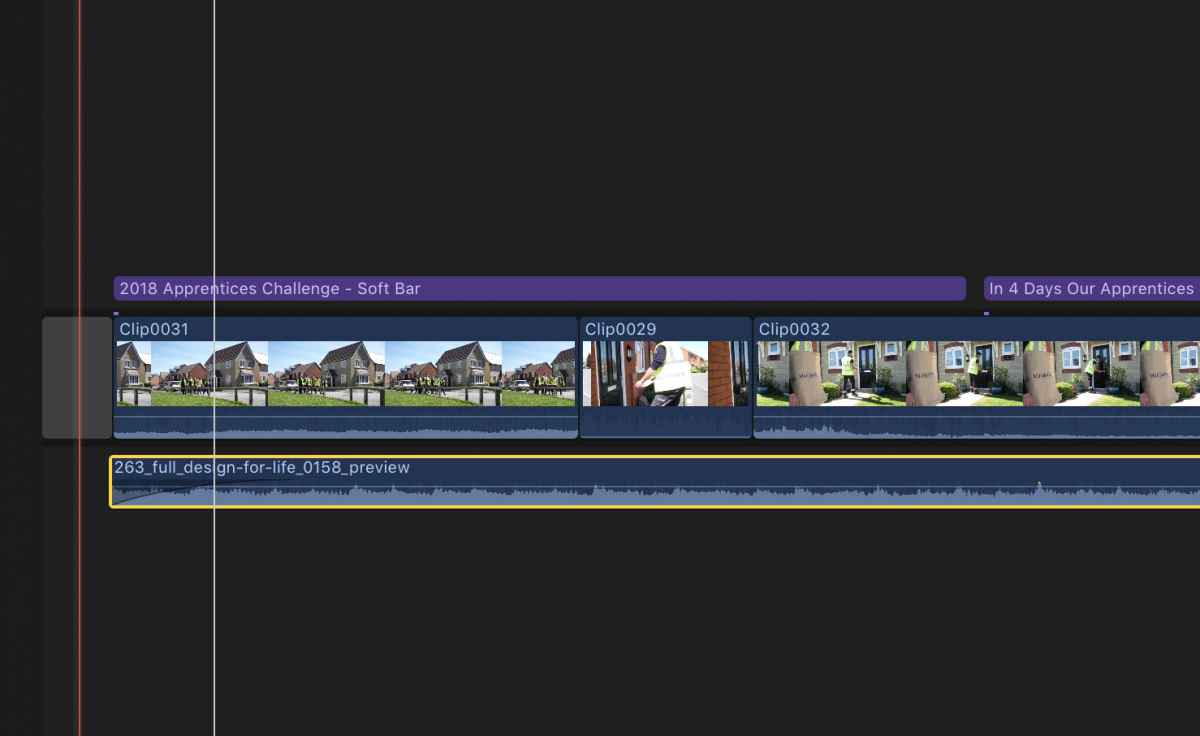
I've put a gap at the head of the time line (using gap generator) , how do i attached the music to it ? see picture
Please Log in to join the conversation.
- Tom Wolsky
-
- Offline
- Moderator
-
25 May 2018 14:49 - 25 May 2018 14:51 #95660
by Tom Wolsky
Replied by Tom Wolsky on topic Clip move , not audio move
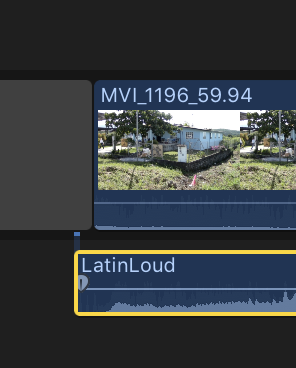
Normally the attachment point for a clip is at the head of the clip, but it doesn't seem to be there, so it's a little more difficult; plus you've already lined up your cuts with the audio, which complicates it further. Normally, if the connection point is at the head, you just have to select the audio and tap the comma key to shift it forward one frame. You can also move the audio to the left, then holding Opt-Cmd click on the audio underneath the gap clip, setting the connection point.
Last edit: 25 May 2018 14:51 by Tom Wolsky.
Please Log in to join the conversation.
25 May 2018 15:03 #95662
by Neil P
Replied by Neil P on topic Clip move , not audio move
I'm still fine tuning the film to the audio track. If I delete the audio track and re load it will I have a attachment point then ?
Please Log in to join the conversation.
25 May 2018 15:05 #95663
by Neil P
Replied by Neil P on topic Clip move , not audio move
Yes, I've just deleted and reloaded the audio track and I have the attached point back, yippee !
thanks for your help,
Neil
thanks for your help,
Neil
Please Log in to join the conversation.
