


3 Post Moderation Rule for New Boarders (25 Jan 2021)
New boarders will have their posts moderated - Don't worry if you cannot see your post immediately.
Captions / subtitles ?

30 Apr 2018 12:45 - 30 Apr 2018 12:50 #95335
by Emmanuel
Captions / subtitles ? was created by Emmanuel
Hi all,
I find the captioning feature of FCPX excellent.
I would like to take advantage of it for adding burnt-in subtitles too. I've been thinking of Exporting captions and importing them back with SugarFX sutbtiles so that I can style the subtitles as much as I can.
Will this work ? Or is there a way Andrea's software can do this ? Or is there another way ?
Thank you !!
I find the captioning feature of FCPX excellent.
I would like to take advantage of it for adding burnt-in subtitles too. I've been thinking of Exporting captions and importing them back with SugarFX sutbtiles so that I can style the subtitles as much as I can.
Will this work ? Or is there a way Andrea's software can do this ? Or is there another way ?
Thank you !!
Last edit: 30 Apr 2018 12:50 by Emmanuel.
Please Log in to join the conversation.

30 Apr 2018 17:30 #95340
by Albo
Replied by Albo on topic Captions / subtitles ?
Yes. That would be nice to know.
I have SugarFX subtitles also and like that I can style it.
I have SugarFX subtitles also and like that I can style it.
Please Log in to join the conversation.
- ronny courtens
-

- Offline
- Moderator
-

Less
More
- Posts: 4455
- Thank you received: 962
30 Apr 2018 17:32 - 30 Apr 2018 17:36 #95341
by ronny courtens
Replied by ronny courtens on topic Captions / subtitles ?
Hey Manu,
This should work, although there is a little detail that needs to be worked out.
I have created some captions in FCP X, using the CEA-608 format, and I have exported the captions out of FCP X as a .scc file.
Then I have converted the .SCC file to .SRT using this site: gotranscript.com/subtitle-converter
I have imported the .SRT file in X-Title Importer by Spherico and I have exported an FCPX XML.
Importing the FCPX XML in FCP X gives me the correct title templates but, unfortunately, the timing is off.
This is not related to X-Title Importer, it happens during the conversion from SCC to SRT. If someone can find a conversion app that does not screw up the timing, converting captions to burnt-in titles is a very fast process.
PS: I had made screenshots, but lately it's very hard to add screenshots here. I have given up.
- Ronny
This should work, although there is a little detail that needs to be worked out.
I have created some captions in FCP X, using the CEA-608 format, and I have exported the captions out of FCP X as a .scc file.
Then I have converted the .SCC file to .SRT using this site: gotranscript.com/subtitle-converter
I have imported the .SRT file in X-Title Importer by Spherico and I have exported an FCPX XML.
Importing the FCPX XML in FCP X gives me the correct title templates but, unfortunately, the timing is off.
This is not related to X-Title Importer, it happens during the conversion from SCC to SRT. If someone can find a conversion app that does not screw up the timing, converting captions to burnt-in titles is a very fast process.
PS: I had made screenshots, but lately it's very hard to add screenshots here. I have given up.
- Ronny
Last edit: 30 Apr 2018 17:36 by ronny courtens.
Please Log in to join the conversation.
- ronny courtens
-
- Offline
- Moderator
-
Less
More
- Posts: 4455
- Thank you received: 962
30 Apr 2018 17:50 #95344
by ronny courtens
Replied by ronny courtens on topic Captions / subtitles ?
I can confirm it works with SugarFX Subtitles.
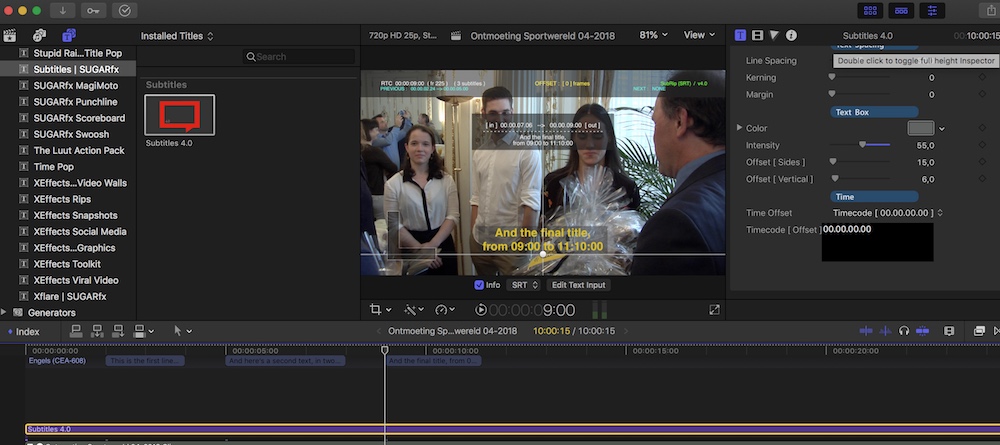
Create captions, export as SCC, convert the SCC to SRT and import the SRT in SugarFX Subtitles. Your captions will appear as regular titles on your timeline. Only the timing is off.
- Ronny
Create captions, export as SCC, convert the SCC to SRT and import the SRT in SugarFX Subtitles. Your captions will appear as regular titles on your timeline. Only the timing is off.
- Ronny
Please Log in to join the conversation.
- ronny courtens
-
- Offline
- Moderator
-
Less
More
- Posts: 4455
- Thank you received: 962
30 Apr 2018 18:01 #95345
by ronny courtens
Replied by ronny courtens on topic Captions / subtitles ?
And here's a message from Andreas Kiel:
I've created a real simple app (time bombed beta) to convert your caption project to one with subtitles. The app installs my TextUp Motion Title. This title will be used in the converted project.
Usage is simple: export XML, in the app set font and font size and drag the XML to the app. Alternatively, drag the project from FCP browser to the app window.
The conversion is really very fast.
The changed XML will be saved to the desktop with an original project name plus " subs" name.
Once the XML is loaded in FCP you "batch set" things like line leading, outline, shadow etc.
Download the app here:
www.spherico.com/filmtools/TitleExchange/XTCC/XTCC.dmg
Comments welcome.
Spherico
www.spherico.com/filmtools
I've created a real simple app (time bombed beta) to convert your caption project to one with subtitles. The app installs my TextUp Motion Title. This title will be used in the converted project.
Usage is simple: export XML, in the app set font and font size and drag the XML to the app. Alternatively, drag the project from FCP browser to the app window.
The conversion is really very fast.
The changed XML will be saved to the desktop with an original project name plus " subs" name.
Once the XML is loaded in FCP you "batch set" things like line leading, outline, shadow etc.
Download the app here:
www.spherico.com/filmtools/TitleExchange/XTCC/XTCC.dmg
Comments welcome.
Spherico
www.spherico.com/filmtools
Please Log in to join the conversation.
30 Apr 2018 20:16 #95351
by Emmanuel
Replied by Emmanuel on topic Captions / subtitles ?
Hey Ronny !
Long time no talk, I've been busy writing the next film, so not much editing lately. How have you been ?
Thanks a million for helping me out, and please thank Andreas for me too ! No time issue with his app ?
What is a time bomb beta by the way ? It sounds dangerous :woohoo:
Long time no talk, I've been busy writing the next film, so not much editing lately. How have you been ?
Thanks a million for helping me out, and please thank Andreas for me too ! No time issue with his app ?
What is a time bomb beta by the way ? It sounds dangerous :woohoo:
Please Log in to join the conversation.
- Andreas Kiel
-

- Offline
- Platinum Member
-

Less
More
- Posts: 1077
- Thank you received: 189
30 Apr 2018 21:50 #95352
by Andreas Kiel
Replied by Andreas Kiel on topic Captions / subtitles ?
Hi Ronny,
This is a very cumbersome way
Inside FCP convert to iTT and export as iTT.
In XTI import and save.
And as mentioned there is the blazing fast XTCC
Andreas
This is a very cumbersome way
Inside FCP convert to iTT and export as iTT.
In XTI import and save.
And as mentioned there is the blazing fast XTCC
Andreas
Please Log in to join the conversation.
30 Apr 2018 22:18 #95353
by Emmanuel
Replied by Emmanuel on topic Captions / subtitles ?
Hi Andreas
Always here to help us with captions
So just export XML to XTCC, and import back ?
Always here to help us with captions
So just export XML to XTCC, and import back ?
Please Log in to join the conversation.
- Andreas Kiel
-
- Offline
- Platinum Member
-
Less
More
- Posts: 1077
- Thank you received: 189
30 Apr 2018 22:26 - 30 Apr 2018 23:35 #95355
by Andreas Kiel
Replied by Andreas Kiel on topic Captions / subtitles ?
It even simpler on a standard system setup.
In the app’s prefs set auto-open. Press cmd-t to make the app “float”.
Drag a project from the FCP browser to the app’s floating window and tell FCP where to import it.
For all the missing parts you would love to have with this handling write a feature request to Apple
In the app’s prefs set auto-open. Press cmd-t to make the app “float”.
Drag a project from the FCP browser to the app’s floating window and tell FCP where to import it.
For all the missing parts you would love to have with this handling write a feature request to Apple
Last edit: 30 Apr 2018 23:35 by Andreas Kiel.
Please Log in to join the conversation.
